


 Harry.



Making the Complicated Simple





WordPress reset password in many ways, prevent you forget the backend password
Forgetting your password is something that happens to everyone. If you haven't logged into your WordPress site for a long time, as an administrator, you may accidentally forget your password. The good news is that there are several ways to retrieve or reset your WordPress user password. 1. Through other admin...

Basic SEO optimization: from SEO principles to submitting sitemaps (detailed tutorial)
This VIP detailed tutorial will be an in-depth introduction to the principles and steps of SEO optimization, from the basics of SEO optimization to get started to how to Google, Baidu and other search engines to submit a site map (sitemap), to help you easily improve the ranking of the site, get more traffic. Detailed content, suitable for beginners and experienced...

How to fix WordPress website "Err Too Many Redirects" error?
When using WordPress to build a website, you may sometimes encounter the error "Err Too Many Redirects". This error is because the site is caught in a cycle of non-stop redirects, resulting in the page can not be loaded properly. This may be due to some plugins or settings out of the problem...

Guide to Integrating Custom Payment Gateways into WooCommerce Checkout Blocks
Before you start, make sure you've checked out the full guide on how to create a WooCommerce Payment Gateway (it's important to read that first before reading this post). However, if you're using the latest version of WooCommerce (I think it's from 8.3 onwards), you may...

Common Errors Encountered During WordPress Password Reset and Their Solutions
Forgetting a password or needing to reset it is a common problem when managing a WordPress website. Sometimes the password reset process may encounter various errors that prevent users from logging in successfully. Together, we will explore the common errors and their solutions during WordPress password reset to help fast...
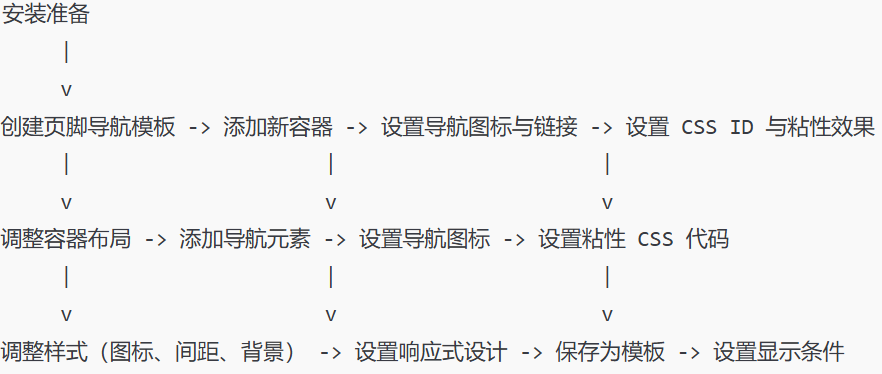
How to Create Sticky Footer Navigation in Elementor: Complete Implementation and Customization Guide
Detailed instructions on how to create sticky footer navigation in Elementor, including template creation, navigation element addition, style customization, and responsive design for a smoother user experience on your WordPress site.

Special goods how to collect payment: cross-border e-commerce in a detailed analysis of the commonly used collection methods
In the rapid development of cross-border e-commerce, "how to collect payment for special goods" has become a key concern for merchants. Specialty goods refers to special cross-border goods, the transaction and collection of such goods often need to take into account the regulations of different countries, currency exchange, transaction security and other factors. The following...
502 Bad Gateway Error Details and Solutions
1. What is a 502 Bad Gateway Error 502 Bad Gateway is an HTTP status code that indicates that a server, acting as a gateway or proxy, attempted to access the next server, but that server returned an illegal response. Simply put, 502 is an error type code that...
How to Fix "The Link You Followed is Expired" Error in WordPress
What causes the "The link you follow has expired" error? When trying to upload a WordPress theme or plugin that is larger than the file size limit set by the server WordPress is running on, it is common to get a "The link you follow is outdated" error. The message is shown below...
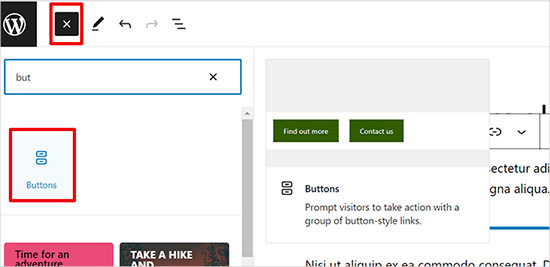
How to Add Buttons in WordPress without Code
Adding buttons to WordPress posts and pages WordPress has a built-in button block that makes adding buttons relatively simple. This is a feature of the Gutenberg WordPress block editor. Let's take a look at some of the ways to do this! Use the default editor in WordP...

Elementor Text Color Cannot Be Adjusted: Solution Guide
When editing text with Elementor, sometimes you may find that the text color does not change as expected. This may be because some settings are not applied correctly or there are other technical problems. If this happens, we need to find the source of the problem before solving it. Possible...

How to Add Images Correctly to a WordPress Website
The Importance of Uploading Images Correctly in WordPress Sometimes, users copy images directly and paste them into their website content. This can lead to issues such as slow page speed, poor user experience and poor SEO. When adding images to a WordPress website, it's important to do it correctly...

How to Set Up Sales Tax with WooCommerce on a WordPress Site
How to set up sales tax in WooCommerce. First, it's important to know the correct tax rate and understand how to set it up manually. Then, we'll cover some WooCommerce extensions that can be used to simplify the process. Use the default WooCommerce tax settings Default...

How to choose between Magento and WordPress: A detailed guide to choosing the best e-commerce platform for your business.
Having an efficient, flexible and user-friendly e-commerce platform is vital for any business looking to gain a foothold in the online marketplace.Magento and WordPress are two of the most popular e-commerce platforms on the market today. Although they both offer powerful features...

How to Create a Recent Comments Page in WordPress
Want to display all the latest comments on your WordPress site? This is a great way to engage users in discussions. Creating such a page on WordPress is now very easy with the "Latest Comments" block. We'll show you how to do it in WordPr...

How to Implement Floating Contacts on WordPress with Chaty
In today's fast-paced internet world, it's crucial to maintain real-time communication with your users. With the Chaty plugin, you can implement a floating contact feature on your WordPress website to enhance user experience and increase conversions. Increase your orders. Step 1: Install and activate Chat...

WooCommerce Advanced Setup Guide: Optimizing Shopping Cart, Checkout and API Integration
WooCommerce is an open source e-commerce plugin designed specifically for WordPress.WooCommerce has many advanced features. In the 'Advanced' settings area, you can set up WooCommerce pages such as the shopping cart and checkout, create access tokens to connect external applications to RE...

Shopee Expands Logistics Network in Brazil: Opens 10th Distribution Center to Improve Service Efficiency
Shopee recently made significant progress in its Brazilian operations by opening the country's tenth distribution center, further enhancing its logistics capabilities in the Latin American country. This new logistics node, located in the city of Colombia, utilizes an advanced cross-transit system to improve...

WordPress Website Tutorial: Adding an Efficient Inquiry Button (CTA)
Many B2B websites set specific goals, such as wanting people to inquire about a product or sign up for an email list. In order to achieve these goals, you need to encourage visitors to take action, which requires adding an inquiry button to WordPress. Call-to-action terms (CTAs) are website...

Comprehensive analysis of the Avada theme: features, installation and template import tutorial (01)
Today we will talk about Avada Theme Welcome to this WordPress tutorial, today we will delve into the power of Avada theme and how to use it. As a popular and versatile theme, Avada offers website builders great flexibility and a wealth of options...

SKYRUN's Cross-Border Breakthrough: A Success Story in the Nigerian Market with Jumia
SKYRUN, a cross-border home appliance brand originating from Jiangsu, China and rapidly growing in Nigeria, has seen its trajectory show significant growth and impact through its partnership with Jumia, Africa's leading e-commerce platform. Guo Nannan, SKYRUN's Deputy General Manager, in an interview with Jumia,...

YouTube Short Video Earnings Calculator
With the popularity of YouTube, more and more creators are flocking to the platform in the hope of earning revenue by posting short videos. Short videos have become a new favorite among creators because of their short content, fast distribution speed and wide audience. However, to get a sizable amount from short videos...

Creating Multilingual Websites with WordPress Multisite
WordPress Multisite allows users to create a network of connected WordPress sites and manage all of them from one control panel. They share many resources, such as plugins and themes, thus simplifying the building and maintenance of all websites. We will cover WordPress ...
JetMenu 2.4.5 Update: Enhancements and Critical Fixes Explained
ADDED: fill svg icon option UPDATED: widget icons FIXED: wrong width of Mega Menu container FIXED: menu item background color applied to wrong menu item on mobile devices (Safari issue) FIXED: when hovering in a sub-menu of the Mega Menu widget...

Beginner's Guide: Comparing the Pros and Cons of Magento, WordPress, Shopify, and Chinese Website Builders
The following is about Magento, WordPress, Shopify and other Chinese website building tools, some of the main differences and advantages and disadvantages of the table: Project MagentoWordPressShopify other Chinese website building tools to use the difficulty of very difficult to use simple easy to use simple easy to use the degree of difficulty of the different tools are not ...

YouTube Shorts vs. long-form video revenue: which is more cost-effective?
The rise of short-form video has seen YouTube introduce the Shorts feature to cater to the growing user demand for short-form content.YouTube Shorts are video clips of up to 60 seconds in length, similar to TikTok and Instagram Reels. However, for content creators, a...

Consumer Reports exposes serious security flaws in smart doorbells sold on Amazon, Walmart and other platforms
In a recent study published by Consumer Reports, a disturbing fact was revealed: many of the doorbell cameras sold on well-known U.S. online retail platforms, such as Amazon, Walmart, Shein, Temu, and Sears, are exposed to serious security vulnerabilities. This...

Fluent Forms: The Ultimate Convenient WordPress Forms Plugin Fully Explained
Fluent Forms is an extremely handy WordPress forms plugin that lets you easily create all kinds of forms with a simple drag and drop operation. Whether you want a simple contact form or a more complex payment, quiz or calculator form, Fluent Forms makes light...

WooCommerce Practical Tutorial: How to Set Exclusive Prices Visible Only to Logged-In Users
Introduction: On WooCommerce driven websites, sometimes we want product prices to be displayed only to logged in users to promote registration and provide a richer user experience. This tutorial will guide you on how to implement this feature in WooCommerce, especially for wordprees...

How to Set Up Different Themes and Plugins for Multi-domain Sites in WordPress
WordPress is a powerful and flexible Content Management System (CMS) that can be used to create and manage multiple websites. If you have multiple domains and want to set up different themes and plugins for each of them, we will detail how to accomplish this below. First, pre...

 简体中文
简体中文  English
  日本語
日本語  Français
  Español



