






![图片[1]-定制 WordPress 的 8 个有用代码片段-光子波动网 | WordPress教程、Elementor教程与故障修复](https://www.361sale.com/wp-content/uploads/2024/05/2024053102423159.png)
WordPress is a highly flexible platform that allows users to customize the UI, site structure and code. By using code snippets, it is possible to add features that are not available in the theme and even replace some paid features. In this article, we will shareeightVery useful code snippets to help you customize every aspect of your WordPress site.
How to Add Code Snippets in WordPress
It is important to understand how to add code snippets to WordPress. Code can be added to the theme's functions.php file, or use a specialized plugin to manage code snippets, such as the Code Snippets Plug-ins.
Using the Code Snippets plugin
![图片[2]-定制 WordPress 的 8 个有用代码片段-光子波动网 | WordPress教程、Elementor教程与故障修复](https://www.361sale.com/wp-content/uploads/2024/07/2024072608345460.png)
- Install and activate the Code Snippets plugin.
- In the WordPress dashboard, go to "Snippets">"Add New".
- Paste the code into the code box and name the snippet.
- Select appropriate run conditions (e.g., front-end only).
- Save and activate the code snippet.
This method is more efficient than directly editing functions.php The file is safer because it avoids the risk of overwriting when the theme is updated.
1. Disable the WordPress admin bar
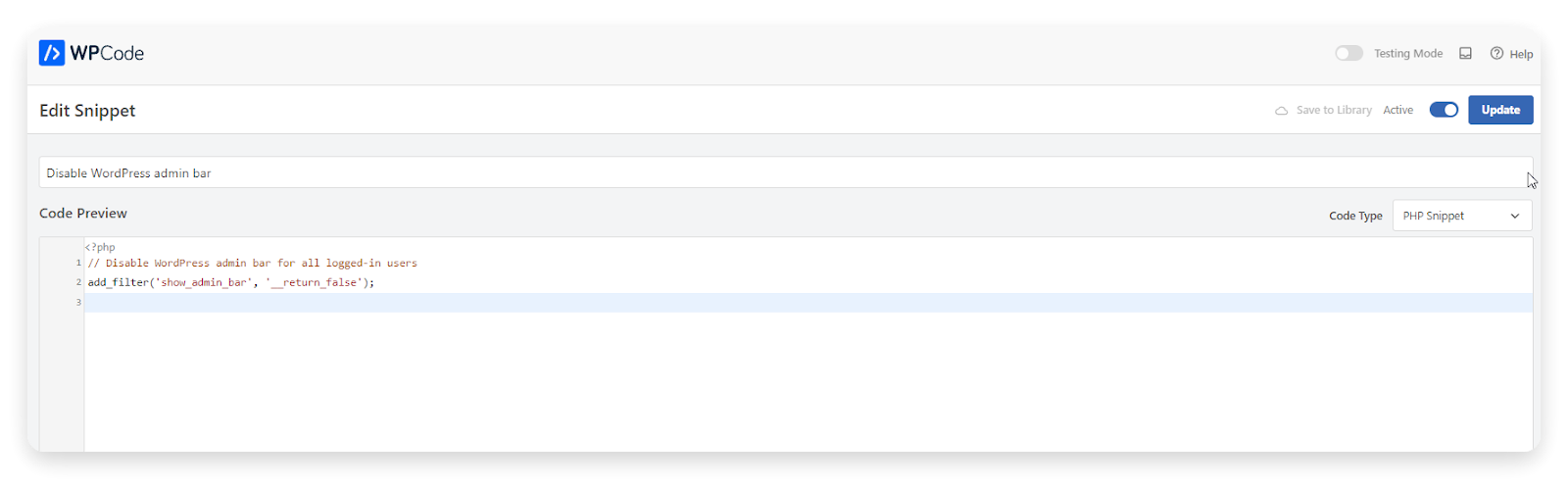
Sometimes it may be desirable to disable the WordPress admin bar, especially for specific user roles. Below is the relevant code snippet:
Disable admin bar for all users
// Disable the WordPress admin bar for all logged-in users
add_filter('show_admin_bar', '__return_false');
Disable the admin bar for specific user roles
function my_disable_admin_bar($show_admin_bar) {
  // Get the current user object
  $current_user = wp_get_current_user(); // Disable admin bar for specific roles (replace 'editor' and 'admin_bar').
  // Disable admin bar for specific roles (replace 'editor' and 'subscriber' with desired roles)
  if ( in_array( 'editor', $current_user->roles ) || in_array( 'subscriber', $current_user->roles ) ) {
    return false;
  }
  return $show_admin_bar;
}
add_filter('show_admin_bar', 'my_disable_admin_bar' );
draw attention to sth.: Make sure to save the code type as PHP Snippet (in some cases).
2. Allow contributors to upload images
By default, WordPress does not allow contributor accounts to upload images. The following code snippet provides permission for contributor accounts to upload images:
function grant_upload_permission_to_contributors() {
  $contributor_role = get_role('contributor');
  if ( ! $contributor_role->has_cap('upload_files') ) {
    $contributor_role->add_cap('upload_files');
  }
}
add_action('admin_init', 'grant_upload_permission_to_contributors');
3. Disable automatic e-mail updates
Whenever WordPress automatically updates plugins and themes, you may receive a large number of notification emails. The following code snippet disables these email notifications:
// Disable auto-update emails for WordPress core
add_filter('auto_core_update_send_email', '__return_false');

// Disable auto-update emails for plugins
add_filter('auto_plugin_update_send_email', '__return_false'); // Disable auto-update emails for plugins.

// Disable auto-update emails for themes
add_filter('auto_theme_update_send_email', '__return_false'); // Disable auto-update emails for themes.
![图片[4]-定制 WordPress 的 8 个有用代码片段-光子波动网 | WordPress教程、Elementor教程与故障修复](https://www.361sale.com/wp-content/uploads/2024/07/2024072608460657.png)
4. Update"How are you?"Management column messages
If one feels that the default "Howdy"The greeting is inappropriate and can be replaced with a customized greeting:
function wpcode_snippet_replace_howdy( $wp_admin_bar ) {
    $new_howdy = 'This is Awesome,' ;
    $my_account = $wp_admin_bar->get_node('my-account');
    $wp_admin_bar->add_node(array(
        'id' => 'my-account',
        'title' => str_replace('Howdy,', $new_howdy, $my_account->title),
    ));
}
add_filter('admin_bar_menu', 'wpcode_snippet_replace_howdy', 25);![图片[5]-定制 WordPress 的 8 个有用代码片段-光子波动网 | WordPress教程、Elementor教程与故障修复](https://www.361sale.com/wp-content/uploads/2024/07/2024072608462494.png)
5. Disabling the search function
If your site doesn't need the search feature, you can disable it completely using the following code snippet:
function fb_filter_query( $query, $error = true ) {
  if ( is_search() ) {
    $query->is_search = false;
    $query->query_vars[s] = false;
    $query->query[s] = false;
    if ( $error == true )
      $query->is_404 = true;
  }
}
add_action('parse_query', 'fb_filter_query');
add_filter('get_search_form', '__return_null');
6. Disable automatic garbage emptying
![图片[6]-定制 WordPress 的 8 个有用代码片段-光子波动网 | WordPress教程、Elementor教程与故障修复](https://www.361sale.com/wp-content/uploads/2024/07/2024072608412059.png)
WordPress automatically removes content that is more than 30 days old from your trash folder. The following code disables this feature:
add_action('init', function() {
  // Disable scheduled post deletion
  remove_action('wp_scheduled_delete', 'wp_scheduled_delete');
});
7. Allow SVG uploads
The SVG format is perfect for logo files, but by default WordPress does not allow SVG uploads. the following code snippet enables SVG uploads:
function enable_svg_upload_for_admins( $mime_types ) {
  // Allow SVG uploads only for administrators
  if ( current_user_can('administrator') ) {
    $mime_types['svg'] = 'image/svg+xml';
    $mime_types['svgz'] = 'image/svg+xml';
  }
  return $mime_types.
}
add_filter('upload_mimes', 'enable_svg_upload_for_admins');
8. Disable automatic updates
Automatic updates can sometimes cause compatibility issues. The following code snippet disables automatic updates for WordPress core, plugins and themes:
// Disable auto-updates for WordPress core, plugins, and themes
function disable_all_auto_updates() {
  add_filter('auto_update_core', '__return_false');
  add_filter('auto_update_plugin', '__return_false');
  add_filter('auto_update_theme', '__return_false');
}
add_action('admin_init', 'disable_all_auto_updates');
![图片[7]-定制 WordPress 的 8 个有用代码片段-光子波动网 | WordPress教程、Elementor教程与故障修复](https://www.361sale.com/wp-content/uploads/2024/07/2024072608443288.png)
reach a verdict
Using code snippets can help WordPress users customize a website exactly to their needs without the need for in-depth coding knowledge. The eight code snippets provided in this article cover everything from feature enhancements to user experience optimization. By carefully integrating these code snippets, you can improve the overall performance and usability of your website.

Link to this article:https://www.361sale.com/en/14769/The article is copyrighted and must be reproduced with attribution.












![表情[wozuimei]-光子波动网 | WordPress教程、Elementor教程与故障修复](https://www.361sale.com/wp-content/themes/zibll/img/smilies/wozuimei.gif)

![表情[baoquan]-光子波动网 | WordPress教程、Elementor教程与故障修复](https://www.361sale.com/wp-content/themes/zibll/img/smilies/baoquan.gif)


 简体中文
简体中文  English


No comments