




I see a lot of onlineWordPress TutorialAll need to be on the websiteAdd code snippet. However, adding a small error to a code snippet can cause the entire site to crash, especially for newbies. If you try something new on your WordPress site and get the following error "Syntax error, unexpected...", don't panic, check out our tutorial.
Use correct syntax to avoid errors
Syntax errors are usually caused by a small but critical mistake in the code syntax.
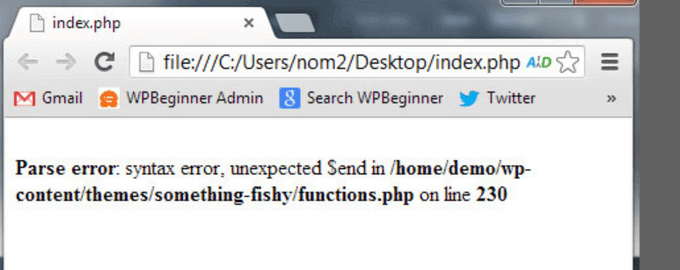
For example, missing commas or extra curly braces may break the entire script.
Have you recently pasted code snippets from the web? Updated a plugin? So where to look for it.
Fixing Syntax Errors with FTP
In order to fix the syntax error, you need to edit the code that is causing this error. Either delete it or fix the syntax.
Newbies usually panic because this error makes the entire website inaccessible. If you are using the WordPress Dashboard Appearance EditorPartially paste the code, then it will be locked.
So how do you edit the code?
The only way to resolve this issue is to use FTP to access theLast edited documentThe
After installing the FTP program, connect it to the website and go to the theme file that needs to be edited. If you forget which file you need to edit, simply look for the error code. The error will tell exactly what needs to be editedWhich file and which lineThe
You can delete the last added code or write the code using the correct syntax. After deleting or editing the code, save the file and upload it back to the server.
After that, visit the WordPress site, refresh the page, and the site will work fine again.
How to Prevent Syntax Errors in WordPress
To prevent your WordPress site from crashing again, we recommend using theWPCodeand other code snippet plugins to add custom code.
WPCodeIt's easy to add code snippets to WordPress without having to edit the theme's functions.php fileThe
It also comes with intelligent code snippet validation that can help avoid common code errors.
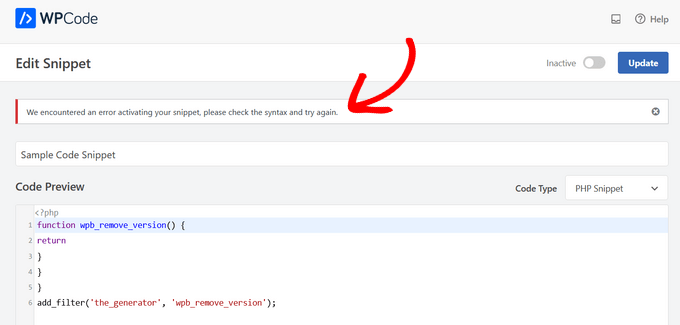
WPCode automatically detects errors when adding custom code. Hovering over the error will display helpful instructions for fixing it.

WPCode also deactivates custom code immediately when it detects a syntax error.
Now, there's no need to worry about adding code snippets that will mess up your website.
I hope this article will help you fix syntax errors in WordPress.

Link to this article:https://www.361sale.com/en/15583The article is copyrighted and must be reproduced with attribution.






















![Emoji[wozuimei]-Photonflux.com | Professional WordPress repair service, worldwide, rapid response](https://www.361sale.com/wp-content/themes/zibll/img/smilies/wozuimei.gif)

![Emoticon[baoquan] - Photon Wave Network | Professional WordPress Repair Services, Worldwide Coverage, Rapid Response](https://www.361sale.com/wp-content/themes/zibll/img/smilies/baoquan.gif)


 简体中文
简体中文  English
  日本語
日本語  Français
  Español


No comments