




When WordPress templates use a two-column layout for content and sidebars, the "Sidebar error below tolerance". Due to a slight change in the code, the sidebar started appearing below the content instead of next to it.
![Image[1]-How to Fix Sidebar Error Below Content in WordPress - Photon Fluctuation Network | Professional WordPress Repair Service, Global Coverage, Fast Response](https://www.361sale.com/wp-content/uploads/2024/08/2024080802540542.png)
What causes WordPress sidebar content errors?
The most common reasons for sidebars appearing below the content are HTML maybeCSS errorSpoils the layout.
Each of the HTML<div>The tags all need to be closed correctly. If the template responsible for displaying the page has unclosed<div>tags, then this will break the layout.
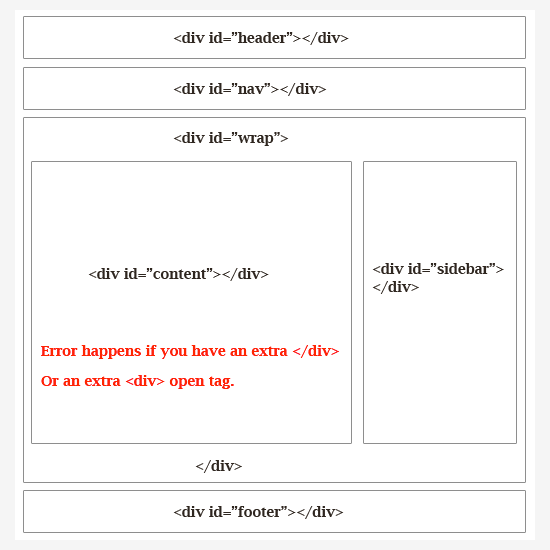
Similarly, the unwanted end</div>Tabs may also affect the layout and cause the sidebar to move down.
Along with HTML, CSS affects the overall design of every element on a WordPress website. It is used to define the width, alignment and floats of the elements in the layout.
Simply put, if the width of the content area is greater than the available space, then it willForce the sidebar to move downThe
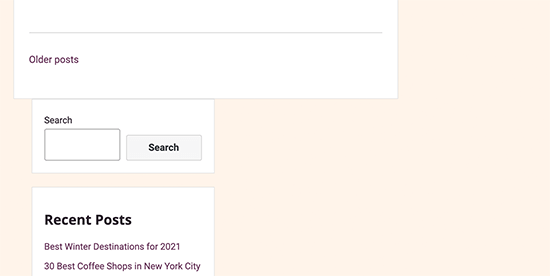
First, find out the exact code that is causing this WordPress sidebar error.
Let's take a look at how to easily troubleshoot and fix the sidebar below content error in WordPress.
Method 1:Undo Recent Changes to WordPress Themes
Typically, sidebar issues are caused by WordPress Theme FilesThe change was caused by a change in the
If there is any recent interest in WordPress ThemesmaybesubthemeChanges have been made, then checking these changes can quickly fix this error.
If you are not sure which changes need to be restored, then move on to the next method.
Method 2:Clear WordPress Cache
![Image [4] - How to Fix Sidebar Error Below Content in WordPress - Photon Fluctuation Network | Professional WordPress Repair Service, Worldwide, Fast Response](https://www.361sale.com/wp-content/uploads/2024/08/2024080802370510.png)
When your changes don't show up immediately, this is usually due to caching issues.
Cached plugins usually show you an older version of the same page. Clear WordPress Cachingrespond in singingbrowser cacheHelpful for you to see the changes applied to the site.
Method 3:Exclude WordPress Plugins
The look and feel of a WordPress website is determined by the use of theSubject Control. However, sometimesWordPress PluginIt may also be possible to add your own HTML and CSS to your site.
For example, adding theContact formmaybepop-up windowAdditional CSS and HTML will be loaded.
To make sure that the problem is not caused by a WordPress plugin, temporarily disable all WordPress plugins on your site.
Go to the WordPress Admin Dashboard in thePlugins " Installed Pluginsand then check the top of the list "plug-in (software component)" next to the box. Then, open the drop-down menu and select "deactivate", and then click "appliance".
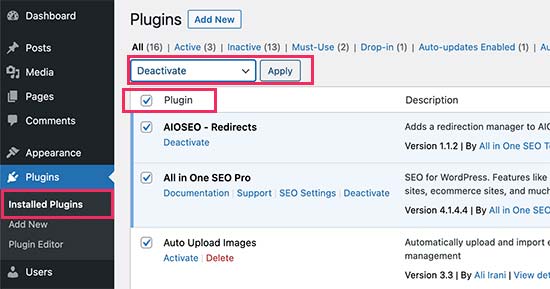
in the event thatProblems disappearThe problem is caused by the plugin.activate one by oneAll WordPress plugins, then check the site after each plugin to find out which plugin is causing the problem.
Method 4:Repair damage that destroys the layout <div> tab (of a window) (computing)
As we mentioned earlier, damaged<div>Tabs are one of the common reasons why sidebars move below content.
If the problem is caused by a specific area of the site, then the template responsible for displaying that code can be checked.
For example, if the issue only occurs on a single post, then one needs to check the single.php templateThe
The easiest way to quickly find an unclosed div element is to use theW3C Validator ToolThe
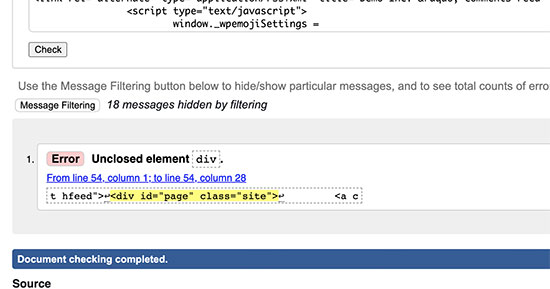
It is also possible to useInspection toolsmaybeCode editor application, which helps debugging code by highlighting the start and end tags of an element.
The following is an example of highlighting the start and end tags of an element:
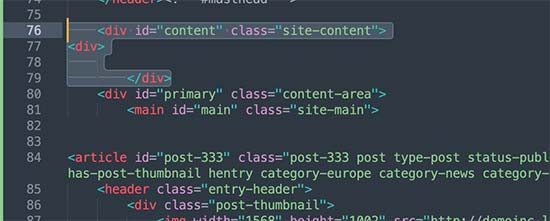
When viewing the code, you need to make sure that any<div>The open tabs also all have an end</div>Tags.
Similarly, look for</div>No corresponding start<div>Isolated end tags for labels.
If a corrupt HTML tag is found, then fixing it will resolve the issue of the sidebar appearing below the content.
Method 5:Find the CSS that moves the sidebar below the content
CSS controls the most important aspects of website design. WordPress themes use CSS to define the width of content and sidebar areas within a grid layout.
This value is a percentage of the available viewing area. On mobile, your theme will automatically push the sidebar below the content.
To find the CSS that is causing the problem, you can use the inspection tool. Simply move the content to the wrapper field, content section, and sidebar area to display their width and height.
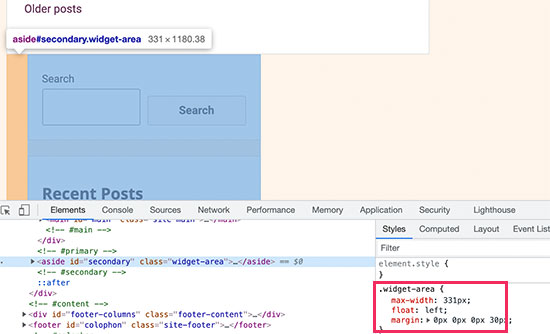
For example, if you have a content area with a width of 70% and a sidebar area with a width of 33%, it will automatically move down. When calculating these values, you also need to consider the space used for padding and margin values in each section.
What to do if the sidebar error below the content persists
If all troubleshooting methods have been tried but still cannot fix the sidebar issue, one option is toEnable debug mode. While this is not a direct fix, it displays a more specific error message related to the sidebar issue.
For example, it may display a PHP error message that mentions that a plugin is causing CSS styling issues that affect the sidebar layout. This message can help you identify the problematic plugin and possibly find a solution or alternative.
If you don't want to troubleshoot anymore, you can "Contact our Photonics team"Help you out.

Link to this article:https://www.361sale.com/en/16053The article is copyrighted and must be reproduced with attribution.






















![Emoji[wozuimei]-Photonflux.com | Professional WordPress repair service, worldwide, rapid response](https://www.361sale.com/wp-content/themes/zibll/img/smilies/wozuimei.gif)

![Emoticon[baoquan] - Photon Wave Network | Professional WordPress Repair Services, Worldwide Coverage, Rapid Response](https://www.361sale.com/wp-content/themes/zibll/img/smilies/baoquan.gif)


 简体中文
简体中文  English
  日本語
日本語  Français
  Español


No comments