




Our site's "Question and Answer Community"A user left a comment about his recent WordPress site constantly logging out from the admin area, which just so happens to be something we've encountered before. So, today we have a tutorial for you to fix it, hope it can help you.
![Image[1]-How to fix WordPress constantly quitting problem - Photon Flux | Professional WordPress Repair Service, Worldwide, Fast Response](https://www.361sale.com/wp-content/uploads/2024/08/2024081903360656.png)
Why does WordPress keep quitting?
There are several main reasons why WordPress keeps logging out. But the most common reason is accessing the site from a URL that doesn't match the URL in your WordPress settings.
When logging into a WordPress site, it sets a cookie in your browser to authenticate the login session. The cookie is set for the WordPress URL stored in your settings menu.
If the site URL does not match the WordPress URL, then WordPress will not validate and you will be logged out.
This may also lead toExcessive redirection issues in WordPressThe
As you can see in the image below, the WordPress address is not the same as the website address, so there will be a conflict.
![Image [2] - How to Fix WordPress Constantly Quitting Problem - Photon Flux | Professional WordPress Repair Service, Global Reach, Fast Response](https://www.361sale.com/wp-content/uploads/2024/08/2024081903140411.png)
Let's see what we can do to fix these problems together!
How to Fix WordPress Constant Logout Issue
The easiest way to solve this login problem is to make sure that "site address"and"The URL in the "WordPress Address" field is identicalThe
Navigate to the WordPress admin panel's"Settings" "General".
![Image [3] - How to Fix WordPress Constantly Quitting Problem - Photon Flux | Professional WordPress Repair Service, Global Reach, Fast Response](https://www.361sale.com/wp-content/uploads/2024/08/2024081903154724.png)
Then, double check that the URLs match. Choose either a "www" or "non-www" URL in both fields.
Technically, "www" itself is a subdomain. This means that a URL with "www" and a URL without "www" are effectively two differentdomain nameThe
Changing and updating the URL to the same address solves the problem. Then, click "Save Changes" button will do.
Fix WordPress Constant Logout by Adding Code to WordPress
If you can't access the WordPress DashboardIf you want to edit the file manually, you need to do it manually.wp-config.php file. This is a special file that contains important WordPress settings for your website.
You can use an FTP client (such as FileZilla) or the File Manager application in the Control Panel.
Then, in the root directory of the site, find the wp-config.php fileThe
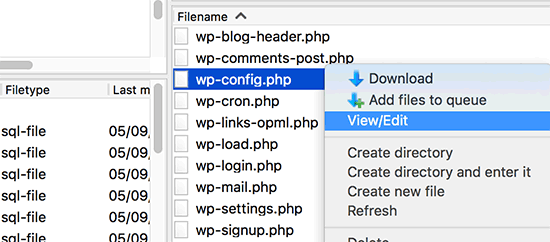
You can download the file to your desktop and open it in your own favorite text editor (such as Notepad).
Afterwards, in "That's all, stop editing! Happy publishing'" above the line.Add the following code:
define('WP_HOME','https://www.361sale.com');
define('WP_SITEURL','https://www.361sale.com');
If you don't want to use "www" in the URL, then you can use the following code instead:
define('WP_HOME','https://361sale.com');
define('WP_SITEURL','https://361sale.com');
Make sure to replace the "www.361sale.com" URL with your own WordPress URL.
Then.Save the file and upload it back to the root directory. Now, when refreshing your login to your site, WordPress should stop logging you out.
If you are still experiencing the same logout issues, see our guide to theHow to fix WordPress login page refresh and redirection issues.
Frequently Asked Questions About WordPress Logout
Here's a compiled list of some of the things readers have learned in our "Question and Answer Community"Answers to the most frequently asked questions about WordPress logouts.
Why does WordPress always make me quit?
Most of the time, WordPress will keep logging you out because of attempts to access your site from URLs that don't match the URLs in your WordPress settings.
Every time you log in to a WordPress website, it saves a cookie in your browser to authenticate the login session. The cookie is stored in the WordPress URL in the Settings menu.
If the site URL is not the same as the WordPress URL, then WordPress will not be able to validate it, so you will be logged out.
How long does it take WordPress to log you off?
The default WordPress login session will expire after 48 hours. WordPress will then log you out and you will have to log in again.
This can be fixed by checking the box next to "Remember password" on the WordPress login screen. When checked, you won't be prompted to log back in for 14 days.

Link to this article:https://www.361sale.com/en/17053The article is copyrighted and must be reproduced with attribution.






















![Emoji[wozuimei]-Photonflux.com | Professional WordPress repair service, worldwide, rapid response](https://www.361sale.com/wp-content/themes/zibll/img/smilies/wozuimei.gif)

![Emoticon[baoquan] - Photon Wave Network | Professional WordPress Repair Services, Worldwide Coverage, Rapid Response](https://www.361sale.com/wp-content/themes/zibll/img/smilies/baoquan.gif)


 简体中文
简体中文  English
  日本語
日本語  Français
  Español


No comments