








It's interesting to note that a fan of Little Red Book reached out to me that when he was editing his post WordPress "Add Media" button doesn't work. This is still a relatively common WordPress issue. Let's put out a tutorial on how to go about fixing it!
What is causing the WordPress "Add Media" button to not work?
Most commonly there are conflicts with scripts or styles in plugins or themes on the site, the classic WordPress editor in the "Add Media" button may stop working.
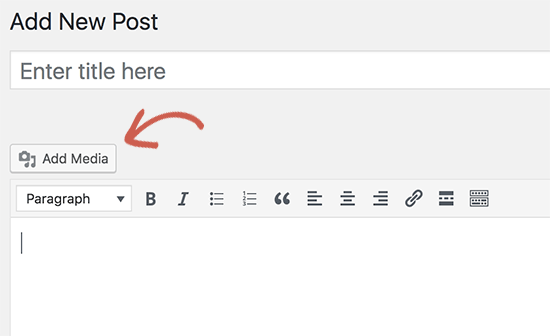
The default behavior of WordPress is to combine all required scripts and stylesheets and load them at the same time. This is usually done in the WordPress admin backend to improve performance and speed.
That is, if there is a conflict between these scripts or styles, especially in thePlugin or Themein the WordPress post editor may break the JavaScript functionality of the WordPress post editor. This may cause the "Add Media" buttonDisabled.
Let's see how to troubleshoot and fix the non-functioning Add Media button in WordPress. Here are two ways to fix the problem:
Method 1: Fix "Add Media" button not working by adding code to wp.config.php
The quick fix is to add the following code to thewp-config.php filein. This can be done by editing the wp-config.php fileAnd add this code before the "That's all, stop editing! Happy blogging'" line to accomplish this:
define('CONCATENATE_SCRIPTS', false ).This line of code simply tells WordPress to load each script individually, which helps prevent JavaScript from conflicting with flawed scripts and core WordPress functionality.
Refresh after adding the code and continue to visit the post editing screen to view the "Add Media" button works on the post editing page of a WordPress site.
Attention:In our experience, adding this line of code is not a suitable long term solution as there is still a script causing the problem. So, we recommend trying the next approach.
Method 2: Fix the "Add Media" button not working by troubleshooting the theme or the plugin
For a long-term solution to this problem, troubleshooting WordPress is required to find out which plugin or theme is causing the issue.
One way to find the root cause of the problem is to use the Classic Editor page on theInspection tools. It will display console errors that will lead to the source of the conflict.
Another approach is to first deactivate all WordPress Plugin, then refresh to see if this fixes it"Add Media" button. If it does, then one of the plugins is causing the problem.
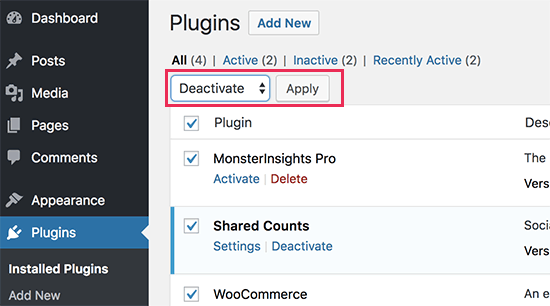
The plugins can now be activated one by one, and after activating the plugins, simply check the "Add Media" button. This will help identify the plugin that is causing the problem.
After finding the problematic plugin, replace it with another plugin with the same functionality.
If deactivating the plugin does not solve the problem, then temporarily switch to theDefault WordPress Themessuch as Twenty Twenty-One or Twenty Twenty-Three.
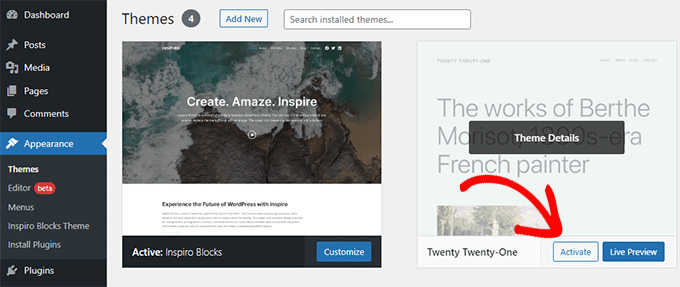
If switching to the default theme solves the problem, it means the theme is causing the conflict. Switch to another theme or find a theme official to solve the problem!
Optional: consider switching to the Gutenberg block editor
Although we have provided a solution for the classic editor, consider switching to theGutenberg Block Editor. This newer editor solves the"Add Media" buttonissues, and can offer several other advantages.
The block editor is now the default editor in WordPress, and it can handle media differently. Each block can have its own media insertion options, rather than relying on a single "Add Media"Button.
It is largely unlikely that you will encounter the kind of problems we discuss in this article.
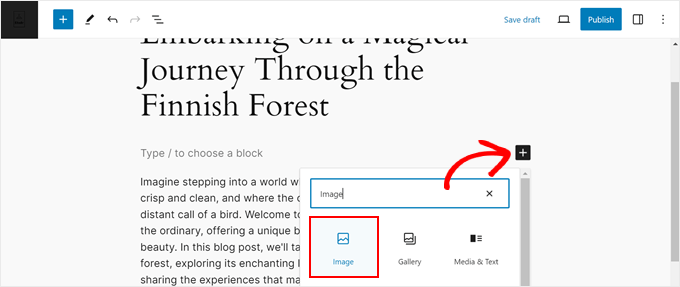
Additionally, as WordPress continues to evolve, many plugins and themes have been optimized primarily for the block editor. Some of the newer features and functionality may not be fully compatible with the classic editor.
By switching to the block editor, you can ensure that you are using the latest and widely supported version of WordPress.

Link to this article:https://www.361sale.com/en/17132/The article is copyrighted and must be reproduced with attribution.













![表情[wozuimei]-光子波动网 | WordPress教程、Elementor教程与故障修复](https://www.361sale.com/wp-content/themes/zibll/img/smilies/wozuimei.gif)

![表情[baoquan]-光子波动网 | WordPress教程、Elementor教程与故障修复](https://www.361sale.com/wp-content/themes/zibll/img/smilies/baoquan.gif)


 简体中文
简体中文  English


No comments