







What causes the Unable to establish secure connection error in WordPress?
WordPress comes with a built-in system toManagement Updates. The system regularly checks for updates and displays notifications to make it easier for you to install plugins and theme updates.
However, it requires a connection to the WordPress.org website to check for updates or install updates. The website may not be able to connect to the WordPress.org website due to some configuration errors on the WordPress web server.
![图片[1]-如何修复 WordPress 中的安全连接错误-光子波动网 | WordPress教程、Elementor教程与故障修复](https://www.361sale.com/wp-content/uploads/2024/08/2024082203192538.png)
This will result in a secure connection error and you will see an error message like the one below:
An unexpected error occurred. Something may be wrong with WordPress.org or this server's configuration. If you continue to have problems, please try the support forums. If you continue to have problems, please try the support forums. (WordPress could not establish a secure connection to WordPress.org. Please contact your server administrator.) in / home/username/public_html/wp-admin/includes/update.php on line 122 |
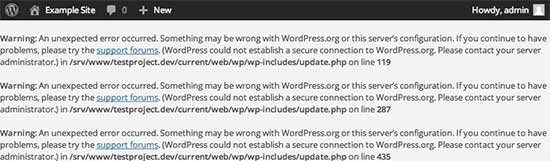
Let's see how to go about fixing the secure connection error in WordPress!
Fix Secure Connection Error in WordPress
There are several ways to fix unexpected secure connection errors in WordPress. You can try one of the following solutions depending on your own situation.
Server issues
If your serverExposure to DDoS attacks, then the connection to WordPress.org may time out, resulting in a secure connection error.
In this case, you can wait for a few minutes and then retry. If the error persists, it's best to contact your server provider to resolve it.
Cloud or VPS server connectivity issues
If you are using thecloud servermaybeVPS HostingThen your server may not be able to connect to WordPress.org due to some DNS issues.
In this case, you can point the server directly to the WordPress.org server. To use theSSHConnect to your server.
SSH stands for Secure Shell, which is an encryption protocol that allows you to use thecommand-line toolConnect to your server.
Windows users can use a tool called PuTTy, while macOS and Linux users can use the Terminal application.
In the terminal, you can connect to your server like the following:
ssh [email protected]Don't forget to replace "username" with your own username and "www.361sale.com" with your own domain name.
Once connected, run the following command:
sudo nano /etc/hostsThis will open a file and add the following code at the bottom of the file:
198.143.164.251 api.wordpress.orgYou can now save the changes and exit the editor. Refresh and visit your WordPress site to see if this resolves the error.
Fix WordPress Secure Connection Error on Localhost
If you are running WordPress on your own computer (localhost), it is possible that the cURL extension for PHP is not enabled. This extension is required to access WordPress.org for updates.
Needs to be edited on a computer php.ini file. This file is usually found in the PHP folder in MAMP, XAMPP or WAMP folderCenter.
If you are using a Windows computer, then look for the following line of code:
![图片[3]-如何修复 WordPress 中的安全连接错误-光子波动网 | WordPress教程、Elementor教程与故障修复](https://www.361sale.com/wp-content/uploads/2024/08/2024082203254363.png)
Mac and Linux users look for this line of code:
![图片[4]-如何修复 WordPress 中的安全连接错误-光子波动网 | WordPress教程、Elementor教程与故障修复](https://www.361sale.com/wp-content/uploads/2024/08/2024082203255834.png)
Now remove the semicolon before the text to enable the extension. Always remember to save the php.ini file.
Finally, restart the Apache server to make the changes take effect.
Check open ports in the firewall
If the cURL extension is properly installed on the local server, the next step is to check the Internet connection firewall.
Your computer's firewall may be blocking outgoing connections from your local server to WordPress.org. If you are using Windows, press "commencement"button and search for "Windows Firewall". Mac users can access the "System Settings" "Network" "Firewall"Find the firewall settings in the
To add Apache to the firewall's allow program and allow incoming and outgoing connections.
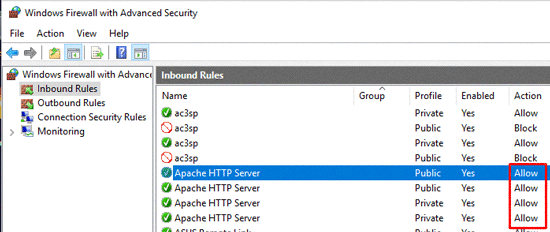
Restart Apache for the changes to take effect.
I hope this article will help you guys to solve WordPress secure connection error, if you can't operate it, then "Contact Us"The

Link to this article:https://www.361sale.com/en/17325/The article is copyrighted and must be reproduced with attribution.














![表情[wozuimei]-光子波动网 | WordPress教程、Elementor教程与故障修复](https://www.361sale.com/wp-content/themes/zibll/img/smilies/wozuimei.gif)

![表情[baoquan]-光子波动网 | WordPress教程、Elementor教程与故障修复](https://www.361sale.com/wp-content/themes/zibll/img/smilies/baoquan.gif)


 简体中文
简体中文  English


No comments