







We all know that using a CDN service can increase the speed of our website.Cloudflare is one of the best WordPress CDN service in the market. And it offers free CDN service with strong security features for small business websites. Including some of our own websites are also using their home service.
Today teaches you how to whittle down a free Cloudflare CDN and add it to yourWordPress websiteSetting it up in, let's find out together!
What is CDN?
A CDN or Content Delivery Network is a system of distributed servers that helps distribute your website files to users faster based on their location.
Usually.Web hosting serviceswill serve your website visitors from a single location. All users access the same server, no matter where they are.
For users who are far away from the central hosting server of the website, it may cause delays in content delivery. This is why CDNs set up multiple edge servers in different locations around the world.
These CDN servers cache static content from the site's originating servers, and are used by users when they access theWordPress websitewhen it is called to the user.
![图片[1]-怎么在 WordPress 中设置 Cloudflare 免费的 CDN-光子波动网 | WordPress教程、Elementor教程与故障修复](https://www.361sale.com/wp-content/uploads/2024/09/2024092303093496.png)
When a user request is made, the CDN server closest to the user's location handles the request.
For example, if someone in the UK wants to access a website hosted in the Netherlands, then the CDN server in the UK will fulfill the request, not the main server in the Netherlands.
With CDN, all user requests are handled by the nearest CDN server. This reduces the physical distance between the visitor and the web server.
As a result, CDNs can increase all users'Website performance and speedNo matter where they are.
Faster websites also improve the user experience and can slightly increase a site'sSEO RankingThe use of CDNs also reduces the load on the main server and prevents it from crashing during peak traffic. Using a CDN also reduces the load on the main server and prevents it from crashing during traffic spikes.
What is Cloudflare CDN?
![图片[2]-怎么在 WordPress 中设置 Cloudflare 免费的 CDN-光子波动网 | WordPress教程、Elementor教程与故障修复](https://www.361sale.com/wp-content/uploads/2024/09/2024092303162265.png)
Cloudflareis one of the most popular free CDN providers on the Internet. It is a large, globally distributed network of servers that automatically caches static content and delivers dynamic content quickly.
In addition to CDN services, Cloudflare is a cloud-based website firewall and distributed proxy server. It monitors all incoming traffic to a website and blocks suspicious traffic before it reaches the server.
They offer a free version suitable for small business websites and blog sites. and offer a paid version starting at $20 per month.
Cloudflare is a great option for small businesses looking for a free CDN. However, to fully utilize all of Cloudflare's features, there is a $200 monthly fee.
Setting up Cloudflare CDN in WordPress
First things first.Cloudflare website"enrollment"An account.
![图片[3]-怎么在 WordPress 中设置 Cloudflare 免费的 CDN-光子波动网 | WordPress教程、Elementor教程与故障修复](https://www.361sale.com/wp-content/uploads/2024/09/2024092303214054.png)
On the next page, typee-mail addressrespond in singingcryptographicCreate a Cloudflare account.
Enter the required information and click "enrollment"Button.
![图片[4]-怎么在 WordPress 中设置 Cloudflare 免费的 CDN-光子波动网 | WordPress教程、Elementor教程与故障修复](https://www.361sale.com/wp-content/uploads/2024/09/2024092303221623.png)
After completing your registration, you will see a thank you page confirming that your Cloudflare account is set up.
The next step is to add the site to Cloudflare. click "Add a website or application" button to begin.
![图片[5]-怎么在 WordPress 中设置 Cloudflare 免费的 CDN-光子波动网 | WordPress教程、Elementor教程与故障修复](https://www.361sale.com/wp-content/uploads/2024/09/2024092303240114.png)
Now available at "Enter your website"Enter the site in the field.
Enter only the domain name of the website, for exampleexample.comThe following is an example of how to enter a full URL. There is no need to enter a full URL or other characters.

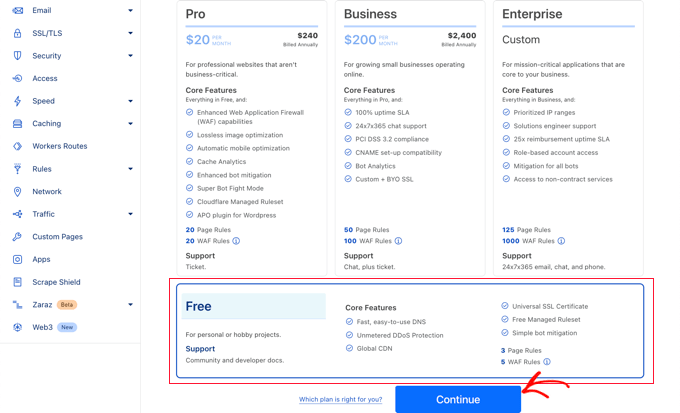
On the next screen, the system will ask to select the desired Cloudflare plan type.
In this tutorial, we choose the free Cloudflare plan. Then click "Continue."Button.
Cloudflare then displays a list of all DNS records found by its system. This also includes subdomains.
DNS records delivered through Cloudflare should have an orange cloud icon. DNS records that bypass Cloudflare will have a gray cloud icon.
To view the list to ensure that the primary domain is active on Cloudflare with an orange cloud icon. Click "agent state"Toggle button to change the status.
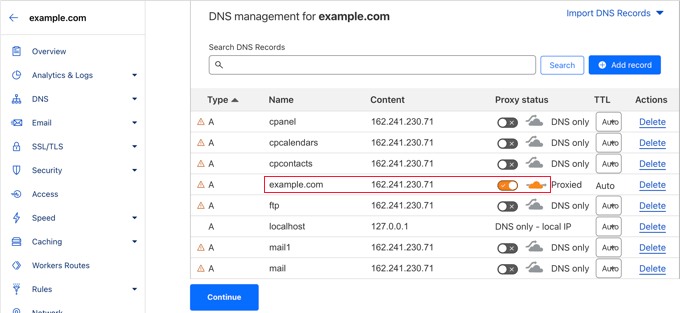
After verifying the DNS record, click the bottom "proceed with"Button.
In the next step of the setup, Cloudflare will ask to update the name servers. The system will ask to change the name server and point it to the Cloudflare name server.
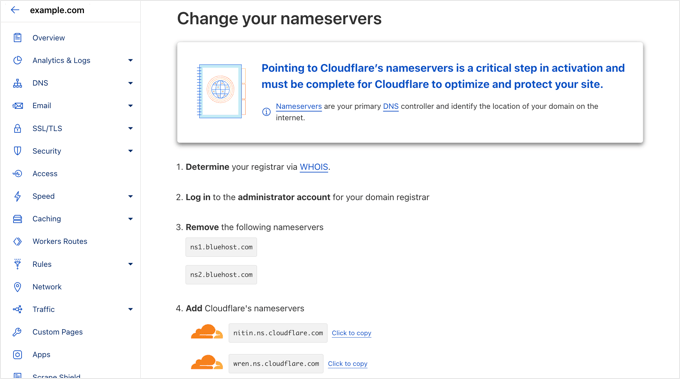
Attention:Changes to name servers may take some time to take effect. During this time, some users may not be able to access the site.
![图片[10]-怎么在 WordPress 中设置 Cloudflare 免费的 CDN-光子波动网 | WordPress教程、Elementor教程与故障修复](https://www.361sale.com/wp-content/uploads/2024/09/2024092303342936.png)
It takes a few minutes to update the name servers and activate Cloudflare.
Once activated, you will see a success message in the Cloudflare dashboard.
![图片[11]-怎么在 WordPress 中设置 Cloudflare 免费的 CDN-光子波动网 | WordPress教程、Elementor教程与故障修复](https://www.361sale.com/wp-content/uploads/2024/09/2024092303350117.png)
In the meantime, the Cloudflare Quick Start Guide opens automatically and can be used to customize your Cloudflare settings. We'll show how to do this in the next section.
Configuring Cloudflare with the Quick Start Guide
Click the "Done. Check name servers." button, the Cloudflare Quick Start Guide will automatically open. The setup wizard will help us to improve the security and performance of our website.
The first setting is 'Automatic HTTPS Rewrite'The
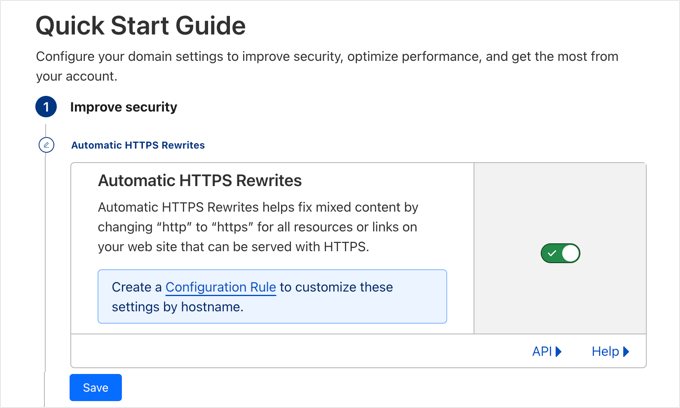
This can help avoidMixed Content Errors in WordPressIt automatically changes "http" to "https" in the URLs of all resources and links on the site that can be served using secure "https" URLs. It does this by automatically changing "http" to "https" in the URLs of all resources and links on the site that can be served using a secure "https" URL. purpose.
This setting is turned on by default. We recommend leaving this setting on and "save (a file etc) (computing)".
The next setting is "Always use HTTPS".
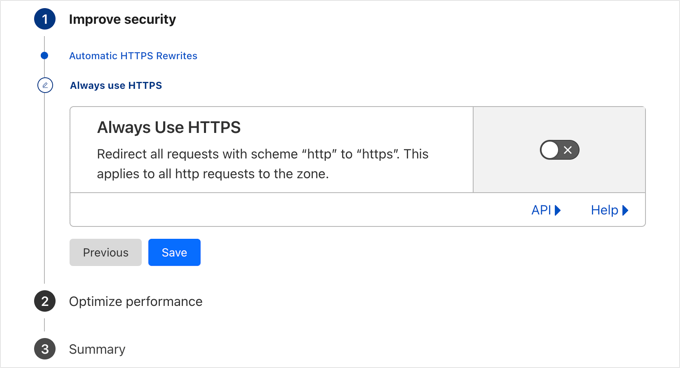
Some users have reported issues when using this setting in Cloudflare. This setting is disabled by default, and we recommend leaving this setting in place.
Now, you can click "save (a file etc) (computing)"Go to the next option.
The next setting is Brotli compression.
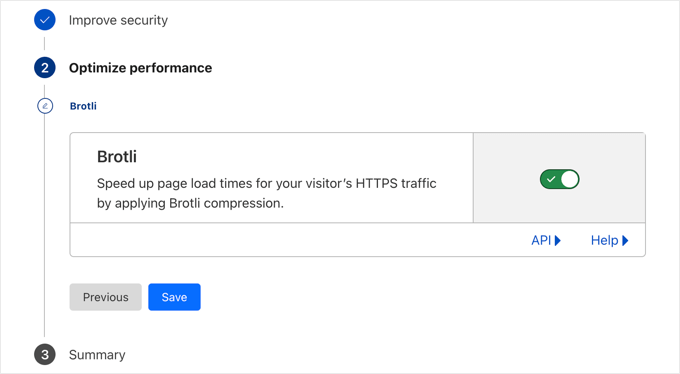
Cloudflare can use Brotli compression to increase the speed of 15-20%. This setting is turned on by default and it is recommended to leave it on.
Make sure to click "save (a file etc) (computing)" button to store this setting.
A summary of the content configured using the Quick Start Guide will now be seen.
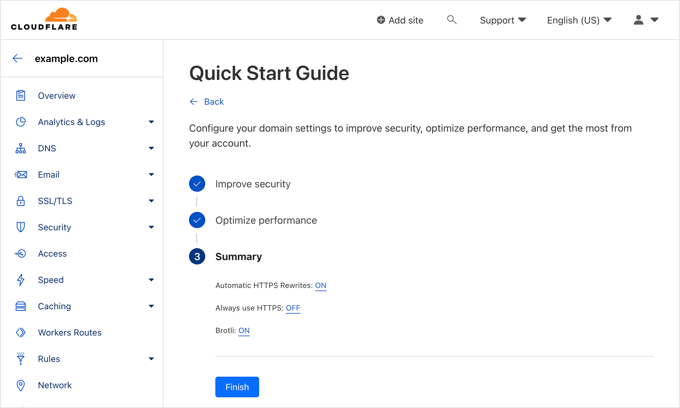
Should be able to see:
- Automatic HTTPS rewriting: on
- Always use HTTPS: off
- Brotli: ON
Now that you have completed the Quick Start Guide, click "fulfillment" button. However, there are some other important settings that need to be configured.
Configure other important Cloudflare settings
The basic Cloudflare setup is complete, but there are some basic settings that need to be configured to secure your WordPress site.
1. Secure WordPress login page
Page rules can be set up to customize how Cloudflare works on specific pages on your site. This is especially useful for protecting critical pages such as login pages and wp-admin areas.
A Cloudflare free account can set up 3 page rules. If you want to add more page rules, you need to pay $5 per month to add 5 additional rules.
First click on the menu on the left side of the page "rules and regulations" option. After that, click on the "Creating Page Rules"Button.
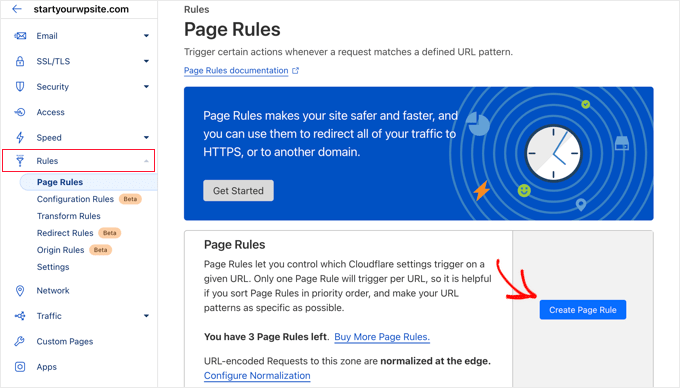
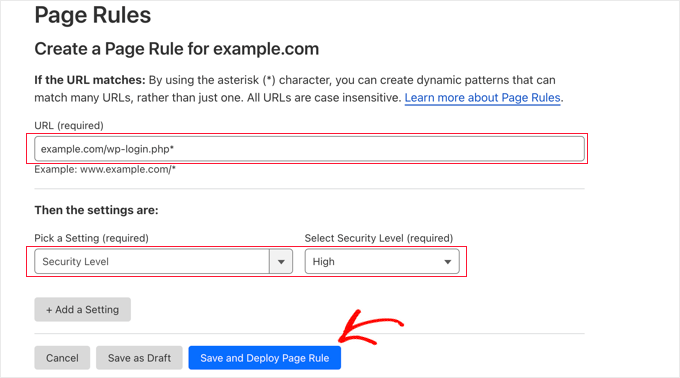
It is now possible to set up 3 different page rules. You can start by creating a rule to protect the WordPress login page.
Add the following settings to secure your website:
- Page URL: example.com/wp-login.php*
- Setting: Security Level - High
When you're done, simply click "Save and deploy" can store and activate rules.
2. Excluding WordPress Dashboards from Cloudflare
will return you to the Page Rules page, where you can see the first rule listed.
Now, create a second rule to exclude the WordPress dashboard from the Cloudflare cache and enable high security.
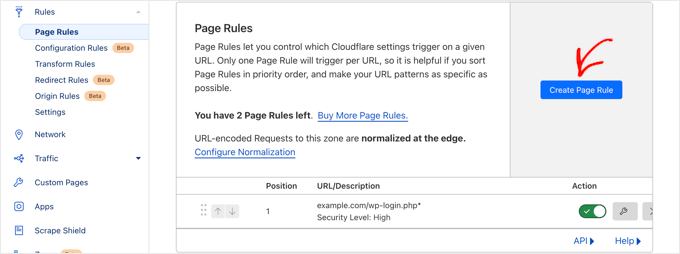
Click "Creating new rules" button to create a second rule.
After that, you have to enter the following settings in the rule. This can be done by clicking on "+ Add Settings"button to add a new row to add additional settings:
- Page URL: example.com/wp-admin*
- Setting: Security Level - High
- Cache Level - Bypass
- Disable Performance
- Disabling applications
When finished, click "Save and deploy"Adding New Rules.

3. Configure SSL certificate settings
Another important setting is the left "SSL/TLSSSL certificate in the "SSL Certificate" menu.
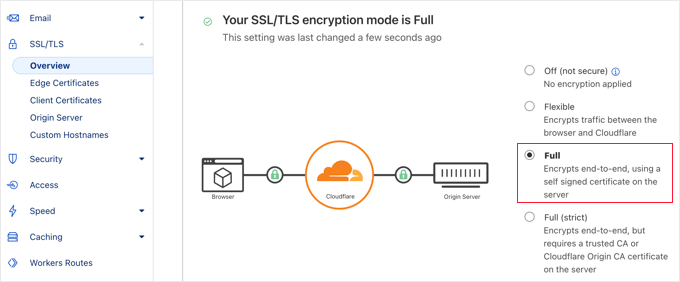
If you are already using SSL, click "incomplete"Radio button.
Upon completion, Cloudflare will provide the necessary green padlock in the visitor's address bar to indicate that the site is secure.
Optimize Cloudflare for WordPress with Plugins
Cloudflare offers a dedicated WordPress plugin for one-click WordPress optimization settings.
This plugin allows you to quickly set up Cloudflare on your WordPress site, add Web Application Firewall (WAF) rulesets, automatically clear your cache, and more.
Start by installing and activating the Cloudflare plugin on the website.
When you're done, access the admin panel in theSetting up "Cloudflareto configure Cloudflare settings.
On the settings page, you will see "Create a free account" button and login options for existing accounts. Click the "Login here"The link will do.
![图片[21]-怎么在 WordPress 中设置 Cloudflare 免费的 CDN-光子波动网 | WordPress教程、Elementor教程与故障修复](https://www.361sale.com/wp-content/uploads/2024/09/2024092306362193.png)
On the next screen, enter your Cloudflare email and API key.
Click "Get your API key from here"Link.
![图片[22]-怎么在 WordPress 中设置 Cloudflare 免费的 CDN-光子波动网 | WordPress教程、Elementor教程与故障修复](https://www.361sale.com/wp-content/uploads/2024/09/2024092306363536.png)
This will populate your account area on the Cloudflare website.
Ensure that the "My Profile" page, and then click the "API Token"Tab.
After that, go to "Global API key"section and click on "ferret out"Button.
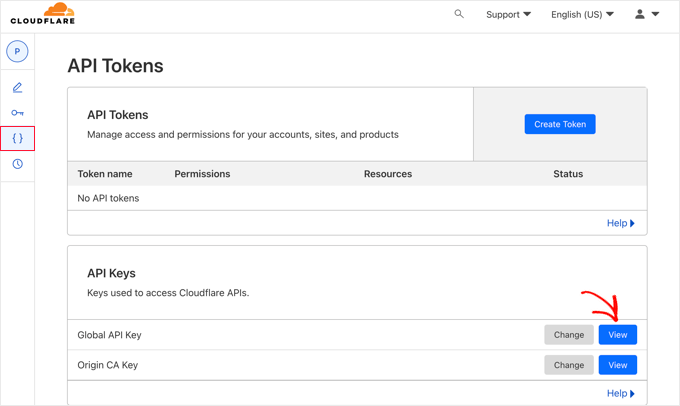
This will open a popup window and display your API key.
Simply click the key to copy it.
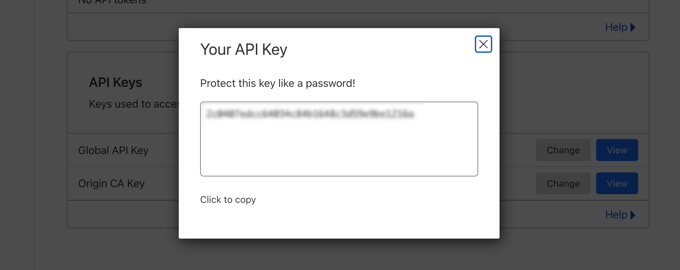
Next, return to the WordPress dashboard and enter your email address and API key.
Then, click "Saving API Keys"Button.

After that, the Cloudflare settings appear on the dashboard.
From here, you can apply one-click WordPress optimization, clear the cache, enable automatic caching, and more.
To optimize a WordPress site, simply click "Applying default settings"Next to."appliance"Button.
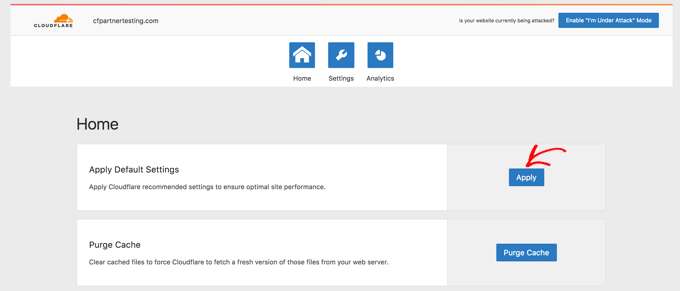
Next, click on "set up"Menu Options.
Here you will find more website optimization settings.
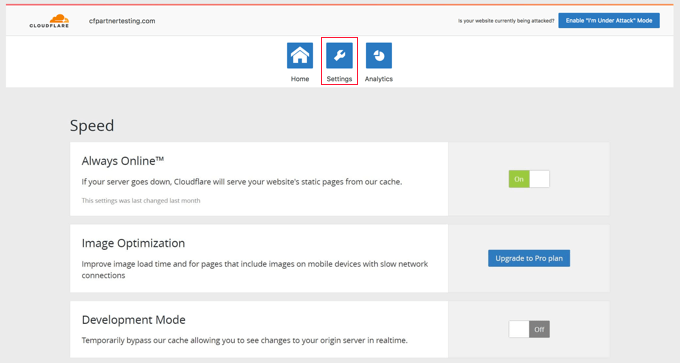
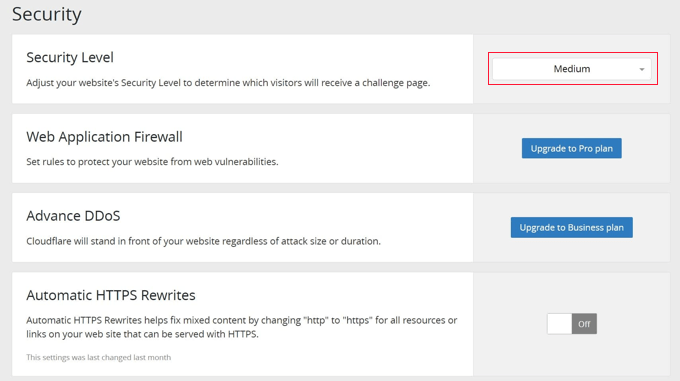
You can scroll down this screen to find "surety"Part.
By default, the security level is medium. To increase the security of your website, you can select from the drop-down list the"High".

Link to this article:https://www.361sale.com/en/20451/The article is copyrighted and must be reproduced with attribution.














![表情[wozuimei]-光子波动网 | WordPress教程、Elementor教程与故障修复](https://www.361sale.com/wp-content/themes/zibll/img/smilies/wozuimei.gif)

![表情[baoquan]-光子波动网 | WordPress教程、Elementor教程与故障修复](https://www.361sale.com/wp-content/themes/zibll/img/smilies/baoquan.gif)


 简体中文
简体中文  English


No comments