






Why do I need to downgrade WordPress?
WordPress releases updates on a regular basis in order to provide better security, optimize performance, and introduce new features. In some cases, theUpgrades may cause compatibility issuesthat affects the proper functioning of the site. For example:
- Plugin or theme compatibility issues: Some plugins or themes have not been adapted to the latest WordPress version, resulting in abnormal functionality or page crashes.
- PHP versioncollision (of interests): WordPress relies on PHP to run, and some updates may require a higher version of PHP that is not available in your server environment.
- New functionality impacts workflow: WordPress updates may change the interface, features, or editor, affecting user habits and flow.
- test purpose: Developers may need to test plugins or themes on older versions of WordPress.
When these problems occur, downgrading WordPress may be a temporary solution. In this article, we'll go over the details ofHow to Safely Downgrade WordPress to Avoid Potential Data Loss and Security RisksThe
![图片[1]-如何安全降级 WordPress:完整指南(手动方法 & 插件教程)](https://www.361sale.com/wp-content/uploads/2025/02/20250224180410512-1740391373193.jpg)
Preparation before downgrading WordPress
Before downgrading, it is important to be fully prepared to ensure the security and data integrity of your website.
1. Creating a Full Backup
Downgrading WordPress will make changes to your site's core files and database, so you'll need to create a full backup.
How to Backup WordPress Website?
- Using plug-insAs UpdraftPlus,All-in-One WP Migration etc.
- Manual Backup::
- Backup Database: in cPanel maybe phpMyAdmin centerExporting a MySQL DatabaseThe
- backup file: Use FTP to download
wp-contentfolder as well as thewp-config.phpDocumentation.
![图片[2]-如何安全降级 WordPress:完整指南(手动方法 & 插件教程)](https://www.361sale.com/wp-content/uploads/2025/02/20250224181248482-image.png)
2. Setting up a Staging Site
Before performing a downgrade, it is recommended that theTesting in a staging environmentto avoid directly affecting the official website.
3. Disable all plugins and switch default theme
Some plugins and themes may not be compatible with the downgraded WordPress version, so you should deactivate the plugin first and switch to the WordPress default theme (e.g. Twenty Twenty-Five).
Steps:
- Go to the WordPress backend and navigate to Plugins > Installed PluginsThe
- Select all plug-ins, batch deactivateThe
![图片[3]-如何安全降级 WordPress:完整指南(手动方法 & 插件教程)](https://www.361sale.com/wp-content/uploads/2025/02/20250224180718291-image.png)
- go into Appearance > ThemesSwitch to Twenty Twenty-Fore or other default themes.
![图片[4]-如何安全降级 WordPress:完整指南(手动方法 & 插件教程)](https://www.361sale.com/wp-content/uploads/2025/02/20250224171321521-image.png)
4. Checking the PHP version
Downgrading to an older version of WordPress may require a specific version of PHP. It is recommended that the WordPress dashboard Tools > Site Health > Information to see the current PHP version and make sure it is compatible with the target WordPress version.
![图片[5]-如何安全降级 WordPress:完整指南(手动方法 & 插件教程)](https://www.361sale.com/wp-content/uploads/2025/02/20250224171536969-image.png)
How to downgrade WordPress core version?
There are two main methods of WordPress degradation:
- manually operatedDegradation (for cases where the backend is not accessible)
- utilizationplug-in (software component)Degradation (for cases where the backend is still accessible)
Method 1: Manually Downgrade WordPress via FTP
If WordPress is inaccessible or you wish to have full control over the downgrade process, you can use FTP toManual RollbackThe
Step 1: Download an older version of WordPress
- interviews WordPress Version ArchiveThe
- Find the WordPress version you need and download it
.zipDocumentation. - Unzip the file locally.
![图片[6]-如何安全降级 WordPress:完整指南(手动方法 & 插件教程)](https://www.361sale.com/wp-content/uploads/2025/02/20250224171746143-image.png)
Step 2: Connect to the server via FTP
- File managers using FileZilla or cPanelConnecting to the web serverThe
- go into
public_htmldirectory (or the WordPress installation directory).
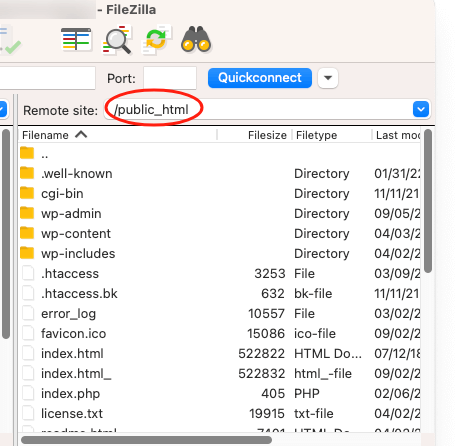
Step 3: Delete the wp-admin and wp-includes folders
take note of: Please do not delete wp-content folder, otherwise the site's themes, plugins and uploaded files will be lost.
- exist
public_htmldirectory, delete thewp-adminrespond in singingwp-includesCatalog. - reservations
wp-contentcatalogs andwp-config.phpDocumentation.
![图片[8]-如何安全降级 WordPress:完整指南(手动方法 & 插件教程)](https://www.361sale.com/wp-content/uploads/2025/02/20250224172207967-1740388919940.png)
Step 4: Uploading Old WordPress Files
- Extract the locally unzipped WordPress Older versions of documentsupload
public_htmlCatalog. - assure uncovered
wp-contentcatalogs andwp-config.phpfileThe - Allow FTP clientsOverwrite other WordPress core filesThe
Step 5: Update WordPress Database
- interviews
yourdomain.com/wp-admin/upgrade.phpThe - If prompted, click Updating the WordPress DatabaseThe
![图片[9]-如何安全降级 WordPress:完整指南(手动方法 & 插件教程)](https://www.361sale.com/wp-content/uploads/2025/02/20250224172429382-image.png)
Method 2: Use Core Rollback Plugin Downgrade WordPress
If you have access to the WordPress dashboard, using a plugin is the easiest way.
Step 1: Install Core Rollback Plugin
- go into Plugins > Add New PluginThe
- look for sth. Core Rollback, install to activate it.
![图片[10]-如何安全降级 WordPress:完整指南(手动方法 & 插件教程)](https://www.361sale.com/wp-content/uploads/2025/02/20250224172553276-image.png)
Step 2: Downgrade WordPress Version
- go into Tools > Rollback CoreThe
![图片[11]-如何安全降级 WordPress:完整指南(手动方法 & 插件教程)](https://www.361sale.com/wp-content/uploads/2025/02/20250224172723475-image.png)
- Select the WordPress version to be downgraded in the drop-down menu (e.g.
6.2.6). - strike (on the keyboard) rolling back, and then confirm the operation.
![图片[12]-如何安全降级 WordPress:完整指南(手动方法 & 插件教程)](https://www.361sale.com/wp-content/uploads/2025/02/20250224172811374-image.png)
plug-in willAutomatically downloads and installs selected WordPress versionsThe entire process requires no manual operation.
What you need to do after a demotion
1. Step-by-step reactivation of plugins and themes
2. Disable WordPress Automatic Updates
After downgrading, it is recommended thatTemporarily disable automatic updatesto prevent WordPress from upgrading itself again.
- possibleutilization Easy Updates Manager plug-in (software component)to control updates.
3. Testing website functionality
Ensure that the websitecore functionalityNormal operation, including:
- Is the page loading correctly?
- Is the form submission working?
- Is the function available?
- Are the block editor and customization tools working?
4. Enhanced security measures
Recommended due to possible security vulnerabilities in older versions of WordPress:
- start using Wordfence maybe Sucuri Perform additional security.
summarize
Learn through the article available throughManual methodor plug-ins (e.g. Core Rollback) Security downgrades, but downgrades WordPress Not a permanent solution. Before downgrading, make backups to ensure compatibility, take necessary safety measures after downgrading, such as turning off automatic updates when you're done, testing site functionality, andEnhanced securityThe

Link to this article:https://www.361sale.com/en/34197/The article is copyrighted and must be reproduced with attribution.












![表情[wozuimei]-光子波动网 | WordPress教程、Elementor教程与故障修复](https://www.361sale.com/wp-content/themes/zibll/img/smilies/wozuimei.gif)

![表情[baoquan]-光子波动网 | WordPress教程、Elementor教程与故障修复](https://www.361sale.com/wp-content/themes/zibll/img/smilies/baoquan.gif)


 简体中文
简体中文  English


No comments