






Imagify It is a program designed for WordPress Image Optimization Plugin, improves website loading speed by automatically compressing and optimizing images. It supports lossless and lossy compression, batch processing of images, and the ability to convert images to efficient WebP formats to further improve page loading efficiency. In this article, we will introduce how to use Imagify plugin in detail, as well as its main features and advantages.
![图片[1]-Imagify 插件使用指南:轻松优化图像,提升网站速度与SEO表现](https://www.361sale.com/wp-content/uploads/2025/02/20250225101231651-image.png)
Imagify plugin's main features
- Automatic optimization of uploaded images: Whenever you upload a picture.Imagify Images are automatically compressed and optimized to ensure that each newly uploaded image reduces the file size without losing quality, thus increasing the loading speed of your website.
- Batch optimization of existing images: Imagify not only optimizes newly uploaded images, but also supports you to batch optimize all the images already on your website.
- Lossless vs. lossy compressionImagify provides both lossless and lossy compression options, so users can freely choose the compression mode according to their needs.
- WebP format support: Imagify supports converting images to WebP format, an efficient image format that reduces image file size while maintaining high image quality.
- Detailed optimization report: Imagify provides detailed image optimization reports that allow users to view the size change of each image before and after optimization, as well as the percentage of optimization.
- Image Optimization History: The plugin also records a history of all optimizations, allowing users to view the progress of image optimization at any time and ensure that all uploaded images have been properly processed.
![图片[2]-Imagify 插件使用指南:轻松优化图像,提升网站速度与SEO表现](https://www.361sale.com/wp-content/uploads/2025/02/20250225103627492-image.png)
How do I use the Imagify plugin?
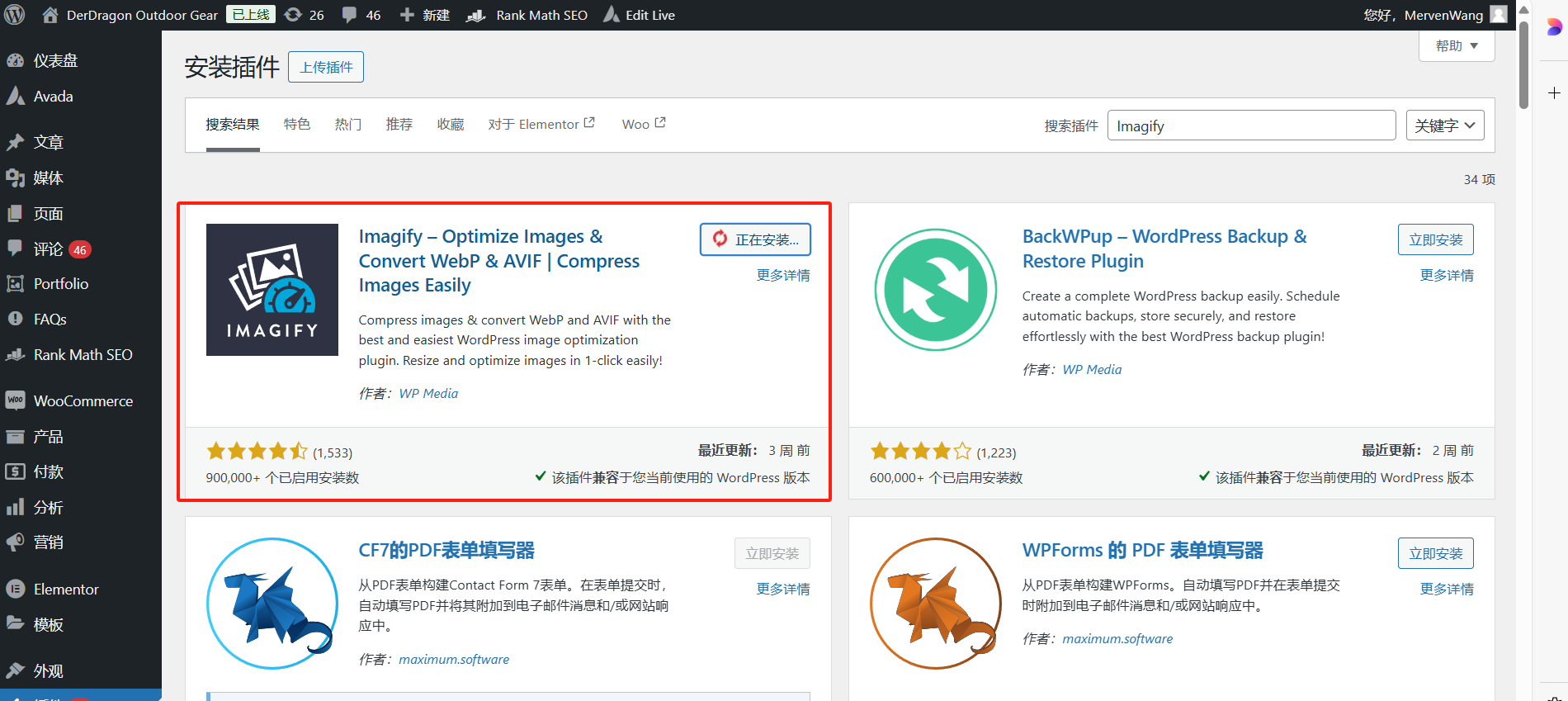
- Installation and activation of plug-ins In the WordPress dashboard, go to "plug-in (software component)"->"Installation of plug-ins", search for "Imagify", then click on "mounting" and activate the plugin.
- Setting Up Plug-ins After activating the plugin, go to Imagify Settings page. You can choose the default compression mode (lossless or lossy), as well as enable the WebP Format Conversion. If you need to batch optimize existing images, you can set it up on this page.
![图片[4]-Imagify 插件使用指南:轻松优化图像,提升网站速度与SEO表现](https://www.361sale.com/wp-content/uploads/2025/02/20250225102346598-image.png)
- Automatic optimization when uploading images As long as the auto-optimization feature is enabled, all newly uploaded images are automatically optimized as they are uploaded and you don't have to do anything extra.
- Functional operation: "set up" → "imagify"
![图片[5]-Imagify 插件使用指南:轻松优化图像,提升网站速度与SEO表现](https://www.361sale.com/wp-content/uploads/2025/02/20250225102246121-image.png)
- Batch optimized images To optimize images that have already been uploaded on your website, you can go to Imagify's Batch Optimization page, select the images you need to optimize and click "Start optimization". You can optimize multiple images at once, saving time significantly.
- Functional operation:"Media" → "Batch operation" → "Optimize" → "Applications"
![图片[6]-Imagify 插件使用指南:轻松优化图像,提升网站速度与SEO表现](https://www.361sale.com/wp-content/uploads/2025/02/20250225102959922-image.png)
- View Optimization Report Once the optimization is complete, Imagify generates an optimization report that lists the file size and optimization percentage for each image before and after the optimization, allowing you to see the results of the optimization at a glance.
![图片[7]-Imagify 插件使用指南:轻松优化图像,提升网站速度与SEO表现](https://www.361sale.com/wp-content/uploads/2025/02/20250225103025774-image.png)
Benefits of the Imagify Plugin
- Improve page loading speed
Images are an influenceWebsite loading speedOne of the key elements of the Imagify program is that using Imagify can dramatically reduce the size of image files and increase page load speeds, which in turn improves the user experience and reduces bounce rates. - Save bandwidth and server resources
Optimized images can effectively reduce bandwidth usage and server load, especially for users with limited bandwidth or shared hosting. - Support SEO Enhancement
Google and other search engines have clear requirements for page loading speed to improve the ranking of your website in the search engines. - Automated processing
Imagify automatically optimizes uploaded images, saving time on manual optimization. Batch optimization can quickly process a large number of images. - Free version and paid version available
Imagify offers a free basic version that optimizes up to 25MB of images per month for smaller sites. If you need more optimization, you can choose thepaid versionEnjoy unlimited optimization space and more advanced features.
![图片[8]-Imagify 插件使用指南:轻松优化图像,提升网站速度与SEO表现](https://www.361sale.com/wp-content/uploads/2025/02/20250225103924392-image.png)
summarize
Imagify Imagify is a powerful image optimization plugin that helps WordPress users easily optimize images and improve website performance. Whether it's automatic optimization of uploaded images or batch optimization of existing images, Imagify effectively reduces the size of image files, dramatically improves page load speed, enhances the user experience andImprove SEO Ranking. If you're not using Imagify yet, give it a try, it'll be a great help in improving the performance of your website.

Link to this article:https://www.361sale.com/en/34321/The article is copyrighted and must be reproduced with attribution.















![表情[wozuimei]-光子波动网 | WordPress教程、Elementor教程与故障修复](https://www.361sale.com/wp-content/themes/zibll/img/smilies/wozuimei.gif)

![表情[baoquan]-光子波动网 | WordPress教程、Elementor教程与故障修复](https://www.361sale.com/wp-content/themes/zibll/img/smilies/baoquan.gif)


 简体中文
简体中文  English


No comments