






form (document)The Elementor editor comes with powerful Form Widget(Form Widget)It helps you to create interactive and high converting online forms in a simple way.
In this article, we will analyze the functions of Elementor forms, applicable scenarios in detail, and share ways to optimize the design to improve your website user submission rate and help you grow your business.
![图片[1]-Elementor 表单完整指南:功能解析、优化技巧与转化率提升策略](https://www.361sale.com/wp-content/uploads/2025/03/20250306204126443-695592ab1c4c7b5bc45b727c703b82b.jpg)
1. Elementor Forms Plugin Overview
Elementor provides Free and Professional (Pro) versions(math.) genusThe form widget is Elementor Pro exclusivity. Compared to the traditional HTML or other WordPress form plugins such as WPFormsElementor Forms widgets offer the following advantages:
- Fully visualized build: Create highly customizable forms without writing code with Elementor's drag-and-drop editor.
- Multiple field types::Supports multiple field types such as text, email, phone number, URL, date selection, file upload, etc.The
- Powerful Integration Features: Compatible MailChimp, HubSpot, Zapier, Slack, Webhook etc. to facilitate automated data processing.
- Dynamic Data Filling: You can use dynamic tags (
Dynamic Tags) pre-populated fields to improve the user experience. - built-in anti-spam mechanism: Support
reCAPTCHArespond in singingHoneypotAnti-spam protection.
2. Scenarios for Elementor forms
Elementor forms can be used in a variety of scenarios, covering areas such as official corporate websites, e-commerce sites, online booking and more:
- Contact form(Contact Form)
Used for customer inquiries, obtaining information about potential customers. - User Registration Form(User Registration Form)
For membership sites, online courses or SaaS platforms. - Product Order/Reservation Form(Order Form)
E-commerce websites or reservation systems may use this form to collect order information. - questionnaire(Survey Form)
Conduct market research, customer feedback collection, etc. - Email Subscription Form(Newsletter Subscription Form)
Ideal for blogs or marketing websites, collect emails from users to build mailing lists.
3. Detailed steps for using Elementor forms
3.1 Adding an Elementor Form Widget
- Go to WordPress instrument panelsin Pages/Articles neighborhoodNew or EditA page.
- strike (on the keyboard) Edit page (using Elementor) Go to the visual editor.
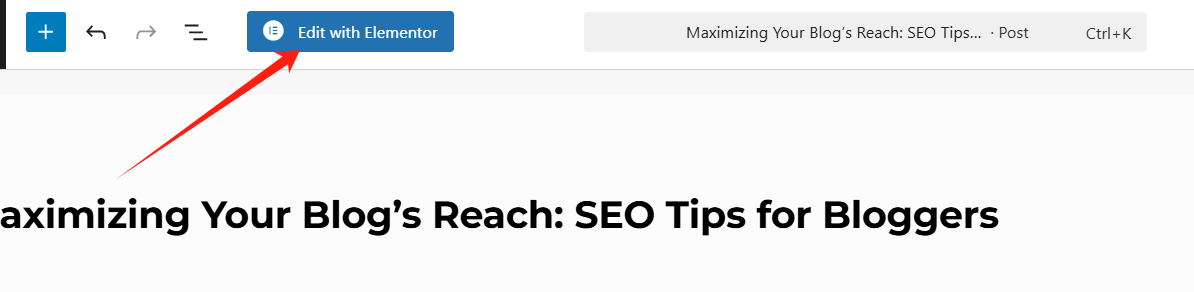
- exist Widget Panel China Search "Forms", drag it into the page.
![图片[3]-Elementor 表单完整指南:功能解析、优化技巧与转化率提升策略](https://www.361sale.com/wp-content/uploads/2025/03/20250306194730758-image.png)
3.2 Configuration form fields
- Default Field Settings: Elementor provides several base fields such asName, Email, Phoneetc., can be added on request.
![图片[4]-Elementor 表单完整指南:功能解析、优化技巧与转化率提升策略](https://www.361sale.com/wp-content/uploads/2025/03/20250306195157326-image.png)
- Custom Fields: Different field types can be selected, such as Textboxes, checkboxes, dropdown menus, date pickers etc.
![图片[5]-Elementor 表单完整指南:功能解析、优化技巧与转化率提升策略](https://www.361sale.com/wp-content/uploads/2025/03/20250306195751736-image.png)
- Setting Required Fields: In the field settings, enable "mandatory field" option to prevent users from submitting incomplete information.
![图片[6]-Elementor 表单完整指南:功能解析、优化技巧与转化率提升策略](https://www.361sale.com/wp-content/uploads/2025/03/20250306195855455-image.png)
3.3 Form Style Optimization
You can use Elementor to customize the appearance of the form, and the following optimizations are recommended to improve conversion rates:
- Resizing the input box: Input boxes that are too small will affect readability and it is recommended that they be appropriately large.
![图片[7]-Elementor 表单完整指南:功能解析、优化技巧与转化率提升策略](https://www.361sale.com/wp-content/uploads/2025/03/20250306201757474-image.png)
- Use high contrast buttons: CTA (Call To Action) The button needs to be visible and the color can be high contrast(e.g., orange, blue).
![图片[8]-Elementor 表单完整指南:功能解析、优化技巧与转化率提升策略](https://www.361sale.com/wp-content/uploads/2025/03/20250306201404186-image.png)
- Simplification of form fields: To avoid users filling in too much irrelevant information, generally 3-5 fields is best practice.
- Add Placeholder: Use a simpleAlertsGuide the user to fill in the content.
3.4 Configuring Form Submission Options
- email notification: in "Submit Action"Select EmailThe address for receiving e-mails to receive the data submitted by the user is filled in.
![图片[9]-Elementor 表单完整指南:功能解析、优化技巧与转化率提升策略](https://www.361sale.com/wp-content/uploads/2025/03/20250306201104838-image.png)
- Redirect: After the form is submitted, you can jump to the thank you page, enhancing the user experience.
![图片[10]-Elementor 表单完整指南:功能解析、优化技巧与转化率提升策略](https://www.361sale.com/wp-content/uploads/2025/03/20250306200812425-image.png)
- Webhook Automation: Support and Zapier maybe CRM (customer management system) Perform data interfacing for automated management.
![图片[11]-Elementor 表单完整指南:功能解析、优化技巧与转化率提升策略](https://www.361sale.com/wp-content/uploads/2025/03/20250306202104393-image.png)
3.5 EnablingAnti-spam protection
Courtesy of Elementor Google reCAPTCHA v3 respond in singing Honeypot option, turn it on to reduce spam.
![图片[12]-Elementor 表单完整指南:功能解析、优化技巧与转化率提升策略](https://www.361sale.com/wp-content/uploads/2025/03/20250306202406436-image.png)
4. How can I optimize my Elementor forms to increase conversions?
Simplify form design
- Reducing Required FieldsThe following are some of the key information that should be retained (e.g.Name, e-mail).
- Multi-step Forms: For complex forms.step by step displayEasier for users to complete than a one-time display.
Making CTA buttons more attractive
- adoption Short, powerful calls to action (e.g., "Get it now," "Get a quote")The
- Make sure the buttons are the right size and in a striking color that contrasts with the background.
Use of A/B testing
- Different form layouts(single column vs. double column).
- Different CTA text("Submit" vs. "Get a Free Quote").
- Different color combinations(Orange vs. Green button).
Provide immediate feedback
- Show error message: Timely feedback is needed if the user makes an input error, e.g. "Incorrect mailbox format".
5. Elementor Forms vs. other form plug-ins
| functionality | Elementor Forms | WPForms | Gravity Forms | Contact Form 7 |
|---|---|---|---|---|
| Drag and Drop Editor | ✅ | ✅ | ❌ | ❌ |
| Prefabricated formwork | ✅ | ✅ | ✅ | ❌ |
| Dynamic Field Filling | ✅ | ❌ | ✅ | ❌ |
| CRM Integration | ✅ | ✅ | ✅ | ❌ |
| Anti-spam protection | ✅ | ✅ | ✅ | ❌ |
| Suitable for complex forms | ✅ | ❌ | ✅ | ❌ |
Elementor Forms Fit Users who need visual editing and a high degree of customizationIf you need to More complex payment, conditional logicYou may consider WPForms maybe Gravity FormsThe
6. Conclusion
The Elementor Forms plugin is Ideal for WordPress Websites to Create High Converting FormsIn the case of a product that is used for Lead generation, email subscriptions, user feedback, all of which provide a smooth user experience.
In practice.Optimize form layout, streamline fields, enhance visual appealand in conjunction with A/B testingthat can effectively increase user submission rates.

Link to this article:https://www.361sale.com/en/35871/The article is copyrighted and must be reproduced with attribution.











![表情[wozuimei]-光子波动网 | WordPress教程、Elementor教程与故障修复](https://www.361sale.com/wp-content/themes/zibll/img/smilies/wozuimei.gif)

![表情[baoquan]-光子波动网 | WordPress教程、Elementor教程与故障修复](https://www.361sale.com/wp-content/themes/zibll/img/smilies/baoquan.gif)


 简体中文
简体中文  English


No comments