





descriptive
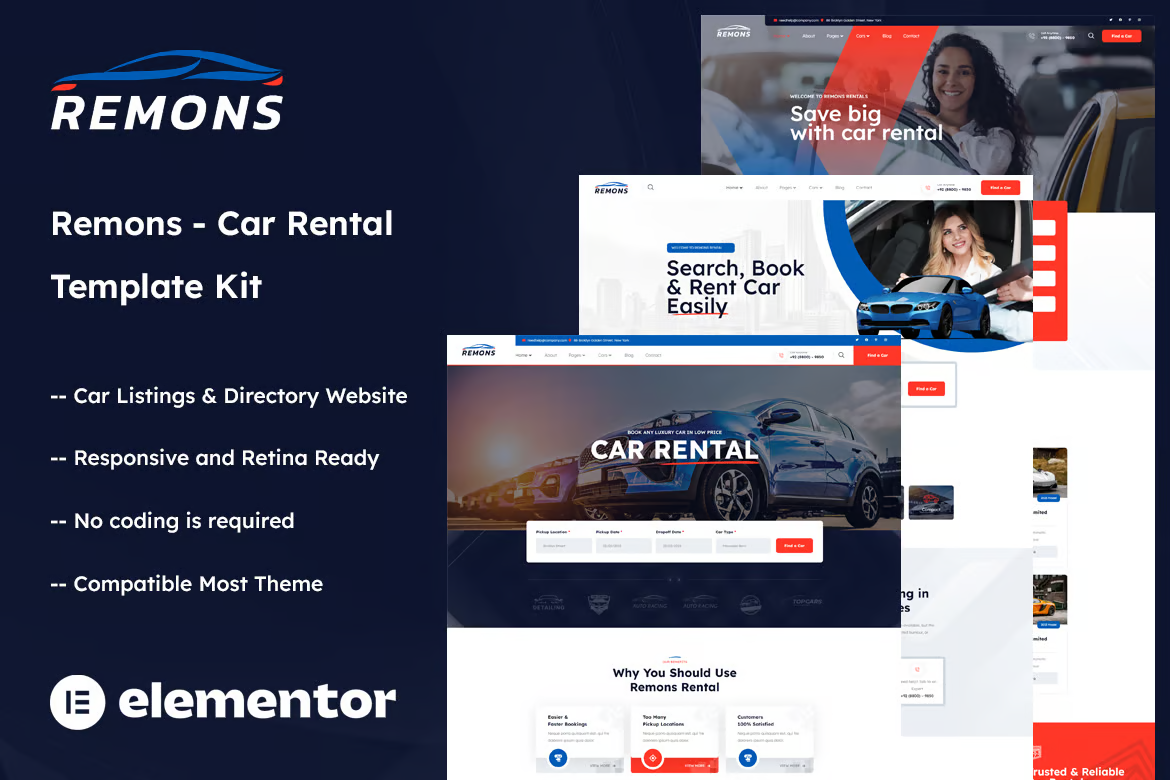
Remons - Car Rental Template Pack is a modern and clean Elementor template pack for all types of agencies, be it car rental, motorcycle rental, yacht rental, online booking, car listings, car directory websites and businesses.
The template package features a clean and modern design aesthetic and includes tons of tools and features that allow you to easily display and showcase your fleet of vehicles with engaging image galleries and interactive car listings.
The template has a professional design, 100% responsive layout, retina screen support and is very easy to edit as it is built using Elementor, which means you don't need to write a single line of code!
![图片[1]-Remons – 汽车租赁 Elementor 模板包-光子波动网 | WordPress教程、Elementor教程与故障修复](https://www.361sale.com/wp-content/uploads/2025/03/20250313112001193-1741835882923.png)
![图片[2]-Remons – 汽车租赁 Elementor 模板包-光子波动网 | WordPress教程、Elementor教程与故障修复](https://www.361sale.com/wp-content/uploads/2025/03/20250313112001173-1741835892773.png)
![图片[3]-Remons – 汽车租赁 Elementor 模板包-光子波动网 | WordPress教程、Elementor教程与故障修复](https://www.361sale.com/wp-content/uploads/2025/03/20250313112001982-1741835901227.png)
Required plug-ins:
- Elementor (free)
- Themesflat Addons For Elementor (free)
- MetForm
- ElementsKit Lite
Template Pack Key Features:
- 03 Unique Home Page Designs
- Automotive Listings and Directory Sites
- No programming knowledge required
- Fully compatible with Elementor Free Edition (no Elementor Pro required)
- Includes header and footer builders
- Unique and modern style
- Super clear and concise layout
- cross-browser compatibility
- Support for article widgets
- Support for rotating slider boxes (create a slider for any content)
- Ultra-responsive and retina-ready
- Compatible with most WordPress themes
- Search Engine Optimization
How to use the template package:
- Install and activate the "Envato Elements" plugin in the WordPress backend under Plugins > Add New Plugin. You don't need an Envato Elements subscription to install template packages using this plugin.
- Download your template package file and make sure not to unzip it! If you are using Safari, make sure that the "Open safe file after download" option is disabled in your preferences.
- Go to Elements > Installed Template Packs and click the Upload Template Pack button. You can also automate the import by clicking Connect Account, and after linking your Elements subscription, you can import in Elements > Template Packs.
- Check the orange banner at the top and click Install Requirements to load the plugin used by the template package.
- First click Import Global Template Styles.
- Click Import each template in turn. These templates are stored in Templates > Saved Templates under Elementor.
- Go to Pages, create a new page and click Edit with Elementor.
- Click the gear icon in the bottom left corner of the builder to view the page settings, select Elementor Full Width and hide the page title.
- Click the gray folder icon to access the My Templates tab and import the pages you want to customize.

Link to this article:https://www.361sale.com/en/39352/The article is copyrighted and must be reproduced with attribution.

















![表情[wozuimei]-光子波动网 | WordPress教程、Elementor教程与故障修复](https://www.361sale.com/wp-content/themes/zibll/img/smilies/wozuimei.gif)

![表情[baoquan]-光子波动网 | WordPress教程、Elementor教程与故障修复](https://www.361sale.com/wp-content/themes/zibll/img/smilies/baoquan.gif)


 简体中文
简体中文  English


No comments