






Elementor Cart widget for WooCommerce, free to design your own!shopping cart pageIn this article, we will introduce you how to use Elementor's Cart widget to enhance brand consistency, improve user experience, and optimize the efficiency of the final transaction. In this article, we will introduce the usage of Elementor's Cart widget in detail, from adding layout, setting text, to beautifying design and adapting to mobile, we will take you to complete the full customization of the shopping cart page.
![图片[1]-如何使用 Elementor 的 WooCommerce Cart 小工具自定义购物车页面](https://www.361sale.com/wp-content/uploads/2025/04/20250408154318117-image.png)
What is the Elementor Cart widget?
Elementor's Cart widget is designed for WooCommerce Store tailored shopping cart display component. Supports full control over the structure and style of the shopping cart page, free from the limitations of the default WooCommerce shortcode. Details such as typography, colors, fonts, button styles, etc. can be easily changed using the Elementor drag-and-drop editor to make the shopping cart page look more professional and in line with your brand's style.
specificities::
- High degree of design freedom: no longer limited to WooCommerce preset styles, fully customizable card structure.
- Improve conversion rate: clearer layout and higher visibility help users to complete checkout quickly.
- Brand consistency: colors, fonts and styles are unified with other pages on the site to improve the overall experience.
![图片[2]-如何使用 Elementor 的 WooCommerce Cart 小工具自定义购物车页面](https://www.361sale.com/wp-content/uploads/2025/04/20250408154354690-image.png)
How to use the Elementor Cart widget
Install WooCommerce and Enable Elementor Editing
Ensure that the WooCommerce plugin is installed and enabled, and open the shopping cart page in Elementor for editing. By default, this page is edited by the WooCommerce "woocommerce_cart" Shortcode generation. It needs to be replaced with Elementor's Cart widget.
![图片[3]-如何使用 Elementor 的 WooCommerce Cart 小工具自定义购物车页面](https://www.361sale.com/wp-content/uploads/2025/04/20250409193050301-image.png)
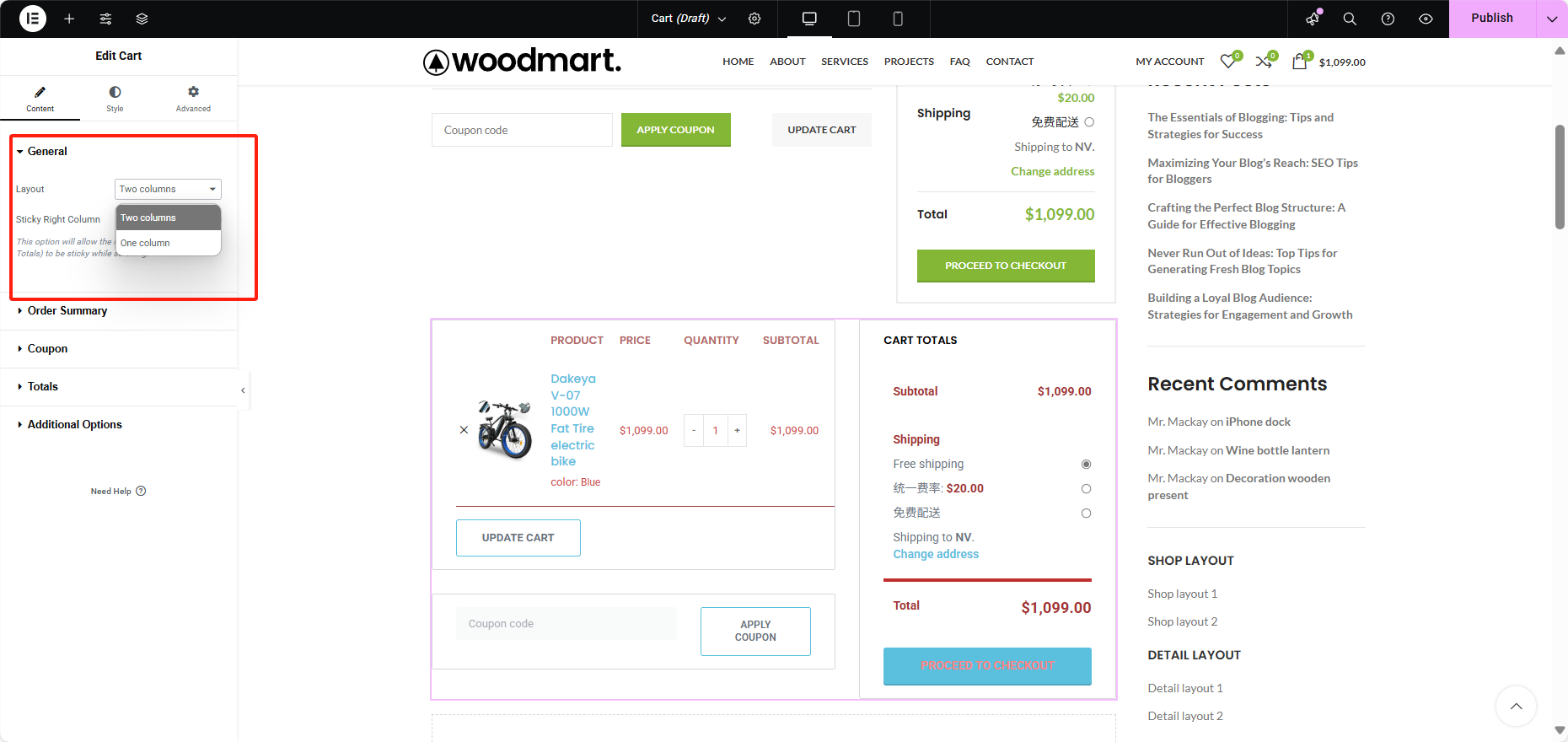
Adding Cart widgets and setting up layouts
- Search in Elementor "Cart", drag the shopping cart widget into the page.

- Set the layout mode under General Options again:
- Single column: for pages with little content.
- Dual Columns: Place order summary and shopping items separately for more intuitive clarity.
Setting copy and button text
Totals in the Content Settings panel to customize the following text fields:
- Update Shopping Cart Button
- Coupon button text
- Total section headings
- Checkout button text
- Update Shipping Button (requires shipping settings to be turned on in WooCommerce)
![图片[6]-如何使用 Elementor 的 WooCommerce Cart 小工具自定义购物车页面](https://www.361sale.com/wp-content/uploads/2025/04/20250409172812781-image.png)
Style Settings Explained
In the "typeThe "tabs" provide complete control over the appearance of the cart, as illustrated in the highlighted modules below:
1. Overall layout style (Sections)
- background color
- Borders and rounded corners
- Inside and Outside Margins
- Box Shadow
![图片[7]-如何使用 Elementor 的 WooCommerce Cart 小工具自定义购物车页面](https://www.361sale.com/wp-content/uploads/2025/04/20250409172314752-image.png)
2. Typesetting (Typography)
- Setting the color, font, and size of title and description text
- Link status (normal/hover) color
- Product name, price, quantity font
![图片[8]-如何使用 Elementor 的 WooCommerce Cart 小工具自定义购物车页面](https://www.361sale.com/wp-content/uploads/2025/04/20250409172329317-image.png)
3. Forms styles (Forms)
- Field styles (colors, fonts, backgrounds) for coupon codes and shipping forms
- Separate styles for normal and focused states
- Setting Field Spacing (Row Gap)
![图片[9]-如何使用 Elementor 的 WooCommerce Cart 小工具自定义购物车页面](https://www.361sale.com/wp-content/uploads/2025/04/20250409172350450-image.png)
4. Button styles (Buttons)
- Coupon code button, update button and checkout button can be set individually
- Includes colors, fonts, borders, shadows, and Hover status.
![图片[10]-如何使用 Elementor 的 WooCommerce Cart 小工具自定义购物车页面](https://www.361sale.com/wp-content/uploads/2025/04/20250409172433153-image.png)
5. Order Summary
- Controls the style of trade names, quantities, and subtotals
- Setting the product separator style
- Product Link Color and Interaction Status
![图片[11]-如何使用 Elementor 的 WooCommerce Cart 小工具自定义购物车页面](https://www.361sale.com/wp-content/uploads/2025/04/20250409172450833-image.png)
6. Totals
- Setting Title and Amount Font Styles
- Add a divider at the top of the total price
- Customizing Checkout Button Styles
![图片[12]-如何使用 Elementor 的 WooCommerce Cart 小工具自定义购物车页面](https://www.361sale.com/wp-content/uploads/2025/04/20250409172503510-image.png)
summarize
Elementor's Cart widgets give WooCommerce cart pages more design freedom than ever before. Whether you're looking to increase conversions, create a brand-consistent shopping experience, or optimize your mobile workflow, Cart widgets make it easy.
For more WordPress related tutorials and information, follow thePhoton fluctuation network, has the most comprehensive WordPress tutorials and the most activeWordPress Exchange CommunityThe

Link to this article:https://www.361sale.com/en/49340/The article is copyrighted and must be reproduced with attribution.















![表情[wozuimei]-光子波动网 | WordPress教程、Elementor教程与故障修复](https://www.361sale.com/wp-content/themes/zibll/img/smilies/wozuimei.gif)

![表情[baoquan]-光子波动网 | WordPress教程、Elementor教程与故障修复](https://www.361sale.com/wp-content/themes/zibll/img/smilies/baoquan.gif)


 简体中文
简体中文  English


No comments