







If you use Flatsome ThemesBuilt a standalone site and modified the theme code (e.g. PHP, CSS, JS), tweaked the template files (e.g. header.php or WooCommerce template).of the situation.Then you need to use a child theme! Otherwise, once you update the parent theme, all of your customized content will be overwritten, resulting in a disorganized site layout, functionality failure, and even affecting the normal operation of the store.
How to create a Flatsome child theme
The child theme is used to customize some special css styles and add functionality to the default Flatsome child theme which has two empty files:
![Image[1]-Flatsome child theme installation tutorial: preventing theme updates from causing loss of customization settings](https://www.361sale.com/wp-content/uploads/2025/05/20250508135741822-image.png)
You use PHP functions and CSS code to override Flatsome
You may also want to cover the Flatsome core template, extensions based on the WooCommerce It is recommended to use a child theme to develop all the features of Flatsome, to override Flatsome shortcodes and to develop new features. There are two ways to install a child theme.
Method 1: Install Flatsome through the installation wizard
The first time you install a theme, you don't know what it's for, and you delete it either intentionally or unintentionally. Some of them are just skipped. Here's how to install it
Step 1: Install the child theme
In the left-hand navigation of the backend of the website, select in turn Flatsome -" Setup Wizard
![Image [2]-Flatsome child theme installation tutorial: preventing theme updates from causing loss of customization settings](https://www.361sale.com/wp-content/uploads/2025/05/20250508140022996-image.png)
Step 2: Click Lets Go to go to the next step
Now, to start the installation, don't worry about losing your data, click "Let's GO" Buttons
![Image [3]-Flatsome child theme installation tutorial: preventing theme updates from causing loss of customization settings](https://www.361sale.com/wp-content/uploads/2025/05/20250508140555836-17466842384561.png)
Enter the authorization code in the Purchase Code field. Then clickproceed withButton.
![Image [4]-Flatsome child theme installation tutorial: preventing theme updates from causing loss of customization settings](https://www.361sale.com/wp-content/uploads/2025/05/20250508141349855-17466847559951.png)
When it is possible to name a Flatsome subthemeClick"Create and Use Child Theme"button to install.
![Image [5]-Flatsome child theme installation tutorial: preventing theme updates from causing loss of customization settings](https://www.361sale.com/wp-content/uploads/2025/05/20250508141603173-17466849075301.png)
After installation click on the button at the bottom to return to the backend of the site and the sub-body is installed.
![Image [6]-Flatsome child theme installation tutorial: preventing theme updates from causing loss of customization settings](https://www.361sale.com/wp-content/uploads/2025/05/20250508141743242-17466850038991.png)
Method 2: Install Flatsome Child Theme Manually
Installing a Flatsome child theme manually is the same as setting up a child theme in any WordPress theme. You can create your own child theme, or you can download a child theme from another website or the official website.
Subthemes generally have only two blank files. These are functions.php respond in singing style.css . Requires the use of PHP Filtersor hooks are used to customize the content, you can place the code in thefunctions.php file. Putting custom CSS code into style.css Inside the document.
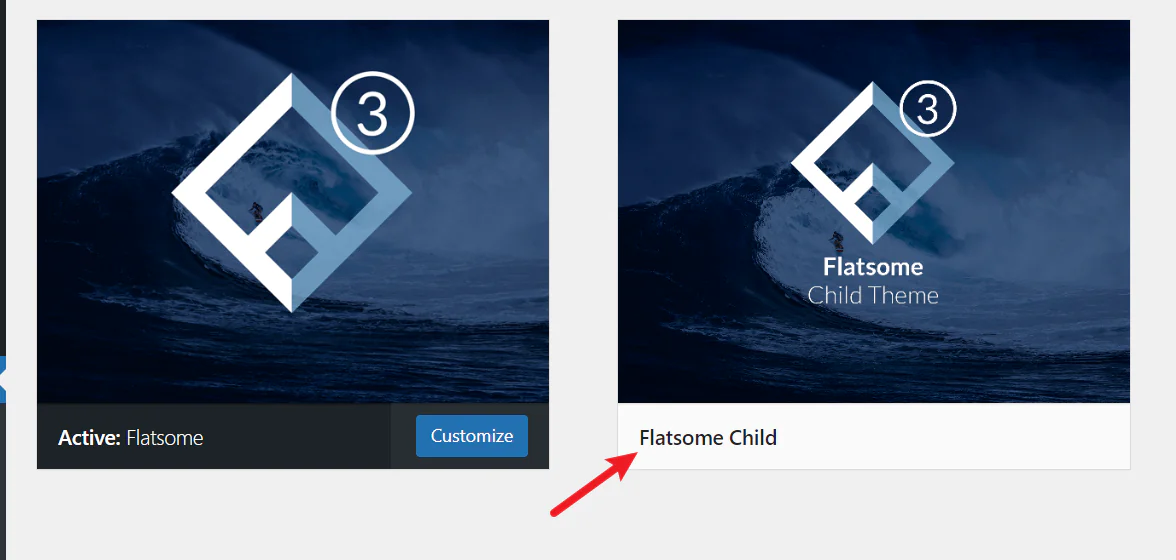
After enabling the child theme, some of the customized settings of the parent theme are not applied to the child theme. In this case, you must manually paste the parent theme settings to the child theme.
reach a verdict
I recommend making a good backup of your website when installing any plugins or modifying code. New plugins or customized code may cause errors to not open the site.
If your site is running steadily, staggered debugging is recommended. The Flatsome theme is constantly being upgraded and some of the interfaces are slightly different. Frequent updates are required to ensure that you follow the tutorials can be installed properly.

Link to this article:https://www.361sale.com/en/53226/The article is copyrighted and must be reproduced with attribution.















![Emoji[wozuimei]-Photonflux.com | Professional WordPress repair service, worldwide, rapid response](https://www.361sale.com/wp-content/themes/zibll/img/smilies/wozuimei.gif)

![Emoticon[baoquan] - Photon Wave Network | Professional WordPress Repair Services, Worldwide Coverage, Rapid Response](https://www.361sale.com/wp-content/themes/zibll/img/smilies/baoquan.gif)


 简体中文
简体中文  English
  日本語
日本語  Français
  Español


No comments