





Images are important visual elements in the use of a website, conveying its aesthetics and message. Especially for e-commerce and content creation websites, the quality of images directly affects the first impression of visitors. However, many people usually encounter the problem of blurred images after uploading images using WordPress. Blurry images can affect the visual effect of a website, and may also cause slow loading speed, affecting search engine rankings. To solve this problem, a content delivery network (CDN) can be used.
![图片[1]-如何通过CDN加速WordPress图片加载,减少图片模糊问题](https://www.361sale.com/wp-content/uploads/2025/05/20250514093405327-1681824397178.jpg)
How CDNs Solve Image Blurring Problems
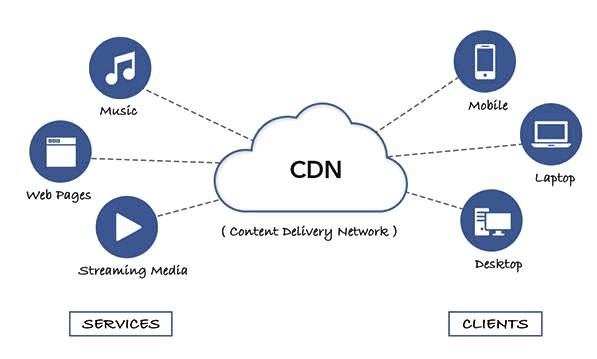
CDN, also known as a Content Delivery Network, is a distributed network that stores and distributes website content globally through multiple servers. When a visitor accesses a website, the CDN automatically directs the request to the server closest to the user. This process not only speeds up the websiteLoading speed, which also reduces loading issues due to network delays.
For image loading, CDNs provide the following help through caching techniques:
Improved loading speed
When a user visits a website, the CDN will load the image from the nearest server, reducing network transmission time. The increase in loading speed avoids the problem of blurred images as they are compressed or delayed during the loading process.
Image compression and optimization
Most CDN providers offerImage OptimizationFunctions. These features automatically adjust the size, format and quality of images to ensure that they load in the most appropriate way and avoid blurring caused by over-compression. Choose the right compression ratio when uploading images and improve site speed while maintaining image quality.
![图片[2]-如何通过CDN加速WordPress图片加载,减少图片模糊问题](https://www.361sale.com/wp-content/uploads/2025/05/20250514100117878-image.png)
Reduced server load
With the use of a CDN, requests for image files are no longer borne by the original server, but are handled by multiple CDN nodes around the world. This reduces the load on the server and improves the overall performance of the website. If the server carries too much pressure, it usually affects the loading quality of the images.
Prevent image distortion
Some CDNs provide the function of automatically adjusting the quality of images to fit the size of the image according to the device and screen. For example, on mobile devices with smaller display screens, CDNs will automatically reduce the quality of the image for fast loading. And on desktop, CDNs will load high-resolution images to avoid blurring problems.
Why Blurry Images Problems Often Appear in WordPress Websites
existWordPressThere can be several reasons for blurry images in a website, the main ones being the following:
- automatic compression
After WordPress uploads images, the system will automatically compress them according to the settings of the website, and the compression ratio will be too large, which will lead to a decrease in the quality of the images and blurring. Especially when using certain themes, the algorithm of automatic compression may not be optimal, affecting the image clarity. - Picture size is not suitable
The uploaded image size is too big or too small, which may lead to the image display blurring. Especially on different devices, WordPress will adjust the image size according to the device resolution, which may lead to blurring if the original image size is not adapted. - CDN not enabled or not properly configured
If CDN is not enabled, images are loaded from the originating server and network latency and server load issues may cause images to display poorly. Even if CDN is enabled, improper configuration may result in images not being fully optimized.
![图片[3]-如何通过CDN加速WordPress图片加载,减少图片模糊问题](https://www.361sale.com/wp-content/uploads/2025/05/20250514095026682-3.gif)
How to Configure CDN Optimization for Images in WordPress
- Choosing the right CDN service provider
Currently, there are many CDN service providers in the market, such asCloudflare, KeyCDN, StackPath and so on. All of these service providers offer image optimization, which can effectively compress images and improve loading speed. After choosing a suitable CDN service provider, register and configure a CDN account.
![图片[4]-如何通过CDN加速WordPress图片加载,减少图片模糊问题](https://www.361sale.com/wp-content/uploads/2025/05/20250514095918816-cname2.gif)
- Installation of CDN plugin
The best way to use a CDN in WordPress is to install a specialized CDN plugin. The common plugins areW3 Total Cache, WP Super Cache, LiteSpeed Cache, and more. These plugins allow for quick CDN integration into WordPress sites while providing more performance optimization options. - Enable image optimization
Users can enable automatic image optimization in the CDN panel. the CDN will automatically adjust the image size and compression ratio to reduce blurring. As needed, you can also choose to manually adjust the compression ratio of the image to further improve the image quality.
concluding remarks
Using a CDN to accelerate image loading can improve the access speed of your WordPress website, and can also effectively reduce the blurring of images. By choosing the right CDN service provider, configuring the plugin and enabling the image optimization function, you can ensure that the images can be displayed in high definition on different devices, helping the website to improve the overall performance and visual effect.

Link to this article:https://www.361sale.com/en/53990/The article is copyrighted and must be reproduced with attribution.















![表情[wozuimei]-光子波动网 | WordPress教程、Elementor教程与故障修复](https://www.361sale.com/wp-content/themes/zibll/img/smilies/wozuimei.gif)

![表情[baoquan]-光子波动网 | WordPress教程、Elementor教程与故障修复](https://www.361sale.com/wp-content/themes/zibll/img/smilies/baoquan.gif)


 简体中文
简体中文  English


No comments