






Sometimes.WordPressThe plugin bar may inexplicably disappear, making it impossible to quickly access and manage installed plugins. Most of the causes are troubleshootable and fixable, though. Here are a few common solutions to help you get your plugin bar back.
![图片[1]-如何恢复消失的WordPress插件栏?](https://www.361sale.com/wp-content/uploads/2025/05/20250515104602970-image.png)
1. Check browser cache
Browser cache can sometimes interfere with the proper display of pages. If the plugin bar disappears, the first thing you can try is to clear the browser cache. This is because the cache file may have stored old page data, causing theplug-in (software component)The bar does not load properly. After clearing the cache and refreshing the page, the plugin bar may reappear.
![图片[2]-如何恢复消失的WordPress插件栏?](https://www.361sale.com/wp-content/uploads/2025/05/20250515105021535-image.png)
2. Confirmation of user rights settings
The plugin bar sometimes disappears because the currently logged in user does not have enough privileges to perform thetake part inclassifier for clothes, luggage, decorations; piece of work; a matter, an eventAdmin. Check to see if you are using thejanitorsAccount Login. If it is another type of account (e.g. editor, author, etc.), it may not have the relevant permissions to access the plugin bar. Try switching to an administrator account to see if the plugin bar is restored.
![图片[3]-如何恢复消失的WordPress插件栏?](https://www.361sale.com/wp-content/uploads/2025/05/20250515105506299-f7479afce9a0c9e336ada0a6af484db.jpg)
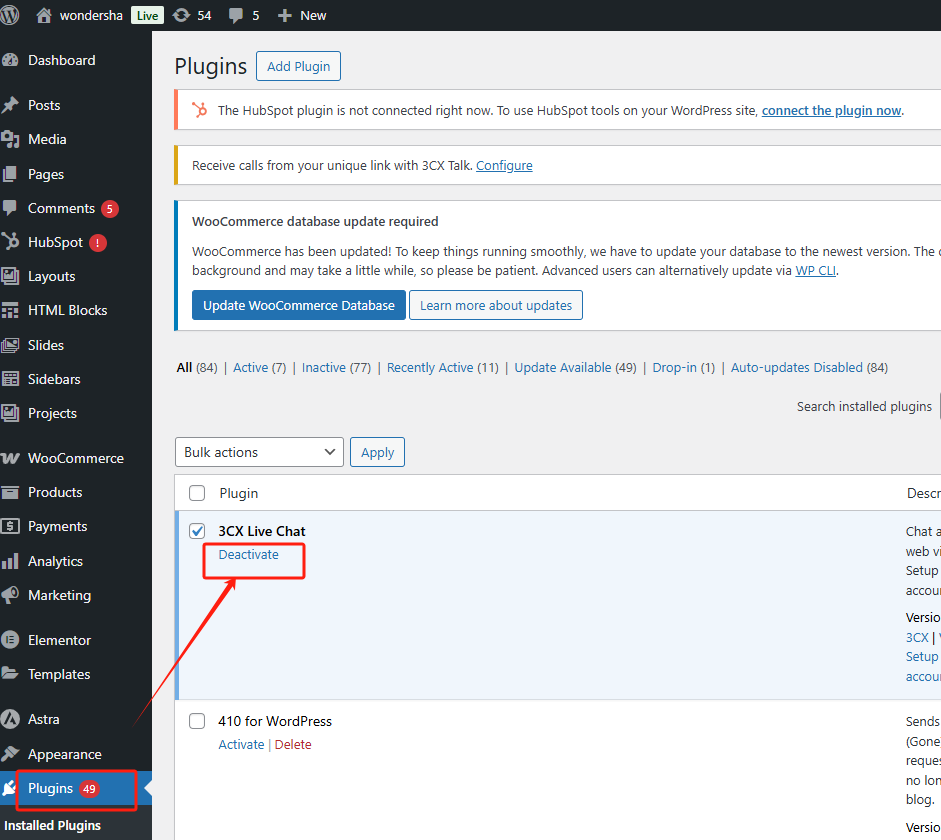
3. Disable conflicting plug-ins
Some plugins may work withWordPressof other plugins or themes create a conflict, causing the plugin bar to disappear. You can disable all plugins and then enable them one by one to check which plugin is causing the problem. If you find the plugin that is causing the problem, you can try replacing or updating that plugin, or contact the plugin developer for a solution.
4. Check the WordPress theme
The design of some themes may affect the display of the plugin bar, such as more customizable themes. If the plugin bar disappears after enabling a theme, try switching to the
5. Debug mode to view errors
Enabling WordPress debug mode can help you discover exactly why the plugin bar is disappearing. Enter thewp-config.phpfile, find the following code:
define('WP_DEBUG', false).
commander-in-chief (military)falsechange intotrue, and then save the file. This will allow you to see the WordPress error in your browserlog (computing), identify errors that may be affecting the display of the plugin bar. If you see an error message related to a plugin or theme, you can follow this informationfurther screeningQuestion.
6. Clear WordPress Cache
If you have a caching plugin installed (such as W3 Total Cache orWP ROCKET), clearing the cache is also a good way to troubleshoot. Caching plugins store website pages to speed up loading. After clearing the cache, reload the page and see if the plugin bar returns.
![图片[5]-如何恢复消失的WordPress插件栏?](https://www.361sale.com/wp-content/uploads/2025/05/20250515110322642-image.png)
7. Update WordPress and plugins
The plugin bar disappears sometimes because of compatibility issues with older versions of WordPress or certain plugins. PeriodicallyupdateWordPressand plugins is a good habit to avoid such issues. If you notice that a plugin is not up to date, it is recommended to update it to the latest version immediately. After updating, reload the page and check if the plugin bar is working.
![图片[6]-如何恢复消失的WordPress插件栏?](https://www.361sale.com/wp-content/uploads/2025/05/20250515110058415-62918c1c1a8162b6b6b047a00f74fbe.jpg)
8. Checking website security settings
In some cases, security plug-ins or firewall settings may affect theWordPressNormal functioning of the backend. If you use security plugins like Wordfence or Sucuri, temporarily disable these plugins first and see if you can restore the plugin bar display. Overly strict security settings can mistakenly block some normal requests and prevent the plugin bar from displaying.
9. Recovery of documents via FTP
If none of the above methods work, you can also access your WordPress file system via FTP. First, connect to the FTP server and go towp-content/pluginsfolder, manually check if the plugin is intact. If the plugin files are corrupted, it may cause the plugin bar to not display. You can try reinstalling these plugins.
10. Reset WordPress
If all else fails to restore the plugin bar, as a last resort, consider resetting WordPress.This action will move theWordPressRestore to the initial state, but it will erase all contents and settings. So, make sure you take a backup before performing a reset to avoid losing data.
![图片[7]-如何恢复消失的WordPress插件栏?](https://www.361sale.com/wp-content/uploads/2025/05/20250515164022903-image.png)
concluding remarks
Disappearing WordPress plugin bar is not an unsolvable problem. By checking factors such as browser cache, user permissions, and plugin conflicts, you can identify the root cause and fix it in time. Always keeping the latest versions of plugins, themes and WordPress itself can also effectively avoid such problems. If the problem persists, it can be debugged or recovered through more technical means.

Link to this article:https://www.361sale.com/en/54531/The article is copyrighted and must be reproduced with attribution.










![表情[wozuimei]-光子波动网 | WordPress教程、Elementor教程与故障修复](https://www.361sale.com/wp-content/themes/zibll/img/smilies/wozuimei.gif)

![表情[baoquan]-光子波动网 | WordPress教程、Elementor教程与故障修复](https://www.361sale.com/wp-content/themes/zibll/img/smilies/baoquan.gif)


 简体中文
简体中文  English


No comments