




In website scenarios such as knowledge payment, e-commerce service, course teaching, etc., you will need to decide whether to open the material download function based on the user's identity or permission. Example:
- only ifLogin MemberOnly then can you download the e-book
- merelypremium memberAccess to project templates
- regular visitorRegistration and payment are required to access the materials
WordPress Provides the basic user management capabilities, and then with the help of plug-ins and simple configuration, you can realize the control of file download function by user role. This article will introduce common practices in a step-by-step manner and is applicable to website builders who wish to enhance their data management and content protection capabilities.
![Pictures[1]-WordPress Guide to Setting Up Member-Only Download Permissions](https://www.361sale.com/wp-content/uploads/2025/06/20250612164541807-image.png)
A clear demand scenario: why do you want to do download permission control?
In open sites, files can often be downloaded by anyone, which can pose the following problems:
- Paid contentRandomly disseminated
- Declining enrollment and lack of status incentives
- Website resources are abused by crawlers and consume bandwidth
- Difficulty matching content value to user personas
For content sites, setting download permissions is an effective way to protect content and help improve the overall quality of operations.
![Image [2]-WordPress set members exclusive download access guide](https://www.361sale.com/wp-content/uploads/2025/06/20250612165505984-image.png)
Second, WordPress User Role Foundation Introduction
WordPress provides the following user roles by default:
- Subscriber: View content and edit personal information.
- Contributor: can create drafts but can't post them
- Author: You can publish and manage your own articles.
- Editor: can manage the content of other users
- janitors(Administrator): the person with the highest level of authority.
![Image [3]-WordPress Guide to Setting Up Member-Only Download Permissions](https://www.361sale.com/wp-content/uploads/2025/06/20250612165830297-image.png)
The plugin also allows you to add features such as "Membership" "VIP"Class custom roles for fine-grained control of access rights.
Third, the realization of method one: the use of member plug-ins to control the download function
For sites that build content hierarchies, registration mechanisms or paid services
The recommended plugins are listed below:
1. MemberPress
![Image [4]-WordPress Guide to Setting Up Member-Only Download Permissions](https://www.361sale.com/wp-content/uploads/2025/06/20250614223140344-1749911476439.png)
- Multiple membership levels can be set
- Control access to pages, articles, files
- Provide short code insertion restriction blocks
- Compatible with e-commerce and subscription service systems
2. Paid Memberships Pro
![Image [5]-WordPress set members exclusive download access guide](https://www.361sale.com/wp-content/uploads/2025/06/20250612170947842-image.png)
- Support for membership programs and permission mapping
- Can set "Download content for members only".
- Integration with Download Monitor extension available
- Support for resuming access after document expiration and renewal
3. Simple Membership
![Image [6]-WordPress Guide to Setting Up Member-Only Download Permissions](https://www.361sale.com/wp-content/uploads/2025/06/20250612171046109-image.png)
- Lightweight Free Plugins
- Provide member registration and permission leveling
- Resource download display can be controlled by short code
- Good compatibility with file management plugins
Steps to use:
- Install the membership plugin and set the membership level
- New page, insert resource download link
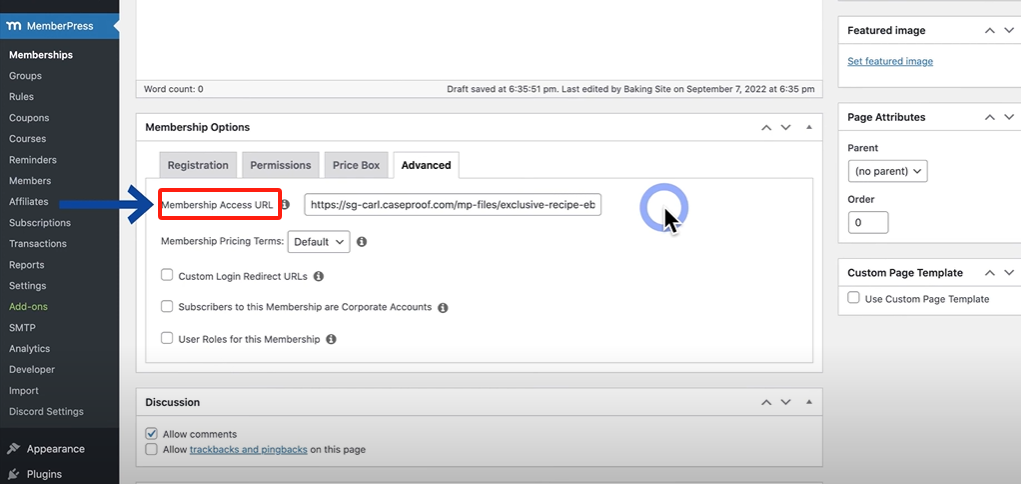
- Setting pages or modules to be visible only to members of a certain rank
- The outer layer of the page can be added with a reminder text to guide the user to visit after login or registration
Fourth, the realization of method two: the use of Download Monitor control file access
Ideal for sites that only need to control file downloads and do not involve complex membership management
Download Monitor is a file download management plugin for WordPress with the following features:
- Manage document metadata (title, version, cover, etc.)
- Short code to provide a download button
- Restrict access to "logged-in users only" or "role-specific users"
Operational Processes:
1. Install and enable the plug-in
2. Uploading files and creating downloads
![Image [8]-WordPress Guide to Setting Up Member-Only Download Permissions](https://www.361sale.com/wp-content/uploads/2025/06/20250612171943501-image.png)
3. Set access rights to "logged-in users only" or selected roles
4. Utilization [download id="123"] Insert into page
If you need to refine the access control, you can add an extension plugin to implement role levels, number of downloads, and other restrictions.
V. Common practical recommendations
- Manage resource files using non-public paths to avoid sharing of direct addresses
- Add permission validation and guidance components to guide users through the login or registration process.
- With anti-theft chain, anti-copying plug-ins, to protect important resources security
- It is recommended to add descriptions, thumbnails, and categories to each resource to enhance the professionalism of the page.
- with regards topaying memberContent, recommended in conjunction with order and expiration status management document visibility
VI. Summary
WordPress has a flexible architecture that allows you to control access to pages and files based on user roles. Whether it is a lightweight site, or a complex content platform, you can find the right plugin and configuration program to achieve the download control function.
Establishing a reasonable access structure helps to protect content, improve the overall quality of the website, and provide a solid foundation for user hierarchical management and service upgrading.

Link to this article:https://www.361sale.com/en/59371The article is copyrighted and must be reproduced with attribution.











![Emoji[wozuimei]-Photonflux.com | Professional WordPress repair service, worldwide, rapid response](https://www.361sale.com/wp-content/themes/zibll/img/smilies/wozuimei.gif)

![Emoticon[baoquan] - Photon Wave Network | Professional WordPress Repair Services, Worldwide Coverage, Rapid Response](https://www.361sale.com/wp-content/themes/zibll/img/smilies/baoquan.gif)


 简体中文
简体中文  English
  日本語
日本語  Français
  Español


No comments