





in usingWordPressWhen using the Elementor page editor, many users have encountered this commonreport an error:"You Must Call the Content Function". This error will prevent you from editing the page smoothly and may also affect the overall performance of the site. The good thing is that this problem is not difficult to fix. This article will provide you with a concise and effective solution that will help you quickly fix "You Must Call the Content Function" issue to restore normal use of the Elementor editor.
![Image [1]-Quick Fix Guide to Resolve Elementor "You Must Call the Content Function" Error](https://www.361sale.com/wp-content/uploads/2025/07/20250704110505105-image.png)
What is the "must call content function" error?
When you try to edit a page or create a new page in Elementor, suddenly the error "You Must Call the Content Function" appears. This problem usually occurs when some themes or plugins are not compatible with Elementor.compatibilityWhen this happens, it causes Elementor to not load the content properly. This often occurs when the theme doesn't properly call the WordPress default contentoutput functionthe_content(), or there is a conflict between the plugin and the theme.
Quick fixes
1. Check the theme's template files
First, check that your WordPress theme is properly calling thethe_content()function. This function should be called in the page template to ensure that Elementor displays the page content properly. You can check this by following the steps below:
- Open the folder of the WordPress theme you are using.
- Locate the page template file, usually
page.phpmaybesingle.phpThe - Verify that the document contains
the_content()function. Example:<?php the_content(); ?>
![Image [2]-Quick Fix Guide to Resolve Elementor "You Must Call the Content Function" Error](https://www.361sale.com/wp-content/uploads/2025/07/20250704110650671-image.png)
If you don't see this function, or the function isn't placed correctly, then it needs to be added in the proper place (usually the page content section)the_content()function.
2. Switch to default theme
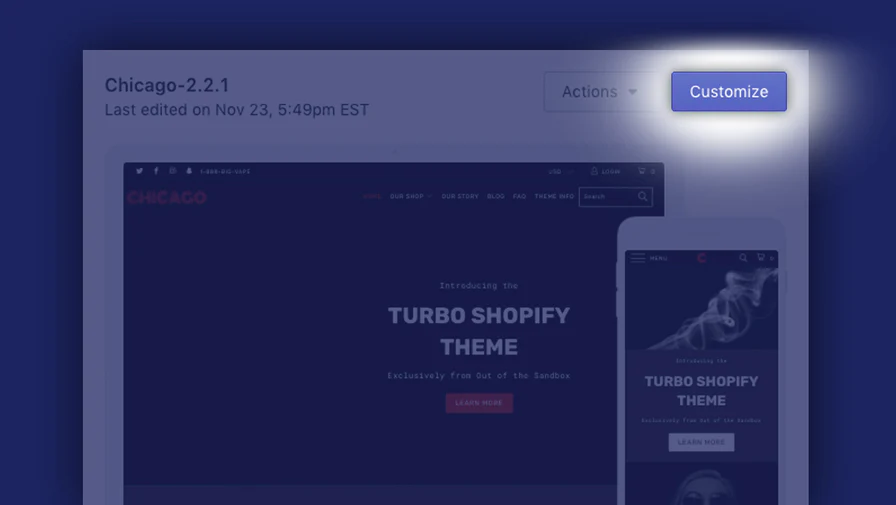
If you're not sure if it's a theme issue, you can temporarily switch to the default WordPress theme (e.g. Twenty Twenty-One). Doing so will help you troubleshoot whether the error is caused by the theme you're currently using.
- Go to the WordPress backend and click on Appearance > Themes.
- Activate the WordPress default theme (e.g. Twenty Twenty-Three).
![Image [3]-Quick Fix Guide to Resolve Elementor "You Must Call the Content Function" Error](https://www.361sale.com/wp-content/uploads/2025/07/20250704105958450-image.png)
- Refresh the page and check if Elementor works.
If Elementor works fine with the default theme, then the problem may be that the current theme is not properly calling thethe_content()function.
3. Disable plug-in conflicts
plug-in conflictIt is also a common cause of "Must call content function" errors. If you have recently installed or updated a plugin, try disabling them to see if the problem is resolved.
- Go to the WordPress backend and click Plugins > Installed Plugins.
- Disable recently added or updated plug-ins.
![Image [4]-Quick Fix Guide to Resolve Elementor "You Must Call the Content Function" Error](https://www.361sale.com/wp-content/uploads/2025/07/20250704110850316-image.png)
- Refresh the page and see if the problem is solved.
If the problem is solved after disabling a plugin, then you have found the source of the conflict. You can try updating the plugin or contact the plugin developer for help.
4. Check PHP version compatibility
Elementorand some other plugins require certain versions of PHP to work properly. Make sure your site is running on the latest version of PHP, this usually helps with most compatibility issues.
- In the WordPress backend, go to Tools > Site Health.
- Check that the PHP version is the recommended one (typically PHP 7.4 or higher).
![Image [5]-Quick Fix Guide to Resolve Elementor "You Must Call the Content Function" Error](https://www.361sale.com/wp-content/uploads/2025/07/20250704111414992-image.png)
- If the version is too low, contact your hosting provider to update the PHP version.
5. Updating Elementor and WordPress
If you're using an older version of Elementor or a version of WordPress, you may encounter thecompatibilityIssue. Making sure your Elementor plugin and WordPress are both up to date usually fixes some of the known bugs.
- In the WordPress backend, go to Plugins > Installed Plugins.
- Check if Elementor has been updated. If so, click the "Update" button.
![Image [6] - Quick fix guide to resolve Elementor's "You Must Call the Content Function" error](https://www.361sale.com/wp-content/uploads/2025/07/20250704111538811-image.png)
- Also, make sure that WordPress itself is kept up to date.
6. Clearing the cache
Sometimes, cached files can cause pages to load improperly. Clearing the cache might solve the problem. You can use WordPressCaching Plugin(e.g.WP Rocket) to clear the cache, or clear the cache directly in your browser.
- Clear your browser cache and refresh the page.
![Image [7]-Quick Fix Guide to Resolve Elementor "You Must Call the Content Function" Error](https://www.361sale.com/wp-content/uploads/2025/07/20250704164500984-image.png)
- If a caching plugin is used, clear the WordPress cache files.
7. Contact Support Team
If none of the above steps solved the problem, you can finally contact Elementor's support team. Provide your website information, error logs, and actions taken, and the support team can usually help you figure out the exact cause and provide a fix.
reach a verdict
Elementor's "You Must Call the Content Function"The error is usually caused by theme or plugin incompatibility, but it is not a difficult problem to solve. By checking the theme's template files, disabling plugin conflicts, updating the PHP version, and updating WordPress and Elementor, most users can easily resolve the issue. If the problem persists, contacting the Elementor support team will be the ultimate solution.

Link to this article:https://www.361sale.com/en/65421The article is copyrighted and must be reproduced with attribution.










![Emoji[wozuimei]-Photonflux.com | Professional WordPress repair service, worldwide, rapid response](https://www.361sale.com/wp-content/themes/zibll/img/smilies/wozuimei.gif)

![Emoticon[baoquan] - Photon Wave Network | Professional WordPress Repair Services, Worldwide Coverage, Rapid Response](https://www.361sale.com/wp-content/themes/zibll/img/smilies/baoquan.gif)


 简体中文
简体中文  English
  日本語
日本語  Français
  Español


No comments