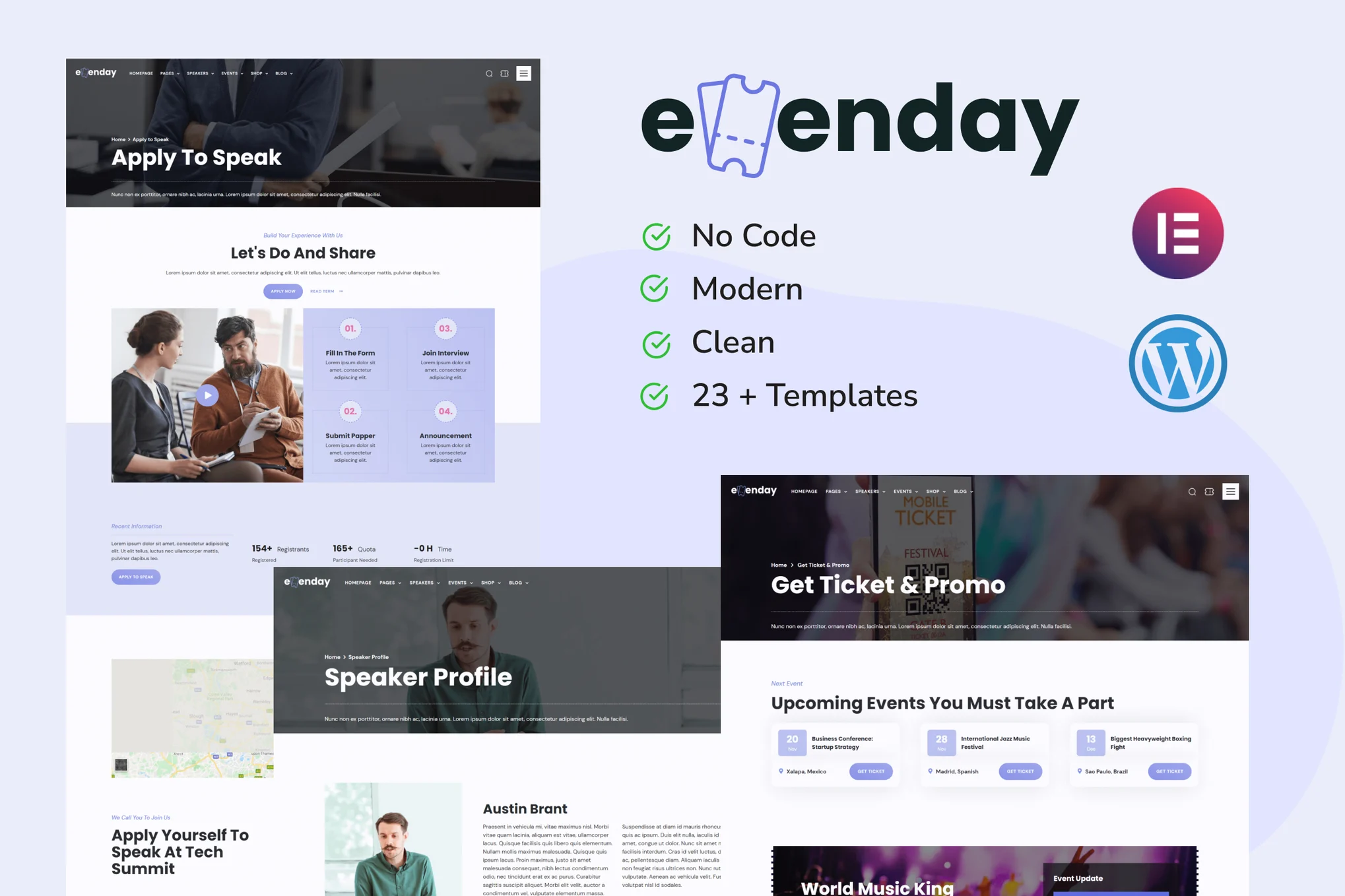






Evenday is a template suite for WordPress that makes it quick and easy to create websites using the Elementor Page Builder plugin, which is optimized for use with the free Hello Elementor theme, and also works with most themes that support Elementor. This template suite also includes WooCommerce templates.
![图片[1]-Evenday – 活动管理与博览会组织 Elementor Pro 模板套件-光子波动网 | WordPress教程、Elementor教程与故障修复](https://www.361sale.com/wp-content/uploads/2025/08/20250802112639948-FAQ-6.webp)
![图片[2]-Evenday – 活动管理与博览会组织 Elementor Pro 模板套件-光子波动网 | WordPress教程、Elementor教程与故障修复](https://www.361sale.com/wp-content/uploads/2025/08/20250802112640690-Product-Archive.webp)
Evenday allows you to create a very attractive website without programming skills.
Features:
- Unique and simple design
- 24+ available pages, popups and templates
- Fully responsive layout
- Fully customizable
- Cross-browser compatibility: Chrome, Firefox, Safari, Opera
Contains templates:
- Global Theme Styles
- fig. beginning
- About Us
- Our Partners
- pricing plan
- area
- FAQ & Help Center
- Get Tickets & Promotions
- 404 Error Page
- Coming soon
- Contact Us
- speaker
- Speaker's profile
- Request a Speech
- itinerary
- Event Details
- store page
- Product Archiving
- single product
- Blog Archive
- single article
- search for pop-ups
- Subscription Form
- side menu
- footer
- footers
Required plug-ins (installed):
- Elementor
- WooCommerce
- XL Tab
Attention:
Some templates and features require Elementor Pro upgrade (not included).
Installation method:
- Install and enable the "Envato Elements" plugin in the WordPress backend plugins.
- Download the template kit file and keep it zipped
- Go to Elements > Installed Kits and click on the Upload Template Kit button
- Before importing the template, make sure to activate the plugin by clicking on "Install Required Plugin".
- For best results, it is recommended to import one template at a time
- Go to Page > Create New Page and click "Edit with Elementor".
- In the Elementor editor, click the gear icon in the lower left corner to set the page to Elementor full width and hide the page title
- Click on the folder icon and go to the "My Templates" tab to import the desired template for customization.

© Reprint statement
本文作者:托尼屎大颗
Link to this article:https://www.361sale.com/en/72688/The article is copyrighted and must be reproduced with attribution.
THE END
















![表情[wozuimei]-光子波动网 | WordPress教程、Elementor教程与故障修复](https://www.361sale.com/wp-content/themes/zibll/img/smilies/wozuimei.gif)

![表情[baoquan]-光子波动网 | WordPress教程、Elementor教程与故障修复](https://www.361sale.com/wp-content/themes/zibll/img/smilies/baoquan.gif)





No comments