




How come the website keeps jumping in a loop and ends up displaying the 'ERR_TOO_MANY_REDIRECTS' error? This error usually causes the website to be inaccessible, causing great distress to webmasters and visitors. If you are experiencing this problem, don't worry, this article will detail how to solve it with some simple stepsWordPressThe "ERR_TOO_MANY_REDIRECTS" error in the
![Image [1]-Solution for ERR_TOO_MANY_REDIRECTS error in WordPress](https://www.361sale.com/wp-content/uploads/2025/08/20250805103745726-image.png)
What is the ERR_TOO_MANY_REDIRECTS error?
When you're visiting a WordPress site, the browser keeps trying toredirectspage, ultimately resulting in an "ERR_TOO_MANY_REDIRECTS" error. This error usually occurs when a site's redirection rules are misconfigured, causing a circular redirection between the browser and the server.
Common Causes of ERR_TOO_MANY_REDIRECTS Errors
Before fixing this error, it is important to understand the common causes of this problem. Here are some of the possible causes:
- Incorrect URL settings
- If the WordPress site URL or homepage URL is misconfigured, this can lead to infinite redirects.
- SSL Certificate Configuration Error
- If you have just enabled SSL for your website, you may encounter redirection errors, especially if there is a mismatch in configuration between HTTP and HTTPS.
- Plug-in Impact
- Some plugins (especially(computing) cache, SEO or security plugins) may modify the redirection rules and cause circular redirects.
- Browser Cache and Cookies Issues
- Sometimes outdated data cached by the browser can cause the page to not load properly, which in turn generates a redirection error.
- .htaccess file configuration issues
- If your WordPress site uses .htaccess files.
Incorrect redirection rules May result in infinite redirects.
- If your WordPress site uses .htaccess files.
Step 1: Clear Browser Cache and Cookies
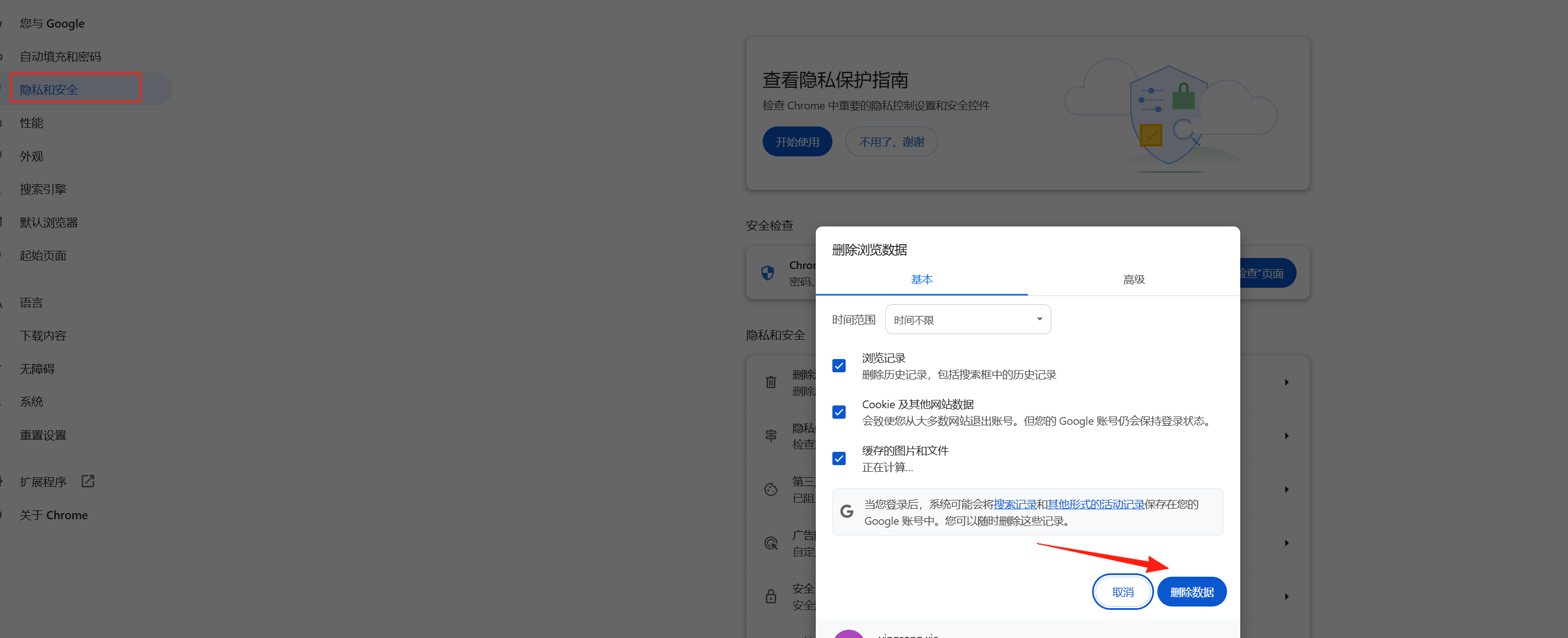
In many cases, the ERR_TOO_MANY_REDIRECTS error is not due to a website setting, but to expired data in the browser cache or cookies. Therefore, first try clearing your browser cache and Cookies.
How do I clear my browser cache and cookies?
- Open the settings of your browser.
- Find and click on the Privacy & Security option.
- Click "Clear browsing data" or "Clear browsing history".
- Select Clear Cache and Cookies and make sure that Clear All History is selected.
- Restart your browser and try to visit the site again.
Step 2: Check WordPress Site URL and Home Page URL Settings
Incorrect site URL settings are one of the common causes of ERR_TOO_MANY_REDIRECTS errors. You can check and fix these URLs through the settings page in the WordPress backend.
How do I check site URL settings?
- Log in to the WordPress backend.
- leave for set up > conventional (weapons)The
- Check the "WordPress Address (URL)" and "Site Address (URL)" fields to make sure they both point to the correct URL. e.g. if you are using HTTPS, make sure both URLs start with
https://Beginning.
![Image [3]-Solution for ERR_TOO_MANY_REDIRECTS error in WordPress](https://www.361sale.com/wp-content/uploads/2025/08/20250805102236819-image.png)
If you find URL errors in your settings, update them immediately and save the changes.
Step 3: Disable all plugins
Sometimes, plugin conflicts can lead to infinite redirection loops. To resolve this issue, you can try disabling all plugins and then see if the problem is resolved.
How to disable all plugins?
- Log in to the WordPress backend.
- leave for plug-in (software component) > Installed plug-insThe
- Select all plugins and bulk select "Deactivate".
- After deactivating all plugins, try reloading the page to see if the error still occurs.
![Image [4]-Solution for ERR_TOO_MANY_REDIRECTS error in WordPress](https://www.361sale.com/wp-content/uploads/2025/08/20250805102449495-image.png)
If the problem is solved, then enable the plugins one by one until you find the one causing the problem.
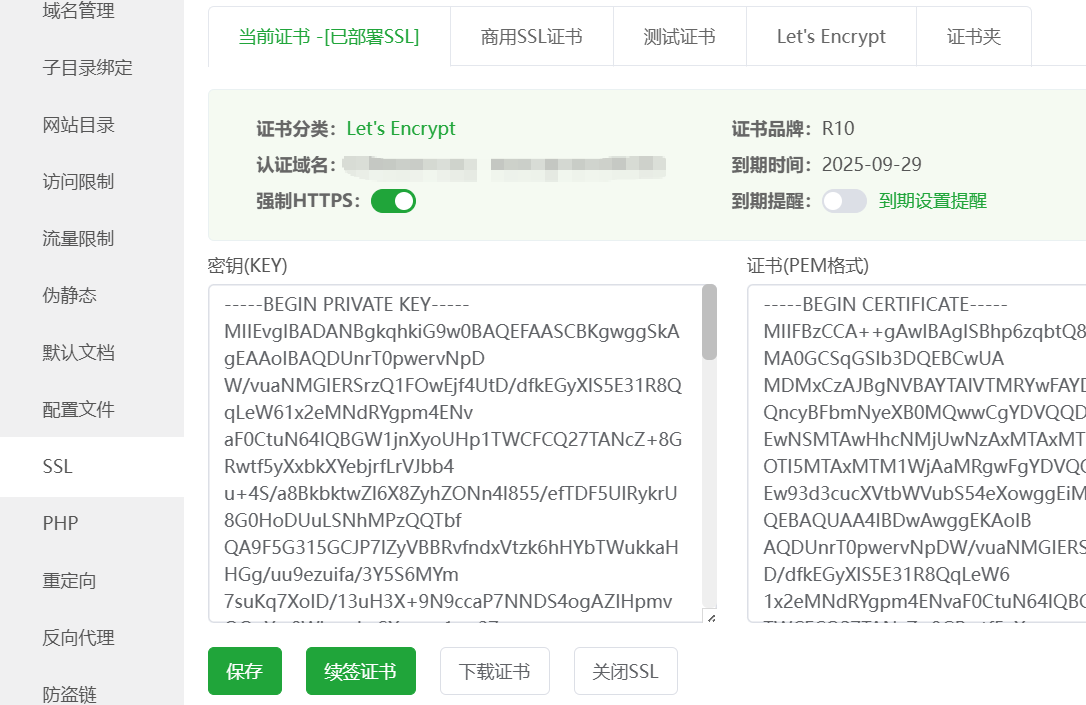
Step 4: Check and Repair SSL Certificate Settings
If you have just enabled SSL certificates for your site, incorrect SSL settings can cause redirection errors. Make sure SSL is configured correctly and check that the site is not forcing redirects to HTTPS.
How do I check my SSL configuration?
- Make sure your SSL certificate is installed and valid. You can check if your website shows a green "lock" symbol in the address bar of your browser.
- In the WordPress backend, go to set up > conventional (weapons)Make sure that both the site URL and the WordPress address URL start with
https://Beginning. - Check the website's
.htaccessfile, make sure there are no settings that cause HTTP andHTTPSConflict between.
Step 5: Check the .htaccess file
WordPress Usage.htaccessfile to manage the site's redirection rules. If some of the rules in the file are incorrect, it may result in an ERR_TOO_MANY_REDIRECTS error. You can manage the redirection rules by regenerating the.htaccessfile to fix the problem.
How to fix .htaccess file?
- Use FTP or cPanel to access the web root directory.
- Find and download
.htaccessfile to a local backup. - Delete the
.htaccessDocumentation. - Log in to the WordPress backend and go to set up > Permanent linkClick on the "Save Changes" button. This will regenerate a new
.htaccessDocumentation. - Check if the problem is solved.
Step 6: Check Server and Host Settings
If the above steps do not resolve the problem, you may need to check the server configuration, specifically the redirection settings on the web server. In some cases, configuration files on the web server (such as Apache or Nginx) may cause redirection loops.
How do I check the server configuration?
- Make sure your web server is configured correctly, especially the parts about HTTPS and HTTP redirects.
- If you are not familiar with server setup, contact your hosting provider or developer for professional help.
Step 7: Contact the hosting provider
If the problem remains unresolved, it could be due to the hosting server or DNS settings. At this point, you can contact your hosting provider and ask them if there are any configuration errors related to redirection.
summarize
Don't worry about the ERR_TOO_MANY_REDIRECTS error, it's usually caused by a website configuration issue, follow the above instructions and you can easily troubleshoot and fix the issue. Make sure you clear your browser cache, check the site URL, disable plugins, fix SSL settings, check the.htaccessfile and contact your hosting provider. If the problem is still not resolved after following these steps, you canContact Photon Flux Customer Service, seeking professional technical support.

Link to this article:https://www.361sale.com/en/72986The article is copyrighted and must be reproduced with attribution.


















![Emoji[wozuimei]-Photonflux.com | Professional WordPress repair service, worldwide, rapid response](https://www.361sale.com/wp-content/themes/zibll/img/smilies/wozuimei.gif)

![Emoticon[baoquan] - Photon Wave Network | Professional WordPress Repair Services, Worldwide Coverage, Rapid Response](https://www.361sale.com/wp-content/themes/zibll/img/smilies/baoquan.gif)


 简体中文
简体中文  English
  日本語
日本語  Français
  Español


No comments