




You know.301or 302 redirect the essential difference between these two redirects and the use of scenarios? If you don't know, it is very likely to lead to the page can not be included in Google correctly, and even the weight loss or inclusion of decline. This article will take you in depth to understand the difference between 301 and 302, common errors and the correct way to set up.
![Image [1] - Make no mistake! A redirection mistake, let your website rankings all fall out](https://www.361sale.com/wp-content/uploads/2025/11/20251103103336525-image.png)
First, what is 301 and 302 redirection?
In the HTTP protocol, 301 and302are status codes that tell a browser or search engine what to do with a changed web page.
- 301 redirects (permanent redirects) Indicates that the page has been permanently migrated to the new URL. search engines will transfer the weight and inclusion of the original page to the new address after recognizing the 301. Example:
https://oldsite.com/page → 301 → https://newsite.com/page
https://example.com/oldpage → 301 → https://example.com/newpage
Google will transfer the weight to the new page along with the historical data.
- 302 redirects (temporary steering) It only represents a temporary migration of the page, and the original path will be restored in the future. For example:
https://example.com/sale → 302 → https://example.com/promo
Search engines retain the weight of the old page and do not automatically pass it on to the target page.
Simply put: 301 is a permanent move, SEO weight will be inherited; 302 is a short move, the search engine only "temporary" borrow.
Second, the core difference between 301 and 302
| sports event | 301 redirect | 302 redirect |
|---|---|---|
| hidden meaning | Permanent redirect | Temporary redirection |
| weight transfer | ✅ Complete transfer to new page | ❌ No transfer |
| Search Engine Processing | Replace old URL | Retain the old URL |
| Usage Scenarios | Domain name change, URL restructuring | Activity pages, A/B testing or ad-hoc maintenance |
| user experience | The page automatically jumps to the new address | Page can be restored after a short jump |
301 is more suitable for long-term structural changes, while 302 is only used for short-term testing or campaigns. Many websites mistakenly use temporary jumps as permanent jumps, which ultimately leads toSEORanking Damage.
III. Common misuse and consequences
1. Permanent relocation but use of 302
This is the most common mistake. Some developers try to save time and set 302 directly in the server or plugin, but the actual scenario is a domain change or path migration. As a result, Google thinks the old page is still the main version and the new address is not indexed.
Consequences:Google Internet companyContinuous crawling of old URLs, new pages are not included, the original ranking is lost or delayed transfer, canonical confusion leads to weight dispersion.
2. Multi-level redirection chains
When page A → B → C → D, Googlebot may stop parsing in the middle of the page, resulting in weight transfer failure.
The right approach:Create a single-level jump directly: A → D, a one-time jump. Reducing the number of redirection layers can improve loading speed and also allow for a smoother weight flow.
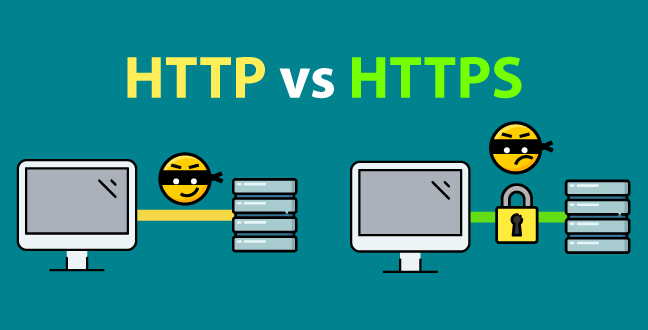
3. HTTP and HTTPS jump setting error
Many websites that have SSL enabled retain the old http version or have conflicting redirects, resulting in "too many redirects" errors. This situation not only affects access, but also confuses search engines as to which version is primary.
![Image [2] - Make no mistake! A redirection mistake that makes your website rank all over the place](https://www.361sale.com/wp-content/uploads/2025/11/20251103112104547-image.png)
The right approach:Preserve one-way jumps: HTTP → HTTPS, check .htaccess or Nginx rules to avoid duplicates.
![Image [3] - Make no mistake! A redirection mistake makes your website rank all over the place](https://www.361sale.com/wp-content/uploads/2025/11/20251103110830197-image.png)
4. Domain name change without updating internal links
Although 301 jumps are set, if there are still links to the old domain on the site, theGooglebotIt will still visit old pages frequently, reducing crawling efficiency.
Recommendation:Replace internal URLs using site search or plugin batch (e.g. Better Search Replace), update sitemaps, and resubmit new domain properties in GSC.
Fourth, why Google does not include your new page?
When using a 302 or error link, Googlebot will consider the new page to be a "temporary version" and the old URL to still be the authoritative address, so there is no need to re-index. In addition, if the following conditions occur, Google indexing will also be affected:
- Canonical pointing error, main and sub pages are confused
- robots.txt blocking crawling
- sitemap still submits old URLs
- Duplicate content not processed
In other words, Google doesn't have a clear signal telling it that "this page is a permanent new home", so naturally it won't include it.
V. Correctly set up 301 and 302 methods
1. Apache (.htaccess) example
# 301 Permanent Redirects
Redirect 301 /old-page https://example.com/new-page

# 302 Temporary redirection
Redirect 302 /test https://example.com/temp
2. Nginx example
# 301 permanent jump
rewrite ^/old-page$ https://example.com/new-page permanent;.

# 302 temporary jump
rewrite ^/promo$ https://example.com/sale redirect;.
3. WordPress plugin (Rank Math or Redirection)
Choose 301 or 302 in the "Redirection" module, make a clear distinction between "permanent" and "temporary" use, and check the redirection log regularly to see if it is working properly.
VI. Best practices and optimization recommendations
- Avoid unnecessary redirect chains and keep it to one hop.
- Prioritize the use of 301s to replace old content over deleted pages.
- Update internal links and don't rely on redirects as a permanent navigation method.
- Ensure canonical consistency, with the main page pointing to itself.
- Submit a new Sitemap and verify the update in Google Search Console.
- Use the browser developer tools orRedirect CheckerCheck the status code.
VII. Conclusion
301 and 302 redirectsAs simple as it may seem, it is one of the key techniques for SEO ranking and indexing. Using the wrong type of redirection will waste search engine crawling resources, more likely to lead to Google completely ignore your new page. Only by correctly understanding and applying the redirection rules can you make the weight transfer smoothly, index faster and rank more stable!

Link to this article:https://www.361sale.com/en/79669The article is copyrighted and must be reproduced with attribution.





















![Emoji[wozuimei]-Photonflux.com | Professional WordPress repair service, worldwide, rapid response](https://www.361sale.com/wp-content/themes/zibll/img/smilies/wozuimei.gif)

![Emoticon[baoquan] - Photon Wave Network | Professional WordPress Repair Services, Worldwide Coverage, Rapid Response](https://www.361sale.com/wp-content/themes/zibll/img/smilies/baoquan.gif)


 简体中文
简体中文  English
  日本語
日本語  Français
  Español


No comments