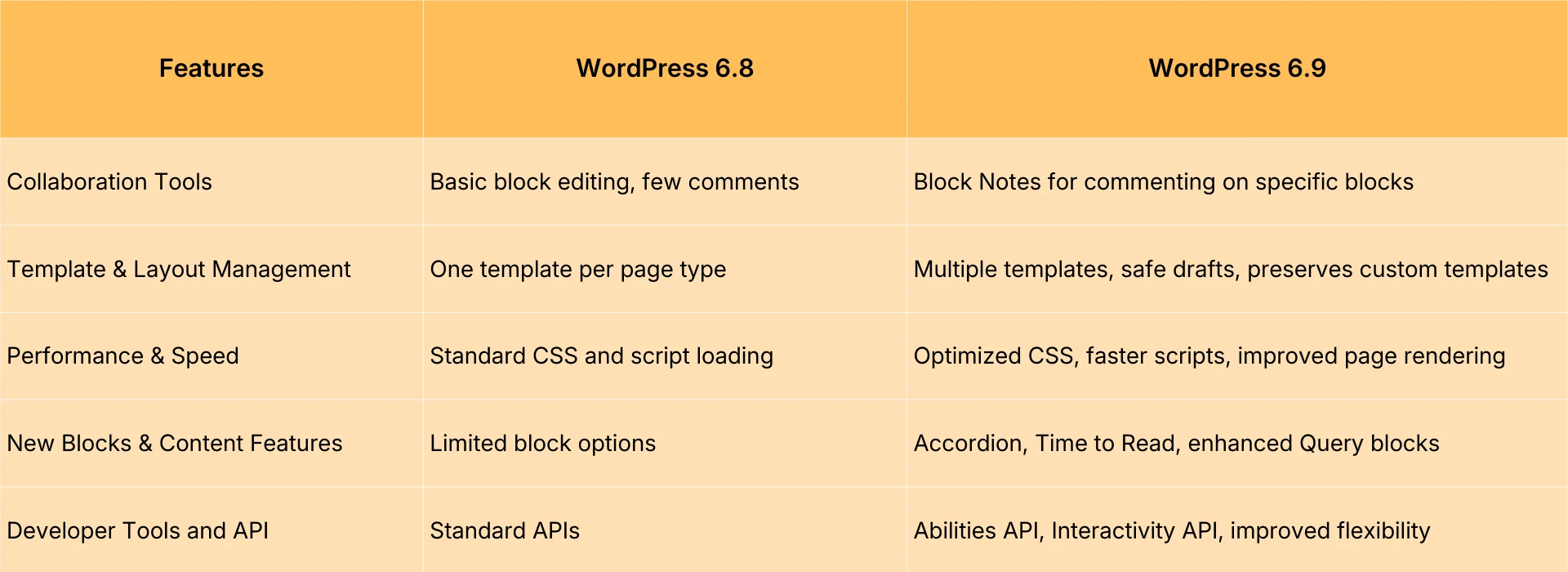






Following the official release of WordPress 6.9, many site owners and creators are eager to understand the tangible differences from version 6.8 and whether upgrading will deliver noticeable improvements. To address users' top concerns, this article will examine the changes across three key areas: editing experience, performance, and...Theme constructionWe'll provide a comprehensive comparison of features and overall user experience, helping you make a clearer decision on whether an upgrade is worthwhile.
![Image[1] - WordPress 6.9 vs. 6.8: A Comprehensive Analysis of Whether It's Worth Upgrading](https://www.361sale.com/wp-content/uploads/2025/12/20251220145517874-Wordpress-6.8-versus-Wordpress-6.9.webp)
![Image [2] - WordPress 6.9 vs. 6.8: A Comprehensive Analysis of Whether It's Worth Upgrading](https://www.361sale.com/wp-content/uploads/2025/12/20251220145548887-wordpress-admin-dashboard.png)
1.Editor Feature Comparison: 6.9 Smoother Editing Experience
WordPress 6.9 Gutenberg The editor has undergone multiple optimizations, making it more efficient and smoother to operate than version 6.8.
![Image[3] - WordPress 6.9 vs. 6.8: A Comprehensive Analysis of Whether It's Worth Upgrading](https://www.361sale.com/wp-content/uploads/2025/12/20251220150020136-ast-3-7-file-block-improvements.webp)
![Image [4] - WordPress 6.9 vs. 6.8: A Comprehensive Analysis of Whether It's Worth Upgrading](https://www.361sale.com/wp-content/uploads/2025/12/20251220150036854-gutenberg-editor-ui.webp)
1. Smarter Block Management
The block management system in version 6.8 has achieved foundational capabilities, but during complex page editing, issues such as insufficiently intuitive hierarchy and slight operational delays still persist.
The 6.9 update includes:
- Hierarchical views offer greater clarity, making complex page structures instantly understandable.
- Blocks respond faster, and the editing process runs smoothly without lag.
- Style synchronization is more flexible, enabling design reuse across blocks.
For users who frequently edit long articles or multi-module pages, version 6.9 delivers a noticeably smoother experience.
1.2. Enhanced Template Editing Efficiency
Template editing has also been significantly enhanced in 6.9.
The comparison shows:
- 6.8 Template switching loads slowly, and previews are not sufficiently accurate.
- 6.9 Faster switching speed and more realistic style previews
- Add more template layouts to enhance site design efficiency.
If your website frequently requires structural or page layout adjustments, the template editing experience in version 6.9 will be more efficient.
2.Performance Comparison: 6.9 Faster, Lighter
Performance is one of the core elements of website experience, and WordPress continues to optimize speed with each new release.
![Image [5] - WordPress 6.9 vs. 6.8: A Comprehensive Analysis of Whether It's Worth Upgrading](https://www.361sale.com/wp-content/uploads/2025/12/20251220150055434-ui.png)
![Image [6] - WordPress 6.9 vs. 6.8: A Comprehensive Analysis of Whether It's Worth Upgrading](https://www.361sale.com/wp-content/uploads/2025/12/20251220150107655-cms-performance-optimization-techniques-d4f2.webp)
2.1 Significant improvement in front-end loading speed
6.9 Page rendering and font loading mechanisms have been rebuilt to deliver a faster browsing experience for users.
Status of 6.8:
- Some blocks take longer to render.
- Font loading will still cause page blocking.
- Script and style output is relatively redundant.
6.9 Upgrade:
- The block rendering path is shorter.
- Font loading method optimized
- Unnecessary scripts have been reduced.
Some sites demonstrated loading speed improvements ranging from 51% to 151% in actual testing. SEO and more advantageous.
2.2 Smoother Background Operation
The performance improvements in version 6.9 are particularly noticeable in the backend, making it ideal for websites with large amounts of content and extensive media resources.
Key changes include:
- Media library loads faster
- Reduced editor startup time
- Improved Data Query Efficiency
In contrast, version 6.8 occasionally experiences delays on large websites, while 6.9 significantly reduces such stuttering.
3.Theme Construction Capability Comparison: FSE 6.9 is more mature
incompleteSite Editor(FSE) was already usable in 6.8, but it wasn't until 6.9 that it truly became an efficient tool.
![Image [7] - WordPress 6.9 vs. 6.8: A Comprehensive Analysis of Whether It's Worth Upgrading](https://www.361sale.com/wp-content/uploads/2025/12/20251220150125231-64-site-editor-TT4-2-jpg-1.webp)
![Image [8] - WordPress 6.9 vs. 6.8: A Comprehensive Analysis of Whether It's Worth Upgrading](https://www.361sale.com/wp-content/uploads/2025/12/20251220150138975-site-editor-styles-menu.png)
3.1 Enhanced Global Style Management Capabilities
6.9 Improvements in style management are primarily reflected in:
- Provide more font, color, and spacing options
- The global style control interface is more intuitive.
- Theme authors can incorporate more diverse style presets.
6.8, while possessing FSE capabilities, falls significantly short of 6.9 in terms of design flexibility and ease of use.
3.2 Blockchain themes offer greater scalability
With the 6.9 update, block theme development has become lighter and more flexible.
Key benefits include:
- New, more flexibleTemplate Structure
- Support for more dynamic content binding
- Theme export formats are more standardized, making migration easier.
For theme developers or users of custom sites, version 6.9 is the more ideal choice.
4.User Experience Differences: 6.9 More refined detail optimizations
Beyond its core features, version 6.9 introduces numerous subtle yet highly useful refinements.
![Image [9] - WordPress 6.9 vs. 6.8: A Comprehensive Analysis of Whether It's Worth Upgrading](https://www.361sale.com/wp-content/uploads/2025/12/20251220150159284-core-major-auto-updates-default.png)
![Image[10] - WordPress 6.9 vs. 6.8: A Comprehensive Analysis of Whether It's Worth Upgrading](https://www.361sale.com/wp-content/uploads/2025/12/20251220150216537-WordPress-UX-improvements-1.jpg)
4.1 Media Processing Capability Upgrade
6.9 Improved image cropping methods, accelerated loading of size presets, and optimized media resource processing logic for lighter, smoother image operations.
4.2 Enhanced Multiplayer Collaboration Experience
For websites with multiple editors, the collaborative experience in version 6.9 has been significantly enhanced:
- Conflict alerts are more accurate
- Draft status and change history are clearer
- The save and sync logic is more stable.
In contrast, version 6.8 is more prone to edit conflicts or accidental operations.
5.Is it worth upgrading? Full conclusion
From editing experience, performance speed, theme capabilities to ease of use, version 6.9 represents a multi-dimensional improvement over 6.8.
The following users are highly recommended for an upgrade:
- Content creators who need an efficient editing experience
- Webmasters who prioritize website loading speed
- Users utilizing the Block theme or planning to transition to FSE
- Those seeking a more stable backend experience
- Theme and Plugin Developers
The following users are advised to test before upgrading:
- Websites using a large number of outdated plugins
- Sites using traditional PHP template themes that are not prepared to switch to block-based themes
- Websites with extensive custom code and unchecked compatibility
Overall, WordPress 6.9 delivers faster performance, a better editing experience, and enhanced theme capabilities compared to 6.8, making it a stable and worthwhile upgrade to consider.

Link to this article:https://www.361sale.com/en/82793/The article is copyrighted and must be reproduced with attribution.















![表情[wozuimei]-光子波动网 | WordPress教程、Elementor教程与故障修复](https://www.361sale.com/wp-content/themes/zibll/img/smilies/wozuimei.gif)

![表情[baoquan]-光子波动网 | WordPress教程、Elementor教程与故障修复](https://www.361sale.com/wp-content/themes/zibll/img/smilies/baoquan.gif)


 简体中文
简体中文  English
  日本語
日本語  Français
  Español


No comments