







Elementor Pro (Professional Edition) offers advanced features to make WordPress websites more beautiful. More widgets, theme builder, popup builder and custom field features are available. Below, we will share a guide on how to build these extra elements to make your pages more professional and beautiful.
![图片[1]-如何使用 Elementor 中的高级功能-光子波动网 | WordPress教程、Elementor教程与故障修复](https://www.361sale.com/wp-content/uploads/2024/04/2024042608265114.jpg)
How to create a popup window in Elementor
Popup forms help capture email addresses of potential customers.Elementor's popup builder makes it easier to create these forms.
Step 1:In the WordPress dashboard.Go to Templates > Popup Window > Add New ContentThe
Step 2: Name the template and clickCreating TemplatesThe
Step 3: Choose a template from the library or create your own design.
Step 4: ClickpostAnd thenSave and closeThe
Step 5: Open a new page in Elementor (CTRL + E for PC users; Command + E for Mac users).
Step 6: Drag in a button widget.
Step 7:Under "Layout" select "Links > Dynamics > Actions > Popup"The
Step 8: Go to "pop-up window">"Open pop-up window", and then select the popup you created.
Step 9: Go to the live page:
Step 10: Then, click on the button and you will see the pop-up window.
How to Customize WooCommerce Product Pages in Elementor
![图片[2]-如何使用 Elementor 中的高级功能-光子波动网 | WordPress教程、Elementor教程与故障修复](https://www.361sale.com/wp-content/uploads/2024/04/2024042608301320.jpg)
WooCommerce " is a popular e-commerce platform that helps in setting up an online store. Before customizing the product pages, you need to install and activate WooCommerce and Elementor on your WordPress dashboard.You also need to add some products on your website.
Once the setup is complete, you can design the product page. Follow the steps below.
1. In the WordPress dashboard, go to theElementor > My Templates.
2. ClickAdd NewButton.
3. SelectionSingle productas the template type, and then clickCreating TemplatesThe
![图片[3]-如何使用 Elementor 中的高级功能-光子波动网 | WordPress教程、Elementor教程与故障修复](https://www.361sale.com/wp-content/uploads/2024/04/2024042607354152.png)
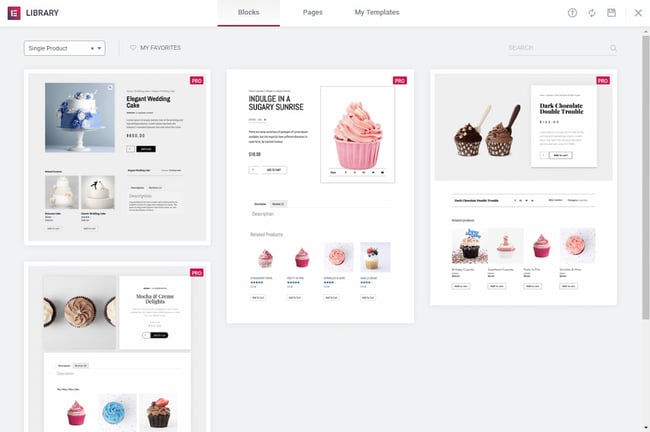
4. The Elementor library will be loaded.
5. Next, choose a pre-designed product page template or create one from scratch.
6. In the template, add different product widgets to customize your page.
![图片[4]-如何使用 Elementor 中的高级功能-光子波动网 | WordPress教程、Elementor教程与故障修复](https://www.361sale.com/wp-content/uploads/2024/04/2024042607391613.png)
7. When you are ready to preview the page, click on the "eye icon" in the lower left panel.
8. Clickset up, and then select the products to be displayed. For example, this kind:
![图片[5]-如何使用 Elementor 中的高级功能-光子波动网 | WordPress教程、Elementor教程与故障修复](https://www.361sale.com/wp-content/uploads/2024/04/2024042607405691.png)
9. To publish the page, click on the green color in the lower left panel "post"Button.
5 Essential Elementor Compatible Plugins
If it's gotten this far, you've probably already discovered that Elementor is a great tool for any WordPress user. However, there is another way to make Elementor even more powerful.
One of the best things about Elementor is that it has a large community of developers who are constantly creating new plugins and add-ons. These plugins can help you do a lot of things, from adding Google Maps to your website to creating custom forms and layouts to make your life easier. If you want to get the most out of Elementor, try these Elementor-compatible plugins.
MasterAddons
![图片[6]-如何使用 Elementor 中的高级功能-光子波动网 | WordPress教程、Elementor教程与故障修复](https://www.361sale.com/wp-content/uploads/2024/04/2024042607484695.png)
Beautifully organized landing pages can help improve engagement and increase leads. However, without the coding knowledge to create animated headers, hover effects or sliders on the page, MasterAddons can help you create an interactive and organized landing page without a single line of code. Image editing, different menu formats and pre-designed pricing tables are available.
most suitable: Build beautiful landing pages.
Dynamic Content
![图片[7]-如何使用 Elementor 中的高级功能-光子波动网 | WordPress教程、Elementor教程与故障修复](https://www.361sale.com/wp-content/uploads/2024/04/2024042607580491.png)
Dynamic Content is another plugin that brings WordPress websites to life. Animated text, SVG effects, and cursor trackers can be used to bring a sense of motion to a website. This plugin is especially useful if you're running an e-commerce business, and Dynamic Content integrates seamlessly with WooCommerce to help with upsells, discounts, or cross-promotions on products.
most suitable: E-commerce website
Starter Templates
![图片[8]-如何使用 Elementor 中的高级功能-光子波动网 | WordPress教程、Elementor教程与故障修复](https://www.361sale.com/wp-content/uploads/2024/04/2024042608003859.png)
If you are new to building a website, using a template will be much easier than starting from scratch. That's where Starter Templates comes in. The plugin offers over 600 templates that can be used as a starting point for building a website. Available templates can be searched by industry. For example, Starter Templates has a demo of an Elementor-compatible daycare service and another for food bloggers. Simply find your favorite site and start building.
most suitable: Users who are just starting to build a website
ElementsKit
![图片[9]-如何使用 Elementor 中的高级功能-光子波动网 | WordPress教程、Elementor教程与故障修复](https://www.361sale.com/wp-content/uploads/2024/04/2024042608123491.png)
If you need templates and add-ons, ElementsKit is your one-stop store. The plugin contains 85 widgets and extensions ready to be used on your website. Then, there's the attention feature. With ElementsKit, you can create a mega menu, add testimonials and a countdown timer. In no time at all, you'll have an aesthetically pleasing, fully functional website.
most suitable: Users looking for templates and extensions
Livemesh Addons
![图片[10]-如何使用 Elementor 中的高级功能-光子波动网 | WordPress教程、Elementor教程与故障修复](https://www.361sale.com/wp-content/uploads/2024/04/2024042608183139.png)
Livemesh plugin has a variety of well-designed features and widgets to help design customized websites. Animated text, sliders and different grids can be created to showcase your services.Livemesh also has grids to show presence on social media. It is possible to show your tweets, recent YouTube videos and content on Vimeo.
Best for:Well-designed add-ons and various widgets
These are how to use the advanced features in Elementor, five plug-ins that are compatible with Elementor; plug-ins that can help make the most of Elementor.

Link to this article:https://www.361sale.com/en/9029/The article is copyrighted and must be reproduced with attribution.















![表情[wozuimei]-光子波动网 | WordPress教程、Elementor教程与故障修复](https://www.361sale.com/wp-content/themes/zibll/img/smilies/wozuimei.gif)

![表情[baoquan]-光子波动网 | WordPress教程、Elementor教程与故障修复](https://www.361sale.com/wp-content/themes/zibll/img/smilies/baoquan.gif)


 简体中文
简体中文  English


No comments