


 Harry.



Making the Complicated Simple




(Gutenberg) Gutenberg 19.2 Re-Release: Block Binding UI Stable Integration and New Editing Features Explained
Due to the time difference, Gutenberg 19.2 is finally released! Gutenberg is now a bi-weekly update with more and more features and a better experience. Gutenberg 19.2 has been released and is available for download! Gutenberg ...
Bricks Themes Explained: Fast, Efficient, and Flexible Website Builders (01)
When building a WordPress website, choosing the right theme is critical for performance, load speed, and design flexibility. In recent years, the Bricks theme has quickly emerged with its built-in visual page builder, clean code structure, and excellent customization...

How to Manually Add Directories in WordPress to Accelerate SEO Results
Then, in addition to the few WordPress website settings we talked about earlier that are important for SEO success, you can also create directories manually with anchor links that can also accelerate SEO results, and you don't need a plugin to do it. Of course, it will take some time and effort. Catalog First of all, ...

How to Create a Multilingual WordPress Website with TranslatePress (01)
TranslatePress is one of the best WordPress translation plugins on the market. Usually, multi-language plugins will require creating multiple versions of the same post in order to translate it.TranslatePress can create translations at the same time. It can also use a live editor to translate all of the site's...

How to Customize Page Sorting in WordPress with Elementor Editor
By default, WordPress sorts the pages on the site alphabetically or by publish date. However, as the site grew in content, it became clear that this default sorting did not meet the expectations of the site's structure. Wanting pages to be sorted in a certain logical order, such as by content of...
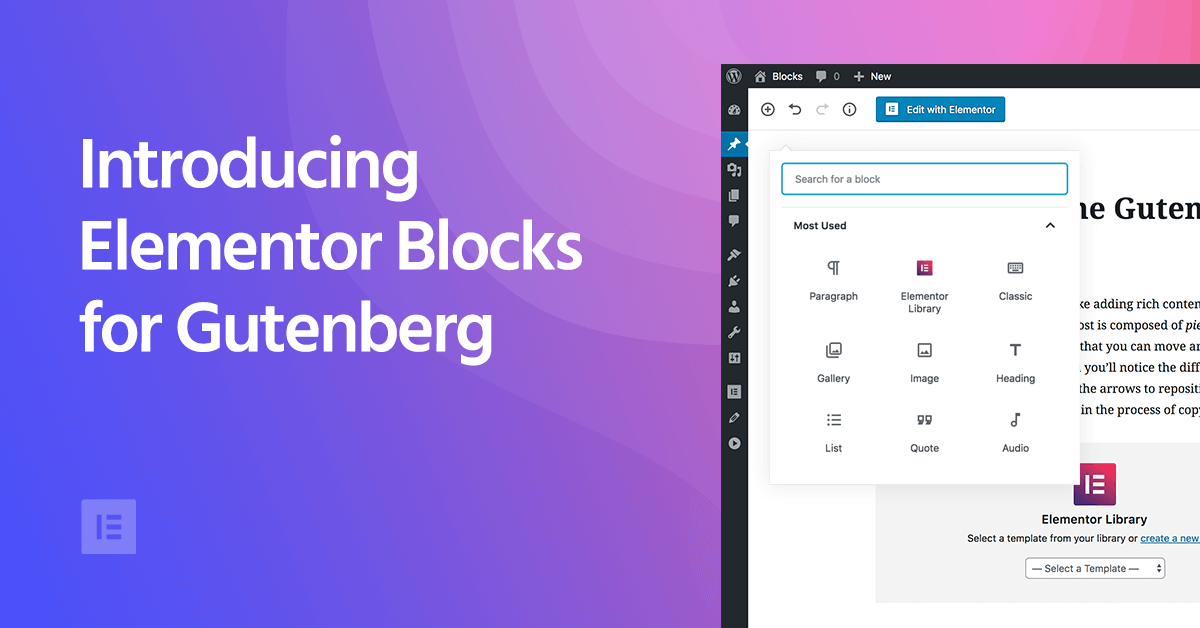
Elementor Blocks for Gutenberg: Using Elementor Blocks in the Gutenberg Editor
As WordPress has grown, the Gutenberg block editor has become its core editor, which builds content in "blocks". Although Gutenberg is very flexible, for those who want to add more advanced features to their site, Gutenberg is still...

Using Avada's own canvas function to easily realize the pop-up window effect: to create an efficient user experience (06)
In modern websites, Popup is an important tool to effectively increase the conversion rate of users, especially in foreign trade websites, timely popups can effectively guide users to initiate inquiries or participate in promotional activities. However, many people still do not understand that Avada theme comes with a "canvas" (...

What are the common WordPress plugins used for e-commerce websites?
Many of our partners who want to do e-commerce do not know which plugins they need to install when building a website with WordPress. Have left messages in our community and article comment section, hoping to recommend some WordPress plug-ins. I have organized some below, we do our own online retail website commonly used...
How to set up a custom maintenance mode page for a website with Elementor?
Switching your website to maintenance mode is a good option when updates, fixes or adjustments need to be made to your website. Maintenance mode not only shows visitors a friendly notification explaining why the site is temporarily offline, it also prevents them from encountering broken links, data errors...
How to Enable WordPress Debug Mode to Fix Site Errors
Why should I enable WordPress Debug Mode? Sometimes, WordPress plugins, themes, or custom code (such as PHP or JavaScript) can cause conflicts on a website. It can lead to different errors and the website may not work properly. Now, it is possible to stop at any time...
How to Implement Multi-Currency Functionality on a WordPress Site: A Practical Guide to Using the WooCommerce Plugin (01)
Today we're talking about websites that need multi-currency functionality and how it should be chosen and set up. In e-commerce operations, I've found that giving users familiar currency choices can greatly increase their willingness to buy. Especially if your website caters to a global audience, multi-currency functionality is almost a must...

How to Improve WooCommerce Performance: 11 Optimization Tips to Improve Website Speed and User Experience
Many of our readers who use WordPress websites for online retailing have left comments in the community wondering what they can do to improve WooCommerce performance. So, this tutorial summarizes some of our team's experience in optimizing WooCommerce performance. Why is WooCommerce speed important? Wo...
How to Migrate WordPress to a New Server Without Downtime
Many webmasters want to know how to safely migrate their website to a new server. This tutorial organizes a step-by-step procedure for newbies, so some plugins will be used. Let's take a look together! Step 1: Choose a new WordPress server If even after optimizing ...

Detailed tutorial on how to set up multi-currency functionality in WooCommerce: manual selection vs. automatic switching (02)
So let's move on today to finish talking about some of the ways to set up multi-currency, with manual selection and automatic switching, but there was a little hiccup in sharing this tutorial, and the article is a little long, so please bear with us. Steps → Website Backend → Woocommerce → Currency Sw...
How to Fix WooCommerce Not Sending Order Emails
What causes WooCommerce emails not to be sent? Being an online store, then emails can be used to help the business run smoothly. For example, if a customer hasn't paid after they have already added to their cart, you can send an email to remind them of the order, etc. Use email to welcome new customers. Send ...
How to Customize WooCommerce Emails
WooCommerce emails help customers get information about the status of their orders, delivery times, and more. Why customize WooCommerce emails? When running a WooCommerce store, customers receive different transactional emails. These emails help them...

How to Properly Configure WordPress Email Settings
Properly configuring your WordPress website's email settings is important to stay in touch with your users. If the settings are not correct, emails may not be sent successfully. This can damage a website's reputation and user experience. Why WordPress email settings don't work...
Easy to optimize your Avada theme: global settings in one step (07)
Previously talked about the Avada theme layout and some features, today we continue to get more important global settings. In fact, these settings are like the site's "behind-the-scenes engineering", mastered, your site effect instantly improve a lot! Don't worry, the steps are not complicated, follow the good ~ Steps ...

How to Send WordPress Emails with Free SMTP Server
I don't know if you guys have noticed that the default PHP email feature of WordPress doesn't work well. It often sends important emails directly to the spam folder, or even not at all. We ourselves use an SMTP server to make sure we get our emails every time. But...
How to Fix WordPress Not Sending Emails Issue
I don't know if you have encountered WordPress website can't send email, contact form submission disappeared, important notification email did not deliver and so on. In fact, the problem does not lie in WordPress, but in the way the website sends emails. Let's see what are the...
How to Fix "Googlebot Cannot Access CSS and JS Files" Error in WordPress
Why does Google need access to CSS and JS files? Google has been providing better rankings, fast speeds, good user experience for user friendly websites and more. In order to determine the user experience of a website, Google needs access to access the website's CSS and JavaS...

Avada theme header and footer can not be set? Detailed solution and practical tips
In the last issue, we talked about the basic Avada theme settings, but still can not set the header and footer We say a separate issue of the header and footer can not be set, as well as some of the ways to set the Steps: Site back-end → Avada → Layouts → Layout Builder → Main He...
How to set up Cloudflare free CDN in WordPress
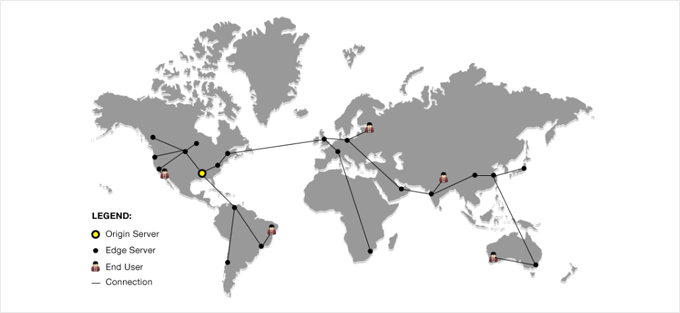
We all know that using a CDN service can increase the speed of our website.Cloudflare is one of the best WordPress CDN service in the market. And it offers free CDN service with strong security features for small business websites. Including some of our own websites are using...
Why should we always use the latest version of WordPress for our WordPress website?
Hello everyone! Today there is no tutorial, but mainly an answer to one of the most frequently asked questions by our readers in our community. The question is "Why should we always use the latest version of WordPress for our WordPress website? Why should we update WordPress WordPress is free,...

Common Reasons Why Elementor Cannot Load Editor and How to Fix It
Elementor editor is very popular among WordPress users. It is favored because of its power and visual editing features. However, many readers have encountered a headache that Elementor cannot load the editor. This kind of...

How to Paste a Code Snippet from a Web Page into WordPress for Newbies
Hello everyone! Today's tutorial focuses on teaching you how to safely paste various custom code snippets into WordPress. Below is mainly to share some of our team's experience in pasting custom code snippets. The best way to add code snippets to WordPress is...
Things to keep in mind before changing WordPress themes
After deciding to change your WordPress theme, there are some very important things to keep in mind. 1. Make a note of all WordPress theme customizations Some WordPress webmasters customize WordPress themes by adding code snippets directly to the theme file. Code snippets...
Gutenberg 19.3 Update Released: New Features and Enhancements
A new version of the Gutenberg block editor, 19.3, has been released and is available for download! A total of 174 PRs have been merged into Gutenberg 19.3! With WordPress 6.7 fast approaching, a lot of contributors have been focused on fixing bugs. However, this version of the block...
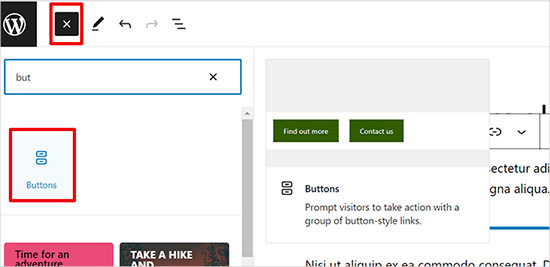
How to Add Buttons in WordPress without Code
Adding buttons to WordPress posts and pages WordPress has a built-in button block that makes adding buttons relatively simple. This is a feature of the Gutenberg WordPress block editor. Let's take a look at some of the ways to do this! Use the default editor in WordP...
How to Add Images Correctly to a WordPress Website
The Importance of Uploading Images Correctly in WordPress Sometimes, users copy images directly and paste them into their website content. This can lead to issues such as slow page speed, poor user experience and poor SEO. When adding images to a WordPress website, it's important to do it correctly...

 简体中文
简体中文  English
  日本語
日本語  Français
  Español



