










Detailed guide on how to effectively customize WooCommerce category pages
How to customize WooCommerce category pages to improve user experience, SEO, and ultimately drive sales is a common and important topic. In this comprehensive guide, we'll explain in detail how to customize WooCommerce category pages without code, along with some more...

How to disable the background image of a specific page in Astra theme
In Astra themes, background images can add visual interest to a page, which can be achieved using Astra Pro. However, sometimes it is desirable to disable background images on specific pages for a cleaner or customized look. This article will detail how to disable the background on specific pages in Astra themes...

A Guide to Choosing the Top Plugins to Boost WooCommerce Ecommerce Efficiency
WooCommerce is one of the most popular WordPress e-commerce plugins, offering a wide range of must-have plugins that make building an e-commerce website easy and efficient. These top-notch WooCommerce plugins not only have all the core features required for an e-commerce website, but also simplify the entire operation...

Building a Multilingual WooCommerce Store: A Comprehensive Guide and Practical Tips
Engaging a global audience is critical to the success of any online store. One effective way to expand your reach is to make your e-commerce store multilingual. According to the Bright Plugins website, offering content in multiple languages can increase online sales by as much as 100%. through...

Comprehensive Guide: How to Create and Customize User Registration Forms in WordPress
Learn how to create user registration forms in WordPress, covering enabling the built-in registration functionality, customization with plugins, code development, and best practices for optimizing user experience and form security.

How to Block Contact Form Spam in WordPress
Are you receiving tons of spam emails through your website's contact form? This situation can give you a headache, but WordPress provides several automatic methods to block spam contact forms. In this article, we'll share 5 effective methods that will help you reduce and block WordPre...
How to Create Convertible Squeeze Pages in WordPress
In website operations, Squeeze Page is an important tool to increase the conversion rate of leads and subscribers. By using the WordPress plugin SeedProd, it is easy to create efficient squeeze pages. This article will detail how to use SeedProd to create squeeze...
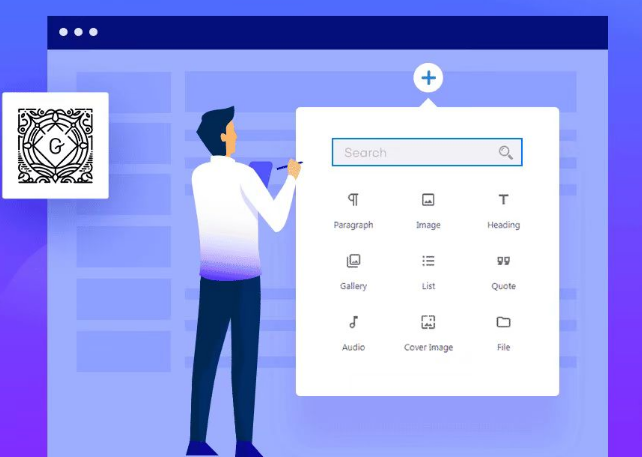
Common Gutenberg Editor Block Types and Their Functions Explained
Explore how to add and use blocks in the Gutenberg editor, learn about common block types, and learn tips for customizing and extending the Gutenberg editor to improve flexibility in WordPress content creation and page layout.
How to Add Title Attribute to WordPress Navigation Menu
In website design, the navigation menu is one of the main ways for users to interact with the website. To enhance the user experience, we can provide users with more background information about the menu items by adding a title attribute to the WordPress navigation menu. This not only helps users to better ge...

Detailed guide to resolving the "Followed link has expired" error
What causes the "The link you follow has expired" error? This error usually occurs when the server is set to limit the size of files that can be uploaded or the duration of a session. When these limits are too low for the file size or the execution time of the process, WordPress is unable to...

Comprehensive Guide: How to Optimize WordPress Website Speed and Performance (Part II)
18 Ways to Speed Up Your WordPress Website On how to speed up WordPress, to help the less tech-savvy optimize the speed of your WordPress website, you can operate on the following aspects so that you don't need to hire a developer until the final stage. 1. test your website...

The Best Types of Schema Markup for SEO: How to Use Architecture Markup to Improve Search Engine Hit Rates
Architecture markup is an important tool for improving SEO, helping search engines generate rich search results such as rating stars, product information, FAQs, etc. This article explains 9 common types of architectural markup and their application scenarios to help websites get more traffic and clicks.

2 Easy Ways to Add a WordPress Catalog
Why add a WordPress Table of Contents? A table of contents helps readers jump to the relevant part of a WordPress post, which improves its readability - especially for long-form content. Adding a table of contents can also enhance search engine optimization. For example, it may reduce a site's...

Detailed tutorial: how to copy pages in WordPress using plugins or manual methods
How to Copy Pages in WordPress Using WordPress Plugins Dedicated plugins are one of the most straightforward ways to copy WordPress pages. These tools are designed to simplify the copying process and make it accessible to users of all skill levels. This article will detail how to use various...
How to Fix Featured Images Not Displaying in WordPress
Featured images give visitors a glimpse of what's in your blog posts and pages. If these images are not appearing on your site, it can affect click-through rates. This article will show you how to fix featured images that are not appearing in WordPress so that your content gets more clicks and engagement. ...
Limit WordPress Users to Multi-Device Logins to Improve Website Security
In some cases, you want to limit the number of user logins on your WordPress site, ensuring that each user can only log in on one device. This method not only improves the security of your website, but also prevents users from sharing login information across multiple devices. This article will detail...
How to Create WooCommerce "Add to Cart" Custom URL: Detailed Guide
WooCommerce provides powerful e-commerce features for WordPress websites, and one of the most important features is the "Add to Cart" button. By customizing the "Add to Cart" URL, you can create a more convenient shopping experience for users. This article will delve into how...

How to Prevent and Manage WordPress Spam
WordPress spam is a common problem that webmasters have to face. With spam messages showing up on your site, visitors may perceive your site as poor quality and search engines may mark your site as unsafe.WordPress is a popular content management...

Mastering WordPress Hooks : A Comprehensive Guide to Customizing and Enhancing Your Site
What are WordPress hooks? WordPress "hooks" give you the flexibility to add or change functionality to your website without changing the core code. Hooks are like special interfaces that are installed at key points in the program, allowing you to insert your own code or modify existing...

How to set different Elementor full width slides for different pages
Full Width Sliders (FWS) are a very popular design element. Not only can they display large, beautiful images, they can also help you convey your core message and grab your users' attention. With Elementor, you can easily set up each page with different...

Comprehensive Guide: Optimizing WordPress Website Render Blocking Resources to Boost Load Speed
What are render-blocking resources? Render-blocking resources refer to CSS and JavaScript files that prevent a page from rendering until it has been fully downloaded and processed by the browser. Impact of render-blocking resources These resources can have a significant impact on Web Vitals...

How to Create Elementor Table in WordPress
Tables are a common way to share information on websites and can be used to display a variety of content such as prices, feature lists, and links. While WordPress itself provides the ability to create basic tables, if you want more customization options, Elementor may be a good choice...

Mastering Global Layout Settings in Elementor: A Detailed Guide
When building a WordPress site with Elementor, controlling global layout settings is critical to ensuring a consistent and visually appealing site. Global layout settings define the default appearance and layout of site pages, whether it's the width of content, the padding of containers, or the elements...
Solving WordPress Out of Memory Problems: Four Ways to Increase PHP Memory Limits
Understanding PHP Memory Limit in WordPress If you encounter a "Fatal Error: Allowed XXXX bytes memory size exhausted" error while editing your WordPress website, it may be due to an insufficient PHP memory limit. What is PHP Memory Limit? PH...

Which WordPress graphic bed plugins support automatic uploading to YapCloud / SevenNiuCloud / AliCloud?
Recommended three mainstream WordPress graphic bed plugin, support and shoot cloud, seven cattle cloud, Ali cloud OSS, realize automatic upload and CDN acceleration.
How to Design Your Own WordPress Blog Theme with Elementor
With Elementor, a powerful visual page editor, it's easy to create a professional and attractive WordPress blog theme without writing any code. This article will take you step by step through how to use Elementor to design your own WordPress ...
Configuring SMTP to solve WordPress form emailing issues: detailed tutorials
How to Configure WordPress SMTP to Solve Forms Can't Be Sent Problems When building a website with WordPress, you often encounter the problem of forms not being able to send emails. Usually, these emails are stored in the WordPress backend, and you need to log in to the backend frequently to check them, which is very troublesome...

How to Set Up 301 Redirects in WordPress: The Complete Guide (Plugins, .htaccess, PHP)
Learn how to properly set up redirects in WordPress to prevent 404 errors and protect SEO rankings. This guide covers 301 redirects using plugins, .htaccess, and PHP code to ensure a smooth user experience and unaffected search engine rankings.
Comprehensive mastery of Elementor theme style settings to enhance the visual unity of the site and design efficiency
Elementor gives users the flexibility to design web pages and also provides comprehensive theme style settings. These settings help you set default styling options for various elements (such as backgrounds, headers, buttons, images, and form fields), thus improving the efficiency and uniformity of web design...
How to Enable WebP Images on WordPress
A quick step-by-step guide to enabling WebP images on your WordPress site WebP is an image file format developed by Google to replace JPEG, GIF, and PNG.It supports lossy and lossless compression, as well as transparency and animation. Using optimized WebP images can shorten...

 简体中文
简体中文  English
  日本語
日本語  Français
  Español



