




Elementor Page 39
Elementor is a powerful drag and drop page builder for WordPress that makes it easy for users to create responsive websites. Known for its user-friendly interface that allows even non-developers to create professional-looking pages without writing a single line of code, Elementor offers a wealth of widgets, templates, and design options that grant complete creative freedom to improve the functionality and aesthetics of your website, making it the tool of choice for beginners and experienced developers looking to streamline their website design workflow.
arrange in order

Elementor Editor In-Depth Analysis: Creating a Personalized WoodMart Theme Website (04)
In the last issue we talked about how to set up a Woodmart theme poster (banner), in this issue we talk about the Elementor editor to renovate a Woodmart theme, we'll dive into how to use the Elementor editor to further customize and optimize your WoodMart theme. By...

Common Problems and Solutions in Elementor Safe Mode
Elementor is a powerful page builder plugin, but in the process of using it, users may encounter various problems, such as blank pages (white screen of death), widget sidebars disappearing, editor loading endlessly, etc. Elementor provides a safe mode as a feature,...

Elementor Safe Mode vs. Regular Mode
Elementor, as a popular WordPress page builder, has won the favor of users with its rich features and user-friendly interface. In order to protect users in the process of building and managing websites, Elementor provides a secure mode and a regular mode. This article will ...

Performance Impact of Elementor Safe Mode and How to Optimize It
Elementor is a popular WordPress page builder that offers great features and flexibility. However, enabling Safe Mode may impact site performance when debugging and problem solving. In this article, we will explore the performance impact of Elementor's safe mode and provide optimization...
Detailed Steps on How to Troubleshoot Elementor Display Errors
Elementor is a powerful page builder plugin, but sometimes you may encounter display errors while using it. This article will detail the steps on how to troubleshoot and resolve Elementor display errors to help you quickly restore your site's normal display. Step 1: Check the plugin...
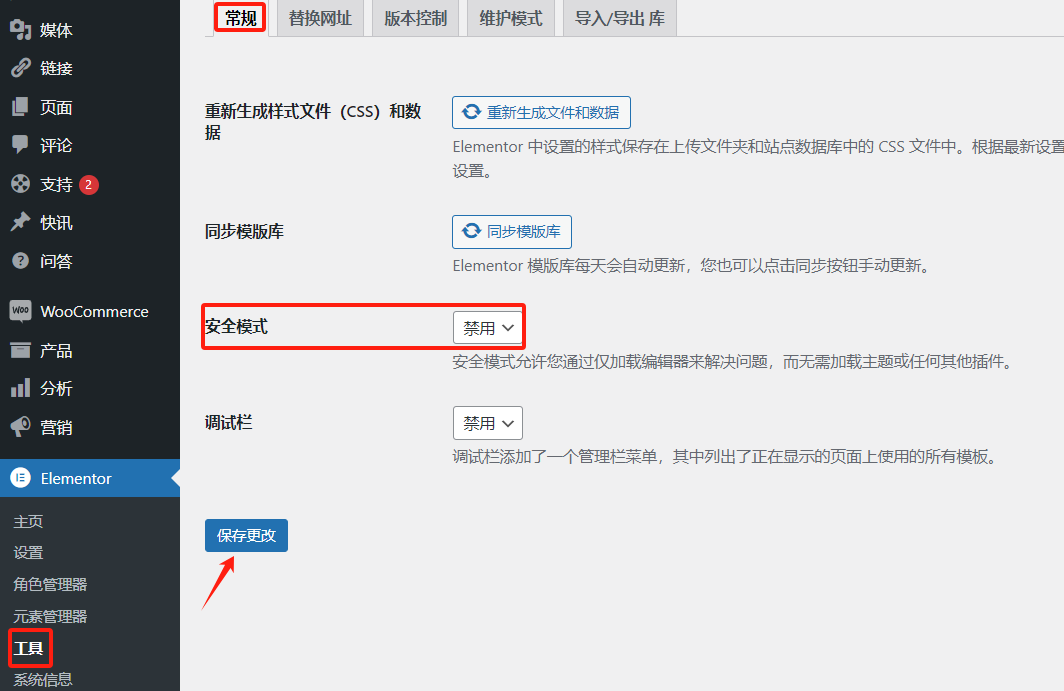
Advanced Debugging Tips for Elementor Display Errors
Elementor is a powerful WordPress page builder, but sometimes users may encounter display errors while using it. Solving these errors requires some advanced debugging skills. This article will introduce some effective debugging methods to help you quickly locate and resolve Elemento...
Elementor Display Errors: Case Studies and Practical Fixes
Elementor is a very popular WordPress page builder plugin, loved by users for its intuitive drag-and-drop interface and rich functionality. In this article, we'll explore the common causes of Elementor display errors and provide practical fixes to help you quickly resolve these issues...

A Guide to Using Elementor Safe Mode for Website Migration
What is Elementor Safe Mode? Elementor's Safe Mode is a troubleshooting tool that loads the Elementor page editor with other plugins and themes disabled. This ensures that when troubleshooting potential conflicts and issues, the editor can...

Elementor Safe Mode Explained: How to Enable and Resolve Issues
Elementor provides us with a Safe Mode, designed to help users solve all kinds of problems they may encounter while editing with Elementor. Whether it's a blank page (white screen of death), disappearing widget sidebars, the editor loading endlessly, or a complete lack of access to Elem...

Streamline business scheduling: Seamlessly integrate appointments with Elementor Pro and Google Business Suite
With the integration of Elementor Pro and Google Business Suite's appointment scheduling features, visitors can schedule appointments directly on your website without the need for additional plugins! Streamline your business scheduling with the latest features of Elementor Pro and Google In this number...

Elementor Global Settings Guide: How to Use Elementor Site Settings for Your Entire Site
Elementor Pro Global Style Settings Guide Elementor Pro provides global style settings feature, just install Elementor Pro and you can make global settings, similar to theme settings for themes. This can help you preset the overall color style of your website, font style,...
Elementor Hidden Elements Guide: Simple Controls for Showing and Hiding Page Elements
Elementor Pro's Hide if Empty method uses CSS, which means that even though the element still exists in the source code, it will be set to invisible (display). The advantage is that it works for all custom field providers such as ACF, JetEngine, Pods, Metabox...





