




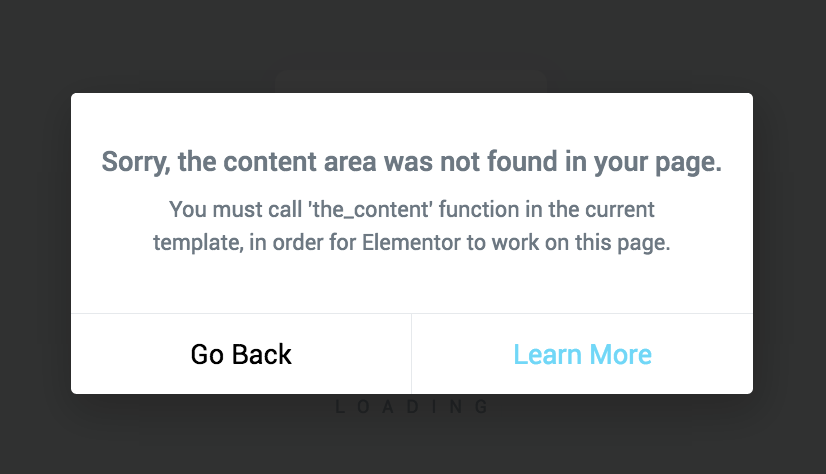
当 Elementor 弹出“必须调用 the_content”(或类似提示)时,表示你的页面模板没有正确输出 the_content()(或没有让 the_content 过滤器生效),Elementor 的内容渲染就“挂不上去”,于是前台可能空白、布局缺失,编辑器里也会各种异常。下面按“根因 → 快速定位 → 修复方案”的顺序,把 调用 the_content 这件事一次讲透。
1. 为什么 Elementor 这么依赖调用 the_content?
Elementor 的前台内容,本质是通过 WordPress 内容体系输出的:
- 主题模板在 The Loop 中输出
the_content() - Elementor 把自己的渲染结果挂载到
the_content过滤链路上 - 主题调用
the_content()时,过滤器被触发,Elementor 才能把布局/小工具 HTML 输出出来
所以只要你的模板没调用 the_content(),或者用错了方式(比如只用 get_the_content()),Elementor 就会判断“模板不兼容”,从而提示必须 调用 the_content。
2. 最常见的 6 个根因(命中率从高到低)
2.1 模板用了 get_the_content(),但没有 the_content()
很多人为了“自定义输出”写了:
echo get_the_content();
这会绕开 the_content 的过滤器链路,Elementor 内容自然不出现。
结论:需要改成调用 the_content(),或至少 apply_filters。
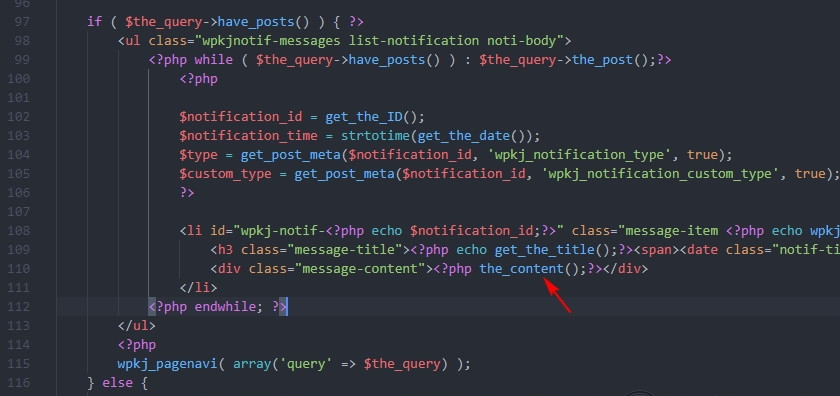
2.2 自定义 page.php / single.php / 自定义模板文件缺失 The Loop + the_content
常见于:你从别的主题拷贝了模板,删改过程中把 the_content() 去掉了,或 Loop 没写完整。
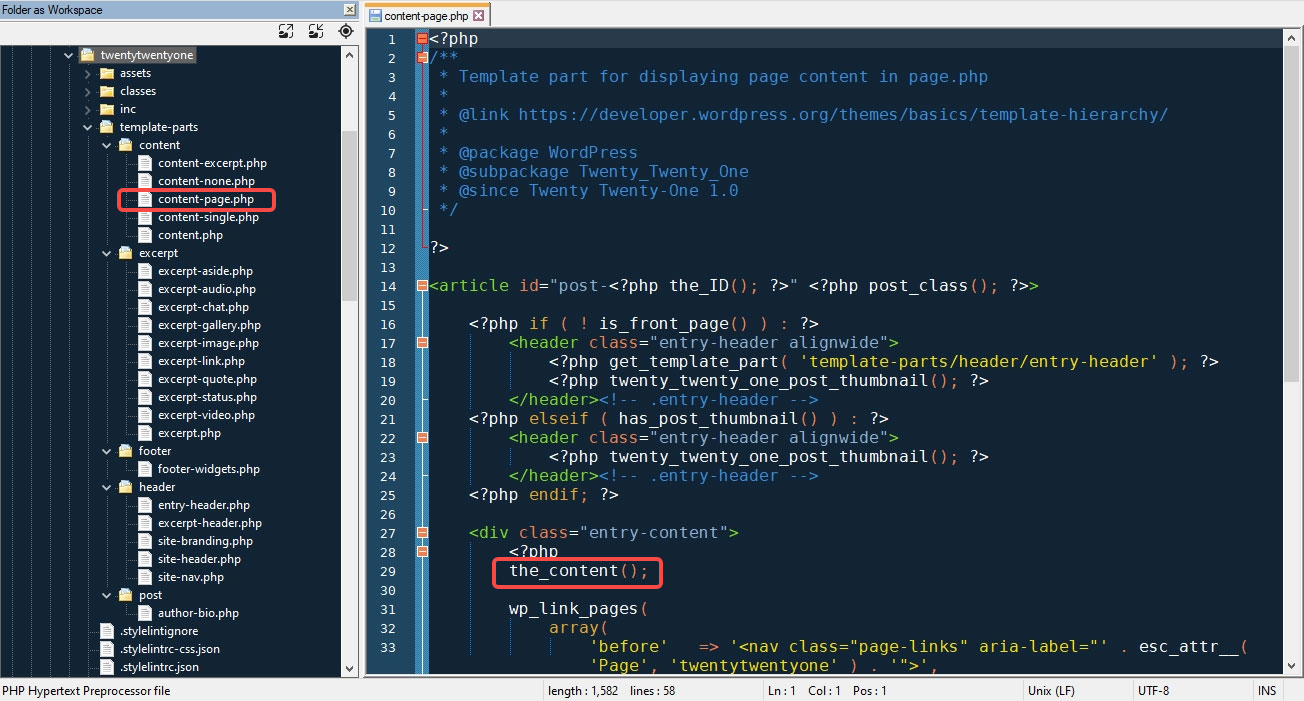
2.3 template-parts/content-*.php 没调用 the_content
很多主题在 page.php 里 get_template_part(),真正输出内容在 template-parts/content-page.php。你检查 page.php 看到了 Loop,但 content-page.php 里可能只输出了标题/摘要,没有 the_content()。
2.4 你做了自定义 WP_Query,但忘了输出内容
例如你写了一个自定义查询循环,只输出了标题、缩略图、字段,没有 the_content(),Elementor 仍然会认为没完成 调用 the_content。
2.5 安全/性能插件或你自己的代码移除了 the_content 过滤器
比较少见,但确实会发生:有人为了“防止短代码”或“加速”,写了 remove_filter('the_content', ...),导致 Elementor 挂载链路失效。
2.6 区块主题 / FSE 模板混用,某个模板没正确输出内容
如果你用的是区块主题(Site Editor),又叠加了自定义 PHP 模板或旧模板,可能出现某一类页面(比如单篇文章)缺失内容输出。
3. 3分钟快速定位:到底是哪一个模板在作怪?
3.1 先确认“只有某些页面报错,还是全站都报错”
- 全站都报:优先查
single.php / page.php / index.php或主题框架级模板 - 只在某个模板报(比如某个页面模板、某个 CPT 单页):优先查对应模板文件
3.2 用“最小排除法”锁定主题模板问题
- 临时切换到 Hello Elementor(或 Twenty Twenty 系列)
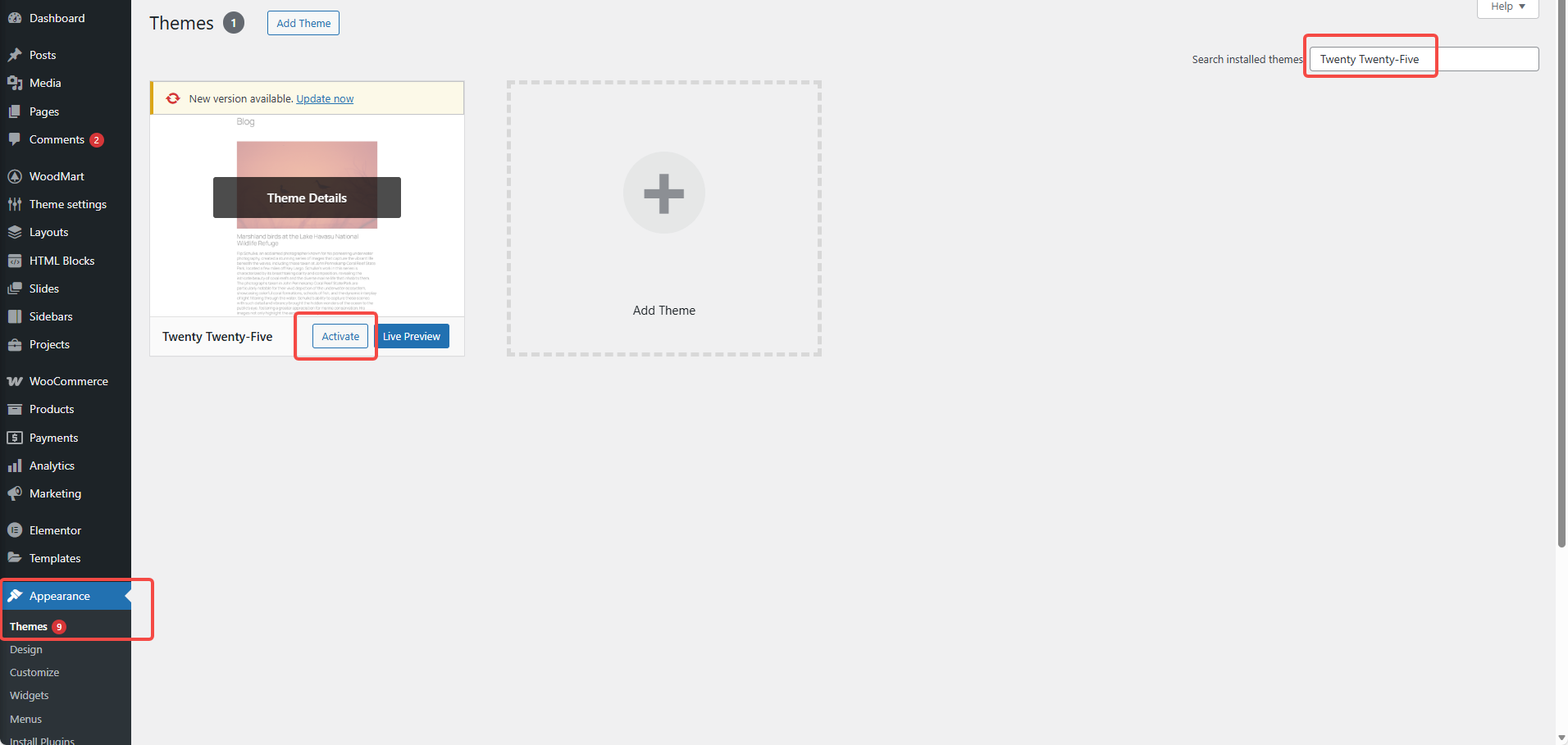
- 如果提示消失:99% 是你当前主题模板未正确 调用 the_content
- 切回原主题继续修复
3.3 直接查你页面用的模板
- WordPress 编辑页面右侧:模板(默认/自定义模板)
- Elementor:页面设置里也能看到布局/模板
如果用了自定义模板(例如template-custom.php),那就优先查这个文件。
4. 修复方案 A:把模板改到“标准写法”(推荐)
下面给你一份最小可用的页面模板结构(page.php / single.php 的思路类似),重点就是:有 Loop,并且在合适位置 调用 the_content。
4.1 page.php(最小正确示例)
<?php get_header(); ?>

<main id="primary" class="site-main">
  <?php
  if ( have_posts() ) :
    while ( have_posts() ) : the_post();
      the_content(); // ✅ 关键:调用 the_content
    endwhile;
  endif;
  ?>
</main>

<?php get_footer(); ?>
如果你主题必须走 template-parts,确保内容文件也有 the_content()。
4.2 template-parts/content-page.php(常见缺失点)
<article id="post-<?php the_ID(); ?>" <?php post_class(); ?>>
  <?php the_content(); // ✅ 关键:调用 the_content ?>
</article>
5. 修复方案 B:你必须用 get_the_content 时,别忘了 apply_filters
有些场景你确实要拿内容做二次处理(比如插入模块、分段渲染)。这时至少要保证 the_content 过滤器会跑:
<?php
$content = get_the_content();
echo apply_filters('the_content', $content); // ✅ 触发 the_content 过滤链路
这条非常关键:很多“看似调用了内容但 Elementor 不显示”的问题,根因就是没触发过滤器,导致 Elementor 没机会输出。
6. 修复方案 C:检查并撤销“拦截 the_content 的代码”
如果你或插件做过下面操作,建议先撤掉再验证:
remove_filter('the_content', 'wpautop');remove_all_filters('the_content');- 安全插件的“防注入/过滤短代码/过滤 HTML”功能(看是否影响内容过滤链)
排查技巧:
先停用最近新增/更新的性能、安全类插件(缓存、加速、WAF、内容过滤),看提示是否消失。若消失,再逐个启用定位。
7. 修复后必做的 4 个“收尾动作”(避免你以为没修好)
- Elementor → 工具 → 重新生成 CSS/数据
- 清缓存:页面缓存、对象缓存、CDN 缓存(如果你在用)
- 检查是否有多套模板覆盖(主题模板 + Elementor Theme Builder)
- 前台用无痕窗口打开,避免浏览器缓存干扰
总结:一句话判断是否修复成功
修复成功的标准不是“提示消失”,而是:
- 前台页面正常渲染 Elementor 布局
- Elementor 编辑器预览正常
- 主题模板中真实发生了 调用 the_content(或
apply_filters('the_content', ...))
| 联系我们 | |
|---|---|
| 教程看不懂?联系我们为您免费解答!免费助力个人,小企站点! |

客服微信
|
| ① 电话:020-2206-9892 | |
| ② QQ咨询:1025174874 | |
| ③ 邮件:info@361sale.com | |
| ④ 工作时间:周一至周五,9:30-18:30,节假日休息 | |















![表情[wozuimei]-光子波动网 | 专业WordPress修复服务,全球范围,快速响应](https://www.361sale.com/wp-content/themes/zibll/img/smilies/wozuimei.gif)

![表情[baoquan]-光子波动网 | 专业WordPress修复服务,全球范围,快速响应](https://www.361sale.com/wp-content/themes/zibll/img/smilies/baoquan.gif)


 简体中文
简体中文  English
  日本語
日本語  Français
  Español


暂无评论内容