






用 Elementor 构建你的页面时,有时会遇到这样一个问题:编辑器加载失败、预览页面空白、提示找不到内容。这种情况很可能是主题中的 PHP 模板缺少了核心函数 the_content() 的调用。
本篇文章就带你了解这个函数的作用,以及在自定义模板中怎样正确添加它,避免 Elementor 出现报错或内容无法渲染的情况。
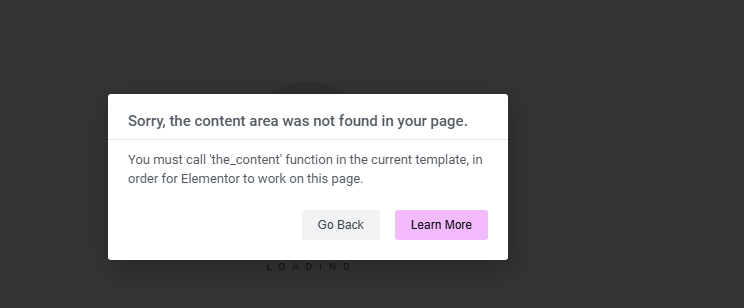
the_content() 是干什么用的?
the_content() 是 WordPress 中最基本也最关键的函数之一。它的作用是将文章或页面的主体内容输出在模板中。比如后台编辑器中写的段落、图片、短代码等,都会通过它在前台展示出来。
如果在自定义模板里省略了这个函数,WordPress 前台虽然加载了页面,但正文内容是不会显示的。这对于依赖 the_content() 输出内容的插件(例如 Elementor)来说,会造成严重影响。
出现问题的常见场景
- 自定义了 page.php 或 single.php 模板,却没有加
the_content() - 用 Elementor 编辑某个页面时加载失败
- 页面预览时内容区域是空的
- 页面生成的 HTML 中,主体部分是
<main></main>,中间什么都没有
![图片[2]-在自定义 PHP 模板中正确添加 the_content() 消除 Elementor 报错](https://www.361sale.com/wp-content/uploads/2025/06/20250612170521994-image.png)
这些问题大多数可以追溯到一个原因:模板结构不完整。
正确添加 the_content() 的位置
在自定义模板文件中,the_content() 应该出现在主体容器的内部。推荐结构如下:
<main id="main" class="site-main">
  <?php
    if ( have_posts() ) {
      while ( have_posts() ) {
        the_post();
        the_content();
      }
    }
  ?>
</main>
![图片[3]-在自定义 PHP 模板中正确添加 the_content() 消除 Elementor 报错](https://www.361sale.com/wp-content/uploads/2025/06/20250612165030938-image.png)
这个结构的核心点在于:
- 使用了 WordPress 的
have_posts()和the_post()循环 the_content()被包含在主循环内- 放在
<main>或<div class="content-area">这样的容器中,便于主题或插件识别
示例:自定义页面模板加入 the_content()
假设你有一个自定义页面模板文件 template-custom.php,应该这样处理:
<?php
/**
 * Template Name: Custom Page
 */
get_header(); ?>

<main id="main" class="site-main">
  <?php
    if ( have_posts() ) {
      while ( have_posts() ) {
        the_post();
        the_content();
      }
    }
  ?>
</main>

<?php get_footer(); ?>
保存后重新访问页面或进入 Elementor,即可恢复内容加载。
小提示:不要替代性使用 get_the_content()
有些人可能会误用 get_the_content(),但这个函数只是返回原始内容字符串,不会自动处理短代码、嵌套区块等,也不会被 Elementor 等插件识别。要显示渲染后的完整内容,用 the_content()。
如何检查主题文件是否遗漏 the_content()
- 打开你当前使用主题的
page.php或single.php
![图片[4]-在自定义 PHP 模板中正确添加 the_content() 消除 Elementor 报错](https://www.361sale.com/wp-content/uploads/2025/06/20250612170839764-image.png)
- 搜索
the_content()是否存在 - 如果是用子主题,记得查看是否覆盖了父主题模板
- Elementor 报错时,配合 Debug 模式开启(wp-config.php 中设置
WP_DEBUG为 true)
![图片[5]-在自定义 PHP 模板中正确添加 the_content() 消除 Elementor 报错](https://www.361sale.com/wp-content/uploads/2025/06/20250612171237273-image.png)
结论
在 WordPress 自定义开发中,很多问题看似复杂,其实源头非常简单。如果你用 Elementor 构建页面,建议始终确认主题或自定义模板中包含了这个函数。这样能保证内容正常显示,也会避免了很多意料之外的排版和功能错误。
最近更新
THE END


















![表情[wozuimei]-361Sale WordPress Care](https://www.361sale.com/wp-content/themes/zibll/img/smilies/wozuimei.gif)

![表情[baoquan]-361Sale WordPress Care](https://www.361sale.com/wp-content/themes/zibll/img/smilies/baoquan.gif)




暂无评论内容