





![Image[1]-Comprehensive Tutorial: How to Implement and Customize Breadcrumb Navigation in WordPress Using RankMath - Photon Fluctuation Network | Professional WordPress Repair Service, Global Reach, Fast Response](https://www.361sale.com/wp-content/uploads/2024/07/2024072602474262.png)
If you install theRankMath SEOplugin, you can use the breadcrumbs it provides (Breadcrumbs) Features. While the free version of RankMath SEO usually implements breadcrumb functionality via shortcodes, the RankMath SEO Pro version offers breadcrumb elements integrated into Elementor, allowing you to edit its appearance via Elementor. This article will detail a tutorial on using RankMath breadcrumbs to help you better implement and customize breadcrumb navigation in your website.
RankMath Breadcrumb Settings Explained
Before using it, let's go through the breadcrumb setting options in RankMath SEO plugin. You can set the breadcrumbs in the RankMath SEO plugin's [General Settings] to find the Breadcrumb Settings option.
Step 1: Turn on the breadcrumb feature
First, make sure the breadcrumb feature is on:
- Enter RankMath SEO's [General Settings]
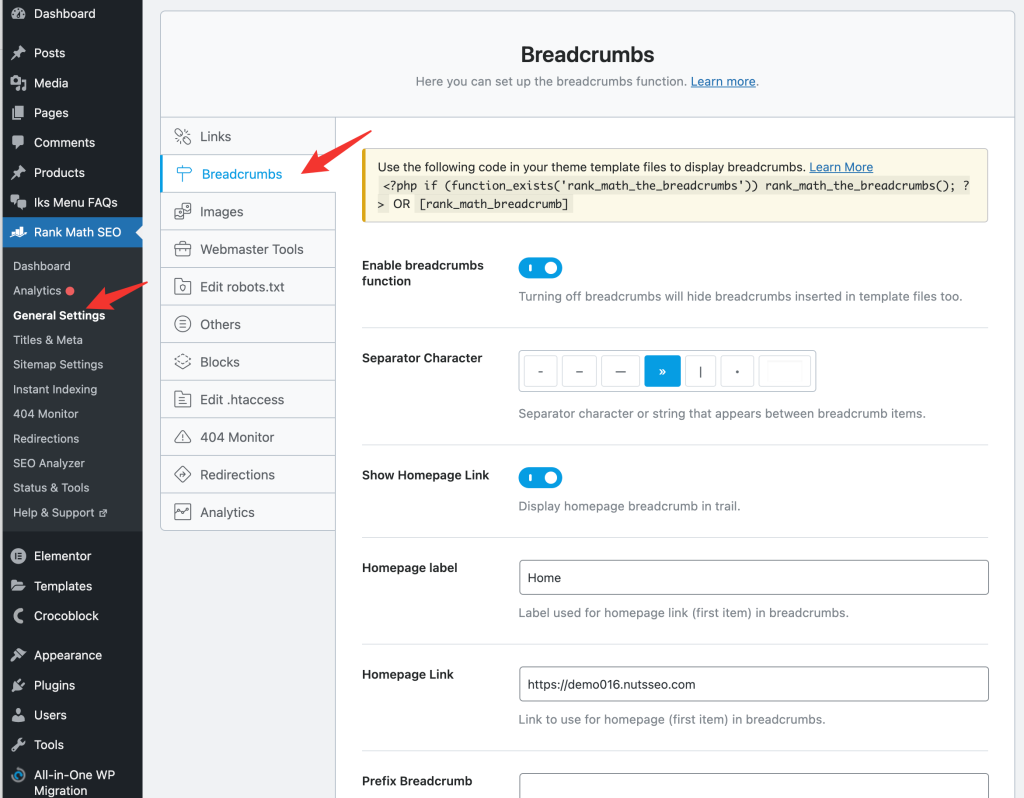
- Find the Breadcrumb Settings option and set it to On.

Step 2: Setting the Breadcrumb Separator
The separator is used to separate between breadcrumb levels. Set the separator to your liking, which can be customized in the text box.

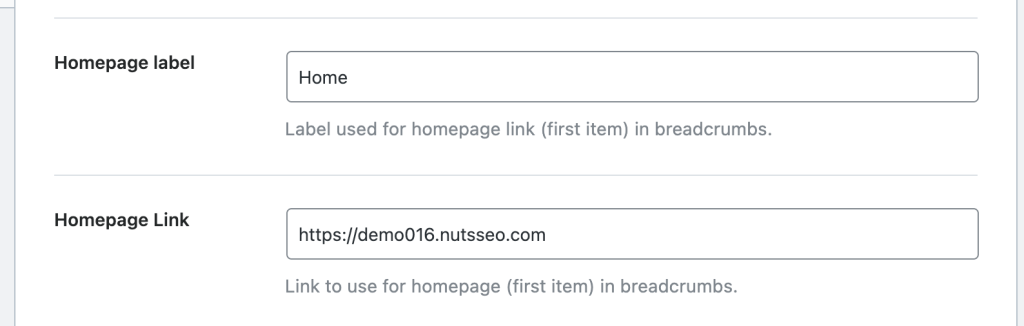
Step 3: Set the home page label and home page link address
Home tab and home link address options usuallyKeep the default settings, but if you need to change it, you can edit it. However, it is recommended that you do not change the home page link address so that it does not interfere with navigation.
Step 4: Set the breadcrumb prefix
If you want to get in front of the breadcrumbsAdd icons or other elementsThe following is an example of a program that can be found in thePrefix set inPerform the operation.

Step 5: Set archive format, search result format, 404 tag options
These options are used to set what breadcrumbs are displayed in archives, search results, and 404 pages. The default settings are usually sufficient, but you can customize them as needed.

Step 6: Hide the Post title
This option hides the names of pages, articles and products and is not recommended to be turned on.

Step 7: Show Categorization Options
When this option is turned on, the name of the category will be displayed in the breadcrumbs, it is recommended to turn it on to reflect the hierarchical relationship.

Step 8: Hide Taxonomy Options
Turning on this option hides the names of the taxonomies, it is recommended to turn it on to streamline the breadcrumbs.

Once you have completed the above settings, remember to save all changes.
RankMath SEO Free Edition Breadcrumbs Tutorial
1、Breadcrumb function through shortcode
The free version of RankMath SEO offers a breadcrumb feature, which you can use in [General Settings] is set in and the breadcrumb element is called by code or shortcode.
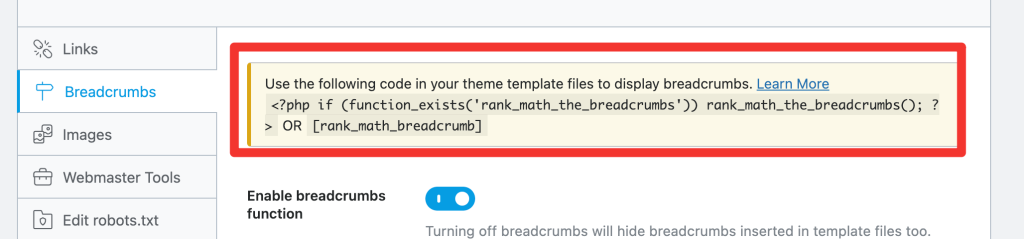
In the Elementor editor, use the ShortCode element to paste the shortcode into the location where you want the breadcrumbs to appear:
The RankMath SEO breadcrumb shortcode is usually as follows:
[rank_math_breadcrumb]Just paste this shortcode into the ShortCode element of the Elementor.
![Image [11] - Comprehensive Tutorial: How to Implement and Customize Breadcrumb Navigation in WordPress Using RankMath - Photon Fluctuation Network | Professional WordPress Repair Service, Global Reach, Fast Response](https://www.361sale.com/wp-content/uploads/2024/07/2024072603000980.png)
2、Customize breadcrumb style
Breadcrumbs added via shortcode follow the theme's color and font style by default. If you want to customize the style, you can do so through CSS code. Below is a sample code:
/* Modify the color and font style of links in breadcrumbs */
selector.rank-math-breadcrumb a{
    color: #ffdc11.
    font-size: 16px; }
}

/* Modify the color and font style of separators in breadcrumbs */
selector.rank-math-breadcrumb .separator{
    color: #ffffff.
    color: #ffffff; font-size: 20px;
}

/* Modify the color and font style of the last content title text in the breadcrumb */
selector.rank-math-breadcrumb .last{
    color: #ffffff.
    last{ color: #ffffff; font-size: 16px; }
}
Paste the above code into the Advanced setting of the Elementor ShortCode element.
3, the global application of CSS styles
If you wish to apply the same style throughout the site, you can place the code on the site [exterior condition]-[customizable]-[Custom Code] in the code, remove the code before theselector, as shown below:
/*Modify the color and font style of links in breadcrumbs**/
.rank-math-breadcrumb a{
    color: #ffdc11.
    font-size: 16px.
}
/*Modify separator color and font style in breadcrumbs**/
.rank-math-breadcrumb .separator{
color: #ffffff.
font-size: 20px.
}/*Modify the color and font style of the last content title text in the breadcrumbs**/
.rank-math-breadcrumb .last{
color: #ffffff.
font-size: 16px.
}RankMath SEO Pro Edition Breadcrumbs Tutorial

Breadcrumb elements integrated into Elementor
RankMath SEO Proversion offers easier integration of breadcrumb elements. First, make sure you have the RankMath SEO Pro plugin installed in your site.
- Find the RankMath SEO breadcrumb element in Elementor's Element Library and drag and drop it to the location on the page where the breadcrumbs need to be displayed.
- In the Content setting of the Breadcrumbs element, you can adjust the element centering and modify the HTML tags.
- In Style settings, you can change the breadcrumb font, text color, link color, and link hover color.
![Image [13] - Comprehensive Tutorial: How to Implement and Customize Breadcrumb Navigation in WordPress using RankMath - Photon Fluctuation Network | Professional WordPress Repair Service, Global Coverage, Fast Response](https://www.361sale.com/wp-content/uploads/2024/07/2024072603035356.png)
Frequently Asked Questions
Why is the Enable breadcrumbs function option grayed out?
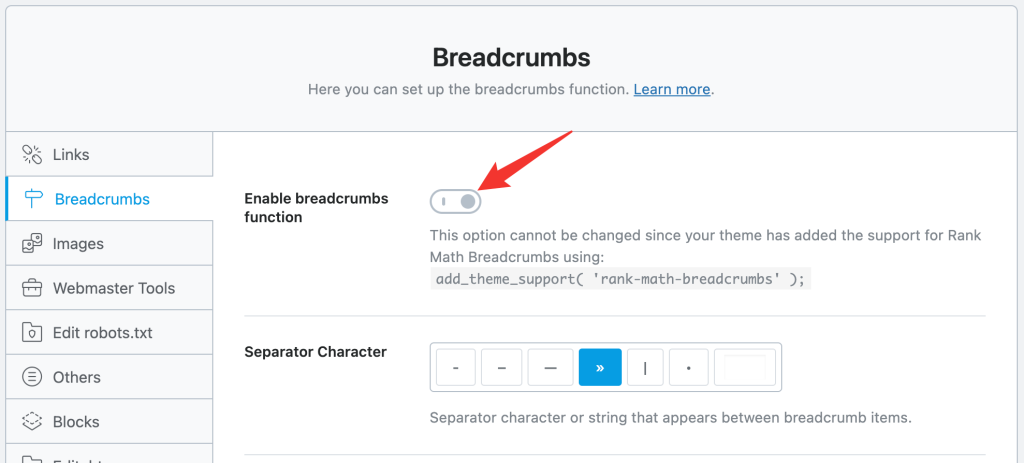
This is because your theme has enabled support for RankMath breadcrumbing, for exampleAstra ThemeIt will force the breadcrumbs feature of RankMath SEO to be turned on. This does not affect the use of breadcrumbs, just that the setting options cannot be modified. There is no need to worry or do additional processing.
With the above tutorial, you should be able to successfully configure and customize RankMath SEO's breadcrumb feature in your own website, whether it's the free version or the Pro version.

Link to this article:https://www.361sale.com/en/14704The article is copyrighted and must be reproduced with attribution.


















![Emoji[wozuimei]-Photonflux.com | Professional WordPress repair service, worldwide, rapid response](https://www.361sale.com/wp-content/themes/zibll/img/smilies/wozuimei.gif)

![Emoticon[baoquan] - Photon Wave Network | Professional WordPress Repair Services, Worldwide Coverage, Rapid Response](https://www.361sale.com/wp-content/themes/zibll/img/smilies/baoquan.gif)


 简体中文
简体中文  English
  日本語
日本語  Français
  Español


No comments