





When to Change the Default Sidebar in WordPress
a side-bar (in software)is a column on a WordPress website, usually located to the left or right of the main content area.
In a classic WordPress theme, this sidebar is essentially a widget area where various elements can be added using WordPress widgets such asContact form, search bar, social media feed, recent postsetc.
While the block theme does not use widgets, the term "a side-bar (in software)" is still commonly used to describe specific sections where additional content or navigation menu options are typically displayed.
Sometimes it is necessary to change the sidebar. For example, a website may be suitable for languages that are written and read from right to left (e.g. Arabic). Placing the sidebar on the left is more in line with the user's natural reading flow.
Some website designs require specific sidebar placement to achieve a balanced and visually appealing layout.
With that in mind, let's see how to change the sidebar on your WordPress site.
Method 1: How to change the sidebar using WordPress Customizer (Classic Theme)
This method works for users using the Classic theme. This means that it is still possible to use the WordPress Customizer to design the site and the widgets section of the Appearance menu in the WordPress admin area is still present.
If the WordPress dashboard is missing a theme customizer, you may be using a block theme, and we'll talk more about how to change that below.
Sometimes, classic themes offer multiple sidebar positions to choose from. This can be confirmed by using the WordPress Customizer and selecting the preferred sidebar position there.
First, go toAppearance" customization. We useAstra ThemeAs an example.
![Images [1] - How to change the sidebar in WordPress? -Photonflux.com | Professional WordPress repair service, worldwide, fast response!](https://www.361sale.com/wp-content/uploads/2024/09/2024090606100515.png)
Here we see that the Astra theme has a special "a side-bar (in software)"Menu.
Click on it.
![Images [2] - How to change the sidebar in WordPress? -Photonflux.com | Professional WordPress repair service, worldwide, fast response!](https://www.361sale.com/wp-content/uploads/2024/09/2024090606104189.png)
As you can see in the picture, Astra has three page templates: one without a sidebar, one with a left sidebar and one with a right sidebar. This way we can change the sidebar with just one click. Here, we have changed the sidebar to the left side.
Astra also provides options to change the sidebar style, adjust the width and make it sticky.
![Image [3] - How to change the sidebar in WordPress? -Photonflux.com | Professional WordPress repair service, worldwide, fast response!](https://www.361sale.com/wp-content/uploads/2024/09/2024090606111218.png)
After completing the changes, you can add the available widgets to the sidebar as usual.
Then, simply click "post"Just do it.
Related to the theme, it's best to look at the theme documentation.
Method 2: How to change the sidebar using FSE (Block Theme)
If using a block theme, the widget section will not be seen in the WordPress admin area. How do I change the sidebar if that menu does not exist?
The good news is that the process is a lot easier compared to classic themes. This is because block themes use Gutenberg blocksYou can use it by simply dragging and dropping the elementFull Site Editor (FSE)Change its position.
Secondly, block themes usually have a template that contains a sidebar. We change it and every page that uses that template is affected.
To demonstrate, we're using the Twenty Twenty-Four theme, which happens to have a page with a sidebar template.
First, go to the dashboard in theAppearance" editor.
![Images [4] - How to change the sidebar in WordPress? -Photonflux.com | Professional WordPress repair service, worldwide, fast response!](https://www.361sale.com/wp-content/uploads/2024/09/2024090606181896.png)
Here, you will see some menus for customizing the block theme.
option"Template".
![Image [5] - How to change the sidebar in WordPress? -Photonflux.com | Professional WordPress repair service, worldwide, fast response!](https://www.361sale.com/wp-content/uploads/2024/09/2024090606294730.png)
Now, find the sidebar template you want to edit.
In Twenty Twenty-Four, the two options are "Pages with sidebars"and"Individual pages with sidebars". Depending on the theme, the template name may not explicitly mention that it has a sidebar, and it's best to read more of the theme documentation.
Continue and select this sidebar template.
![Image [6] - How to change the sidebar in WordPress? -Photonflux.com | Professional WordPress repair service, worldwide, fast response!](https://www.361sale.com/wp-content/uploads/2024/09/2024090607042756.png)
On the next page, a pencil can be seen "compiler"Button.
Click to open the block editor.
![Image [7] - How to change the sidebar in WordPress? -Photonflux.com | Professional WordPress repair service, worldwide, fast response!](https://www.361sale.com/wp-content/uploads/2024/09/2024090607043953.png)
Typically, block themes will contain sidebars and main content areas in column blocks. This keeps all content neat, organized, and spaced appropriately.
To changeSide of the sidebar, select the columns that make up the sidebar and move it.
The easiest way to do this is to click on the left side of the page "List View"Function.
Then, click "columns" block expands it and hovers over its contents until it finds the column containing the sidebar element.
In our case, the Twenty Twenty-Four theme has a theme called "a side-bar (in software)" part of the template, so it's easy to recognize it. That said, some themes may only contain a set of regular, unnamed blocks that make up the sidebar.
When the sidebar's entire block group is surrounded by theRectangle Highlightrespond in singingtoolbar (in computer software)When it does, it indicates that the correct column has been chosen.
![Image [8] - How to change the sidebar in WordPress? -Photonflux.com | Professional WordPress repair service, worldwide, fast response!](https://www.361sale.com/wp-content/uploads/2024/09/2024090607044942.png)
Now, in the toolbar of the sidebar, you will see arrows that can be used to change the position of the columns.
Click on it to adjust the position to the right place depending on how the column block is designed.
![Image [9] - How to change the sidebar in WordPress? -Photonflux.com | Professional WordPress repair service, worldwide, fast response!](https://www.361sale.com/wp-content/uploads/2024/09/2024090607050380.png)
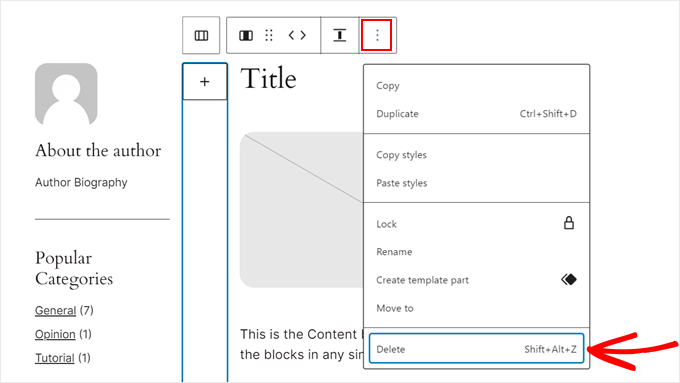
The theme developer added some empty columns to create space between the main content area and the sidebar area.
To delete it, use the List View feature as before to find the correct empty column. Then, on the block toolbar, click thethree-point menuand select "removing".
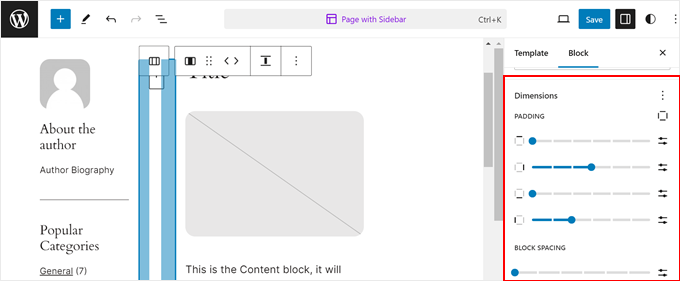
Or, if you want to leave more space between the sidebar area and the content area, then you can turn on the "Block" Settings taband switch to "type"Part.
Then, in "sizes" section, you can drag the sliders for fill, margins, or block spacing.
When finished, click "save (a file etc) (computing)".
You can then preview all the pages that use the template you just edited on your phone and computer to see how it will be displayed.
![Image [12] - How to change the sidebar in WordPress? -Photonflux.com | Professional WordPress repair service, worldwide, fast response!](https://www.361sale.com/wp-content/uploads/2024/09/2024090607055810.png)
What if a template has been edited but the page or post doesn't use it?
It's also relatively simple to open the page or post in the block editor. Then, in the post settings panel, click "templates" field and select the link in the "Exchange of templates".
![Image [13] - How to change the sidebar in WordPress? -Photonflux.com | Professional WordPress repair service, worldwide, fast response!](https://www.361sale.com/wp-content/uploads/2024/09/2024090607054337.png)
Now, choose to use the sidebar template.
After that, the page or post can be updated.
![Image [14] - How to change the sidebar in WordPress? -Photonflux.com | Professional WordPress repair service, worldwide, fast response!](https://www.361sale.com/wp-content/uploads/2024/09/2024090607053583.png)
That's it for today's Changing Sidebars in WordPress, it's all relatively simple. In addition to the two methods described above, you can alsoChanging the sidebar manually with CSS coderespond in singingChanging the Sidebar with a WordPress Plugin. These two methods are left out because it is more strenuous for newbies. Especially modifying the sidebar using custom code is more technically demanding. Of course, all of you have any questions. It can all be answered in our "Question and Answer Community"and"Communities of exchange"Leave a message and we'll all respond in unison.

Link to this article:https://www.361sale.com/en/19004The article is copyrighted and must be reproduced with attribution.






















![Emoji[wozuimei]-Photonflux.com | Professional WordPress repair service, worldwide, rapid response](https://www.361sale.com/wp-content/themes/zibll/img/smilies/wozuimei.gif)

![Emoticon[baoquan] - Photon Wave Network | Professional WordPress Repair Services, Worldwide Coverage, Rapid Response](https://www.361sale.com/wp-content/themes/zibll/img/smilies/baoquan.gif)


 简体中文
简体中文  English
  日本語
日本語  Français
  Español


No comments