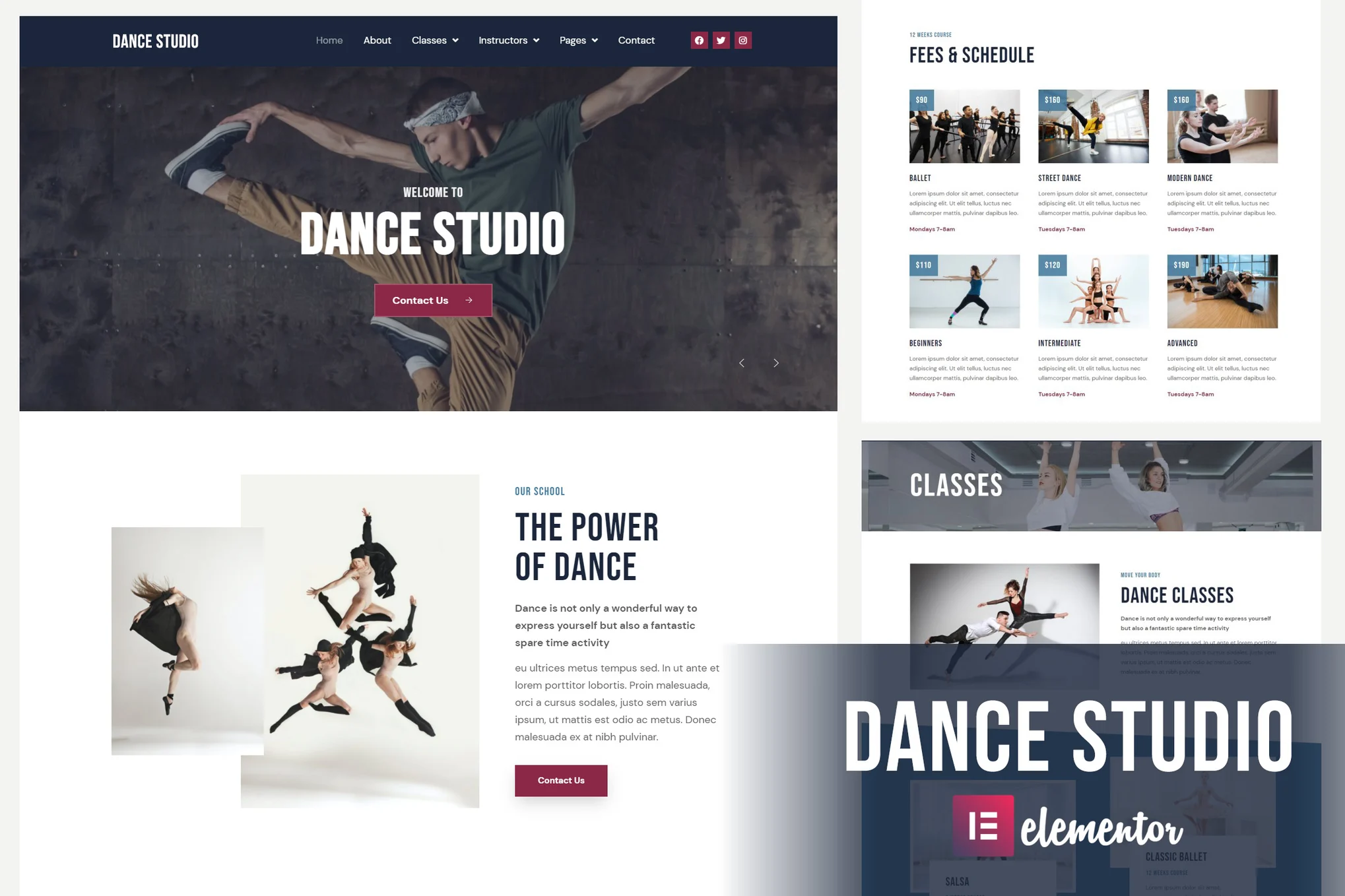





Dance Studio is an Elementor template suite designed for dance-related websites, allowing for quick website creation using the Elementor plugin for WordPress. It's fully responsive, includes 13 pre-made templates, is easy to use, and is recommended for use with the Hello Elementor Themes are paired, but most Elementor themes are also supported.
![Image[1]-Dance Studio - Introducing Elementor Template Suite - Photon Flux | Professional WordPress Repair Service, Global Reach, Fast Response](https://www.361sale.com/wp-content/uploads/2024/12/20241216165958752-_20241216165553.png)
![Image [2]-Dance Studio - Introduction to Elementor Template Suite - Photon Flux | Professional WordPress Repair Service, Global Reach, Fast Response](https://www.361sale.com/wp-content/uploads/2024/12/20241216165958154-_20241216165547.png)
Template Features
- Clean and modern design
- 100% Responsive
- Easy to edit, support global style modification
- Built-in Google Fonts
Function Highlights
- True no-code customization, drag-and-drop visual editing
- Unified management of global fonts and color schemes
- Modern professional design, fast loading
- Compatible with most Elementor themes
Required plug-ins(Automatically installed when the kit is installed)
- Elementor
- Prime Slider
- Elementor - Header, Footer & Blocks
- MetForm
- Essential Addons for Elementor
- Premium Addons for Elementor
Installation steps
1.Installation Templates
- Activate the Envato Elements plug-in to load templates from the Premium Kits library.
- Or manually upload the downloaded ZIP file (no need to unzip it) via the "Import Suite" button.
- Make sure to activate the required plugins by clicking "Install required plugins" before importing the template.
2.Importing MetForm Forms
- After importing the MetForm2Go module template, edit the relevant page and locate the MetForm2Go widget via Navigator.
- Select "New Form" and go to the form editor, load the imported form template and customize it, then save it.
3.Setting the global header and footer
- Import the header and footer templates, go to "Appearance > Header Footer" to add a new header/footer, choose to display it site-wide and save it.
- Use Elementor to edit the header or footer, load the template and update it.

© Reprint statement
This article was written by Banner1
Link to this article:https://www.361sale.com/en/30638The article is copyrighted and must be reproduced with attribution.
THE END





















![Emoji[wozuimei]-Photonflux.com | Professional WordPress repair service, worldwide, rapid response](https://www.361sale.com/wp-content/themes/zibll/img/smilies/wozuimei.gif)

![Emoticon[baoquan] - Photon Wave Network | Professional WordPress Repair Services, Worldwide Coverage, Rapid Response](https://www.361sale.com/wp-content/themes/zibll/img/smilies/baoquan.gif)


 简体中文
简体中文  English
  日本語
日本語  Français
  Español


No comments