






At a time when the competition for website traffic is white-hot, SEO is the key to breaking through. As a tool in the WordPress ecosystem that covers the entire chain of optimization, theRank MathWith zero threshold operation and accurate SEO diagnostic functions, it has become a practical tool for webmasters. This article reveals the complete enhancement path from keyword layout to technical optimization by disassembling its core modules.

1. How to set up and use the Rank Math plugin
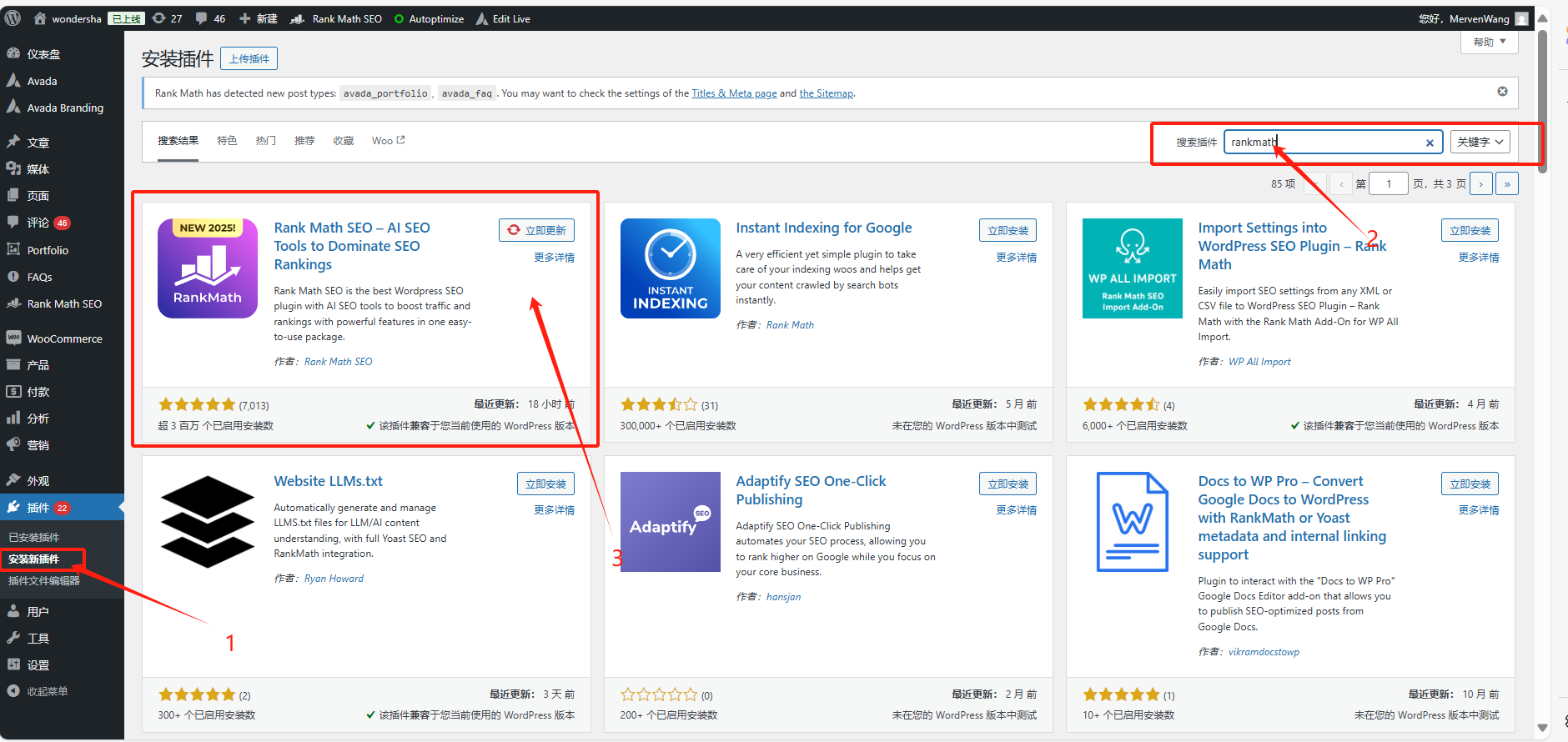
Step 1: Install Rank Math Plugin
- Log in to your WordPress backend.
- In the left menu select "plug-in (software component)" > "Installation of plug-ins".
- Search for "Rank Math" and click on "Installation".
- After the installation is complete, click "start using"Button.
2. Core function one:XML Sitemap
XML Sitemapis key to helping search engines index site content more efficiently.Rank Math automatically generates a sitemap for you with detailed customization options.
How to use:
- In the WordPress backend, select "Rank Math" > Enable "Sitemap"Function.
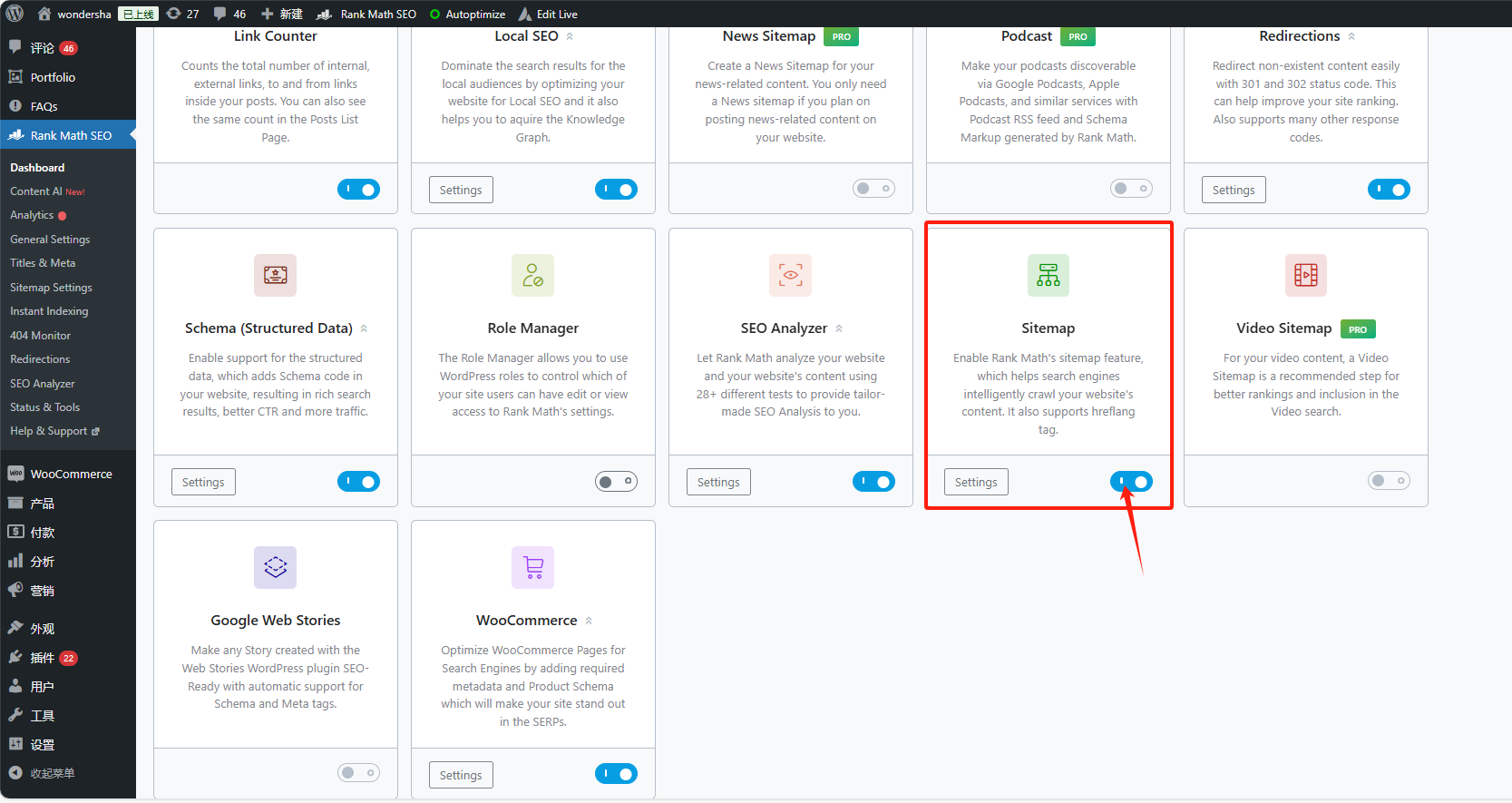
- Enable "HTML sitemap", action: "Rank Math" > "Sitemap" > Enable "HTML sitemap"Function.

3. Core Feature 2: Meta Description & Google Previews
Rank Math can customize Meta descriptions for each of your posts and pages withGoogle Internet companyPreview feature to help you optimize the display of your page in search engine results.
How to use:
- When editing a post or page, scrolling to theRank Math(used form a nominal expression)SEOModule.
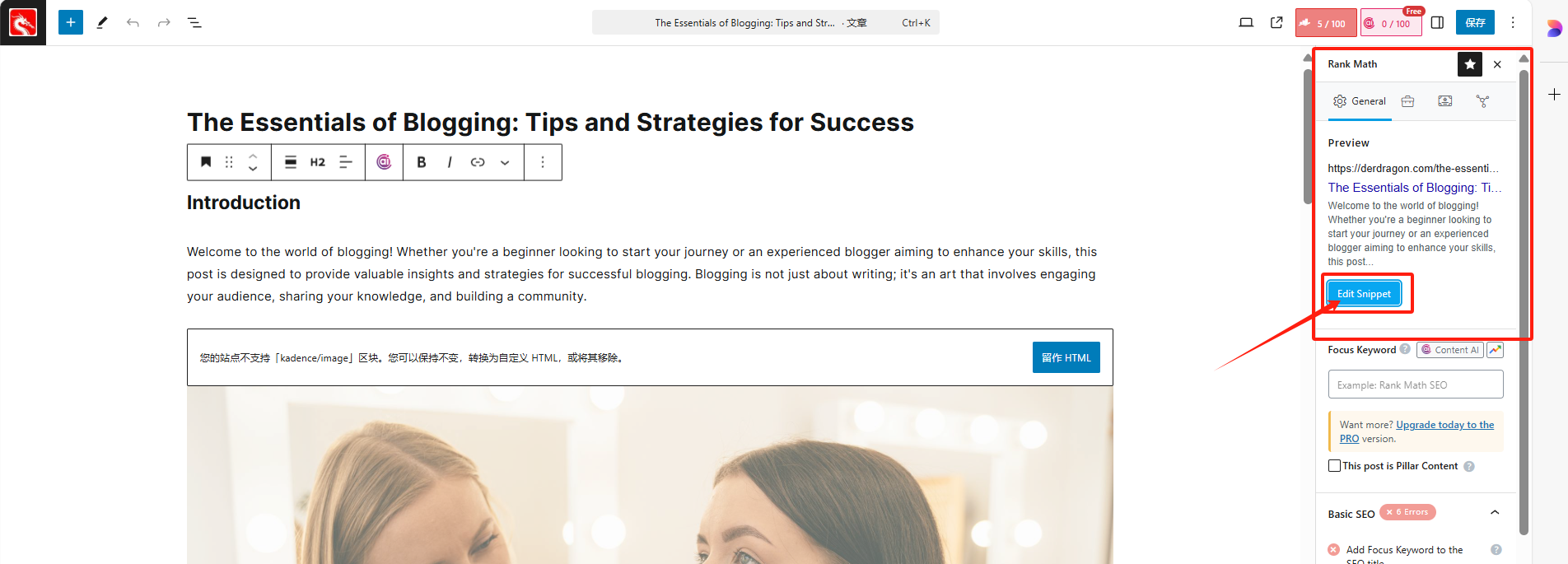
- In "Edit Snippet"Click through and enter the description you want to display here.
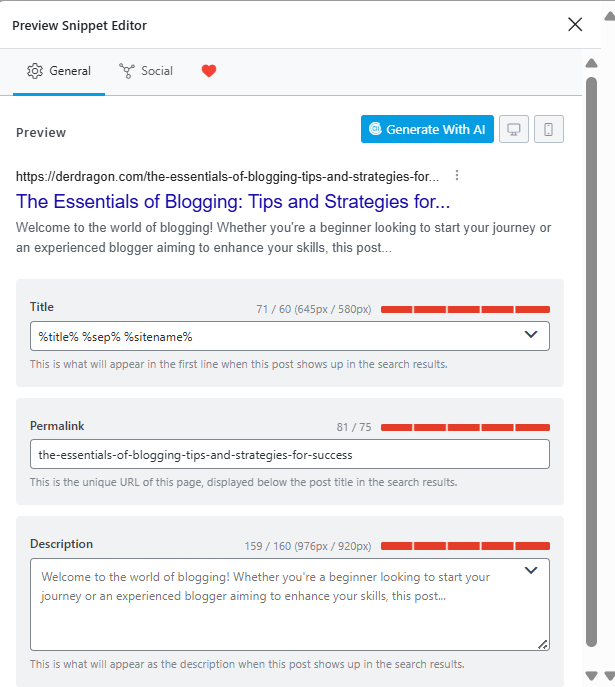
- See how the Meta description will appear in search results with Google Preview.

- Modify as needed to ensure descriptions are concise and in line with SEO best practices.
Optimizing Meta descriptions not only improves click-through rates, but also increases page exposure.
4. Core Function 3: Focus Keywords, SEO Score and Optimization Advice
Rank Math provides focused keyword functionality for each page and provides real-time optimization recommendations based on page content and keyword usage.
How to use:
- When editing a page or post, select your "Focus Keywords".
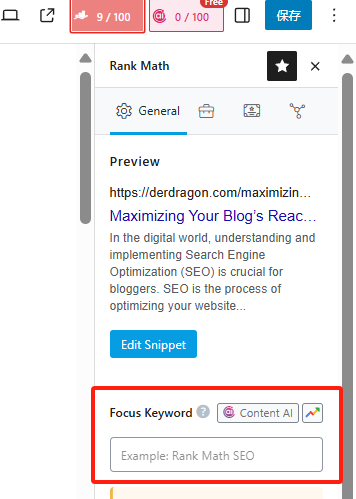
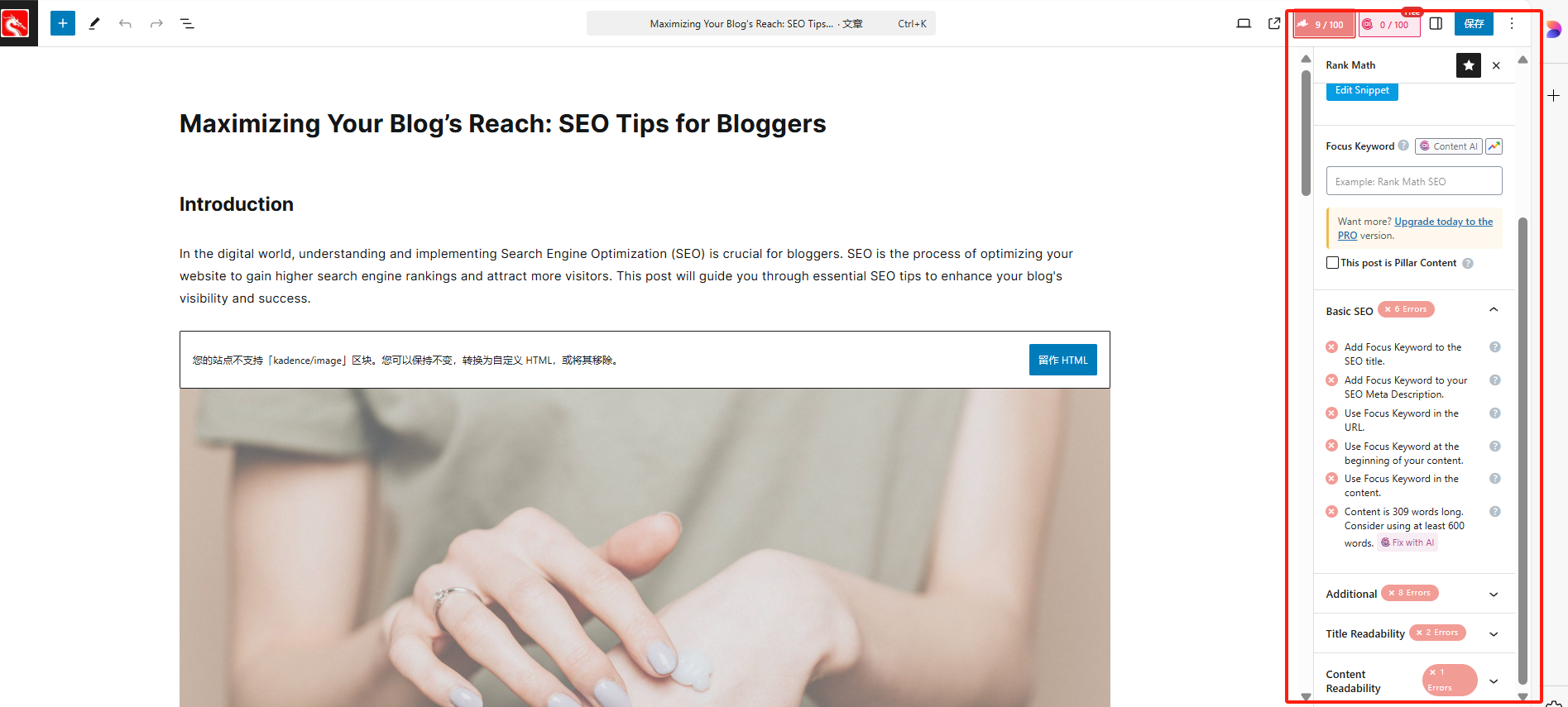
- Rank Math automatically analyzes the page content and displays the SEO score in the "SEO Analysis" module.
- Tweak your content to optimize keyword usage, internal linking, etc. based on Rank Math's real-time recommendations.
- Make changes as suggested until SEO scores are optimal.
- 81+ (green): this score means your article has met basic SEO optimization and is ready to publish.
- 51-80 (yellow): this score indicates that your article still has a lot of room for improvement and SEO optimization is not done sufficiently.
- Below 50 (red): a red score means you are not following basic SEO optimization principles and need to improve immediately.
5. Core Function Four: Redirection Manager
A 404 error page in your website not only affects the user experience, but can also hurt SEO rankings.Rank Math has a redirect manager feature that can help you avoid these problems.
How to use:
- In the WordPress backend, select "Rank Math" > "Redirections", click on "Add New" to add a new redirect.
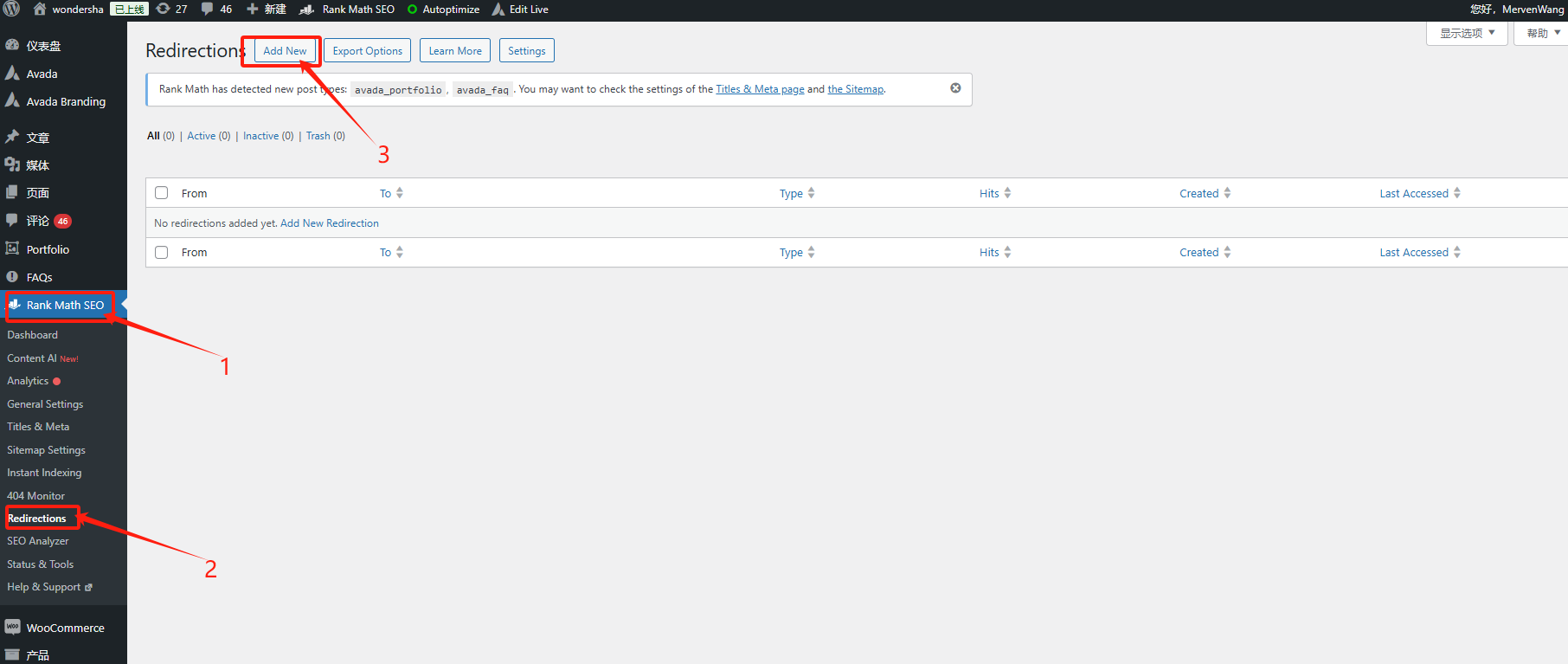
- Enter "Source URL" (i.e., the page that the user accessed with an error) and "Target URL" (i.e. the valid page you wish to redirect to).

- Select the 301 Permanent Redirect or 302 Temporary Redirect type and save.
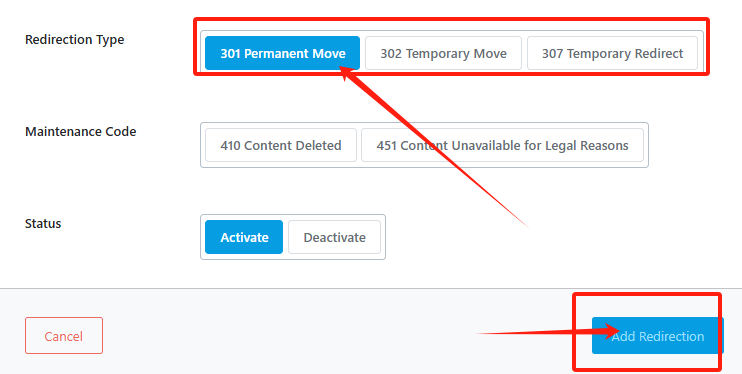
By using a redirect manager, you can easily avoid 404 error pages and improve your website's user experience and SEO performance.
6. Core function five: 404 error monitoring
Rank Math also offers404 errorMonitoring to help you keep track of all 404 error pages on your website and ensure that invalid links are fixed in a timely manner.
How to use:
- In the WordPress backend, select "Rank Math" > "404 Monitor" to see all the 404 error pages that appear on your website.
- Depending on the frequency and importance of the page's appearance, choose to either fix it or set up a redirect.

Handling 404 errors in a timely manner not only improves the user experience, but also helps to avoid these errors from affecting your site's search rankings.
7. Core Function 6: Image SEO Optimization
Rank Math can help you automatically optimize the images in your website to enhance theSEO Performance of Images. You can add ALT tags to each image to help search engines understand the content.
How to use:
- In the WordPress backend, select "Rank Math" > "General Setting" > "Images".
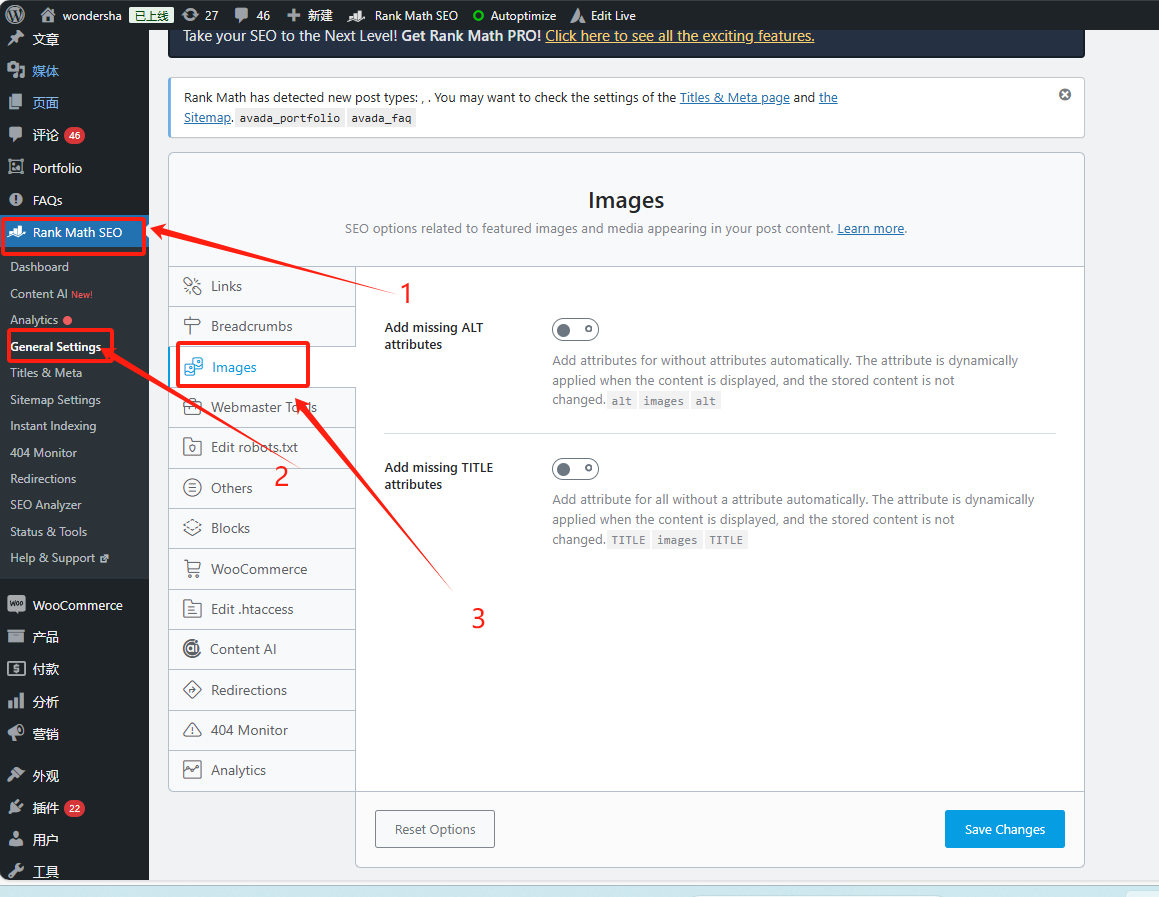
- Enable"Add missing ALT attributes" function, so that Rank Math will automatically add ALT text to images without ALT tags.
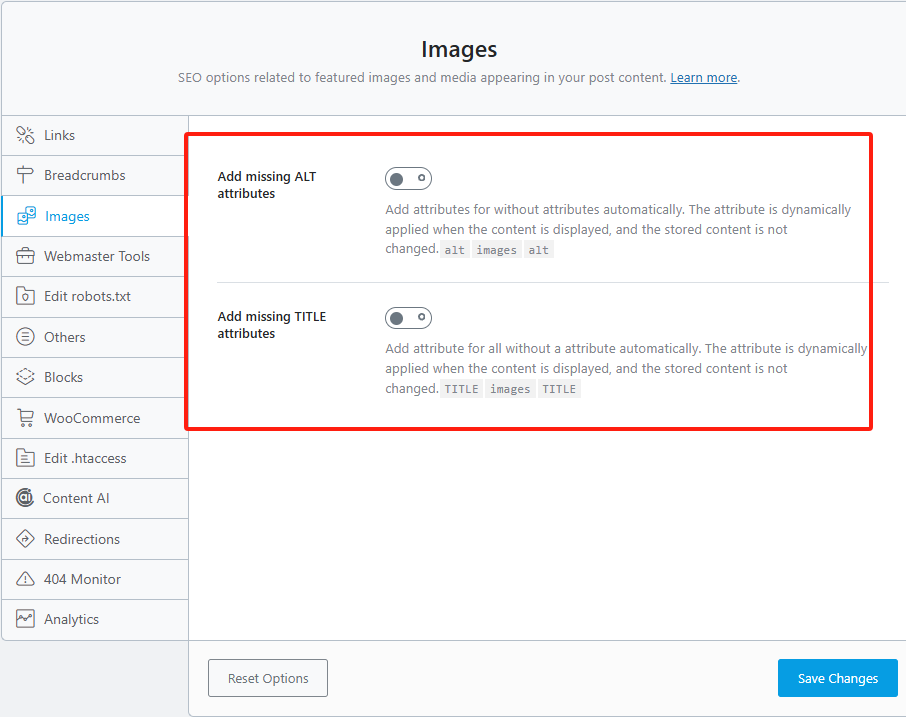
Optimizing image SEO improves the exposure of images in search engines and further improves the overall SEO of your website.
8. Core Function 7: Content AI Analysis and Optimization
Rank Math's Content AI Analytics feature helps you optimize on-page content in real-time to ensure that it complies with SEO best practices.
How to use:
- In the article or page'sRank Math SEOmodule to enable the Content AI feature.
- Rank Math analyzes page content in real time and provides optimization recommendations.
- Adjust keyword density, content structure, internal linking, etc. based on Rank Math's feedback.
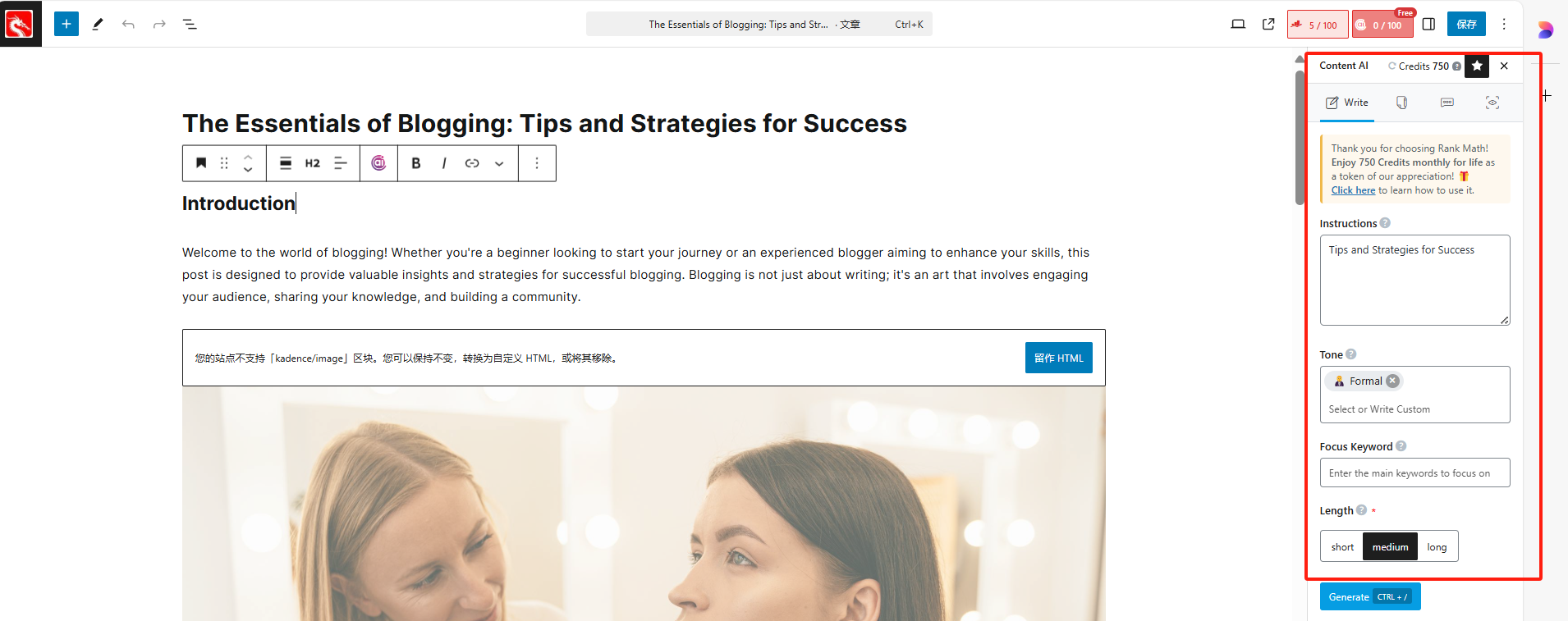
With the Content AI feature, you can ensure that the quality of your content is constantly improving for optimal SEO results.
summarize
Rank Math offers a range of powerful SEO features for WordPress websites, fromXML Sitemap,Meta description optimizationup toredirect management,404 Error Monitoringetc., all of which can help you effectively improveSEO performance. With these core features, you can easily optimize every detail of your website, improve search engine rankings and increase website traffic.

Link to this article:https://www.361sale.com/en/34911The article is copyrighted and must be reproduced with attribution.



















![Emoji[wozuimei]-Photonflux.com | Professional WordPress repair service, worldwide, rapid response](https://www.361sale.com/wp-content/themes/zibll/img/smilies/wozuimei.gif)

![Emoticon[baoquan] - Photon Wave Network | Professional WordPress Repair Services, Worldwide Coverage, Rapid Response](https://www.361sale.com/wp-content/themes/zibll/img/smilies/baoquan.gif)


 简体中文
简体中文  English
  日本語
日本語  Français
  Español


No comments