






expense or outlay Elementor When building your pages, you sometimes encounter an issue where the editor fails to load, the preview page goes blank, and the prompt fails to find content. This is most likely due to the PHP templates in the theme missing core functions! the_content() The call.
This post takes you through what this function does, and how to customize the template in theCorrectly addedIt prevents Elementor from reporting errors or failing to render content.
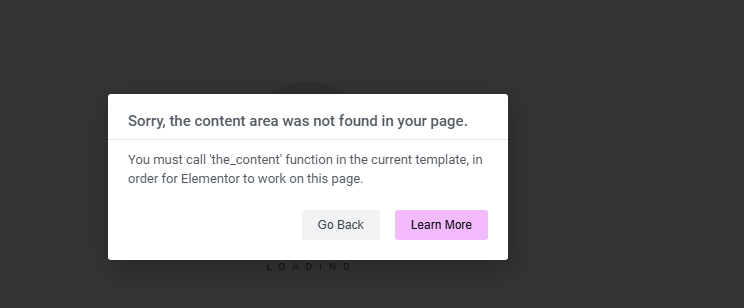
What does the_content() do?
the_content() is one of the most basic and critical functions in WordPress. Its role is to output the main content of a post or page in thetemplatesin. For example, paragraphs, images, short codes, etc. written in the backend editor will be displayed in the frontend through it.
If this function is omitted from a custom template, the WordPress frontend loads the page, but the body content is not displayed. This is a very useful feature for those who rely on the the_content() for plugins that output content, such as Elementor, can have a serious impact.
Common scenarios where problems occur
- Customized page.php or single.php templates without adding the
the_content() - Failure to load when editing a page with Elementor
- Content area is empty on page preview
- In the HTML generated by the page, the body is
There's nothing in between.
![Image [2] - Add the_content() correctly in a custom PHP template to eliminate Elementor errors](https://www.361sale.com/wp-content/uploads/2025/06/20250612170521994-image.png)
Most of these problems can be traced back to one cause: an incomplete template structure.
Add the correct location for the_content()
In the custom template file, thethe_content() Should appear in the maincontainersof the interior. The recommended structure is as follows:
</main
![Image [3] - Add the_content() correctly in a custom PHP template to eliminate Elementor errors](https://www.361sale.com/wp-content/uploads/2025/06/20250612165030938-image.png)
The central point of this structure is this:
- Using the WordPress
have_posts()respond in singingthe_post()circulate the_content()Included in the main loop- put together
maybe<div class="content-area">in such a container to make it easy for the theme or plugin to recognize the
Example: Customizing a page template by adding the_content()
Suppose you have aCustomized page templatesfile template-custom.php, should be handled this way:
</main
Save and revisit the page or go to Elementor to resume loading content.
Tip: Don't use get_the_content() instead.
Some people may misuse get_the_content()However, this function just returns the original content string and will not automatically handle shortcodes, nested blocks, etc., nor will it be recognized by plugins such as Elementor. To display the full rendered content, use the the_content()The
How to check if the theme file is missing the_content()
- Open your current theme's
page.phpmaybesingle.php
![Image [4] - Add the_content() correctly in a custom PHP template to eliminate Elementor errors](https://www.361sale.com/wp-content/uploads/2025/06/20250612170839764-image.png)
- look for sth.
the_content()whether or not - If it's withsubthemeRemember to check if the parent theme template is overwritten
- When Elementor reports an error, enable Debug mode (set in wp-config.php).
WP_DEBUG(true)
![Image [5] - Add the_content() correctly in a custom PHP template to eliminate Elementor reporting errors](https://www.361sale.com/wp-content/uploads/2025/06/20250612171237273-image.png)
reach a verdict
In WordPress custom development, a lot of issues that seem complicated actually have a very simple source. If you use Elementor To build a page, it is recommended to always make sure that the theme or custom template includes this function. This will ensure that the content is displayed properly and will avoid a lot of unexpectedtypographicaland functional errors.
Recent Updates

Link to this article:https://www.361sale.com/en/59370/The article is copyrighted and must be reproduced with attribution.












![表情[wozuimei]-光子波动网 | WordPress教程、Elementor教程与故障修复](https://www.361sale.com/wp-content/themes/zibll/img/smilies/wozuimei.gif)

![表情[baoquan]-光子波动网 | WordPress教程、Elementor教程与故障修复](https://www.361sale.com/wp-content/themes/zibll/img/smilies/baoquan.gif)


 简体中文
简体中文  English
  日本語
日本語  Français
  Español


No comments