




Seeing a browser error "ERR_TOO_MANY_REDIRECTS"The first thing that comes to mind is a plugin conflict, a caching issue, or a WordPress setup error. But often the culprit is the seemingly convenient "Flexible Encryption" of Flexible SSL Mode.
This article will take you on a deep dive into why the Flexible mode raises ERR_TOO_MANY_REDIRECTS and how to resolve the issues it causes in the right way.
![Image [1]-ERR_TOO_MANY_REDIRECTS Solution: Flexible SSL Mode Fatal Mistakes and Fixes](https://www.361sale.com/wp-content/uploads/2025/07/20250721185009255-image.png)
What is Flexible SSL Mode?
Accessing the website Cloudflare After that, it will provide four encryption modes:
- Off: No encryption
- Flexible: HTTPS from browser to Cloudflare, HTTP from Cloudflare to server
- Full: HTTPS is used on both the front and back end, but server certificates are not verified
- Full (Strict): HTTPS on both the front and back ends, and validate the server's valid certificate
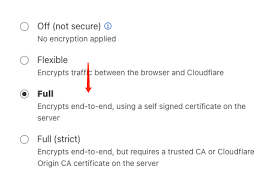
The essence of the Flexible model:
The user sees HTTPS, but there is plaintext HTTP between Cloudflare and the source.
Does this sound like the "best choice for free SSL"? Wrong. This model has serious pitfalls for sites using WordPress or WooCommerce.
II:How does Flexible SSL trigger ERR_TOO_MANY_REDIRECTS?
WordPress via $_SERVER['HTTPS'] Determine whether the current connection is secure (i.e., HTTPS). But in Flexible mode:
- Browser request is HTTPS (Cloudflare receives it as HTTPS)
- Cloudflare forwards to the source as HTTP (the source receives it as HTTP)
So, WordPress mistakenly thinks the current connection is Insecure HTTPThe first step in the process is to force a jump to HTTPS -- which in turn is converted by Cloudflare to HTTP and sent back to the source site, creating aInfinite loop jumpThis is the case when the user's browser reports an error. This situation causes the user's browser to report an error directlyERR_TOO_MANY_REDIRECTS
Three: to determine whether the site in the Flexible "trap"
You can tell if you are using Flexible and experiencing a dead loop by doing the following:
- Websites are accessible when not logged in and redirect infinitely once in the backend or on certain pages

- Site back to normal after Cloudflare shutdown
- WordPress Enabled
https://address, but no real SSL certificate is deployed on the server
- Cloudflare SSL/TLS mode is "Flexible"
IV: Correct Solution: Switch from Flexible to Full or Full (Strict)
Step 1: Deployment at the server SSL Certificate
Recommended Practice:
- Install Let's Encrypt Free Certificate(Most hosts support one-click installation)
- Using Cloudflare's Origin Certificate (for Cloudflare only)
Cloudflare → SSL/TLS → Origin Server → Create Certificate and Deploy to Hosts
Step 2: Toggle Encryption Mode to Full or Full (Strict)
Go to the Cloudflare backend:
- Open Site Settings
- strike (on the keyboard) SSL/TLS → Overview
- Change the encryption mode from Flexible change into Full maybe Full (Strict)
Full (recommended): for sites that have not purchased a commercial certificate
Full (Strict): Suitable for sites with valid certificates (e.g. Let's Encrypt) configured.
Step 3: Ensure that WordPress The address is correct.
In the WordPress backend → Settings → General, make sure:
![Image [6]-ERR_TOO_MANY_REDIRECTS Solution: Flexible SSL Mode Fatal Mistakes and Fixes](https://www.361sale.com/wp-content/uploads/2025/07/20250721184648656-image.png)
- WordPress Address (URL):
https://www.361sale.com - Site address (URL):
https://www.361sale.com
Step 4: Clearing the Cache
- Empty Cloudflare Cache::Cache - clear all cache
- Clear local cache plugin cache (WP Rocket(e.g., W3 Total Cache, LiteSpeed, etc.)
- Clear Browser Cache
V: Summary: Why is the Flexible pattern not recommended?
- Low security: plaintext transfer between Cloudflare and the server
- Easy to cause jump conflicts: especially WordPress judgment protocols rely on server variables
- not conducive SEO: Google recommends using HTTPS for the entire site, as plaintext transfers can cause crawl failures.
- Poor plugin compatibility: WooCommerce, membership systems, payments and other scenarios are prone to triggering circular redirects
proper practice: Configure real SSL certificate → switch to Full (Strict) mode → clear cache → maintain URL consistency.

Link to this article:https://www.361sale.com/en/69005The article is copyrighted and must be reproduced with attribution.










![Emoji[wozuimei]-Photonflux.com | Professional WordPress repair service, worldwide, rapid response](https://www.361sale.com/wp-content/themes/zibll/img/smilies/wozuimei.gif)

![Emoticon[baoquan] - Photon Wave Network | Professional WordPress Repair Services, Worldwide Coverage, Rapid Response](https://www.361sale.com/wp-content/themes/zibll/img/smilies/baoquan.gif)


 简体中文
简体中文  English
  日本語
日本語  Français
  Español


No comments