






By 2025, the evolution of search algorithms will make user experience and behavioral signals indispensable ranking factors.Google leverages multi-dimensional user interaction dataEvaluate whether a website truly meets searchers' needs—and the checkout process is precisely where these behavioral signals converge.
This article explains how checkout processes impact SEO and provides five practical methods to leverage them.Flexible Checkout Fields: Methods for Optimizing the Checkout ProcessTo enhance SEO key behavioral signals.

I. Why Does the Checkout Process Affect SEO Performance?
On the surface, Google cannot directly "see" whether users successfully complete their orders. However, the search engine evaluates the effectiveness of checkout pages through a series of indirect yet measurable behavioral metrics:
- Page dwell time and bounce rate
- Task Completion Rate and Abandonment Rate Along Conversion Path
- Mobile Device Interaction Quality
- Form Submission Success Rate and Error Rate
- Frequency and pattern of returning search results

When Google detects frequent cart abandonment, high bounce rates, or poor mobile experiences on checkout pages, it interprets these signals as "the page fails to meet user needs" or "the user experience is flawed."
Research indicates that checkout processes with the following issues send negative behavioral signals to Google, significantly impacting SEO Performance::
- Excessive fields lead to increased form abandonment rates.
- Mobile-unfriendly design leads to a decline in interaction quality.
- Complex workflows result in multiple page transitions.
- Insufficient validation causes high-frequency submission errors

Two,Flexible Checkout FieldsHow to Optimize Key SEO Behavior Signals
This professional WooCommerce plugin enhances core user behavior that impacts SEO rankings by redesigning the checkout experience to streamline task paths, reduce input effort, and minimize error rates.
Here are the top five optimization strategies with the most significant impact on SEO.
1. Reduce the number of fields and optimize the task completion path.
SEO Impact Mechanism: Google considers high task completion rates as a core metric for high-quality user experience. Reducing unnecessary fields can significantly lower cognitive load, improve process completion rates, and generate stronger behavioral signals.
Flexible Checkout Fields can achieve::
- Hide WooCommerce Default Fields: Merge or Remove "Address Line 2"
- Reduce visual clutter to encourage users to continue filling out the form: Simplify region/zip code validation logic.
- Simplify information input to streamline processes: Remove the "Company Name" field outside B2B scenarios and make "Order Notes" optional instead of required.
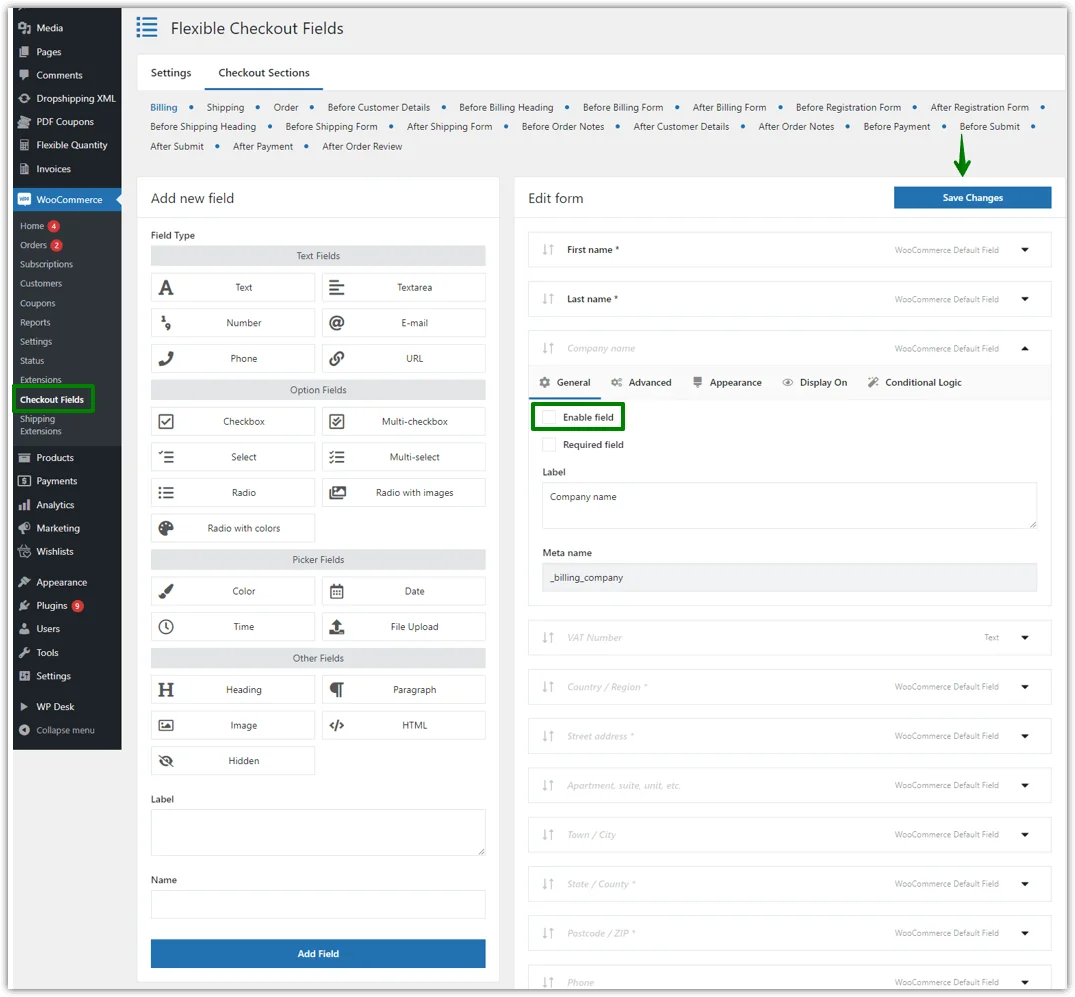
Data Support: A UX study found that for every form field removed, conversion rates increased by an average of approximately 1.51%.(Note: Data sourced from research findings in China Digital Marketing in Practice (by Li Jing, published by China Electronics Press))——These small but cumulative improvements collectively send positive user behavior signals to Google.
2. Smart Suggestion System, Enhancing Page Engagement Quality
SEO Impact Principle: Clear guidance reduces user confusion and improves form completion accuracy, thereby creating smoother, more continuous user sessions—a key factor in Google's evaluation of "page dwell time quality."
Flexible Checkout Fields Solution:
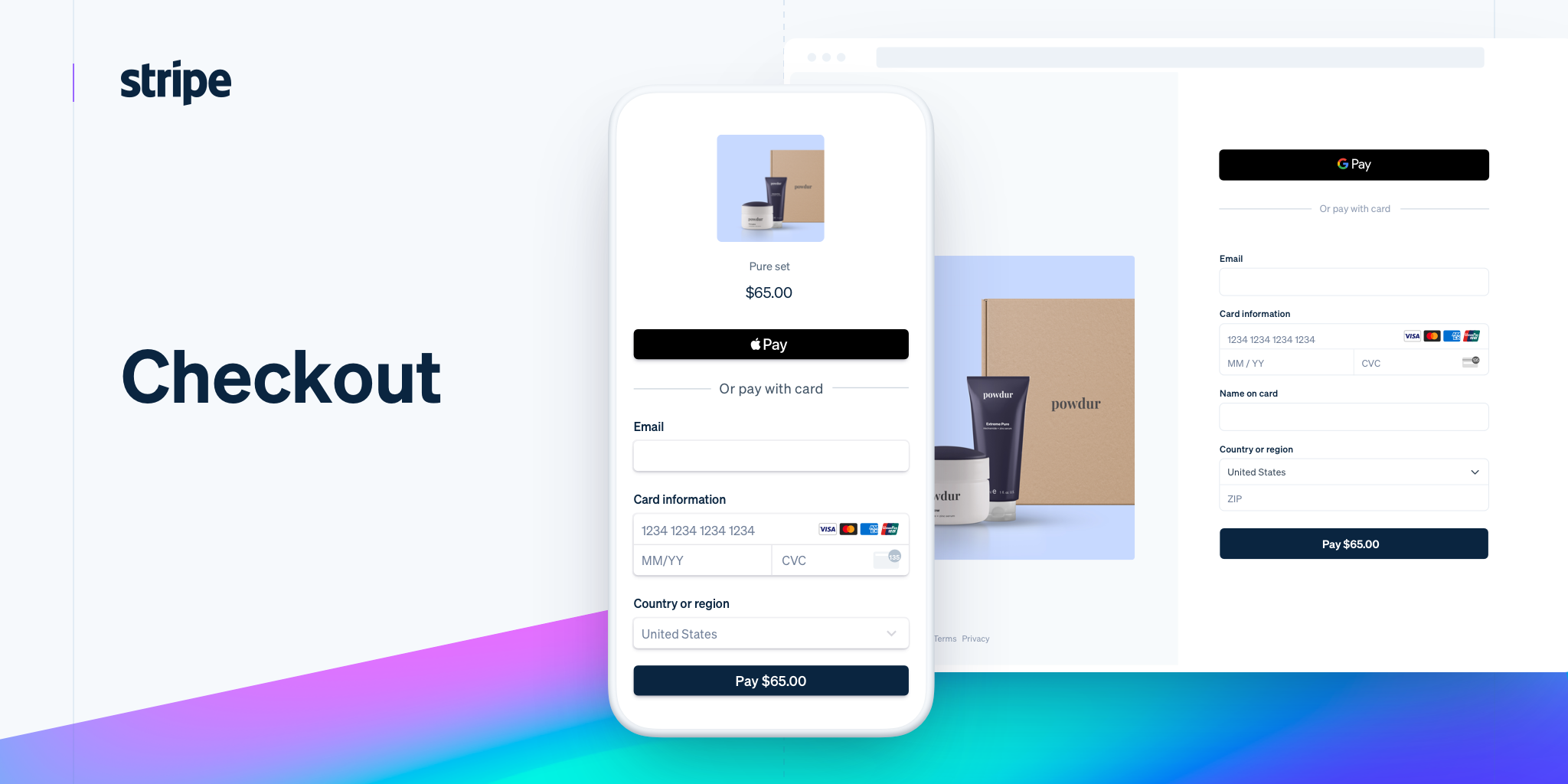
- Reduce input errors: Use sample formats as placeholders within fields, implement real-time validation, and display error messages.
- Enhance the clarity of each field: Add concise descriptive text explaining the purpose of each field.
- Reduce completion time: Provide tooltips for complex fields (e.g., tax ID, special requirements)
![Image [5] - Flexible Checkout Fields: Core Methods to Improve Checkout Experience and SEO](https://www.361sale.com/wp-content/uploads/2025/11/20251120170758836-20251120-170706.png)
Effect Analysis: When users don't need to think about "how to fill it out," the continuity and depth of page sessions improve, resulting in better search signal scores. These are precisely the key behavioral metrics Google uses to evaluate page value.
3. Conditional logic display to reduce information overload
SEO Impact Principle: Dynamically displaying relevant fields can significantly reduce visual clutter, maintain user focus, and lower the likelihood of mid-session abandonment—an effective strategy for reducing bounce rates.
Implementation Scenarios:
- If the user selects "Corporate Purchase" → Display the "Tax ID" field
- If you select "Digital Product" → Hide all shipping fields
- If you select "In-store pickup" → The pickup location selector will appear.
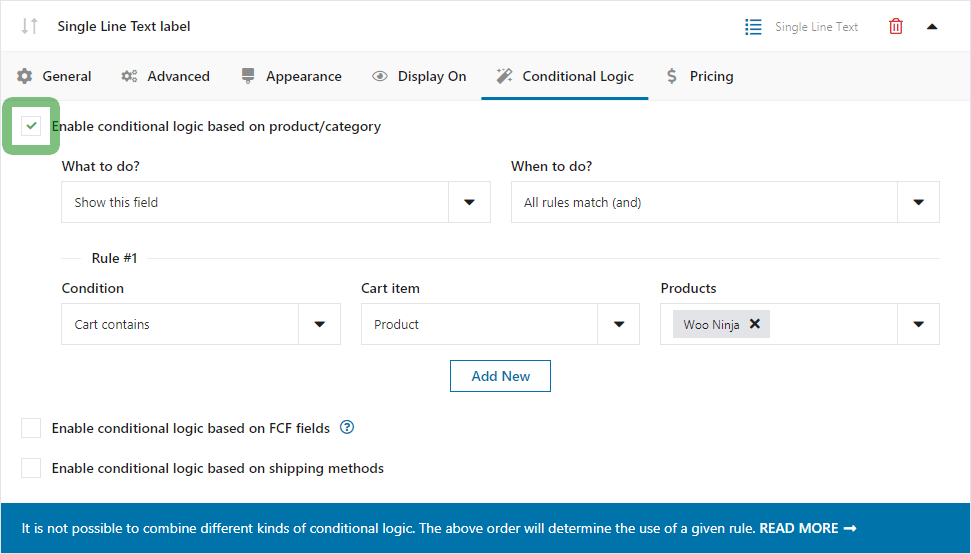
SEO Value: Conditional logic ensures each user sees only relevant fields by creating personalized paths. This highly relevant experience is interpreted by Google as a signal of high-quality content matching.
4. Strengthen validation rules to reduce submission error rates
SEO Impact Mechanism: High error rates and duplicate submissions frustrate users and cause them to exit prematurely. They also damage your SEO signals, lowering your website's overall user experience score.
Verify optimization strategy:
- Format Validation: Automatic Email Format Detection and Prompts
- Character Length Validation: Phone Number Structure and Digit Validation
- Field Validation: Required fields checked before submission
- Regular Expression Validation: Custom Regular Expression Validation for Special Formats
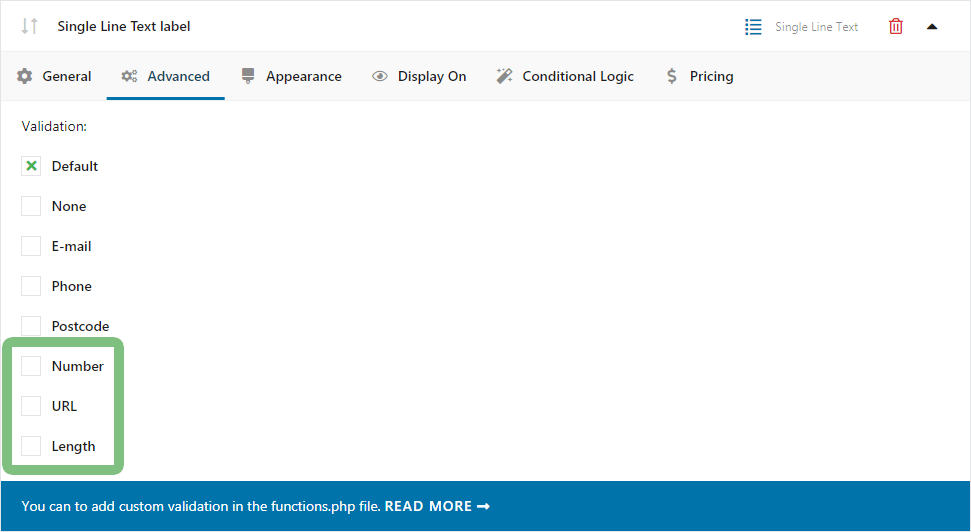
Data proves: The higher the success rate, the more likely users are to continue. Google's behavioral algorithms will also recognize your website as "highly usable," naturally awarding it a better quality score.
5. Mobile-first optimization to enhance core user experience
SEO Impact Mechanism: Google's "Mobile-First Indexing" principleMobile experience has become a significant factor influencing rankings. The mobile-friendliness of checkout pages directly impacts a website's performance in mobile search results.
Flexible Checkout Fields enhance the mobile experience in the following ways:::
- Priority: Adjust field order to prioritize critical information
- Convenient input: Utilizes mobile-friendly input types (date picker, dropdown menu)
- Adaptive: Ensure touch target dimensions meet accessibility standards
- Keyboard Optimization: Optimizes keyboard type matching based on input content (e.g., using the numeric keypad for phone numbers)
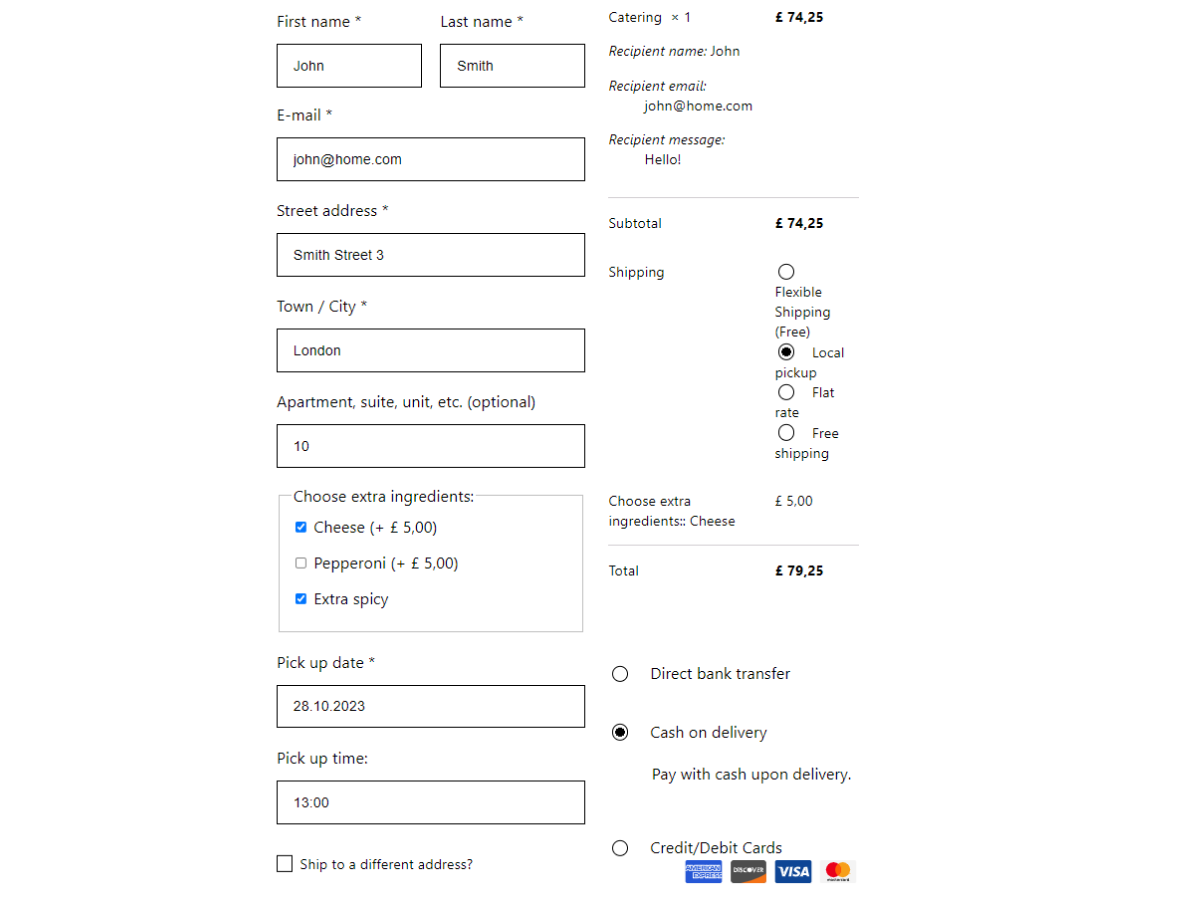
Industry Data: Google research reveals that for every additional second of mobile page load time, conversion rates drop by approximately 20%. Similarly, the complexity of mobile forms directly impacts user dwell time, which in turn affects SEO.
III. Implementation Roadmap: Five Steps to Optimize Your Checkout Experience and SEO Performance
Here is a practical approach for achieving maximum improvement at minimum cost:
- Step 1: Remove unnecessary fields
- Step 2: Rearrange the field order
- Step 3: Reduce Form-Filling Confusion with Placeholders and Instructions
- Step 4: Set up conditional logic for different user types
- Step 5: Optimize Field Display on Mobile Devices
By following these five steps, you'll see two key improvements: higher conversion rates and healthier SEO behavioral signals. This is a growth strategy that requires virtually no additional cost.
Simultaneously, continuously track key metrics such as abandonment rates, completion times, and error rates. Utilize heatmap tools to analyze user interaction patterns. Conduct A/B testing on different configurations to assess their impact on conversion rates and SEO. Maintain ongoing website monitoring and iterative improvements.
IV. Beyond Conversion Rates: The Sitewide SEO Value of Flexible Checkout Fields
By optimizing the checkout process, you not only boost conversion rates but also create site-wide SEO benefits:
- Reduce overall bounce rate: A seamless checkout experience minimizes premature user exit.
- Enhancing Conversation Quality: Successful Transactions Foster Positive Behavioral Patterns
- Boosting Website Authority: High-conversion websites typically achieve superior engagement metrics.
- Signals for improving mobile user experience: Directly impact Google's Page Experience Evaluation
- Establishing Content Relevance Signals: A seamless purchasing process enhances the alignment between pages and commercial intent.

Link to this article:https://www.361sale.com/en/81080/The article is copyrighted and must be reproduced with attribution.

















![Emoji[wozuimei]-Photonflux.com | Professional WordPress repair service, worldwide, rapid response](https://www.361sale.com/wp-content/themes/zibll/img/smilies/wozuimei.gif)

![Emoticon[baoquan] - Photon Wave Network | Professional WordPress Repair Services, Worldwide Coverage, Rapid Response](https://www.361sale.com/wp-content/themes/zibll/img/smilies/baoquan.gif)


 简体中文
简体中文  English
  日本語
日本語  Français
  Español


No comments