




Many people are using it for the first time. Loop GridYou might fall into the trap of thinking, "I've got this down": listing articles or products, converting them into grids, adjusting spacing. But once it goes live, you realize the page looks unappealing, is a hassle to maintain, content isn't updated, and click-through rates are low. The problem often isn't the tool itself, but falling into common pitfalls that prevent Loop Grid's strengths from shining through.
Below, we'll explain the most common misconceptions in a way beginners can understand, and provide the corresponding correct approaches.
Misconception 1: Treating Loop Grid as a "prettier article list"
![Image[1] - Loop Grid Common Misconceptions: Looks like you know how to use it, but you're just going through the motions.](https://www.361sale.com/wp-content/uploads/2025/12/20251223164109952-image.png)
Common manifestations
- Apply a default card skin directly
- Title, abstract, and buttons can be placed anywhere.
- Once it's done, it's done—no further optimization.
The real issue
Loop Grid The core value isn't "displaying lists," but "creating reusable cards using templates." If you treat it solely as a list component, you'll end up restyling it on every page, and any single modification will cause inconsistencies across the entire site.
proper practice
- First, treat Loop Item as a "card template system."
- Fixed layout: Image area, Information area, Button area
- Once developed, copy and reuse; pages only call functions, avoiding reinventing the wheel.
2. Misconception #2: Overloading cards with content only makes them messier as you edit.
![Image [2] - Loop Grid Common Misconceptions: Looks like you know how to use it, but you're just using it in vain.](https://www.361sale.com/wp-content/uploads/2025/12/20251223164702805-image.png)
Common manifestations
- Include author, date, category, tags, summary, read count, buttons, price, and rating on the card.
- Visitors find the information overwhelming at first glance.
The real issue
The purpose of the card is to "make people want to click through," not to preemptively display the full details page content. The more information you include, the harder it is to scan, which actually lowers the click-through rate.
proper practice
Each card should contain no more than three layers of information:
- Instant Recognition: Image + Title
- One-sentence explanation: Short summary or selling point
- A single action: The button or entire card can be clicked.
Other information is better placed on the details page.
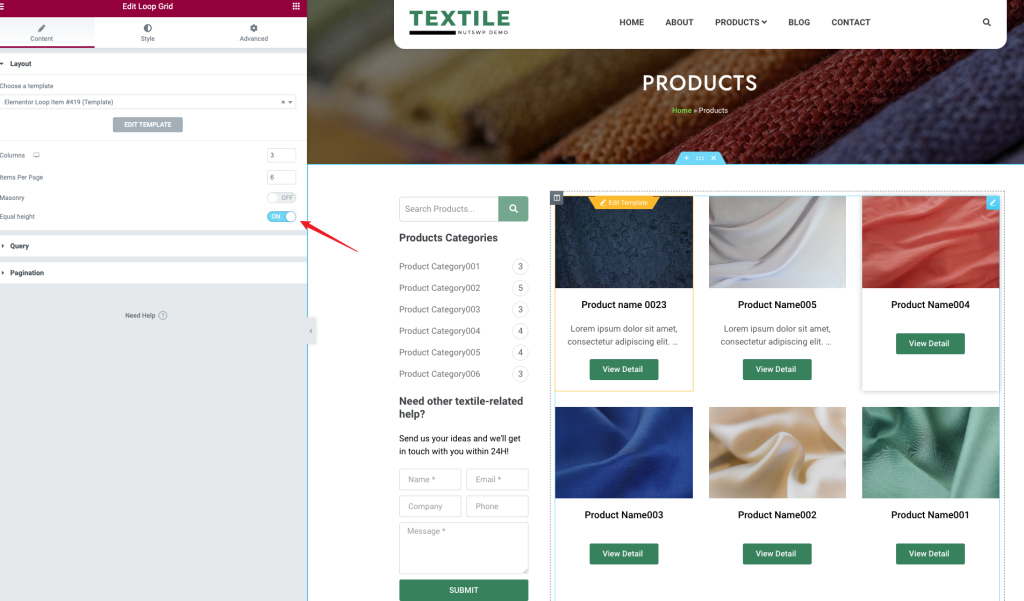
Misconception 3: Failing to align buttons vertically makes the page look cheap.
![Image[3] - Loop Grid Common Misconceptions: Looks like you know how to use it, but you're just going through the motions.](https://www.361sale.com/wp-content/uploads/2025/12/20251223164841155-image.png)
Common manifestations
- Cards of varying heights in the same row
- Button alignment is uneven
- The list looks like it was cobbled together.
The real issue
Different content lengths naturally result in varying heights. If you don't handle it, it will remain disorganized.
Correct Procedure (Beginners, remember these two steps)
- Unify the height of the image area, starting with half.
- Divide the card into two sections: place variable content at the top and the button area at the bottom, with buttons aligned to the bottom edge.
This way, regardless of the title's length, the buttons will align in a straight line.
4. Misconception Four: Arbitrarily selecting search criteria leads to inaccurate results.
![Image [4] - Loop Grid Common Misconceptions: Looks like you know how to use it, but you're just going through the motions.](https://www.361sale.com/wp-content/uploads/2025/12/20251223165500272-image.png)
Common manifestations
- The category page displays irrelevant content.
- The same article appears repeatedly in multiple lists.
- Thought it was a bug, but it turned out to be an unclear query.
The real issue
Loop Grid What is displayed is entirely determined by the query. If the query is unclear, it can lead to situations where something "appears to work but is actually incorrect."
proper practice
- Category Page: Only load the current category
- Tab Page: Only load the current tab
- Special Page: Pull only special tags or specified categories
- Homepage Modules: Establish clear rules for each module—don't let it "grab randomly."
When writing content, you can also directly tell readers: First determine what you want to showcase in this section, then tailor the query accordingly.
5. Misconception Five: Choosing the wrong pagination method tires visitors and makes content hard to discover.
![Image [5] - Loop Grid Common Misconceptions: Looks like you know how to use it, but you're just going through the motions.](https://www.361sale.com/wp-content/uploads/2025/12/20251223165530765-image.png)
Common manifestations
- Infinite scrolling for the homepage or category pages
- Visitors cannot find their way back to a certain page.
- The list is scrolling slower and slower.
The real issue
Infinite scrolling is ideal for content streams but unsuitable for list pages requiring precise navigation and search functionality. Beginners often mistakenly choose this approach simply because it "looks sophisticated."
proper practice
- Category pages, search pages: Prioritize pagination by number
- Event pages, special feature pages: Can use "Load More"
- Pure content stream: Consider infinite scrolling
6 The most reliable starter set Loop Grid practice
If you want to avoid something that "looks like it'll work but ends up being a waste of time," just follow this approach:
- First, define your goal: Who is this list page for, and what do you want them to click?
- Create a card template: Keep the structure consistent and don't overload it with information.
- Unify image height, align buttons to the bottom
- Define the query rules clearly; don't let content be randomly scraped.
- Use numeric pagination as the default option.
Loop Grid When used effectively, it's not just about dragging a component—it's about building a card system that's reusable, maintainable, and boosts click-through rates.

Link to this article:https://www.361sale.com/en/84135The article is copyrighted and must be reproduced with attribution.




















![Emoji[wozuimei]-Photonflux.com | Professional WordPress repair service, worldwide, rapid response](https://www.361sale.com/wp-content/themes/zibll/img/smilies/wozuimei.gif)

![Emoticon[baoquan] - Photon Wave Network | Professional WordPress Repair Services, Worldwide Coverage, Rapid Response](https://www.361sale.com/wp-content/themes/zibll/img/smilies/baoquan.gif)


 简体中文
简体中文  English
  日本語
日本語  Français
  Español


No comments