





In building an international WordPress websiteWhen the time comes, how to efficiently translate and manage all kinds of content is a challenge that every webmaster needs to face. At this time, a powerful translation plugin is especially important.Loco Translate PROAs one of the most popular translation tools, Loco Translate PRO helps webmasters easily handle a large amount of translation work and optimize the localization experience of websites with its convenient phrase translation function. In this article, we will bring you an in-depth understanding of how to utilize Loco Translate PRO to efficiently translate strings and improve the efficiency of website translation management.
![Image [1]-Phrase translation feature of Loco Translate PRO: How to translate strings efficiently?](https://www.361sale.com/wp-content/uploads/2026/01/20260122101722802-image.png)
Introduction to Loco Translate PRO: Translation made easy!
Loco Translate PRO It is a translation plugin designed for WordPress websites, which can manage the translation of themes and plugins directly in the background, eliminating the need for tedious manual editing. .po respond in singing .mo The process of documents. Its biggest advantage is the simple but powerful interface, which allows users to easily find the string to be translated and quickly translate or update it.
With Loco Translate PRO, you don't need deep coding skills to handle complex translation tasks with ease. The plug-in automatically lists all strings and displays the translation status in a clear table, helping you manage your translations efficiently. Even for large-scale multilingual translation jobs, Loco Translate PRO can handle them with ease and help you save a lot of time.
![Image [2]-Phrase translation feature of Loco Translate PRO: How to translate strings efficiently?](https://www.361sale.com/wp-content/uploads/2026/01/20260122101611237-image.png)
Streamlining the translation process
Loco Translate PRO greatly simplifies the translation process. All strings to be translated are automatically listed by the plugin, and you only need to select the untranslated content to translate. The translation process is intuitive and simple, and there's no need to jump out of the WordPress backend, so you can really translate and update instantly.
Multi-language switching support
For multilingual websites, Loco Translate PRO has a clear advantage. Not only does it support translations in different language versions, it also allows you to easily manage translated content for each language. This ensures that every page of your website displays exactly the right content, no matter what language your visitors are using.
How to Translate Strings Efficiently: Tips for Using Loco Translate PRO
1. Installation and Setup Loco Translate PRO
After installing the Loco Translate PRO plugin, you just need to enable it in the WordPress backend and make a simple configuration. On the settings page, select the theme or plugin you want to translate and specify the translation language for it. The plugin will automatically detect your current installed language and provide you with the appropriate translation options on demand.
![Image [3]-Phrase translation feature of Loco Translate PRO: How to translate strings efficiently?](https://www.361sale.com/wp-content/uploads/2026/01/20260122102020929-image.png)
2. Find the string to be translated
Loco Translate PRO offers a very convenient search function that allows you to quickly find and translate the desired string. With a simple keyword search, you can jump directly to the specified translation entry, saving a lot of time searching and locating. This feature is especially useful for translating large amounts of content.
![Image [4]-Phrase translation feature of Loco Translate PRO: How to translate strings efficiently?](https://www.361sale.com/wp-content/uploads/2026/01/20260122101839598-image.png)
3. Editing and saving translations
Once you have located the string to be translated, click on the edit box and enter your desired translation. Click Save and the translation will be saved in real time to the .po file, the plugin will also automatically generate .mo file for front-end display. Once the translation is complete, the translated content in the appropriate language is automatically displayed when visitors view the page in their browser.
Advanced Features of Loco Translate PRO: Enhancing Translation Efficiency
In addition to the basic translation functions, Loco Translate PRO has a series of powerful advanced features to help users further improve translation efficiency and accuracy.
1. Automatic translation and translation memory
Loco Translate PRO supports the use of the Google TranslateThe integration with translation services, such as the CMS, automatically provides translation suggestions based on the content of the string. This feature is particularly suitable for dealing with common phrases or recurring content. The plugin remembers your previous translations and automatically applies them the next time you encounter the same phrase, further saving translation time.
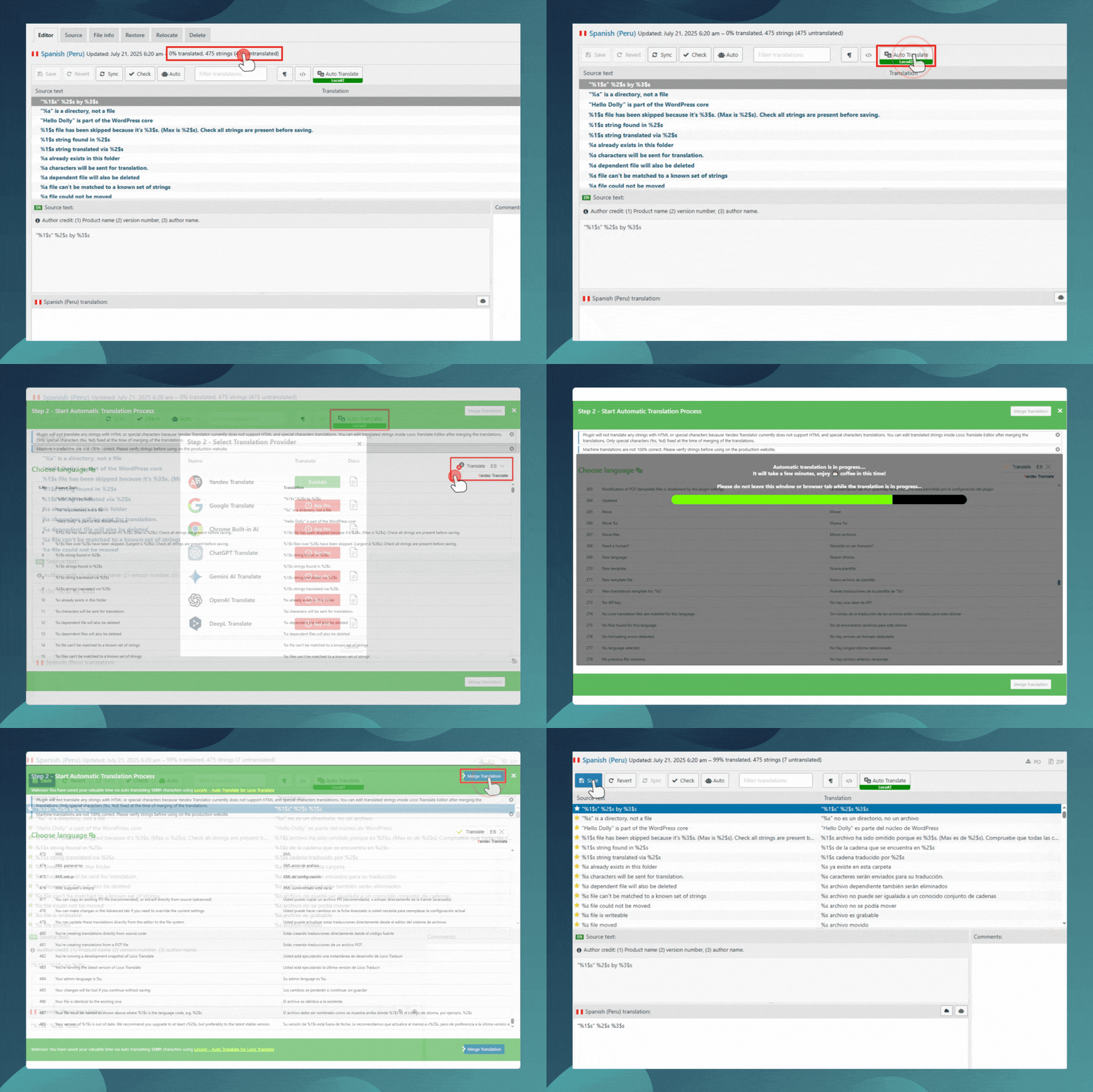
2. Support for backup of translated documents
To avoid losing translations due to plugin updates or system failures, Loco Translate PRO provides a backup function for translated files. You can back up your translated files regularly to ensure that you can resume your translation progress even if you encounter problems.
3. Customized translation management
Loco Translate PRO also supports customizing the storage location and organization of translated files. This is particularly important for teamwork, ensuring that different translators work together efficiently and in accordance with a uniform process that ensures consistency and standardization of translated content.
Conclusion: Loco Translate PRO, a powerful tool for translation management
Loco Translate PRO More than just a translation plugin, it shows great advantages in improving translation efficiency and managing translated content. Whether you are the webmaster of a small blog or the manager of a large e-commerce platform, you can greatly improve the localization process of your website with this plugin. Loco Translate PRO is undoubtedly an indispensable assistant in the construction of today's multilingual websites.

Link to this article:https://www.361sale.com/en/86185The article is copyrighted and must be reproduced with attribution.



















![Emoji[wozuimei]-Photonflux.com | Professional WordPress repair service, worldwide, rapid response](https://www.361sale.com/wp-content/themes/zibll/img/smilies/wozuimei.gif)

![Emoticon[baoquan] - Photon Wave Network | Professional WordPress Repair Services, Worldwide Coverage, Rapid Response](https://www.361sale.com/wp-content/themes/zibll/img/smilies/baoquan.gif)


 简体中文
简体中文  English
  日本語
日本語  Français
  Español


No comments