





come across Elementor editor loads very slowlyThe biggest fear is to "change something in the east and change something in the west", and in the end, we don't know who caused the problem in the end. The correct approach is to arrange them according to the dependency links:Conflicts and front-end resources first, then WordPress back-end and database, and finally server and network.The following is a step-by-step checklist for you to follow. Here's a checklist you can follow in order to basically pinpoint the root cause in 30-60 minutes.

Check first: where is the slowdown?Don't tune the server right off the bat.
Split the "slow" into three phenomena (different phenomena correspond to different investigation directions):
- White screen/circling when entering the editor: mostly JS errors, plugin conflicts, caching/security blocks
- Can enter but drag and drop is stuck, settings panel opens very slowly: mostly browser performance, editor resource overload, fonts/icons/third party scripts
- Saving/previewing/publishing is slow: mostly PHP/database, heartbeat requests, server resources, WAF/security policies
Step 1: Use "Safe Mode"Quickly determine if there is a plugin/theme conflict(highest priority)
Elementor comes with Safe Mode, it will temporarily disable the theme with some features to troubleshoot conflicts.
- If it gets noticeably faster in safe mode:The probability that the problem is in Theme/plugin conflicts
- If Safe Mode is still slow: continue down the list to Cache, Security, Server
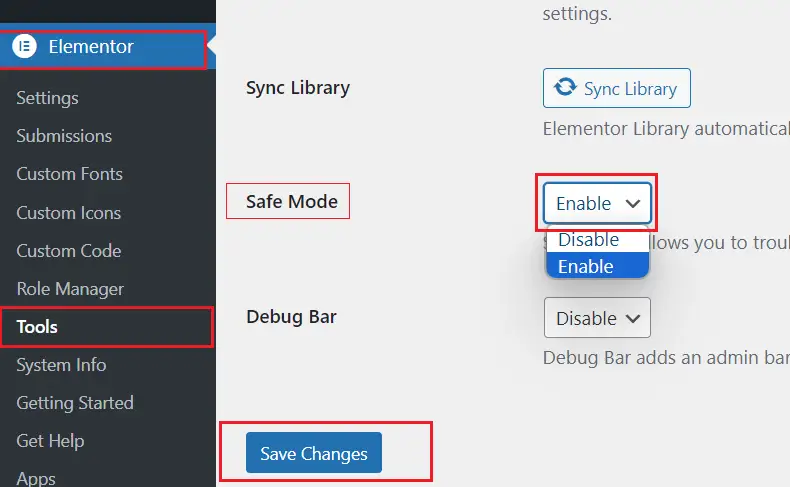
Hands-on: Do this step first, as it is the fastest way to troubleshoot "conflicting slows" on the 70%.
Step 2: Troubleshooting editor resource anomalies due to caching/compression/merging (most common pitfalls)
Many sites will open in order to speed up the front end:
- JS/CSS Merge, Delayed Loading (Delay JS)
- HTML caching, object caching
- Automatic CDN optimization (e.g. Rocket Loader, etc.)
These work for the frontend, but can easily "misbehave" with the editor, causing the Elementor editor to load slowly or infinitely.
Actions you're going to do (in order)
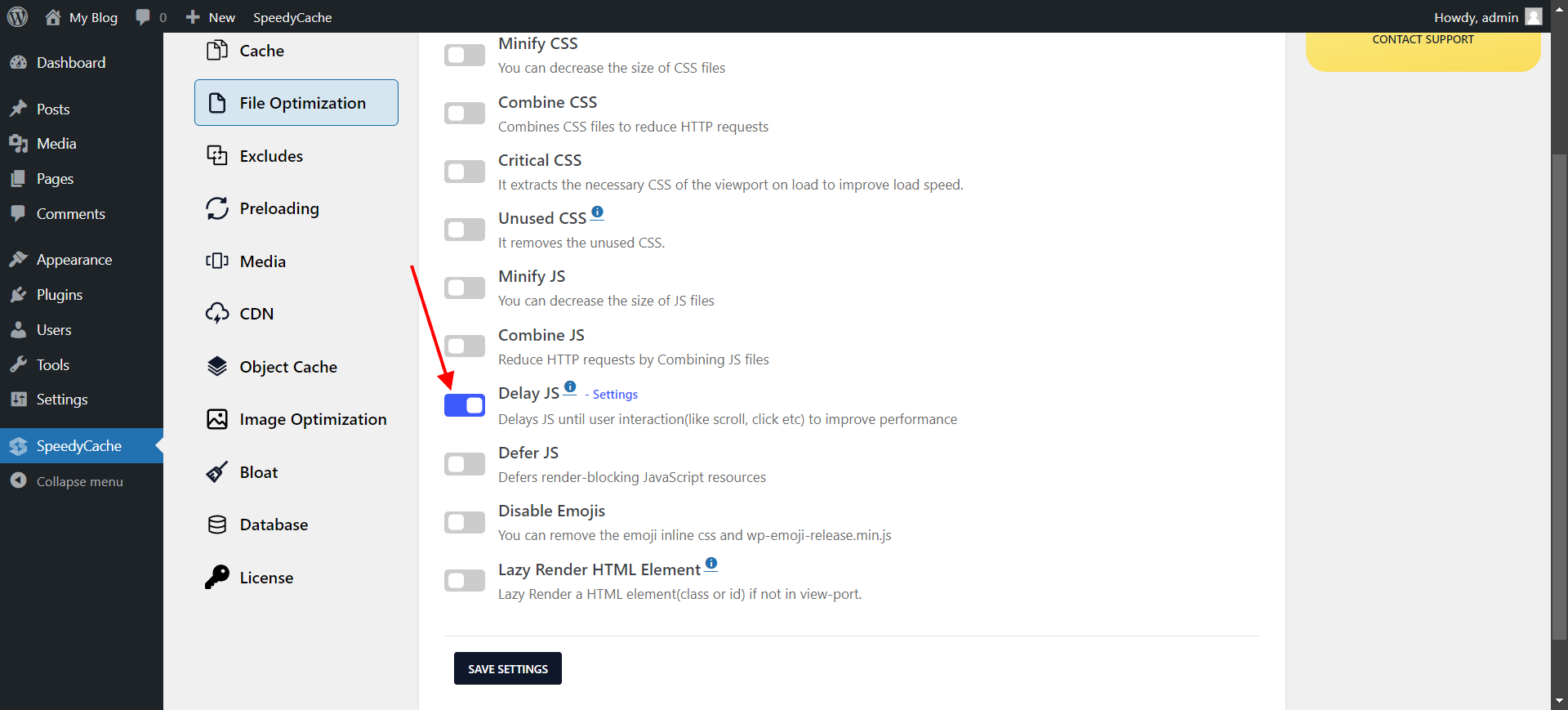
- Temporary closure: JS delays, JS/CSS merging, removal of unused CSS (if any)
- Add the following path to "Exclude Cache/Exclude Optimization" in the cache plugin:
/wp-admin/admin-ajax.php*elementor**wp-json*
- Clear Cache: Plugin Cache + CDN Cache + Browser Cache
- Re-enter the editor to test
Experience: As long as you have "Delay JS/Merge JS" on, the probability of the editor slowing down is very high.
Step 3: Look at the Browser Console & Web Panel - Lock "Stuck on Which Request"
(coll.) fail (a student) Elementor editor loads very slowlyYou need to know what it's stuck on:
- JS Resource Loading
- REST API request (
/wp-json/) admin-ajax.phpirregular heartbeat- Fonts/Icons/Third Party Scripts
Quick checkpoints
- Open the browser DevTools → Network
- See if a request is taking an abnormal amount of time (e.g. 10s+)
- Look for errors such as 401/403/500/524.
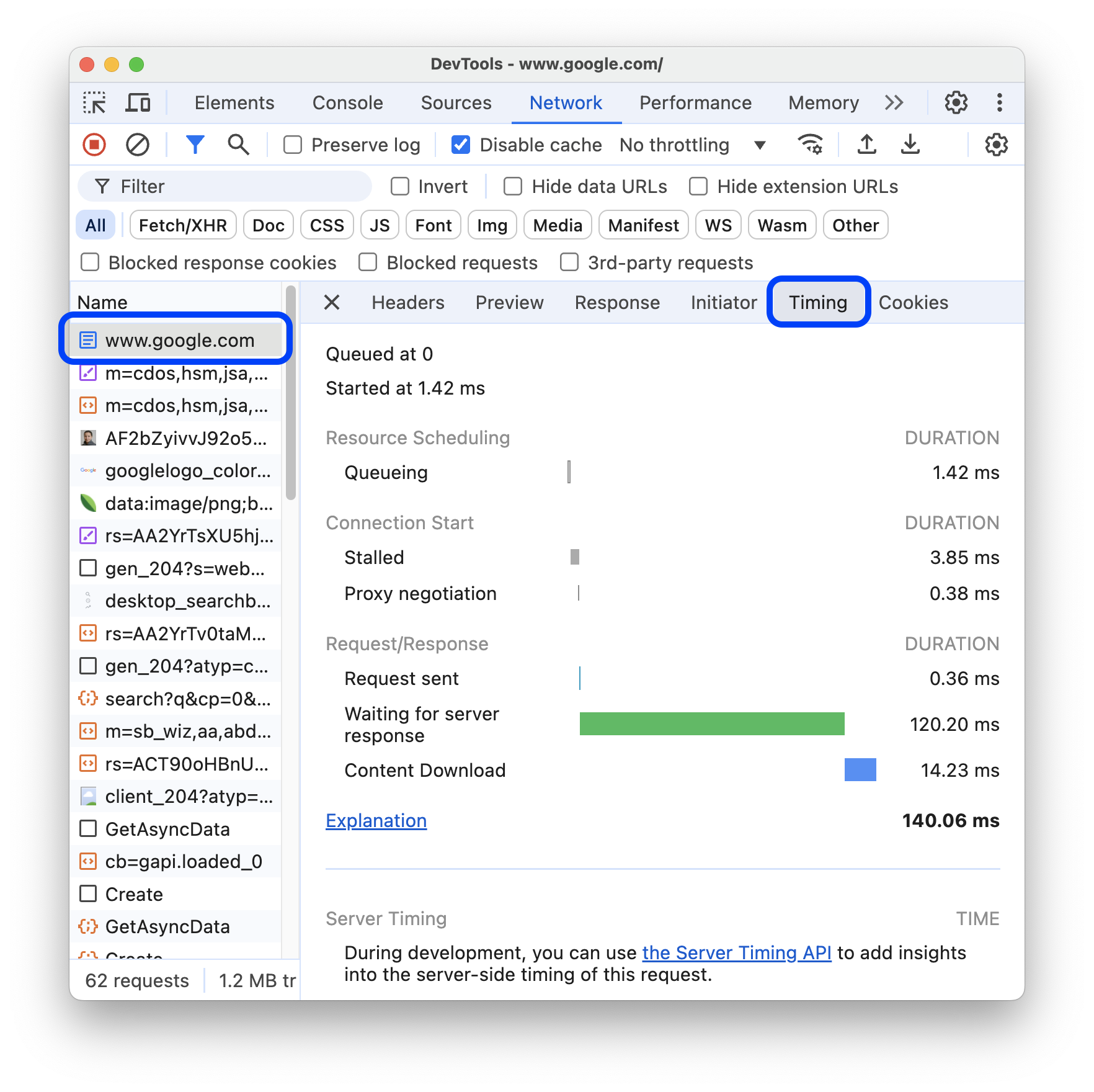
- Console for JS errors (any red errors are prioritized)
- See if some external domain resource (fonts, icons, stats) is slow to load causing the blocking
Common Snap Points:
wp-jsonIntercepted by security plug-in/WAF (403/401)admin-ajax.phpSlow response (caused by server or plugin)- Fonts/Icons slow to load from abroad (network issues)
Step 4: Focused inspection REST API with Heartbeat (Elementor relies heavily on them)
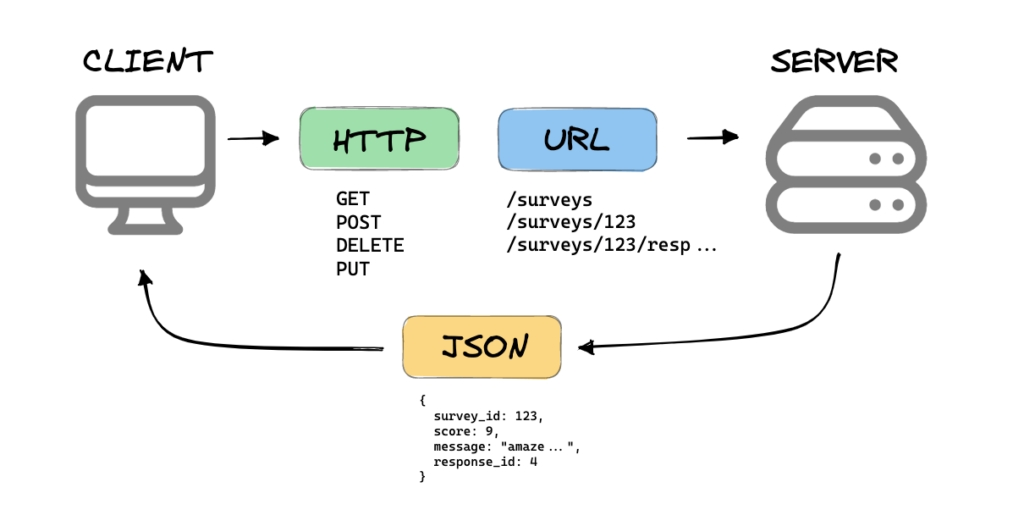
The Elementor editor relies heavily on REST API (wp-json) and background asynchronous requests. If disabled or slowed down, the editor will be slow or even not open.
You need to make sure of two things.
- Visit:
https://你的域名/wp-json/- Normal should return JSON (not 404/403/500)
- Watch in Network
admin-ajax.phpIs it frequent and slow
Common Root Causes:
- Security plugin to turn off REST APIs or limit
wp-json - Server ModSecurity/WAF Intercept
- Heartbeat frequency is too high + insufficient server resources
Step 5: Locate the "Culprit Plugin" (Plugin Conflict Path) using the Minimize and Deactivate Method
If the previous judgment is caused by rushing headless/plugins, deactivating them in this order is more time efficient:
- security category(WAF, login protection, API restrictions)
- Cache/Optimization Class(JS latency, merging, CDN optimization)
- Editor Enhancement Class(Elementor plugin packages, animations, icon libraries)
- Statistics/Burying Points Category(heat maps, chat plug-ins, tracking scripts)
- Multi-language/membership/complex business plug-ins(They may slow down background requests)
Measure the speed of access to the editor for each category of deactivation until you find the one that is "faster when deactivated".
Step 6: Check for backend performance bottlenecks (PHP, database, object caching)
If it's not front-end/conflict, but "slow save/preview" and "overall slow backend", you need to look:
7.1 PHP Resources and Errors
- Is the PHP memory limit too low (Elementor needs more memory)
- Does PHP-FPM
max_childrenToo small, resulting in a queue - Does the error log
out of memory,timeout,fatal error
7.2 Slow database queries
- Backend requests are slow but CPU is not high: most likely the DB is waiting for the
- See if there's a lot of
autoloadOptions, huge table of options, transients
7.3 Object Caching (Redis/Memcached)
A properly configured object cache will speed up the backend; a misconfiguration will slow it down.
- Temporarily disable object caching to test for speed
- Check if the Redis connection is stable
Step 7: Server and Network Layer (do it last, but don't ignore it)
(coll.) fail (a student) Elementor editor loads very slowly And after all the previous ones are ruled out, look at the server:
- Is the CPU high for a long period of time
- Does the memory fill up and swap frequently?
- Whether disk IO is bursting (especially small disks/low IOPS)
- Is the network slow to external resources (fonts, 3rd party JS)
Simple positioning method:
- Synchronized execution on the server when the editor is slow
top/htopLook at CPU, load, memory, swap - Check the Nginx/Apache access log to see if the
wp-json,admin-ajaxresponse time - If you have a CDN/WAF in place, check to make sure that you have a good understanding of the
/wp-admin/maybewp-jsonDid unnecessary challenges/restrictions
Summary:
Elementor editor loads very slowly Troubleshooting in order: First use Safe Mode to determine if there is a theme/plugin conflict. Then exclude the impact of caching plugin's JS latency/merge optimization on the editor, and confirm that wp-json together with admin-ajax.php It is not blocked and responds normally. If it's still slow, check PHP/PHP-FPM, database and object caching, and finally look at the server CPU/Memory/IO and network.

Link to this article:https://www.361sale.com/en/86778/The article is copyrighted and must be reproduced with attribution.












![表情[wozuimei]-光子波动网 | WordPress教程、Elementor教程与故障修复](https://www.361sale.com/wp-content/themes/zibll/img/smilies/wozuimei.gif)

![表情[baoquan]-光子波动网 | WordPress教程、Elementor教程与故障修复](https://www.361sale.com/wp-content/themes/zibll/img/smilies/baoquan.gif)





No comments