




Why do you need to have SEO friendly website?
![Image [1] - How to Create and Maintain an SEO Friendly Website - photonfluctuation.com | Professional WordPress Repair Service, Global Reach, Fast Response](https://www.361sale.com/wp-content/uploads/2024/04/2024042416264897.png)
Neglecting SEO is equivalent to passing up the opportunity to turn your website into a valuable asset. Therefore, SEO should be prioritized when developing your online marketing strategy.This will not only help your website achieve better search engine rankings, but also improve overall web visibility. When you are building a website from scratch, it is crucial to incorporate SEO (Search Engine Optimization) into the design and content, as doing so can provide the following benefits:
- Enhance brand credibility: A website with a top search engine ranking is more likely to be perceived by users as an authority in the industry, thus enhancing brand trust.
- Improving the user experience: Search engines like Google take user experience very seriously as one of the key factors in ranking. An SEO friendly website design boosts visitor satisfaction and retention.
- reduce costs: SEO is a cost-effective form of marketing that can help you attract leads and increase sales, and in the long run, reduce the amount of money you spend on paid advertisements and other marketing tactics.
- Increase website traffic: Top-ranked websites are more likely to receive more visitor traffic, as studies show that the top few search results typically receive aboutHits on 32%The
How to make an SEO friendly website?
Creating a search engine friendly website takes consistent effort and time as search engine algorithms are frequently updated. Here are some basic steps that can help make it easier for your website to appear at the top of search engine results:
1. Embedding keywords in the content
- When you create content, such as blog posts, make sure you include relevant keywords. These keywords help search engines understand what your website is about, which in turn improves your position in search results. You can find these terms through keyword research by simply typing your topic into a search engine, such as "pet toys," and looking at other related popular search terms, such as "dog toys" or "pet supplies ".
![Image [2] - How to Create and Maintain an SEO Friendly Website - Photon Fluctuation Network | Professional WordPress Repair Service, Worldwide, Fast Response](https://www.361sale.com/wp-content/uploads/2024/04/2024042415264574.png)
Consider usingGoogle TrendsmaybeAhrefsand other tools to better understand popular topics and audience search intent.
![Image [3] - How to Create and Maintain an SEO Friendly Website - Photon Fluctuation Network | Professional WordPress Repair Service, Worldwide, Fast Response](https://www.361sale.com/wp-content/uploads/2024/04/2024042415282985.png)
Once you've found your target keywords, make sure you use them naturally and strategically in your content. Avoid sacrificing the context and readability of your content just to fill in keywords, as this can affect the user's reading experience and may also reduce the chances of your page appearing at the top of search engine results pages (SERPs).
2. Use title tags
![Image [4] - How to Create and Maintain an SEO Friendly Website - photonfluctuation.com | Professional WordPress Repair Service, Worldwide, Fast Response](https://www.361sale.com/wp-content/uploads/2024/04/2024042416131786.png)
An effective way to create a search engine friendly website is to use heading tags correctly. These tags are part of the HTML code that help give structure and meaning to the content of a web page, making it easier for search engines to understand what the page is about.
The title tag is removed from the <h1> until (a time) <h6>which <h1> respond in singing <h2> Most importantly, as they are usually used to label the main title and sub-titles of the page. Make sure to include your keywords in these titles.
optimal <h1> After labeling, continue in the <h2> and possibly <h3> Tag with relevant SEO keywords. Use this method when publishing each piece of content to improve search engine optimization (SEO) results.
3. Have a clean URL structure
It is important to have a clear URL structure for creating SEO friendly websites. A good URL should be easy to read, easy to understand, and closely related to the content of the page.
Search engines crawl and index website content through URLs, so a keyword-inclusive, clear URL helps search engines better understand the topic of each page. For example, a page that deals with SEO-friendly website design might have a URL that looks like this:www.examplewebsite.com/seo-web-design.
![Image [5] - How to Create and Maintain an SEO Friendly Website - photonfluctuation.com | Professional WordPress Repair Service, Worldwide, Fast Response](https://www.361sale.com/wp-content/uploads/2024/04/2024042416171282.jpg)
Avoid long strings of numbers and complex query strings (e.g. /top-23-seo-web-design-practices-in-2024-for-top-professionals), as such URLs are not only hard to read, but also not SEO-friendly.
By adopting SEO-friendly URLs, search engines can access and index your website more efficiently and accurately, which in turn helps to improve your website's display position in relevant search results.
4. Include keyword-rich anchor text in links
Anchor text is the clickable text on a web page, by clicking on which a user can jump to other pages on the same website or to a specific part of the website. In order to improve your website's search engine rankings, using SEO-friendly anchor text is a very effective strategy as it helps search engines to better understand the content of the links.
When creating SEO-friendly anchor text, you should use keywords that are closely related to your site's content. Choose words or phrases that accurately describe the content of the page you are linking to. For example, if you want to link to a page about SEO tips, use anchor text such as "learn SEO tips" or "SEO strategies".
Also, make sure that the anchor text is closely related to the content of the page it links to so that search engines can clearly understand the topic of the link. Additionally, avoid overstuffing keywords in your anchor text, a practice that may not only degrade the user experience, but may also negatively impact your site's SEO performance. Overall, using anchor text wisely is a simple and effective way to improve your website's SEO performance.
5. Ensure that the website is suitable for mobile devices
![Image [6] - How to Create and Maintain an SEO Friendly Website - photonfluctuation.com | Professional WordPress Repair Service, Worldwide, Fast Response](https://www.361sale.com/wp-content/uploads/2024/04/2024042416192031.png)
Making an SEO-friendly website is not only about optimizing the content, but also about making sure the site is mobile-friendly. As mobile device users account for an increasing share of global website traffic year after year (for example, reaching nearly 59% in Q2 2022), search engines such as Google are even more likely to cite a website's mobile-friendliness as an important factor in influencing search rankings.
As a result, your website needs to load quickly on mobile devices, as well as have a responsive design that ensures it will perform well on all screen sizes. Fortunately, off-the-shelf themes using WordPress or other platforms usually already support mobile access.
You can utilize Google'sLighthouseand other tools to check if your website meets the latest mobile-friendly standards. Doing so will help boost your site's ranking in mobile search results and attract more visits from mobile users.
6. Optimization of images
Optimize website imagesIt's an effective way to improve your website's visibility in search engines. Here are a few steps to help ensure that your images are SEO-friendly to boost your SEO performance:
- Use descriptive file namesChoose a file name for each image that contains relevant keywords, which helps search engines understand the content of the image and improves visibility on the search results page (SERP). For example, if your image is of a cat playing in grass, the file name could be "cat-playing-in-grass.jpg" instead of the unrelated "IMG_123.jpg".
- Reduce image size: Reduce the size of your images before uploading them to your website. Larger image files can affect page loading speed, which in turn negatively affects SEO. Ensure that the image size is appropriate for the webpage needs and avoid using oversized images.
- Compressing Image Files: Consider using a compression tool to reduce the size of the image file while trying to maintain the quality of the image. For WordPress users, you can utilize tools such as theSmushmaybeElementor's Image Optimizerand other plugins automatically optimize website images. These tools can reduce file sizes without significantly reducing visual quality.
![Image [7] - How to Create and Maintain an SEO Friendly Website - photonfluctuation.com | Professional WordPress Repair Service, Worldwide, Fast Response](https://www.361sale.com/wp-content/uploads/2024/04/2024042415451055.png)
For image optimization, addingAlternative text(alt text) is crucial, not only does it help with SEO, but it also improves the accessibility of your website. Here are some tips on how to effectively use alternative text and image captions:
- Add alternative text::
- Alternative text is the text that is displayed in place of an image when the image cannot be displayed. It should succinctly describe the content of the image, which helps search engines understand the image and index it, especially important when the content of the image is relevant to the topic of the web page.
- When writing alternative text, make sure it contains keywords (but avoid keyword stuffing) and accurately describes the image. For example, if the image shows a gardener planting flowers, the alternative text could be "The gardener planted flowers in the spring garden".
- Reduce image file size::
- Reduce the size and file size of images before using them on your website. Using an image compression tool such as TinyPNG or Photoshop's "Save for Web" feature can reduce file size without sacrificing too much image quality.
- Adding an Image Title::
- Image captions, while not having as much of a direct impact on SEO as alternative text, provide additional contextual information to the user and help improve the user experience. Captions should be concise and relevant to the content of the image and can sometimes include keywords.
- For example, if the image shows a home gardening activity, the caption could be "Home gardening tips: a guide to planting flowers in spring".
7. Make sure your pages load fast!
![Image [8] - How to Create and Maintain an SEO Friendly Website - photonfluctuation.com | Professional WordPress Repair Service, Worldwide, Fast Response](https://www.361sale.com/wp-content/uploads/2024/04/2024042416212459.png)
Ensuring that your pages load quickly is a key factor in improving your website's SEO performance and user experience. Search engines love fast loading websites and fast websites increase user satisfaction and retention. Here are some effective ways to optimize your website's loading speed:
- Optimizing HTTP requests::
- Reducing server response time is key. This can be achieved by simplifying front-end resources (e.g. merging CSS and JavaScript files) and optimizing back-end queries.
- Compressing images and media files::
- Reduce the size of images and video files without losing quality. Use tools such as TinyPNG or JPEGmini to compress images effectively.
- Utilizing Browser Cache::
- Setting up a browser cache to save frequently visited files on the user's device reduces the amount of downloads each time a website is visited. This can be achieved by setting up a proper caching policy.
- Use of Content Delivery Networks (CDNs)::
- A CDN stores the static content of a website (e.g. images, CSS, JavaScript files) on multiple servers around the world. This allows users to load content from the geographically closest server, resulting in increased speed.
- Choosing a better web hosting service::
- Invest in a high-performance hosting solution, especially as your website traffic increases. Higher bandwidth and better server response times can significantly improve the loading speed of your website.
Using website optimization tools such as Google'sPageSpeed Insights)to check if your site is up to par and get various insights on how to improve its loading speed.
![Image [9] - How to Create and Maintain an SEO Friendly Website - photonfluctuation.com | Professional WordPress Repair Service, Worldwide, Fast Response](https://www.361sale.com/wp-content/uploads/2024/04/2024042415563588.png)
8. Use social media to promote your content
Social media is a powerful tool for boosting your website's SEO and expanding the reach of your content. By sharing your content on social platforms, you can reach a wider audience, which not only directly increases traffic, but also indirectly improves your search engine rankings through backlinks.
In order to use social media effectively, you need to understand which platforms are best suited to your industry or type of content. For example, for visually intensive topics like fashion or food, theInstagramrespond in singingPinterestMore useful. These platforms can appeal to specific target groups and may be an important source of driving traffic.
9. Use of Google tools
![Image [10] - How to Create and Maintain an SEO Friendly Website - photonfluctuation.com | Professional WordPress Repair Service, Global Reach, Fast Response](https://www.361sale.com/wp-content/uploads/2024/04/2024042416230577.png)
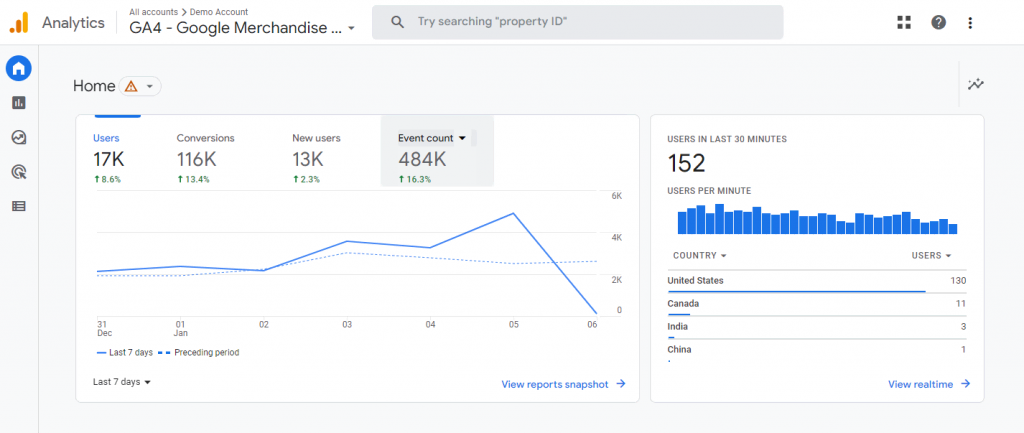
In order to create an SEO-friendly website, you need to take advantage of the tools that Google provides to analyze and optimize your website.Google Search Console and Google Analytics are two highly valuable resources that provide in-depth insights into your website's performance.
- Google Search Console: This tool allows you to see how well your website is performing in Google search results, which keywords are attracting visitors, and where your pages rank in the search results. It also provides feedback on possible technical issues with your website, such as 404 errors, server errors, and usability issues, which are all factors that can affect your SEO performance.
- Google Analytics: This tool helps you analyze your visitors' behavior, including how they find your site, how much time they spend on it, and the content they interact with the most. This information is essential for optimizing your content and improving the user experience.
10. Clean-up and organization of site code
Your website consists of multiple lines of code running various functions. As your site grows, these lines of code can become cluttered and get in each other's way. To prevent this, we recommend cleaning them up when necessary.
This process also helps the search engine indexing process and makes your website load faster. These two factors are key factors that highly affect the SEO performance of your website. Website code may cover different types of programming languages. The three most common are HTML, CSS, and JavaScript. these languages are organized in different ways.
![Image [11] - How to Create and Maintain an SEO Friendly Website - photonfluctuation.com | Professional WordPress Repair Service, Worldwide, Fast Response](https://www.361sale.com/wp-content/uploads/2024/04/2024042416003514.png)
neverthelessHTML Cleanerrespond in singingJS BeautifierTools such as can help you with this process.
11. Add internal links
Internal linking is the process of adding hyperlinks in your content to other pages or posts on your website. This creates a network of interlinked content and helps search engines recognize the structure and relevance of each page.
Strategic internal linking also helps reduce bounce rates. Visitors can find the right content and navigate the site more easily.
![Image [12] - How to Create and Maintain an SEO Friendly Website - photonfluctuation.com | Professional WordPress Repair Service, Worldwide, Fast Response](https://www.361sale.com/wp-content/uploads/2024/04/2024042416050274.png)
usableInternal Link Juicer,Link Whisperrespond in singingYoast SEOand other tools to optimize your internal links and improve the SEO-friendliness of your website.
12. Optimize title tags and meta descriptions
Title tags and meta descriptions are HTML elements that provide context for page content. Title tags appear as clickable headings in search engine results, while meta descriptions provide short snippets about what readers can find on the page.
When dealing with the title tag, make sure it contains the keyword that is the focus of the content. Usually, it should align with the search intent of your target audience and help your content appear in the right search results. The length of the title tag should be kept at50-60between characters. This will ensure that they appear correctly in search results and have a higher chance of attracting readers.
13. Use images and video to enhance content
Visual elements such as images and videos can enrich your content and make it more engaging. Some visuals such as graphs and charts also allow you to present data and convey messages more effectively.
14. Update your content regularly
![Image [13] - How to Create and Maintain an SEO Friendly Website - photonfluctuation.com | Professional WordPress Repair Service, Worldwide, Fast Response](https://www.361sale.com/wp-content/uploads/2024/04/2024042416285732.png)
Creating new content on a regular basis is a great SEO strategy. However, sometimes it can be difficult to come up with new content ideas. In these cases, you can update old content to improve your website's search engine optimization (SEO).
Summary:
Creating an SEO-friendly website requires a combination of factors and ongoing optimization and tweaking. From having a clear URL structure to optimizing images and videos to using social media to promote content, each step has a significant impact on a website's SEO performance. By using Google tools to analyze and optimize your website's performance, as well as regularly updating content, you can ensure that your website stays at the top of the search engine results pages. In summary, by following SEO best practices and continually improving your website's user experience and accessibility, you can increase your website's traffic and visibility, which in turn will enhance your brand's reach and fulfill your business goals.

Link to this article:https://www.361sale.com/en/8867The article is copyrighted and must be reproduced with attribution.


















![Emoji[wozuimei]-Photonflux.com | Professional WordPress repair service, worldwide, rapid response](https://www.361sale.com/wp-content/themes/zibll/img/smilies/wozuimei.gif)

![Emoticon[baoquan] - Photon Wave Network | Professional WordPress Repair Services, Worldwide Coverage, Rapid Response](https://www.361sale.com/wp-content/themes/zibll/img/smilies/baoquan.gif)


 简体中文
简体中文  English
  日本語
日本語  Français
  Español


No comments