





arrange in order

WordPress Website Slowdown? 6 Solutions to Help You Boost Your Speed
Discover why your WordPress site is slowing down and take effective measures. Improve website loading speed, user experience, and SEO rankings by enabling caching, optimizing images, streamlining plugins, using CDN, and other 6 optimization strategies
Advanced Methods for Solving the_content Error in Elementor
Encountered Elementor page does not display content or the_content error? This article explains in detail the role of the_content function, common causes of errors and advanced repair techniques to help you completely solve the content loading problems in Elementor, improve site performance and compatibility ...

Why Add Alt Text to Website Images and How to Quickly Generate It with AI
Find out why adding Alt Text to your website images is crucial and learn how to use AI tools to quickly generate SEO-friendly Alt Text that improves accessibility, search rankings, and user experience.

How to Change Passwords and Usernames in WordPress (Full Tutorial)
Learn how to change passwords and usernames in WordPress, learn simple steps to solve the problem of forgotten passwords without creating a new user, and improve account security. Easily change usernames with the Swiss Toolkit plugin.

How to Troubleshoot and Fix WordPress 500 Errors: Common Causes and Solutions
This article describes in detail the common causes of 500 errors in WordPress, such as plugin conflicts, theme issues, memory limitations, and provide step-by-step troubleshooting and repair methods.

Elementor and SEO: Best Practices for Optimizing Page Structure and Loading Speed
Learn how to enhance your website's SEO performance, user experience and search engine rankings by optimizing page structure and improving load speed when building websites with Elementor.

Comparison of the most popular open source CMS in 2025: WordPress, Joomla and Drupal
Explore a comparative analysis of the most popular open source CMS in 2025 - WordPress, Joomla & Drupal. Learn about their advantages, features and how to choose the right CMS for your website based on your needs.

How to prevent malicious attacks and code injection with Elementor Security Mode?
Learn how to protect your website from malicious attacks and code injection risks by enabling Elementor Security Mode. Learn ways to improve website security, including preventing XSS, SQL injection attacks, and file upload vulnerabilities, to ensure the long-term stability and security of your organization's website.
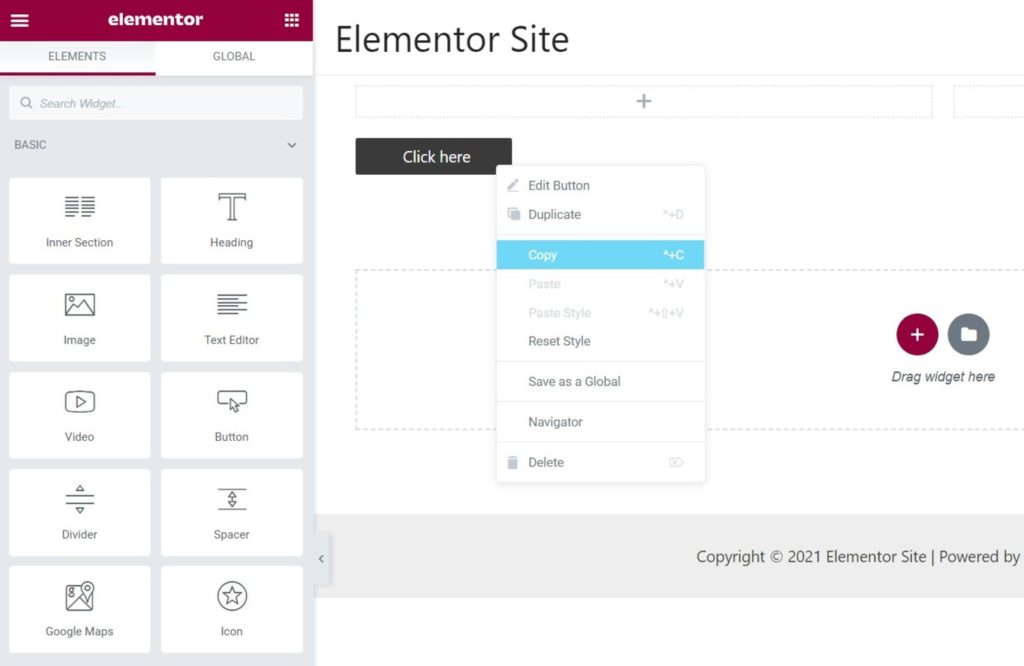
Common Misconceptions and Solutions in Elementor Safe Mode
Learn about common misconceptions and solutions in Elementor security mode to help you easily troubleshoot plugin conflicts, front-end design issues, and performance impacts to optimize your WordPress site building process.
The Impact of Elementor Secure Mode on SEO Optimization: Improving Website Performance and Accessibility
Learn how Elementor Security Mode can indirectly improve the SEO performance of your WordPress site by optimizing site performance and accessibility, with a full breakdown from load speed to user experience.

How to build a personal blog and content creation platform using open source CMS
Learn how to build a personal blog and content creation platform with an open source CMS such as WordPress, Ghost, Joomla, and more. This article provides a complete guide from choosing the right CMS to content creation to help you quickly launch and optimize your blogging platform.

Best Practices for Content Creation and Management in an Open Source CMS
Master the best practices of open source CMS (e.g. WordPress, Drupal, Joomla) in content creation and management, from strategy planning, editorial collaboration to SEO optimization, to enhance the efficiency and professionalism of website content.
Elementor Secure Mode for Mobile Optimization: How to Improve Mobile User Experience?
Understand the real impact of Elementor's security model on mobile presentation, and master practical tips and responsive design recommendations to enhance the mobile user experience during debugging and development.

Elementor Safe Mode and Cross-Browser Compatibility: Ensuring the Perfect Experience for All Users
Learn how to diagnose browser compatibility issues with Elementor's Safe Mode, along with practical optimization strategies to ensure website consistency and performance across all major browsers and devices.

Indirect SEO Impact of Elementor Secure Mode: Optimizing Site Load Speed and Stability
Elementor's security mode can not only troubleshoot plugin conflicts, but also indirectly improve site loading speed and stability. This article explains its practical application and operation strategy in SEO optimization.
How to achieve seamless page recovery with Elementor Safe Mode?
Elementor editor won't open? Page loading failed? With Elementor Safe Mode, you can seamlessly diagnose and fix page problems, quickly troubleshoot plugin conflicts, and realize safe and efficient page recovery operations.

How to set up social sharing buttons and links for WoodMart? Optimize User Experience and Interaction
Learn how to set up social sharing buttons and links in the WoodMart theme for WordPress to enhance user experience and increase site interaction and exposure.
Fatsome theme changelog: new features and guide
The latest update of Fatsome theme provides a comprehensive analysis of new modules, performance optimization details and usage, helping you to efficiently upgrade and build a full-featured, high-quality WooCommerce mall website.

How to troubleshoot a server configuration issue where the Elementor editor won't open?
Elementor editor can not open may be closely related to your server configuration. This article explains the key PHP parameters that affect the loading of Elementor, REST API status and extension dependencies, and provides practical troubleshooting and optimization suggestions to help you quickly restore the editor function.

WordPress vs. Drupal's SEO capabilities: which is better for search rankings?
Who is better at SEO, WordPress or Drupal? This article comprehensively compares the performance of the two CMS in URL control, structured data, multi-language support, on-page performance and other key dimensions of SEO, to help you make the most appropriate technical choices for your website ranking goals.

Elementor free templates not working? Three common errors and solutions
Solve the problem that Elementor free templates can't be loaded or edited by providing solutions to three common errors to ensure that the templates are displayed and edited properly.

How do I diagnose Elementor not loading issues using the browser console and debugging tools?
Experiencing Elementor editor loading failure, white screen or stuck? This tutorial teaches you how to use the browser console and developer tools, step-by-step troubleshooting JavaScript errors, network request anomalies, CSS hiding and other issues, and efficiently diagnose the root cause of Elementor can not be loaded....

Tips for handling Elementor load failures and cache plugin conflicts
What should I do if Elementor fails to load? This guide analyzes in detail the common causes of conflict between Elementor and caching plugins, and provides practical troubleshooting tips and solutions to help you quickly restore editor functionality and site stability.
How to Enable Multi-Language Support with WordPress Multi-Domains
This article describes the steps to implement multi-language support in WordPress by using multiple domain names, including purchasing a domain name, enabling multiple sites, configuring multi-language plugins, etc., to help you personalize your experience for users of different languages.

Free vs Paid: Elementor Multilingual Plugin Comparison, Who is the best solution for multilingual website building?
Want to add multi-language support to your Elementor website and don't know whether to choose a free plugin or a paid version? This article compares the features, performance and application scenarios of TranslatePress, WPML, Polylang and other major plugins to help you make the most informed choice.

Tips for Handling Elementor Load Failures and Cache Plugin Conflicts: A One-Stop Troubleshooting and Fixing Guide
Elementor editor load failure, page white screen, style does not update, mostly from the interference of caching plug-ins. This article explains the causes of conflict and repair steps, covering WP Rocket, LiteSpeed Cache, Autoptimize and other mainstream plug-ins, to help you quickly troubleshoot and resolve Elem...

Astra and Elementor Combination Tutorial for Building a Clean and Efficient Knowledge Base
How can an organization build a clean and efficient WordPress knowledge base system with Astra Theme and Elementor? This article describes the complete steps from installing theme plugins to layout editing and optimization.

Elementor Loading Stuck/Unresponsive? Practical Tips for Optimizing Site Performance
Elementor loading lag or slow response of the editor is a common problem. In this article, we've compiled 7 practical tips from hosting environment, plugin configuration to caching strategy, to help you fully optimize Elementor performance, so that the editing experience is smoother and the website loads faster.

WordPress Theme Incompatible with Elementor? A Complete Guide to Identifying and Resolving Conflicting Issues
Experiencing white screen, messy styles, or save failures with Elementor? This article analyzes the reasons why WordPress themes are incompatible with Elementor, and provides detailed troubleshooting and solutions to help you create a stable and smooth visual editing experience.

Images are also SEO critical! How to optimize WooCommerce product images, ALT tags and compression settings?
Image optimization not only improves the loading speed of your WooCommerce site, but also enhances search engine visibility. This article explains in detail how to optimize product image size, file naming, ALT tags and compression settings to improve overall image SEO performance.

 简体中文
简体中文  English
  日本語
日本語  Français
  Español



