


WordPress Tutorial Page 94
The "WordPress Tutorials" feature takes you in-depth understanding of WordPress, from the basic installation, theme and plug-in configuration, to SEO optimization and site security, covering all aspects of the core knowledge and practical skills needed to build a site. Whether you are a novice or an experienced developer, you can find the appropriate tutorials to help you easily master the use of WordPress and advanced operations.
arrange in order
Create Mobile-Friendly WordPress Sites Without Plugins
With internet users around the world increasingly relying on mobile devices to access the web, it has become an essential task to ensure that your WordPress website runs smoothly on all screen sizes. While there are many plugins on the market that can help achieve this goal, these plugins usually increase web...

Tarkamo - Football and Sporting Events Elementor Template Suite
Tarkamo - Football and Sporting Events Elementor Template Suite is an Elementor template suite specially designed for soccer and sporting events, suitable for displaying fixtures, results, team profiles, etc., facilitating the organization and promotion of sporting events. Key features: Responsive design...
 Members Only
WordPress Multisite vs. Multidomain: How to choose the best way to manage it?
In many business scenarios, one website may not be enough to fulfill all the needs of a client. For example, when there are multiple brands, selling customized products for different regions, running a chain of organizations, or managing a network of blogs, there may be a need for multiple related websites. At this point, how to effectively manage this...

WordPress Two Tone Filter Tutorial: How to Create Unique Visual Effects for Images and Videos
We're going to take an in-depth look at how to utilize a very useful and creative feature in WordPress - the two-tone filter. We'll go through a series of detailed steps that will help you learn how to apply a two-tone filter to images and videos, create custom two-tone effects, and...
How to Choose and Use the Best Plugins to Accelerate Your WordPress Website
WordPress is the world's most popular Content Management System (CMS), offering users unparalleled flexibility and ease of use. However, when it comes to website page loading speed, how to speed up your WordPress website by choosing and using the best plugins would be what you need to...
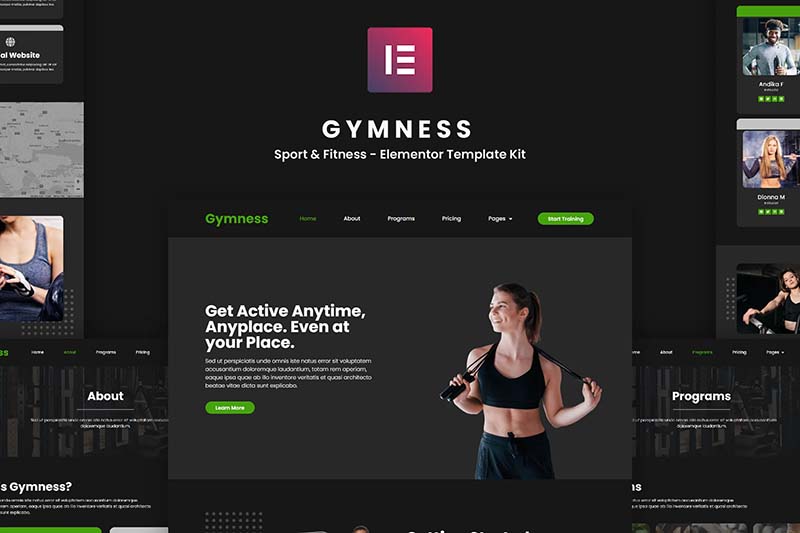
Gymness - Sports & Fitness Elementor Template Suite
Gymness is an Elementor template suite for gyms, yoga studios and fitness instructors, offering a modern and professional design to help you build sports and fitness websites with ease.

How to Efficiently Build and Manage Website Content with WordPress Posts & Pages
WordPress is a feature-rich platform that makes it easy to build a variety of websites, such as personal blogs, online portfolios to showcase one's work, and even e-commerce stores to trade goods. When building a WordPress website, content is usually organized into two main shapes...

Performance Impact of Elementor Safe Mode and How to Optimize It
Elementor is a popular WordPress page builder that offers great features and flexibility. However, enabling Safe Mode may impact site performance when debugging and problem solving. In this article, we will explore the performance impact of Elementor's safe mode and provide optimization...

A Comprehensive Analysis of the WordPress Dashboard: A Guide to Management, Customization, and Optimization
This guide takes a step-by-step look at all aspects of the WordPress dashboard, offering tips and insights along the way. How to Access the WordPress Admin Dashboard Accessing the WordPress Admin Dashboard is the first step in managing your website. WordPress login page: open your web...

Beginner's Guide: Building Your Website for Free with WordPress
WordPress can provide you with all the tools you need to help you build and manage your website with ease. Whether you want to create a blog, showcase a portfolio, or open an online store, WordPress has your back, and most of its features are free. The first ...
How to Fix Password Reset Key Error in WordPress
I don't know if you have ever encountered the "Unable to save password reset key to database" error in WordPress. We have found that this error usually occurs when trying to log in to a WordPress site and it can lock the administrator out of the site, making it impossible for the administrator to...

Add Image Focus Tool to WordPress Media Library
What is the Image Focus Tool? The Image Focus Tool is a tool that allows you to quickly select the location of the main focus area of any image. By simply clicking on the image, you can easily determine exactly where the image's focal point is located on the x and y axes. This x and y position can then be used in...

How to Reset WordPress Password When Email Access is Unavailable
Forgetting a password is a common problem when using a WordPress website. However, this can cause even more trouble when there is no access to the registered email to reset the password. The good news is that WordPress offers several ways to help you reset your password without accessing the email...

What is Elementor for WordPress?
Before we get into the details of what Elementor is, let's take a look at WordPress. What is WordPress? This is a screenshot of the WP backend with the Elementor plugin installed WordPress is a content management system (CMS) that simplifies the creation of a blog site...

WordPress.com and WordPress.org: exploring two kinds of magic in the digital world
Welcome to the fantasy world of WordPress! In this world, there are two kinds of magic: WordPress.com and WordPress.org. They sound similar, but they're actually like the magic of the two wands in Harry Potter, each with their own magic. Let's explore these two magic...

How to Create and Optimize Recipe Cards in WordPress with the WP Tasty Recipes Plugin
What are recipe cards? Why should you use them? Recipe cards are an extremely useful tool in the culinary world. They provide the ingredients and instructions for cooking a specific dish, helping chefs to create a delicious meal. Recipe cards are usually in a structured format and contain the following sections: dish...
Content Automation and Integration with Python and the WordPress REST API: A Comprehensive How-To Guide
Automate content publishing, data analysis, and page updates by integrating the WordPress REST API with Python. This guide covers the complete step-by-step process from API setup and authentication to content management to help realize efficient WordPress automation.

What are the common WordPress plugins used for e-commerce websites?
Many of our partners who want to do e-commerce do not know which plugins they need to install when building a website with WordPress. Have left messages in our community and article comment section, hoping to recommend some WordPress plug-ins. I have organized some below, we do our own online retail website commonly used...

How to Bulk Compress Existing Images in WordPress
When managing a WordPress website, images are one of the most common resources. A large number of uncompressed images will not only take up server space, but also affect the loading speed of the website, which in turn affects user experience and SEO ranking. Therefore, batch compression of existing images is one of the ways to improve website performance...

How to Add Custom Fields to WooCommerce Products: Methodology and Best Practices
Learn how to add custom fields to WooCommerce products to improve user experience and conversion rates. Detailed explanations of plugins and code implementations for beginners and experienced developers.
Benefits of using maps in WordPress blogs: in website design and SEO optimization
Modern websites not only need to have an aesthetically pleasing design, but must also play a key role in user experience, SEO rankings and building user trust. For self-taught website builders via WP, integrating Google Maps into every page of your website is a simple yet powerful strategy to...

How Elementor Quickly Accesses Widget and Configuration Page Settings
Effective management of your website's widgets not only improves the functionality of your website, but also optimizes the user experience. When using the Elementor editor, you can easily create and manage a "Favorites" section to quickly access the most frequently used widgets in the widget panel. This article focuses on how to utilize Ele...

Elementor Safe Mode vs. Regular Mode
Elementor, as a popular WordPress page builder, has won the favor of users with its rich features and user-friendly interface. In order to protect users in the process of building and managing websites, Elementor provides a secure mode and a regular mode. This article will ...

5 Practical Ways to Add Custom CSS in WordPress and FAQs
Adding custom CSS to WordPress is a very practical way to give you complete control over the look and feel of your website. Custom CSS is a very flexible and powerful tool in WordPress website customization, helping you to have fine control over your website's visuals, cloth...

How to Add a Table of Contents to WordPress: a Complete Guide to Improving Readability and SEO
Adding a table of contents to a long WordPress post not only improves readability but also enhances the overall structure of the site. A table of contents provides readers with clear navigation and helps them quickly locate the content they are interested in. In this post, we will detail how to add a table of contents in WordPress...

How to Customize WooCommerce Emails
WooCommerce emails help customers get information about the status of their orders, delivery times, and more. Why customize WooCommerce emails? When running a WooCommerce store, customers receive different transactional emails. These emails help them...

How do I customize the colors of my WordPress website?
What are WordPress themes? Can I change the theme colors? WordPress themes control the appearance of a website and the visual experience users have while using it. A typical WordPress theme is a set of pre-designed templates that can be installed on a website to change its...

Fully Protecting WordPress Ecommerce Websites: Improving Security and Earning Customer Trust
When you build an e-commerce website using WordPress tools, have you ever understood that protecting your e-commerce website is vital to your business and your customers. As an e-commerce website owner, you may often hear customers complaining about slow loading websites and having to deal with hackers trying to commit fraud...

WordPress Internal Linking: The Definitive Guide
What are internal links? Internal links are hyperlinks to pages within the same domain. Internal links are links that direct users to another page on the same website. Every website with multiple pages should use internal links to connect them. Think about the home page of a website. Most likely...

The Complete Beginner's Guide to Troubleshooting WordPress Errors
This article details how to troubleshoot and fix common WordPress errors, including white screen of death, database connection errors, plugin and theme conflicts, and more. With this guide, you can quickly resolve issues, ensure your website runs smoothly and improve user experience.

 简体中文
简体中文  English
  日本語
日本語  Français
  Español



