




WP self-taught website builder Page 52
At Photon Academy, we specialize in providing high quality WordPress instruction to help you master every aspect of WordPress from basic to advanced. Our courses are designed to allow students to get hands-on and understand the power of WordPress, whether it's building a personal blog or a business website.
arrange in order

How to Configure HTTPS in WordPress
HTTPS (Hypertext Transfer Protocol Secure) is a website security protocol implemented through SSL certificates that encrypts the transmitted data and protects the data security of the website and users. Configuring HTTPS not only improves the security of your website, but also enhances user trust. How to configure HTTPS in WordPre...

How to Effectively Solve WordPress Theme Editing Problems
"Unable to edit theme in WordPress" means that you can't access or modify the WordPress theme files or customize the appearance of your website using the theme editor. This may happen due to the following reasons: Lack of WordPress Appearance Editor Theme Editor...

Comprehensive Guide: How to Fix WordPress "Error Establishing Database Connection" Issue
Error establishing database connection" means that your site cannot connect to the database. When you create a website using WordPress, all data is stored in a MySQL database, including posts, text, images, videos, settings, and user information. When a user visits the site, Word...

WordPress Reset Password: A Complete Detailed Guide
Forgotten passwords for WordPress websites are a common problem. The good news is that WordPress offers a variety of ways to reset your password so that you can easily regain access to your website. I will describe these methods in detail, including using the built-in password reset feature, resetting through the database...

WordPress Multi-Domain SEO Optimization Tips
Many cross-border sellers doing C-suite choose to use multiple domains to improve their search engine rankings. Today we focus on how to perform multi-domain SEO optimization on WordPress websites to help you effectively manage multiple domains and maximize your SEO results. First, understand the multiple domain name cur...
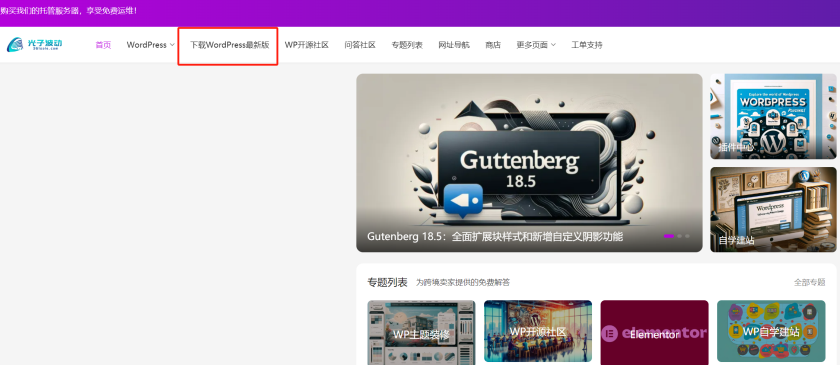
Detailed WordPress Installation and Configuration Guide
WordPress is relatively easy to install. In most cases, WordPress installations take less than 5 minutes to complete. Many web hosts now offer tools to install WordPress automatically (e.g. Fantastico). But if you want to install WordPress yourself, the following tutorials are useful for...

WordPress Multi-Domain Redirection Setup Guide
When running a WordPress website, you come across situations where you need to redirect multiple domains to one main domain. Whether it's for SEO optimization, to unify your brand image, or to avoid user confusion, it's important to set up your redirects correctly. Why do you need multiple domain redirects? 1. to unify...
Best WordPress Plugins of 2024 (I)
We have handpicked some of the best WordPress plugins for 2024, covering various categories like forms, SEO, security, analytics and more. Since there are a bit too many plugins; we will cover them in several installments. Must Have Plugins for Every WordPress Website Regardless of the purpose, every...
Best WordPress Plugins of 2024 (II)
We talked about a few of the more useful WordPress plugins for 2024 earlier, mainly about form plugins and SEO plugins, see Best WordPress Plugins for 2024 (I) for more details. Today we'll look at the best security plugins, analytics plugins, and caching plugins for 2024 have...
How to Create and Optimize Mobile Menus for WordPress Websites
After building a WordPress website, because whether it's a blog site or a store site; most of the users are from mobile. That's why it's important to add a cell phone menu on your WordPress website. Why should your website menu be dropped? When building a WordPres...
Recommended Best WordPress Slider Plugins on the Market
There are dozens of WordPress slider plugins available in today's market. However, not all plugins meet the need for high performance and a high degree of customization. We have found that most plugins have poor performance or limited customization options. To help you choose the right plugin, we...
How to Easily Create Custom Homepage Templates in WordPress: a Detailed Step-by-Step Guide
What is a homepage? The homepage is simply that page that someone sees first when they type your website address (domain name) into their browser. For most people, this page is like the gateway to your website, it's how they learn about your business, blog or website content...

How to Customize and Optimize URLs in WordPress
How to Customize and Manage URL Addresses in WordPress In WordPress, the last part of the URL address is called the "slug", which is used to refer to a specific page, post, category, or tag.The setting of the slug is crucial for SEO optimization and user experience. In this article, we'll go over...

A Guide to Effectively Contacting WordPress Support: Best Practices for Resolving Common Website Issues
How to Contact WordPress Support and Solve Common Problems Even though WordPress is supported by more than 43% sites on the Internet, sometimes you still run into roadblocks and don't know what to do next. This article will detail when you need to contact WordPress support and...

Configuring SMTP to solve WordPress form emailing issues: detailed tutorials
How to Configure WordPress SMTP to Solve Forms Can't Be Sent Problems When building a website with WordPress, you often encounter the problem of forms not being able to send emails. Usually, these emails are stored in the WordPress backend, and you need to log in to the backend frequently to check them, which is very troublesome...
WPCode Launches New "Search and Replace All Content" Feature for Easy WordPress Bulk Updates
WPCode Simplifies WordPress Content Management WordPress plugin WPCode introduces the new "Search and Replace All Content" feature, a free tool designed to simplify bulk content management operations for WordPress websites. This feature will greatly enhance the site...

How to Fix "WordPress Database Error Disk Full" Problem: A Comprehensive Guide
Resolving "WordPress Database Error Disk Full" Error WordPress is a powerful content management system, but when the database space is insufficient, you may encounter "WordPress Database Error Disk Full" message. This error can cause the website to not function properly,...

Why Adding a Syntax Checker Tool to Your WordPress Website is a Smart Choice
Grammar and spelling mistakes are inevitable when writing blog posts or website content, and even the most experienced writers make mistakes. To help you ensure that your content is professional and readable, using an online grammar checker tool is a smart choice. In this article, we'll go over the details of the tools that apply to...
How to Integrate TikTok for Your WordPress Site: Best Plugin Recommendations & Detailed Guide
In the digital era, social media platforms have become one of the most important channels for brands and content creators to showcase and promote.TikTok, as a popular short video platform, has a huge user base and high interactivity. Integrating TikTok with WordPress website not only...
A Complete Guide to Changing Domain Names for WordPress Websites
Changing the domain name of a WordPress website can be a complex but necessary task, especially if you need to change the domain name frequently for a bargain site, migrate to a better domain, or undergo a website reorganization. We have a detailed guide here to help you safely and effectively change your WordPress website...

How to force a domain transfer: steps and considerations
When you want to transfer a domain name from one registrar or hosting provider to another, it is usually necessary to obtain authorization from the current registrant of the domain name. However, in some cases, it may be necessary to perform a mandatory transfer, i.e., to transfer a domain name to another service without authorization...

How can independent e-commerce sites effectively reduce shopping cart abandonment rates?
Cart abandonment is a situation where a customer selects an item and is ready to pay for it but ultimately decides not to purchase it. Many times, customers will browse a website, learn about a product, or even add the item to their cart, but opt out during the payment session. This phenomenon is commonplace, so what...

Comparison of the most popular CMS open source programs in 2024 (WordPress, Joomla, Drupal, Squarespace, Wix)
What is a Content Management System: things to look out for in a CMS platform A CMS is software that allows people who don't know how to program to create, edit and publish online content such as articles, images and videos through a simple interface. To manage your content marketing, you have to make sure...

A Detailed Guide to Optimizing WordPress Website Performance with the WP Rocket Plugin
How to Optimize WordPress Website Performance with WP Rocket Plugin In the modern internet environment, website loading speed and user experience are key factors in attracting and retaining visitors. For websites built with WordPress, installing a caching plugin is one of the effective ways to improve performance...

How to set up 301 redirects to ensure SEO weight inheritance
Setting up a 301 redirect when changing WordPress domains is a critical step in ensuring SEO weight inheritance.A 301 redirect is a permanent redirect that tells search engines and users that content on the old domain has been permanently moved to the new domain. Properly configuring 301 redirects can help you keep...

PHP Missing MySQL Extension Error: Causes and Solutions Explained
When building or accessing a WordPress website, you may encounter the error "Your PHP installation seems to be missing the MySQL extension required by WordPress". This error usually means that there is a problem with your site's code that prevents WordPress from connecting to its MySQL database. This ...
How to Create Convertible Squeeze Pages in WordPress
In website operations, Squeeze Page is an important tool to increase the conversion rate of leads and subscribers. By using the WordPress plugin SeedProd, it is easy to create efficient squeeze pages. This article will detail how to use SeedProd to create squeeze...

What is the WordPress Heartbeat API and how to manage it?
In 2013, WordPress introduced the Heartbeat API, a feature that allows your browser to automatically communicate with the server. If you are using web hosting, you need to look carefully at your server's CPU usage. This is because when you exceed the limit, some hosting companies may...

How to fix high usage of admin-ajax.php in WordPress
Asynchronous JavaScript and XML (AJAX) is a set of web development technologies that enhance the user experience and interactivity of websites. WordPress theme and plugin developers often use AJAX to create dynamic and interactive features. In addition, AJAX allows site visitors to ...

Optimize Images in WordPress in 4 Easy Ways
Good image optimization can give a WordPress website the benefits of fast load times, enhanced user experience and better SEO. There are 4 generally used methods, so come along and learn about four simple ways to optimize WordPress images, and I'll also list the images used to optimize...

 简体中文
简体中文  English
  日本語
日本語  Français
  Español



