



WordPress Page 2
arrange in order

Plugins and Extensions for Open Source CMS: How to add more functionality to your website?
Want to make your website more powerful? This article is a comprehensive analysis of the role of open source CMS plug-ins and extensions, installation methods and recommended tools for WordPress, Joomla and Drupal users.
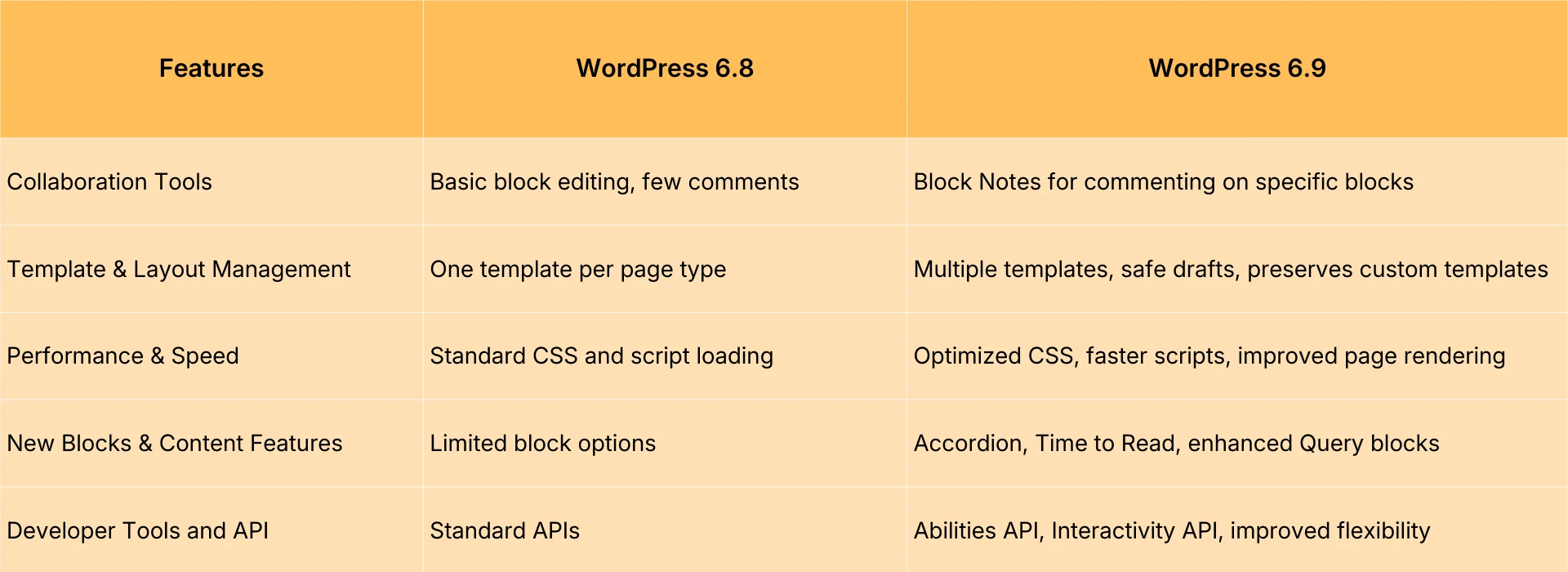
WordPress 6.9 vs. 6.8: Is Upgrading Worth It?
In-Depth Analysis: WordPress 6.9 vs. 6.8 Comprehensive Comparison of Upgrades from Editing Experience to Performance Optimization Helping You Determine Whether the New Version is Worth Adopting
Flatsome Theme Security Analysis: How to Protect Your WordPress Website?
In-depth analysis of Flatsome theme security performance in 2025, revealing potential risks and protective measures. Provide practical plugin recommendations and professional configuration guide to help you build a safe and reliable WordPress website.
WP-Members and Paid Subscriptions: Strategies to Boost User Retention and Revenue
By combining WP-Members with paid subscription model, it creates an efficient membership system, enhances user retention and revenue, and realizes sustainable profitability and long-term competitiveness of the website.
Creating Customized Search Results Pages with Elementor Pro
Detailed tutorial teaches you to use Elementor Pro to create WordPress custom search results page, including live search, post archive display and styling, suitable for e-commerce, blogs and knowledge base sites.

How do I diagnose Elementor not loading issues using the browser console and debugging tools?
Experiencing Elementor editor loading failure, white screen or stuck? This tutorial teaches you how to use the browser console and developer tools, step-by-step troubleshooting JavaScript errors, network request anomalies, CSS hiding and other issues, and efficiently diagnose the root cause of Elementor can not be loaded....

WordPress vs. Drupal's SEO capabilities: which is better for search rankings?
Who is better at SEO, WordPress or Drupal? This article comprehensively compares the performance of the two CMS in URL control, structured data, multi-language support, on-page performance and other key dimensions of SEO, to help you make the most appropriate technical choices for your website ranking goals.

WordPress 6.8 RC1 Released for Testing, Official Version to Go Live on April 15
RC1, the first release candidate of WordPress 6.8, has been officially released. This release marks the end of the development phase and the beginning of a full testing and optimization phase. The new version is scheduled to go live on April 15, 2025.

How WooCommerce Boosts Site Speed to Boost SEO Rankings
Master the WooCommerce site speed optimization methods, through hosting, caching, images, database and other multi-dimensional speed, effectively improve SEO ranking and conversion rate.

Kadence Tutorial: How to Make Giant Dropdown Menus with Kadence Themes
Learn how to create mega dropdown menus using the paid version of the Kadence theme. This article provides detailed steps, including installing the plugin, configuring Mega Menu, using the WooCommerce shortcode, and more, to help you create a professional WordPress site navigation.
How to install a theme using WP-CLI
Explains the whole process of installing WordPress themes using WP-CLI, from preparing the environment, finding themes, to installing and enabling them, suitable for both developers and efficient operation and maintenance scenarios.

Frequent Bugs in Cracked Plugins?This is the result of developers' inability to maintain the
Cracked plugins may seem free, but they are full of hidden dangers. Failed updates, wrong functionality, hacked websites, behind these bugs are the results of developers' inability to maintain them. Stay away from cracks and choose genuine.

WordPress Theme Incompatible with Elementor? A Complete Guide to Identifying and Resolving Conflicting Issues
Experiencing white screen, messy styles, or save failures with Elementor? This article analyzes the reasons why WordPress themes are incompatible with Elementor, and provides detailed troubleshooting and solutions to help you create a stable and smooth visual editing experience.

How to Write High-Converting SEO Titles and Descriptions for WooCommerce Product Pages
This guide provides an in-depth analysis of how to write high-converting SEO titles and descriptions for WooCommerce product pages, covering keyword layout, digital elements, emotional vocabulary, and CTA application, to help e-commerce sellers improve their search rankings, increase click-through-rates, and effectively convert them into actual sales.

How to create your own website membership system with WP-Members?
Learn how to use WP-Members to quickly create an efficient membership system in WordPress websites, set up registration and login, exclusive content and membership management, and increase user stickiness and conversion rate.

How to troubleshoot a server configuration issue where the Elementor editor won't open?
Elementor editor can not open may be closely related to your server configuration. This article explains the key PHP parameters that affect the loading of Elementor, REST API status and extension dependencies, and provides practical troubleshooting and optimization suggestions to help you quickly restore the editor function.

How to Downgrade WordPress Version with WP-CLI
If you encounter errors after updating WordPress, you can use WP-CLI to downgrade WordPress to a specific version. This article explains how to downgrade WordPress version using WP-CLI with complete steps and notes.

WordPress local installation detailed tutorial: server environment configuration and site deployment
Detailed explanation of how to use 1Panel to configure the local server environment and deploy WordPress sites, suitable for beginners to quickly start building sites.

Choosing the wrong one equals nothing! Newbie must see WordPress e-commerce plugin to buy the ultimate secret tips
Newbie do not know which e-commerce plugin to choose? This article from the product type, payment methods, scalability and other five aspects of teaching you the precise choice, easy to build your own WordPress online store!

SEO Optimization Tips for WordPress Multi-Domain Setups
A comprehensive explanation of common problems and optimization techniques for WordPress multi-domain deployments, including redirection settings, Canonical tags, hreflang applications, and content differentiation methods.

Complete Guide to Installing WordPress Plugins with WP-CLI
This tutorial explains how to install, enable and manage WordPress plugins using WP-CLI. Learn how to simplify the plugin installation process via the command line for developers.

Site Security Race: Who is more resistant to attacks, Drupal or WordPress?
Drupal and WordPress who is more secure? This article from the authority control, plug-in ecosystem, security updates, attack defense capabilities and other aspects of a comprehensive comparison of the two mainstream CMS, to help you choose the most suitable for their own website security solutions.

WooCommerce 10.0 Released: Overview of New Features and Useful Updates
WooCommerce 10.0 is released with new checkout links, optimized coupon configuration, HTML import support, and a number of features to improve front-end and back-end efficiency.
WordPress error "temp-write-test" how to do? Quick Fix Guide
WordPress temp-write-test error commonly occurs in plugin installation, theme update failure. This article provides troubleshooting and quick fixes, including PHP temp directory configuration, file permission adjustment and custom temp path settings.

Backdoor Code and Data Hijacking Behind Elementor Pro Cracked Plugin Revealed
Behind the cracked Elementor Pro plugin, there are hidden risks of remote control, data theft and page tampering. The article analyzes the typical tactics and reminds to avoid using illegal plugins.
Elementor Security Model and Teamwork: How to Improve Stability in Multi-Developer Projects?
Building a WordPress website with Elementor in a multi-developer environment? This guide teaches you how to quickly diagnose problems, avoid plugin conflicts, and improve the stability and efficiency of your collaborative projects through Safe Mode.

How to Install WordPress with WP-CLI
Installing WordPress through WP-CLI makes the process of building a website more efficient. This article details the steps to install WordPress using WP-CLI, including folder creation, WordPress download, configuring wp-config.php and the final installation process.

Tips for handling Elementor load failures and cache plugin conflicts
What should I do if Elementor fails to load? This guide analyzes in detail the common causes of conflict between Elementor and caching plugins, and provides practical troubleshooting tips and solutions to help you quickly restore editor functionality and site stability.

Manage Multiple Regional, Language and Currency Settings in WooCommerce
Learn how to configure multiple regional tax rates, shipping zones, multi-currency and multi-language settings in WooCommerce to help your store provide a personalized global shopping experience.

Fully unlocked global styles and template libraries for GenerateBlocks
In-depth analysis of GenerateBlocks global style and template library features, support for multiple combinations and batch insertion of templates, to improve the efficiency of WordPress page design and style consistency.

 简体中文
简体中文  English
  日本語
日本語  Français
  Español



