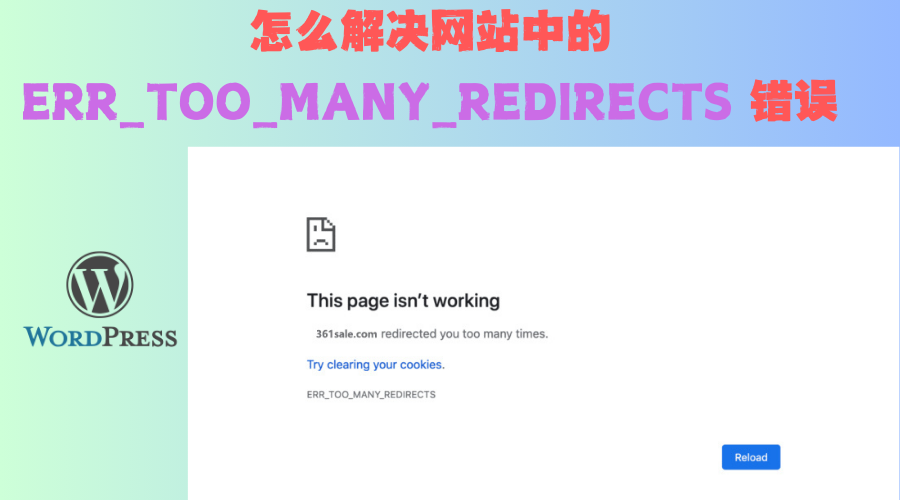






ERR_TOO_MANY_REDIRECTS The error usually occurs when the site undergoesredirect loopcase. That is, the browser is constantly trying to get a page from aredirectsto another page and cannot find the final destination page. This problem can be caused by a variety of reasons, here are some common solutions.
1. Clearing browser cache and cookies
Browser caching and cookies may be a cause of redirect loops. Browsers may be caching pages or settings that have become outdated, preventing the site from loading the correct content, which can lead to redirect loops.
Operational Steps:
- In your browser, press the shortcut key
Ctrl + Shift + Delete(Windows) orCmd + Shift + Delete(Mac) to open the Clear Browsing Data page. - Select Clear Cache, Cookies, and Site Data.
- Ensure selection all time as a time range, which ensures that all expired caches are cleared.
- strike (on the keyboard) Clear dataThe
![Image [1]- How to Fix ERR_TOO_MANY_REDIRECTS Error in WordPress Website: Complete Fix Guide](https://www.361sale.com/wp-content/uploads/2025/02/20250217095334381-image.png)
- Then, reload your page and check to see if it resolves the issue.
2. Check WordPress URL settings
WordPress WordPress Address (URL) respond in singing Site Address (URL) If the settings are inconsistent, this may cause problems with redirection loops.
Operational Steps:
- Log in to the WordPress backend.
- go into Settings > GeneralThe
- ferret out WordPress Address (URL) respond in singing Site Address (URL). The two addresses should be identical.
- If you are using SSL (HTTPS), make sure that both URLs start with
https://Beginning. - If you don't have SSL (HTTP) enabled, both should be
http://The
- If you are using SSL (HTTPS), make sure that both URLs start with
![Image [2]- How to Fix ERR_TOO_MANY_REDIRECTS Error in WordPress Website: Complete Fix Guide](https://www.361sale.com/wp-content/uploads/2025/02/20250217095902667-image.png)
- If you have changed these settings, click Save ChangesThe
3. Check SSL settings
Misconfiguration of SSL can often lead to redirection loops, especially after you have switched your site to HTTPS, where some pages may still try to load over HTTP.
Operational Steps:
- Ensure that both the WordPress address and the site address use the
https://(if you have SSL enabled). - Check if the SSL certificate is valid:
- Visit your website (starts with HTTPS) and look for the lock icon next to your browser's address bar. If the green lock is not displayed or the certificate is invalid, you may need to reinstall your SSL certificate.
- If you are using the Cloudflare Make sure that Cloudflare's SSL configuration matches that of WordPress. For more information on how to do this, see this articleHow to Fix ERR_TOO_MANY_REDIRECTS Error in CloudflareThe
4. Disabling plug-ins
Certain plugins, especially caching plugins, SEO plugins, or security plugins, may modify the site's redirection rules and cause redirection loops. If the problem is caused by plugins, you can disable them by doing the following:
Operational Steps:
- Log in to your WordPress website root directory using FTP or a file manager.
- switch to
wp-content/pluginsFolder. - Disable plugins one by one: by changing the name of the plugin folder to something like
plugin-name_oldto disable the plugin. - After disabling the plugin, refresh the page and see if it resolves the issue.
- If the problem is resolved, enable the plugins one by one until you find the one causing the problem.
- Try disabling caching plugins (e.g. W3 Total Cache, WP Super Cache) and security plugins (e.g. Wordfence) to see if they are causing the redirection issue.
![Image [3] - How to Fix ERR_TOO_MANY_REDIRECTS Error in WordPress Website: Complete Fix Guide](https://www.361sale.com/wp-content/uploads/2025/02/20250217103953575-image.png)
![Image [4] - How to Fix ERR_TOO_MANY_REDIRECTS Error in WordPress Website: Complete Fix Guide](https://www.361sale.com/wp-content/uploads/2025/02/20250217104404602-image.png)
5. Check the .htaccess file
On the site's server..htaccess file is used to configure redirection and URL rewrite rules. If this file is not configured correctly, it may cause redirection loops.
Operational Steps:
1. Login to your site's root directory using FTP or a file manager.
2. Search .htaccess File. If the file exists, make a backup copy first.
3. Delete .htaccess Documentation.
![Image [5] - How to Fix ERR_TOO_MANY_REDIRECTS Error in WordPress Website: Complete Fix Guide](https://www.361sale.com/wp-content/uploads/2025/02/20250217105104592-image.png)
4. Log in to the WordPress backend and go to the Settings > Fixed Links Page (English interface:Settings > Permalinks).
5. Click Save ChangesThis will automatically generate for you a new .htaccess Documentation.
![Image [6] - How to Fix ERR_TOO_MANY_REDIRECTS Error in WordPress Website: Complete Fix Guide](https://www.361sale.com/wp-content/uploads/2025/02/20250217105308459-image.png)
default .htaccess The document is usually shown below:
# BEGIN WordPress

RewriteEngine On
RewriteBase /
RewriteRule ^index\.php$ - [L]
RewriteCond %{REQUEST_FILENAME} ! -f
RewriteCond %{REQUEST_FILENAME} ! -f RewriteCond %{REQUEST_FILENAME} !
RewriteRule . /index.php [L]
</IfModule
# END WordPress
6. Check Nginx Configuration (for Nginx users)
If your site uses an Nginx server, check that the redirection rules in the Nginx configuration file are not causing a loop.
Operational Steps:
- Log in to your server using SSH.
- Find the Nginx configuration file, usually located in the
/etc/nginx/sites-available/maybe/etc/nginx/nginx.confThe - Check the redirection rules in the configuration file to make sure there are no incorrect redirection directives, for example:
server {
    listen 80; server_name ;
    server_name www.yoursite.com; return 301 www.yoursite.com;
    return 301 https://$host$request_uri;
}
- Ensure that no multiple redirection rules conflict with each other.
- After modifying the configuration, restart the Nginx service:
sudo service nginx restartThe
7. Examination CDN Configuration
If you're using a CDN (e.g. Cloudflare, KeyCDN, etc.), misconfiguration can lead to redirection loops.
Operational Steps:
- Log in to the control panel of your CDN service (e.g. Cloudflare).
- option Overview > Advanced Actions > Pause Cloudflare on Site, determine if the service is causing the problem by suspending the Cloudflare service.
![Image [7] - How to Fix ERR_TOO_MANY_REDIRECTS Error in WordPress Website: Complete Fix Guide](https://www.361sale.com/wp-content/uploads/2025/02/20250217111351790-image.png)
![Image [8] - How to Fix ERR_TOO_MANY_REDIRECTS Error in WordPress Website: Complete Fix Guide](https://www.361sale.com/wp-content/uploads/2025/02/20250217111637259-image.png)
- Check the SSL settings:
- Ensure that the SSL settings are consistent with your hosting configuration (e.g., use "Full" or "Full Strict" SSL settings).
- To disable automatic HTTPS rewriting, try turning off the
Always Use HTTPSSetting.
- Clear the CDN cache to ensure that the site loads the latest files.
In Cloudflare, you can pass the Caching > Purge Cache Clear the cache.
![Image [9]-How to Fix ERR_TOO_MANY_REDIRECTS Error in WordPress Website: Complete Fix Guide](https://www.361sale.com/wp-content/uploads/2025/02/20250217144038122-1739774432371.png)
8. Checking customized code and redirection rules
If you use custom code in your site, or have set up redirection rules manually (e.g., via a plugin or wp_redirect() function), check that these settings are correct.
Operational Steps:
- Check your custom code in the theme or plugin to make sure you're not using redirection functions (such as the
wp_redirect()maybeheader()). - If you are manually configuring URL redirection, make sure that the redirection loop is not set to the wrong direction.
- Try disabling all custom redirection rules and see if that resolves the issue.
9. Contacting the hosting provider
If you've tried all of the above and the problem persists, it may be a server-side configuration issue. You can contact your hosting provider and ask if there are any server configuration errors or adjustments that need to be made, especially for Nginx or Apache configurations.
Going through these steps in this article will hopefully help you to identify and solve the ERR_TOO_MANY_REDIRECTS Error.redirect loopThis problem is usually associated withconfiguration file,URL Settings,plug-in (software component)maybe(computing) cacheRelated.

Link to this article:https://www.361sale.com/en/33346The article is copyrighted and must be reproduced with attribution.



















![Emoji[wozuimei]-Photonflux.com | Professional WordPress repair service, worldwide, rapid response](https://www.361sale.com/wp-content/themes/zibll/img/smilies/wozuimei.gif)

![Emoticon[baoquan] - Photon Wave Network | Professional WordPress Repair Services, Worldwide Coverage, Rapid Response](https://www.361sale.com/wp-content/themes/zibll/img/smilies/baoquan.gif)


 简体中文
简体中文  English
  日本語
日本語  Français
  Español


No comments