




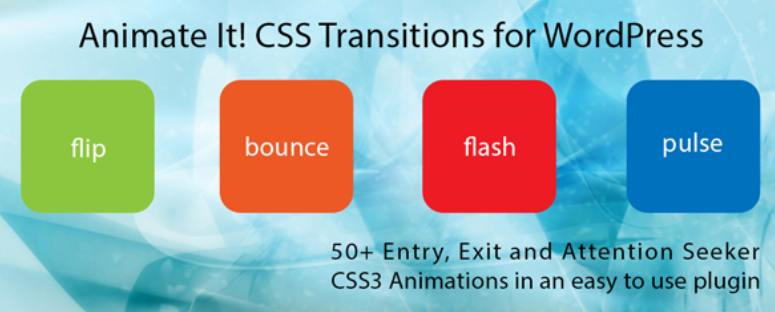
WordPress offers a number ofanimePlugins such as Animate It!, AOS, Motion.Page, ScrollMagic, etc. can easily add various dynamic effects. However, many people will encounter troubles when using them, such as animations not displaying, slow loading, and many problems on cell phones.
![Image [1]-WordPress animation plugin common problems and solutions](https://www.361sale.com/wp-content/uploads/2025/05/20250513165811756-image.png)
This article will provide an in-depth analysis ofCommon WordPress Animation Plugin Questionsand providePractical SolutionsIt helps you to build dynamic web effects smoothly.
Issue 1: Animation cannot be displayed or fails to trigger
Common Causes:
- Plugin conflicts with current theme or other plugins
- JavaScript or CSS Not loading correctly
- Animation trigger conditions not set or set incorrectly
- Animated elements are hidden or overridden by styles
Solution:
- Switch to the default theme (e.g. Twenty Twenty-Four) to test if this is a theme issue
![Image [2]-WordPress animation plugin common problems and solutions](https://www.361sale.com/wp-content/uploads/2025/05/20250513183027771-image.png)
- Open your browser's developer tools (F12) to see if there are any reported errors
![Image [3]-WordPress Animation Plugin Common Problems and Solutions](https://www.361sale.com/wp-content/uploads/2025/05/20250513200421949-image.png)
- Verify that the animation trigger conditions are set correctly, e.g. scrolling trigger, entering viewport, etc.
- Troubleshooting by disabling other plugins one by one
- Optimize resource loading order with plugins such as "Asset CleanUp".
Problem 2: Stuttering animation and slow page loading
Common Causes:
- Excessive page animation and rendering stress
- Plugin code is large and unoptimized
- Multiple animations are triggered at the same time, taking up a lot of resources
Solution:
- Reduce the number of animated elements on the page
- utilization
transformrespond in singingopacityAchieve better performance animations - Prioritize lightweight plugins such as AOS, WOW.js
- Setting delays and triggers for animations to avoid loading them all at the start
- Improve performance with caching plugins such as WP Rocket
Issue 3: Relationship topage builderIncompatibility (Elementor,Gutenberg)
Common Causes:
- The plugin does not recognize the DOM structure generated by the builder
- Animation scripts are initialized at the wrong time and do not recognize asynchronous loading content
- The builder itself already has animations that create conflicts
Solution:
- Manually insert plugin-supported shortcodes or blocks in the page builder
- Use JS deferred loading to ensure that animations are initialized after the DOM has been rendered.
- Apply plugin animations to specific CSS classes to avoid conflicts with the builder's default animations
- Animation using Gutenberg enhancement plug-ins like Spectra, Kadence Blocks
Issue 4: Mobile animation does not work or is misaligned
Common Causes:
- Mobile animations are disabled by default in the plugin settings
- Responsive layout not adapted to animation effects
- Performance limitations or CSS overrides on mobile devices
Solution:
- Check if the plugin settings disable mobile animation effects
- Optimize animation styles to ensure elements don't get hidden or overflow on small screen devices
- Use media queries to enable certain animations on desktop only
- Test the effect at different resolutions to ensure compatibility
- If you are using Lottie animation, you can select SVG AnimationEnsure Mobile Fluency
![Image [4]-WordPress Animation Plugin Common Problems and Solutions](https://www.361sale.com/wp-content/uploads/2025/05/20250514112220321-image.png)
Problem 5: Confused or overlapping animation trigger sequence
Common Causes:
- All animations start at the same time with no delays
- Animation nesting leads to trigger order conflicts
- No animation queue logic set
Solution:
- utilization
animation-delayor plug-in built-in delay function for control - Set multiple trigger conditions to load animations in batches
- Use the "Timeline" or "Serialization" features of plug-ins (e.g. Motion.Page supports timeline)
- Rationalize the nesting structure to avoid multiple animation components interfering with each other
Recommended animation plug-ins
Here are a few recommendations for animation plugins with excellent user reviews and high adaptability:
| Plug-in Name | specificities | Suitable for people |
|---|---|---|
| Animate It! | Free, animated genre rich | Primary users, bloggers |
| AOS (Animate On Scroll) | Lightweight, scroll-triggered animation | Content site, display site |
| Motion.Page | Height customization, Elementor compatibility, timeline animation | Senior User, Interaction Designer |
| LottieFiles for WordPress | Support JSON/SVG animation, small size | Brand official website, creative site |
| ScrollMagic | Advanced scroll control, JS driven | Developers, front-end designers |
wrap-up
Animation can improve the quality of your website, but used incorrectly it can slow down, affect the mobile experience and even SEO.
Best practices include: adding animations only where necessary, testing for multi-device compatibility, and controlling the number and timing of animations using a plugin compatible with the theme builder.
Hopefully, the advice in this article will help you use animation plugins more efficiently and make your website more dynamic, faster and more stable.
Feel free to leave a comment if you have questions, and I will continue to share more animation optimization tips and plugin recommendations!

Link to this article:https://www.361sale.com/en/53846The article is copyrighted and must be reproduced with attribution.

















![Emoji[wozuimei]-Photonflux.com | Professional WordPress repair service, worldwide, rapid response](https://www.361sale.com/wp-content/themes/zibll/img/smilies/wozuimei.gif)

![Emoticon[baoquan] - Photon Wave Network | Professional WordPress Repair Services, Worldwide Coverage, Rapid Response](https://www.361sale.com/wp-content/themes/zibll/img/smilies/baoquan.gif)


 简体中文
简体中文  English
  日本語
日本語  Français
  Español


No comments