






504 gateway timeout erroris a common server error that usually occurs when a user accesses a website and the server is unable to get a response from an upstream server within the required time. This not only affects the usability of the website but can also lead to user loss. Therefore, it is crucial to understand the root cause of 504 errors and take appropriate measures to resolve them. In this article, we will analyze why 504 errors occur from multiple perspectives and provide effective solutions to help you solve the problem once and for all.
![Image [1]-504 Gateway Timeout Error Explained: Solve Website Crash Problems Completely](https://www.361sale.com/wp-content/uploads/2025/10/20251025094303632-image.png)
I. What is the 504 Gateway Timeout Error?
The 504 Gateway Timeout error (504 Gateway Timeout) is aHTTP status code, indicating that when a client request is transmitted through one or more intermediate servers, the final upstream server does not return a response within a specified time. Simply put, a 504 error is triggered when a server, while acting in the role of a proxy or gateway, fails to obtain data from another server in a timely manner.
![Image [2]-504 Gateway Timeout Error Explained: Solve Website Crashing Problems Completely](https://www.361sale.com/wp-content/uploads/2025/10/20251025094506965-image.png)
II. Root causes of 504 gateway timeouts
1. Upstream server response timeout
The most common cause of 504 errors is an upstream server response timeout. This means that when a request is sent to the target server, the server fails to return a response within the specified time due to overload, lack of resources, or other reasons.
2. Network delays or connectivity problems
in the event thatserver (computer)There is a problem with the network connection to the target server, and delays in data transfer can result in 504 errors. This typically occurs with cross-region or cross-country network requests, especially during peak hours or network congestion.
3. Excessive server load
A 504 error may result when a server handles too many requests that exceed its processing capacity. If the server's CPU, memory, or bandwidth is being utilized by a large number of requests, it may not be able to process all requests in a timely manner, and a timeout may occur.
![Image [3]-504 Gateway Timeout Error Explained: Solve Website Crash Problems Completely](https://www.361sale.com/wp-content/uploads/2025/10/20251025094703844-image.png)
4. Firewalls or security settings
In some cases, firewalls or security settings may prevent communication between servers, resulting in a 504 error. This typically occurs when communication between servers is considered insecure or restricted.
5. DNS resolution issues
DNSResolution is the process of converting a domain name into an IP address, which can also result in a 504 error if the DNS servers are slow to respond or malfunction. Especially if multiple DNS servers are configured, some servers may return incorrect IP addresses or time out.
![Image [4]-504 Gateway Timeout Error Explained: Solve Website Crashing Problems Completely](https://www.361sale.com/wp-content/uploads/2025/10/20251025100219315-image.png)
III. Solutions to 504 errors
For the different reasons mentioned above, here are some common solutions to help you solve the 504 Gateway Timeout Error effectively.
1. Check and optimize upstream server performance
If the 504 error is caused by a timeout in the response of the upstream server, it can be optimized in the following ways:
- Optimize server performance: Check the server's CPU, memory, and disk usage to ensure that the server has sufficient resources. Consider increasing the hardware resources of the server or optimizing the configuration of existing resources.
- Improve database performance: If the upstream server is involved incomprehensive databaseQueries to ensure that database queries are efficient, using indexing and caching to improve database responsiveness.
- Increase in server capacity: For high-traffic applications, add more server instances to share the traffic pressure and avoid overloading a single server.
- Perform regular load tests: Simulate traffic through load testing to ensure that servers can cope with large-scale requests and adjust server configurations in a timely manner.
![Image [5]-504 Gateway Timeout Error Explained: Solve Website Crash Problems Completely](https://www.361sale.com/wp-content/uploads/2025/10/20251025100343485-image.png)
2. Optimize network connectivity and reduce latency
Network latency is also a common cause of 504 errors. In order to solve this problem, the following measures can be taken:
- utilizationCDN (Content Delivery Network): CDNs can cache static resources to multiple nodes around the world, reducing the distance of a request from the source server to the user, thus reducing latency.
![Image [6]-504 Gateway Timeout Error Explained: Solve Website Crash Problems Completely](https://www.361sale.com/wp-content/uploads/2025/10/20251025100540698-image.png)
- Optimize network bandwidth: Ensure that the network bandwidth is sufficient and check that the server's network connection is stable. If the network is congested or has insufficient bandwidth, you may need to upgrade your network connection.
- Choosing a Better Internet Service Provider: If the problem is with the network provider, consider switching to a more reliable ISP or choosing a more stable dedicated line.
3. Tuning server load and traffic management
In order to avoid 504 errors due to excessive server loads, you can manage the
- Using a Load Balancer: A load balancer reduces the burden on a server by distributing requests to multiple server instances, preventing one server from handling too many requests.
![Image [7]-504 Gateway Timeout Error Explained: Solve Website Crash Problems Completely](https://www.361sale.com/wp-content/uploads/2025/10/20251025100924438-image.png)
- Enable Auto Scaling: In cloud servers, auto-scaling can be enabled to automatically start more server instances as traffic increases, ensuring smooth system operation.
- Optimize request and response processing speed: Improve server responsiveness by optimizing backend code and reducing unnecessary computation and I/O operations.
4. Check and adjust firewall and security settings
firewallsand security settings may prevent normal communication between servers, resulting in a 504 error. To resolve this issue, the following steps can be taken:
- Checking Firewall Rules: Ensure that the firewall is not erroneously blocking legitimate network connections. Adjust firewall rules as needed to open necessary ports.
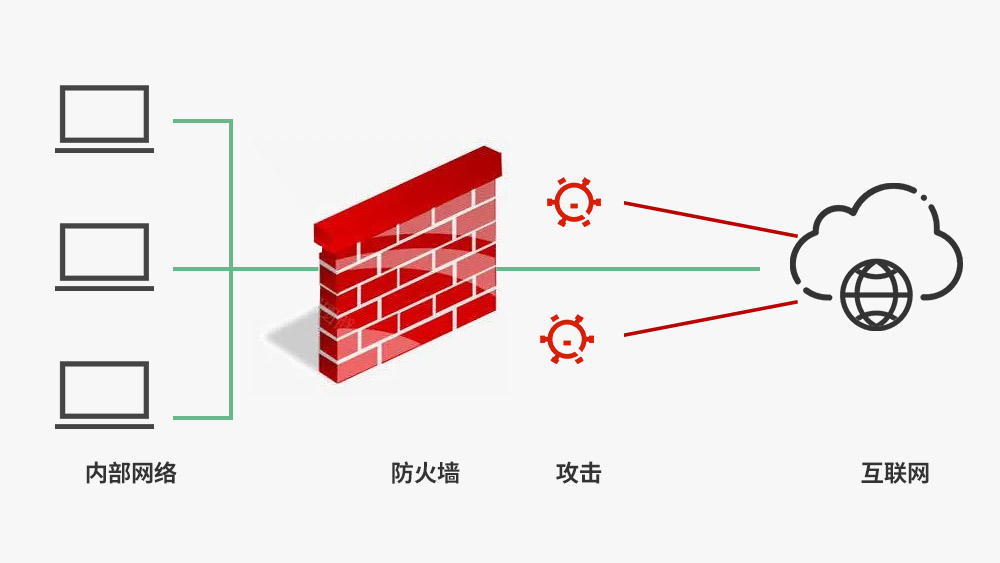
- Check network security software: Some security software may mistakenly consider certain requests to be malicious and cause them to be blocked. Check the logs of your security software to ensure that legitimate traffic is not being blocked.
5. Resolving DNS Resolution Issues
DNS resolution issues are also a common cause of 504 errors. In order to resolve this issue, you can consider the following ways:
- Use reliable DNS servers: Choose a high-performance and stable DNS service provider to avoid DNS resolution timeout.
![Image [9]-504 Gateway Timeout Error Explained: Solve Website Crashing Problems Completely](https://www.361sale.com/wp-content/uploads/2025/10/20251025101742561-image.png)
- Using the local DNS cache: Configure the server to use local DNS caching to reduce dependency on external DNS resolution and reduce resolution latency.
- Configuring Alternate DNS Servers: Configure multiple backup servers for DNS resolution to avoid failure of a single DNS service.
IV. Best practices for preventing 504 errors
After resolving the 504 error, the following precautions are recommended to avoid its recurrence:
- Regular system monitoring: Monitor server performance, network latency and traffic conditions in real time with monitoring tools to detect potential problems in advance.
- Optimize website code and database: Optimize the site's code, especially database queries in the backend, to ensure that all operations are executed efficiently.
- Perform load tests: Conduct regular load tests to understand how servers perform under high loads and adjust server configurations in a timely manner.
- Utilizing caching and CDN acceleration: Using CDNs and(computing) cacheto reduce the burden on servers and ensure that users can access content faster.
- Keeping servers well resourced: Ensure that servers have sufficient computing resources and bandwidth to cope with fluctuations in traffic and avoid resource bottlenecks.
V. Summary
504 gateway timeout errorIt is usually caused by upstream server response timeout, network latency, excessive server load, firewall settings or DNS resolution issues. Whether you are using cloud services or local servers, the core of solving 504 errors is to improve server performance, optimize network connection and traffic management. By implementing the above solutions, you can effectively reduce the occurrence of 504 errors and improve the stability and user experience of your website. At the same time, taking preventive measures, regularly monitoring your system and optimizing your configuration will help you avoid the recurrence of such problems and ensure the long-term stable operation of your website.

Link to this article:https://www.361sale.com/en/79167/The article is copyrighted and must be reproduced with attribution.
















![Emoji[wozuimei]-Photonflux.com | Professional WordPress repair service, worldwide, rapid response](https://www.361sale.com/wp-content/themes/zibll/img/smilies/wozuimei.gif)

![Emoticon[baoquan] - Photon Wave Network | Professional WordPress Repair Services, Worldwide Coverage, Rapid Response](https://www.361sale.com/wp-content/themes/zibll/img/smilies/baoquan.gif)


 简体中文
简体中文  English
  日本語
日本語  Français
  Español


No comments