






Many beginners new to website building face a dilemma: should they use Elementor's table module to drag and drop elements on the page, or write traditional HTML table code directly? Both methods can display data tables, but they differ significantly in learning curve, design flexibility, maintenance costs, and long-term scalability. Below, we break down these aspects to help website novices make a more informed choice based on their actual needs.
1. First, let's clarify: What exactly are Elementor tables and traditional HTML tables?
1.1 Basic Concepts of Elementor Tables
Elementor forms typically refer to those created within the Elementor page editor by usingWidgets or extensions(Example:TablePressUsers can directly drag and drop to generate table layouts. Within the visual interface, they add columns, rows, and cell content, then configure borders, spacing, fonts, backgrounds, responsive display, and more via the sidebar panel (some features require a PRO subscription). No HTML coding is required.
For website beginners, Elementor tables function more like a "what you see is what you get" data module. As long as you know how to use Elementor to edit pages, you can build basic price tables, comparison tables, feature tables, or timeline tables.
1.2 Basic Concepts of Traditional HTML Tables
Traditional HTML tables, on the other hand, use <table>,<tr>,<td> Manually structure elements like labels, then use CSS styles to control borders, spacing, alignment, colors, and more. More complex interactive features, such as sorting, filtering, and pagination, often require implementation with JavaScript or front-end frameworks.
This approach is more user-friendly for developers with a solid foundation, but for novice webmasters, understanding nested tags, semantic structures, and CSS layouts may present a learning curve.
II. From a Beginner's Perspective: Is Elementor's Table Feature More User-Friendly for Newcomers?
2.1 Visual Drag-and-Drop:Elementor Tables make it easier to "see results right away."
For beginners with no prior front-end experience, Elementor's greatest advantage lies in its tables, which require almost no understanding of code structure.Install the pluginAfter installing the add-ons (using Table Addons For Elementor as an example), simply:
- Add a table or column layout widget to the page
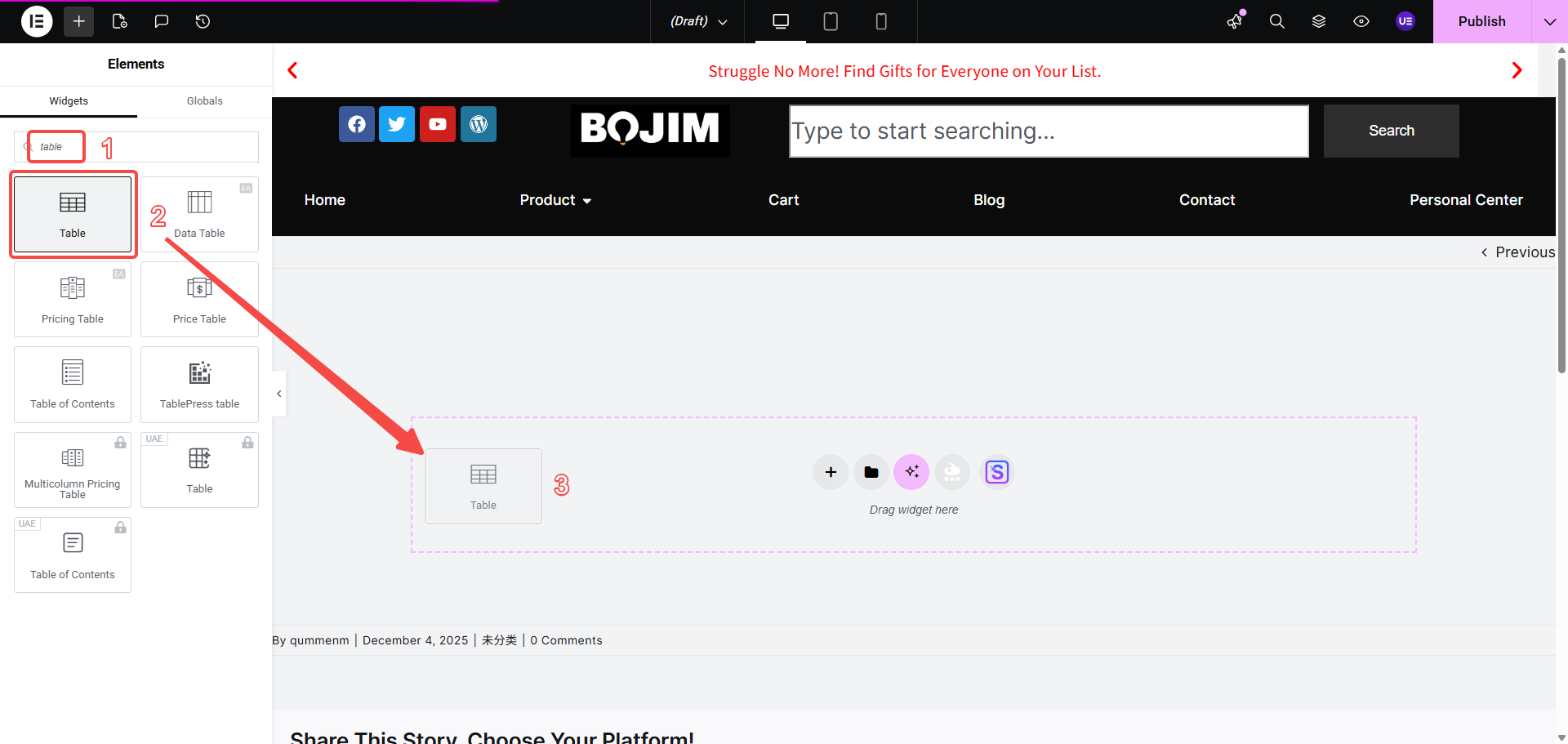
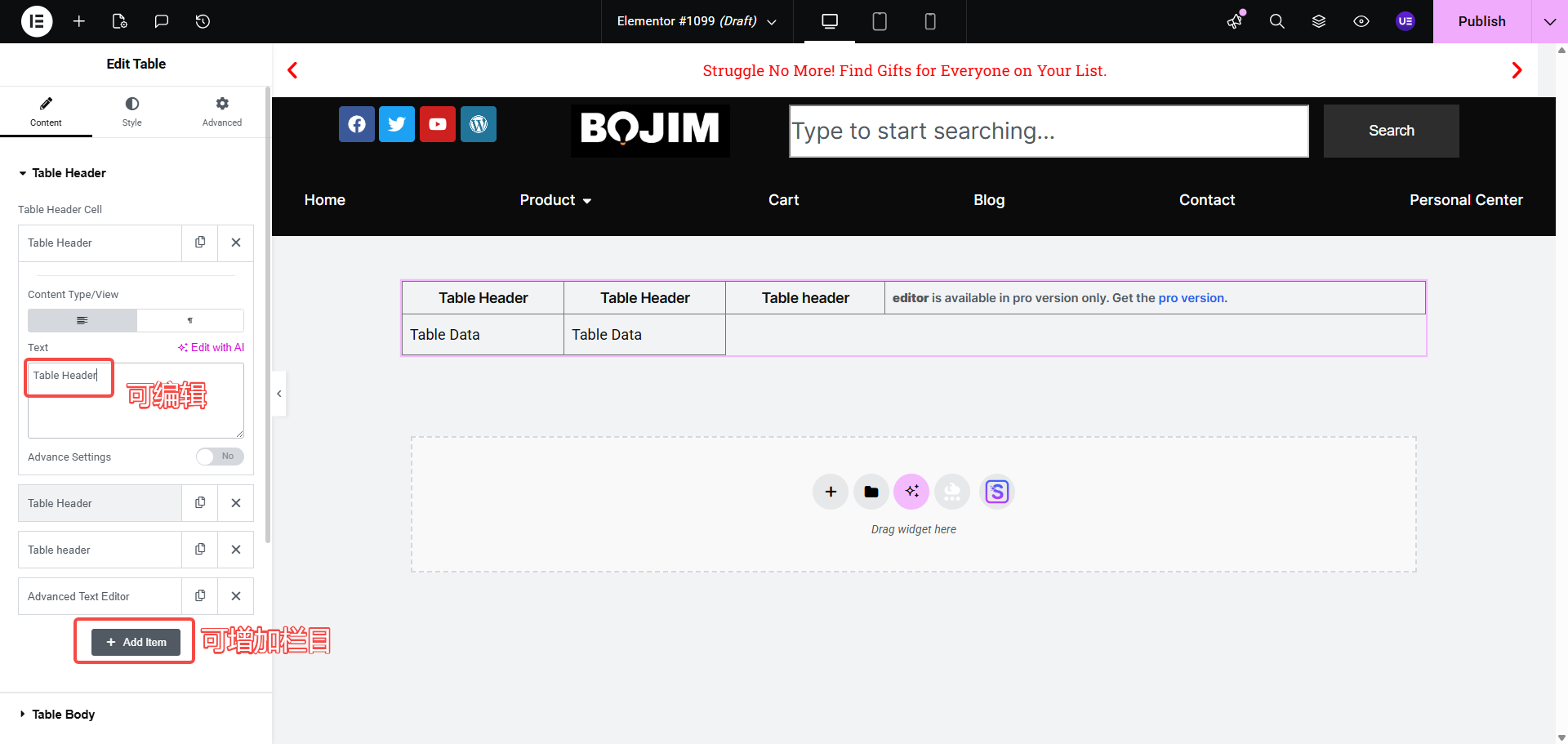
- Add text, icons, or buttons to each column (Icon and button functionality requires PRO version activation).
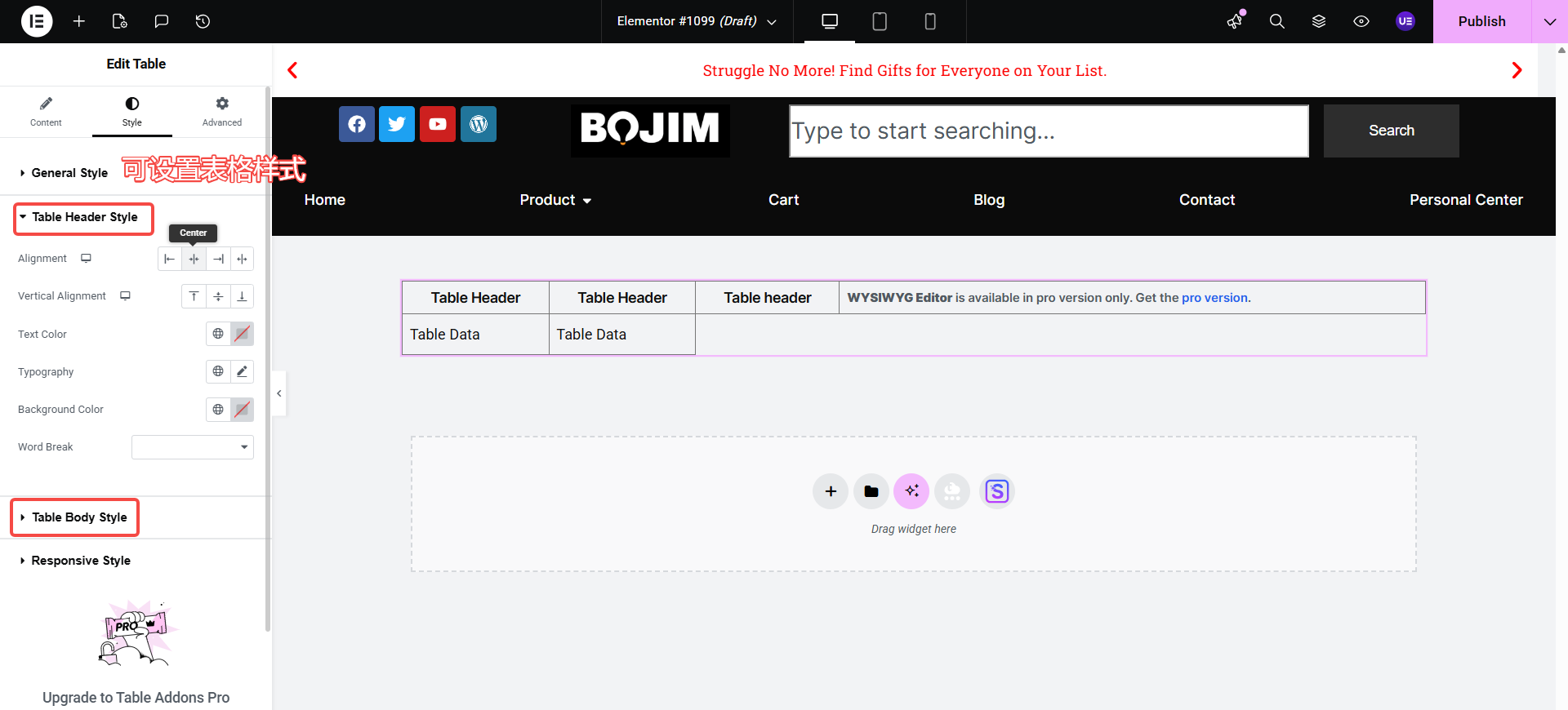
- Adjust fonts, margins, and color schemes via the Styles panel.
You can build a functional comparison chart or price list in just minutes. For users who simply want to quickly launch a product price list or service package comparison chart, this low-barrier approach is highly suitable and facilitates future fine-tuning.
2.2 Hand-Coding: Traditional HTML tables are better suited for users willing to build a foundation.
While traditional HTML tables require a bit of learning, their advantages lie in clearer structure and finer control. Once you grasp the fundamentals of HTML and CSS, you can customize every detail of the table as needed, gaining greater control over responsive layouts and structural optimization.
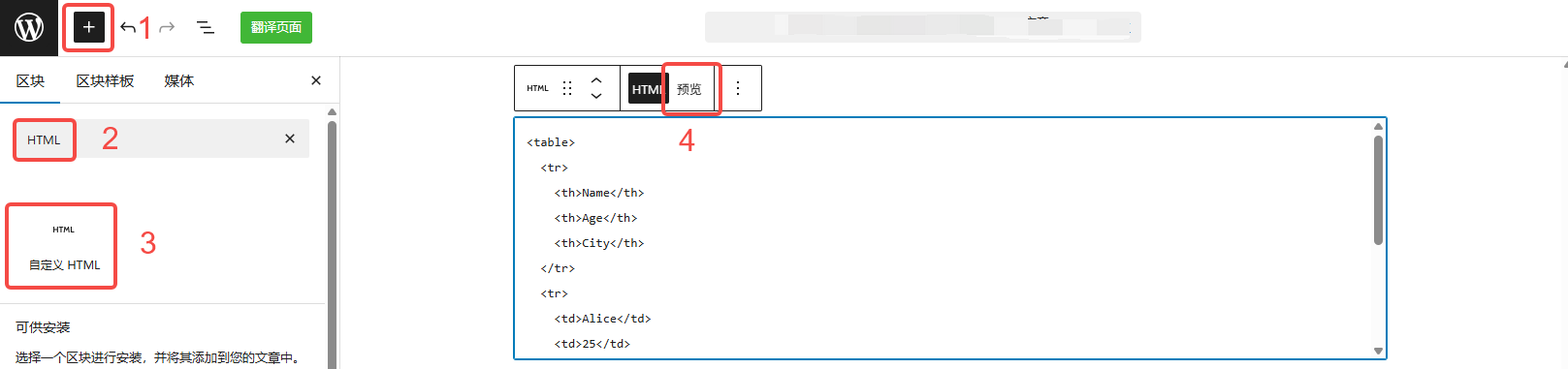
If you plan to delve deeper into front-end development later, or if your website involves complex data types requiring integration with external systems, it's more beneficial in the long run to familiarize yourself with HTML table syntax and CSS layout early on.
III. From the perspective of design and display effects: What are the respective features of Elementor tables and HTML tables?
3.1 Elementor Tables: Advantages in Styling and Layout
Elementor tables feature several standout design elements:
- The table content can combine text, icons, buttons, and images, making it suitable for creating marketing comparison charts.
- All styles are controlled through a visual panel, making adjustments to colors, shadows, rounded corners, and spacing highly intuitive.
- With responsive options, you can set different column widths, font sizes, and display styles for various screen sizes.
These features make Elementor Tables stand out for being visually appealing, easy to edit, and user-friendly, making them particularly well-suited for scenarios like product comparisons, service packages, and showcasing key features.
3.2 Advantages of Traditional HTML Tables in Controllability and Performance
Traditional HTML tables can achieve highly granular control through hand-coded structures and CSS, such as:
- Strictly adhere to semantic structure to facilitate search engine comprehension.
- Develop customized, complex responsive layout solutions tailored to media inquiries.
- Implementing sorting, filtering, pagination, and other interactive features for large datasets using JavaScript libraries
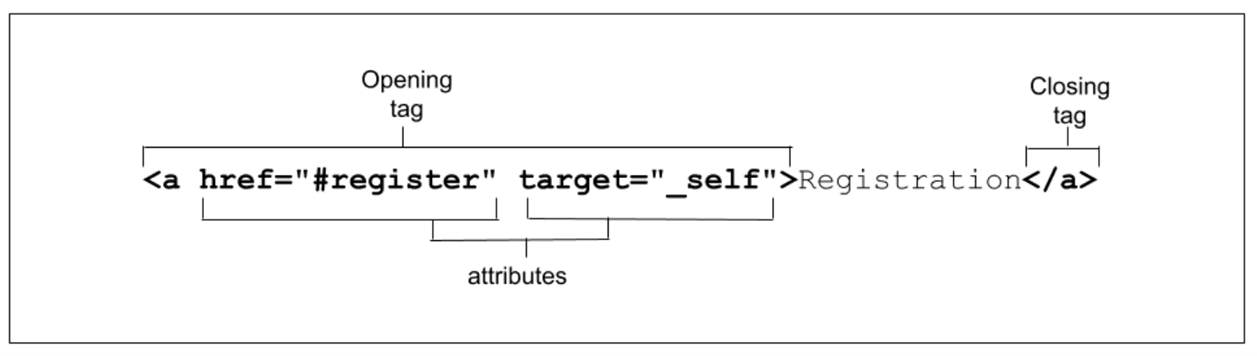
When presenting large datasets, creating technical documentation, dealing with performance-sensitive scenarios, or addressing specific accessibility requirements (such as screen reader support), traditional HTML tables combined with front-end technologies often offer significant advantages.
IV. From the Perspective of Maintenance and Expansion: Which Option Offers Greater Peace of Mind in the Long Run?
4.1 Elementor Form Maintenance Experience
For websites using Elementor, maintaining Elementor forms is straightforward: open the page editor, locate the corresponding form module, and simply edit the content directly within the interface.
The advantages of this approach are:
- Editors do not need to understand code.
- Edit copy, adjust column widths, and change color schemes—all within a single interface.
- Suitable for operations and content teams that frequently adjust plans and pricing
The drawback is that if similar tables are scattered across numerous pages without unified template management, each structural adjustment requires modifying every page individually. This approach is not well-suited for sites with a large number of repetitive structures.
4.2 Advantages of Traditional HTML Tables in Project-Based Websites
When the website structure leans more toward a "system-level project," such as:
- Large volume of data tables
- Uniform Structure Configuration Table
- Content Table Generated by the Interface
Traditional HTML tables are often used in conjunction with template systems, component-based solutions, or front-end frameworks. Once the template structure is finalized, subsequent maintenance primarily occurs at the data layer. Modifying the structure requires changing only one template, which proves highly efficient in medium to large-scale projects.
V. How Should Website Beginners Choose Based on Real-World Scenarios?
5.1 Scenarios Where Elementor Tables Are Recommended
For websites of the following types, prioritize Elementor Tables as the primary solution:
- Corporate websites focused on showcasing, personal branding sites, and portfolios
- Product feature comparisons, package price comparisons, and service descriptions are required.
- The number of tables isn't excessive, but I'd like them to be more visually appealing and easier to modify.
At this point, you can treat the Elementor form as a marketing component to enhance page aesthetics and conversion rates, without pursuing complex data functionality.
5.2 Situations Where Traditional HTML Tables Are More Appropriate
If a website leans toward the following types, traditional HTML tables are more suitable:
- Data-driven websites, technical documentation, and tutorial sites require the display of large amounts of structured data.
- We aim for lightweight pages with standardized structures and improved accessibility.
- We have development resources and expect to integrate with interfaces and databases in the future.
In such scenarios, Elementor tables serve primarily as supplementary display components, while core data tables should still utilize HTML + CSS + JS solutions to achieve superior performance and control.
5.3 Hybrid Approach: Combining Elementor Tables with HTML Tables
In practical projects, a compromise approach can also be adopted:
- Marketing pages and landing pages use Elementor tables to create visually appealing comparison charts.
- Document pages and data pages utilize traditional HTML tables to present large volumes of information.
- Some pages are Embedding Custom HTML Table Code Blocks in Elementorbalancing design and controllability
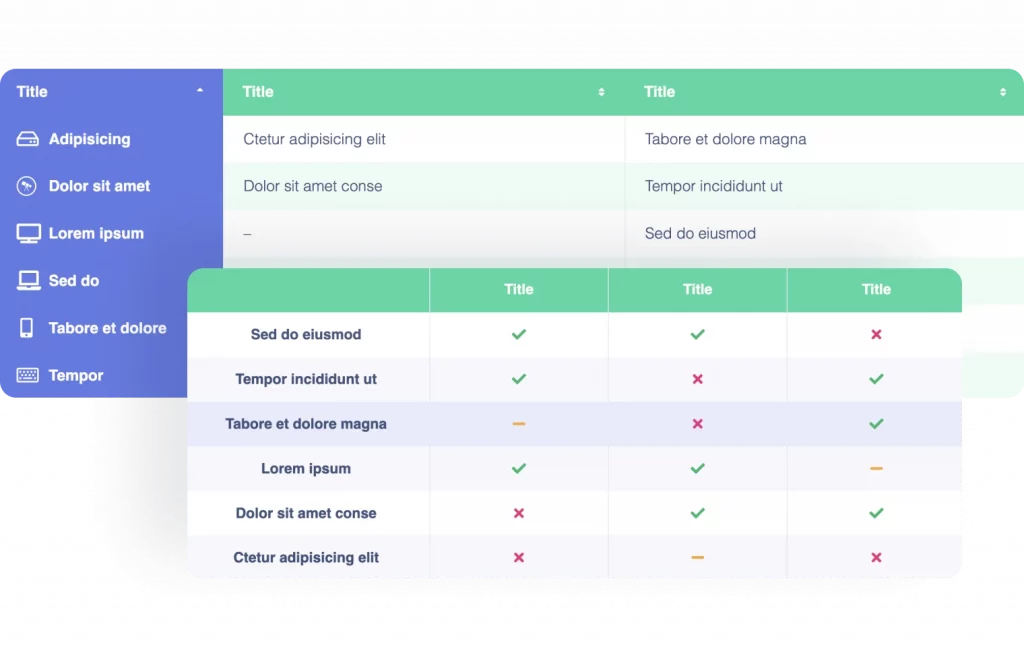
This hybrid approach retains the efficiency of building tables with Elementor while leveraging the structural and performance advantages of HTML tables.
VI. Practical Tips for Beginners Using Elementor Tables
To help website beginners get started faster, consider the following practical approach:
- Start by building one or two simple comparison tables using Elementor Tables to familiarize yourself with column width adjustments, font styles, and responsive options.
- Building on this foundation, familiarize yourself with the basic tags and structure of HTML tables, and try writing a simple table within Elementor's HTML widget.
- Gradually add sorting, filtering, or highlighting effects to the table to experience the difference between "plugin-based construction" and "code-based construction."
- Based on the website's positioning, decide whether to rely more on Elementor tables in the future or gradually transition to HTML tables and front-end solutions.
By following this incremental approach, you won't be intimidated by the code while still leaving room for future upgrades.

Link to this article:https://www.361sale.com/en/81975/The article is copyrighted and must be reproduced with attribution.



















![Emoji[wozuimei]-Photonflux.com | Professional WordPress repair service, worldwide, rapid response](https://www.361sale.com/wp-content/themes/zibll/img/smilies/wozuimei.gif)

![Emoticon[baoquan] - Photon Wave Network | Professional WordPress Repair Services, Worldwide Coverage, Rapid Response](https://www.361sale.com/wp-content/themes/zibll/img/smilies/baoquan.gif)


 简体中文
简体中文  English
  日本語
日本語  Français
  Español


No comments