




exist WordPress Membership sites, online course sites and knowledge payment sitesMiddle.videoIt is the most central, and the most likely resource to cause performance and security problems. As the number of users and videos grows, common problems are concentrated:Stuttering playback, large file size, rising bandwidth and storage costs, stolen or downloaded videosand even affectsStability. These issues are not WordPress defects in themselves, but rather as a result of poor video processing. This paper will focus on theVideo compression, controlled playback and access acceleration, speaking clear a set of course station video solutions that can run for a long time.
![Image [1] - Why are course station videos always stolen? Your video architecture is wrong from the start!](https://www.361sale.com/wp-content/uploads/2026/01/20260106154930306-image.png)
I. Why is it important that the video on the course station be compressed and controlled?
1.1 Video is the most "heavy" type of resource on a WordPress site.
In real projects, the video volume of a course station usually has the following characteristics:
- Single raw video: 300MB - 2GB
- One full course: 10-50 videos
- Total video volume: tens of gigabytes to hundreds of gigabytes.
If these videos were to beStored directly in the WordPress server as a normal media file, will bring up several definite issues:
- take up a lot of disk space
- Increase Web Server I/O Stress
- Concurrent playback is prone to lagging and even timeouts
It is important to clarify that:WordPress itself is not a system designed for highly concurrent video distribution.
1.2 Uncompressed video directly affects the user experience
Many video lagging issues are not a result of under-configured servers, but rather unreasonable parameters of the video itself, for example:
- Raw video bit rate too high (10-20 Mbps)
- Cannot be played smoothly if the network environment is a little poor
- Significantly longer load times on mobile
![Image [2] - Why are course station videos always stolen? Your video architecture is wrong from the start!](https://www.361sale.com/wp-content/uploads/2026/01/20260106160152913-image.png)
In course-based websites, the more reasonable video target parameters are usually:
| Usage Scenarios | Recommended Video Bitrate |
|---|---|
| 1080p Desktop | 3-5 Mbps |
| 720p Generic Scene | 1.5-2.5 Mbps |
| Mobile first | 1-2 Mbps |
With clarity guaranteed.rationalizedcompressedThe video volume can often be reduced 50%-80%The
1.3 Uncontrolled video resources are almost equivalent to public resources
If the video file can be accessed directly, for example:
- https://example.com/wp-content/uploads/lesson01.mp4
Then regardless of whether a membership system is set up or not, as long as the user gets the link, it's fine:
- Direct access in your browser
- Save using the download tool
- Secondary dissemination
A note of clarification is in order:The front-end "disable right-click" does not technically prevent downloads, but only serves as a secondary measure.
Second, the reasonable overall structure of the WordPress course station video
2.1 Recommended Video Processing Flow
A reasonable video processing process should contain the following steps:
- Original video file upload
- videocompressedtranscoding
- Video storage (private or cloud)
- Playing through a controlled player
- Playback rights linked to membership system
And the not recommended way is: uploading the original video → inserting it directly on the page tab (of a window) (computing)
2.2 Correctly recognize the technical boundaries of "video compression".
videocompressedIt's not simply a matter of "making the file smaller", but a process that involves adjusting a number of parameters, including:
- Video encoding format (H.264 / H.265)
![Image [3] - Why are course station videos always stolen? Your video architecture is wrong from the start!](https://www.361sale.com/wp-content/uploads/2026/01/20260106160340181-image.png)
- Resolution Control
- video bitrate
- Key Frame Interval (GOP)
WordPress core does not provide these capabilities.Must rely on external tools, services or plug-ins to accomplishThe
Third, WordPress video compression program of the three common ways to achieve
3.1 Local server transcoding (for specific scenarios only)
implementation method: Compresses and transcodes the video locally on the server via FFmpeg.
![Image [4] - Why are course station videos always stolen? Your video architecture is wrong from the start!](https://www.361sale.com/wp-content/uploads/2026/01/20260106160353660-image.png)
vantage::
- Full autonomy
- No third-party platform dependency
limitations::
- Transcoding process consumes a lot of CPU and memory
- Normal site access may be affected during transcoding
- Not suitable for sites with a high number of videos or high concurrency
programOnly suitable for small-scale projects with O&M capabilities and sufficient server resourcesThe
3.2 Cloud transcoding + distribution (mainstream option)
This is the current course station in theThe most common and stable optionThe
basic idea::
- Video upload to the cloud
- Compression and transcoding done by cloud services
- Generate multi-sharp versions
- Distributed via CDN
dominance::
- Doesn't take away from WordPress server performance
- Stable for concurrent playback
- Relatively manageable cost and usage
3.3 Playback layer controlled
Regardless of where the video is stored, the playback layer should have the following characteristics:
- Without revealing the real video address
- Playback requests have validation logic
- Can be linked to the member rights system
It's video protection.core layerThe
IV. Parameter recommendations for course video compression
4.1 Recommendations for the preparation of the original video
When creating or exporting course videos, it is recommended that the following basic specifications be followed:
- Container format: MP4
- Video encoding: H.264
- Frame rate: ≤ 30fps
- Resolution: no more than practically necessary
These settings can significantly reduce the subsequentcompressedDifficulty.
4.2 Recommended Video Compression Parameters for Courses
| parameter term | recommended value |
|---|---|
| video encoding | H.264 |
| audio encoding | AAC |
| 1080p code rate | 4 Mbps |
| 720p | 2 Mbps |
| GOP | 2 seconds or so |
In course-based content, this set of parameters offers a good balance between clarity, volume and playback stability.
4.3 Multi-Definition and Adaptive Playback
It is recommended that at least the following clarity versions be provided:
- 1080p (desktop)
- 720p (default)
- 480p (mobile network)
![Image [5] - Why are course station videos always stolen? Your video architecture was wrong from the start!](https://www.361sale.com/wp-content/uploads/2026/01/20260106160728537-image.png)
The player automatically selects the appropriate definition according to the user's network conditions, which can significantly reduce the probability of lagging.
V. Key realization points for video resource protection
5.1 Hide the real video address
Reasonable practices include:
- iframe or JS dynamic loading
- Permission checking before playback
- Avoid exposing video file paths directly in HTML
This is the first technical threshold for video protection.
5.2 Anti-theft chains and access restrictions
At the storage or distribution layer, at a minimum, it should be configured:
- Referer Checksum
- domain whitelisting
- Cross-domain access restrictions
This effectively prevents videos from being embedded on other websites.
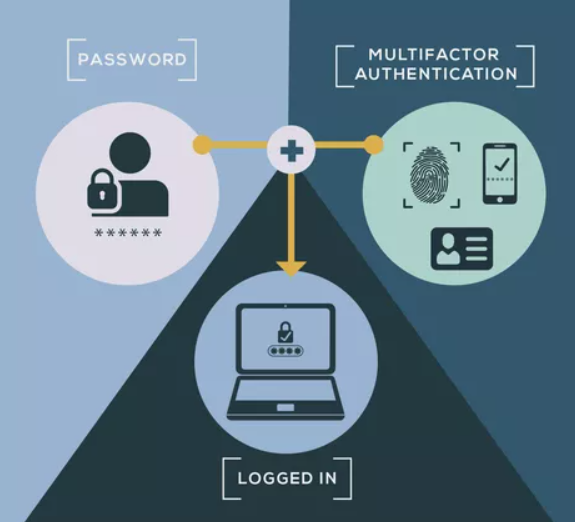
5.3 Permission Linkage with Membership System
Common playback permission logic is:
- Not logged in → Player not displayed
- Logged in but no access → Prompt to buy or upgrade
- Have permission → Normal playback
Playback permissions should be controlled by the server and not rely solely on front-end judgment.
5.4 Rationalization of "disabling right click"
Disable right click, disable control bar download button:
- Cannot fundamentally stop technical users
- But it can block most regular users
It should therefore be treated ascomplementary means of protection, rather than the only program.
VI. Several key details of video acceleration
6.1 Distributing Video Content Using a CDN
The core role of a CDN is:
- Reduced stress on source servers
- Improve access speed for users in different regions
This is a necessary configuration for course stations with a certain number of visitors.
![Image [6] - Why are course station videos always stolen? Your video architecture is wrong from the start!](https://www.361sale.com/wp-content/uploads/2026/01/20260106161021407-image.png)
6.2 Use of segmented loading protocols (e.g. HLS)
Compared to a single MP4 file, segmented loading has:
- Faster start-up speeds
- Better dragging experience
- More friendly to network fluctuations
This has become the de facto standard for online course videos.
6.3 Delayed loading at the page level
Avoid requesting video resources immediately on page load:
- Render the page content first
- User clicks play and then loads the video
Helps improve first screen performance scores.
VII. Common errors and summaries
7.1 Common errors
- The video is stored directly in the
wp-content/uploads - The original video is uncompressed and directly online
- Full disclosure of playback address
- All devices use the same clarity
7.2 Characteristics that should characterize a video from a mature course station
- The video is reasonably compressed
- Supports multiple definition adaption
- Controlled playback
- Tied to member permissions
- Distributed using CDN

Link to this article:https://www.361sale.com/en/85286The article is copyrighted and must be reproduced with attribution.
















![Emoji[wozuimei]-Photonflux.com | Professional WordPress repair service, worldwide, rapid response](https://www.361sale.com/wp-content/themes/zibll/img/smilies/wozuimei.gif)

![Emoticon[baoquan] - Photon Wave Network | Professional WordPress Repair Services, Worldwide Coverage, Rapid Response](https://www.361sale.com/wp-content/themes/zibll/img/smilies/baoquan.gif)


 简体中文
简体中文  English
  日本語
日本語  Français
  Español


No comments