







如果你最近在搜索 perfmatters vs wp rocket,多半不是想看一篇“谁秒杀谁”的文章,而是想知道:我的 WordPress 网站到底该买哪一个、能不能一起用、哪些开关会冲突。同样,搜索 imagify vs smush maybe smush vs imagify 的站长,真正关心的也不是品牌名,而是图片压缩会不会糊、WebP/AVIF 怎么做、免费额度够不够、和缓存插件会不会打架。
这篇文章不重复站内旧文的基础介绍,而是从“插件分工”和“真实使用场景”重新梳理。你可以把 WP Rocket 理解为缓存和前端优化主力,把 Perfmatters 理解为脚本减负和细节控制工具;把 Imagify 理解为更偏自动化的图片压缩方案,把 Smush 理解为上手门槛低、适合先把图片问题管起来的方案。选错插件不一定会让网站更慢,但功能重复、开关乱开、测试方式不对,确实很容易让分数好看、前台体验反而变差。
先说结论:不要把四个插件当成同一类工具
很多性能优化文章会把所有插件放在一张榜单里排序,这对新手并不友好。Perfmatters 和 WP Rocket 解决的是“页面加载链路”的问题,Imagify 和 Smush 解决的是“图片体积和格式”的问题。前两者可以对比,也可以搭配;后两者通常二选一,不建议同时启用批量压缩和 WebP 输出。
| 组合 | 适合网站 | Recommended Reasons |
|---|---|---|
| WP Rocket 单独使用 | 普通博客、企业官网、新站 | 缓存、延迟加载、CSS/JS 优化入口集中,学习成本低。 |
| WP Rocket + Perfmatters | Elementor、WooCommerce、插件较多的网站 | WP Rocket 管缓存,Perfmatters 控制脚本、禁用无用功能,分工更细。 |
| Perfmatters 单独使用 | 主机已有 LiteSpeed/Cloudflare 缓存的网站 | 不重复缓存层,重点减少请求、脚本和后台负担。 |
| Imagify 或 Smush 二选一 | 图片多的内容站、电商站 | 图片压缩应保持一个主工具,避免重复生成 WebP 和改写 URL。 |
Perfmatters vs WP Rocket:核心差异在“缓存”与“减负”
WP Rocket 的优势是完整:页面缓存、预加载、延迟加载、数据库清理、文件优化、CDN 配置入口都放在一个插件里。对不想折腾太多技术细节的站长来说,它的价值不是某一个开关,而是把常见优化项集中成一套相对稳妥的流程。你装完之后,通常先开页面缓存、缓存预加载、图片懒加载,再逐步测试 CSS/JS 优化。
Perfmatters 的优势是轻和细。它更像“网站减负工具”:禁用 emoji、embeds、XML-RPC、Heartbeat 调整、脚本管理器、延迟 JavaScript、预加载关键资源、控制 WooCommerce 脚本加载范围等。对于 Elementor、WooCommerce、表单插件、会员插件比较多的网站,Perfmatters 的 Script Manager 很实用,因为它能让某些 CSS/JS 只在真正需要的页面加载。
- 如果你没有任何缓存方案,优先考虑 WP Rocket 或服务器级缓存,不要只靠 Perfmatters。
- 如果你已经有 LiteSpeed Cache、Cloudflare APO、主机缓存,再加 WP Rocket 可能重复;这时 Perfmatters 更容易作为补充。
- 如果网站插件很多、单页请求臃肿,Perfmatters 的页面级脚本控制比单纯清缓存更有价值。
- 如果你是新手,WP Rocket 的路径更直观;如果你愿意逐页测试,Perfmatters 的上限更高。
两者能不能一起用?可以,但要分清边界
Perfmatters 与 WP Rocket 可以一起用,但不要把同类功能重复打开。比较稳的做法是:让 WP Rocket 负责页面缓存、缓存预加载、基础文件优化;让 Perfmatters 负责禁用无用 WordPress 功能、Script Manager、按页面卸载脚本、DNS prefetch/preconnect、部分资源提示。延迟 JS、懒加载、数据库清理这类两边都有或容易重叠的功能,最好只留一个插件负责。
实际测试时,不要一次性把所有优化开关全打开。建议每次只改 2 到 3 个选项,然后检查首页、文章页、产品页、购物车、结账页、表单提交和 Elementor 弹窗。性能插件最怕“分数提升但功能损坏”:例如菜单不能展开、轮播不动、结账按钮失效、统计脚本丢失,这些都比 PageSpeed 少几分更严重。
Imagify vs Smush:图片优化不是越狠越好
图片插件的目标不是把文件压到最小,而是在清晰度、体积、格式兼容和自动化之间找到平衡。Imagify 和 Smush 都能做图片压缩,也都围绕 WebP 等现代格式提供方案,但使用体验和适合人群不太一样。
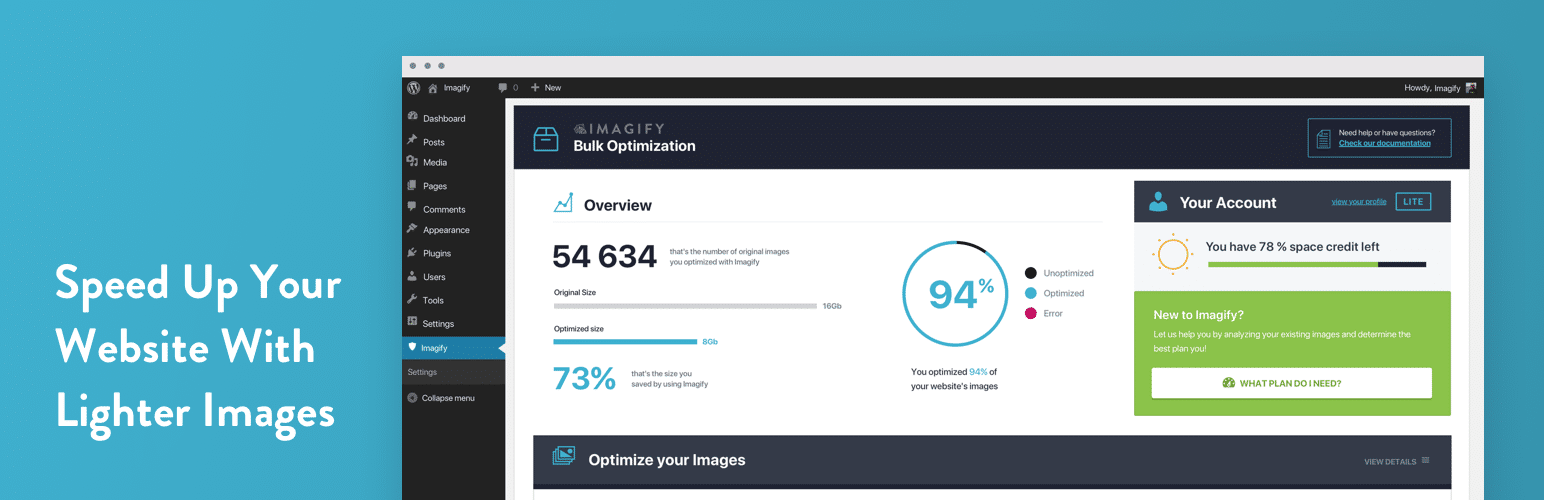
Imagify 更适合想要“少配置、自动跑”的站点
Imagify 和 WP Rocket 同属一个生态,因此很多使用 WP Rocket 的站长会自然选择 Imagify。它的优势是流程清晰:上传图片后自动压缩,批量优化旧图,生成现代图片格式,并且在压缩强度上给出比较明确的选择。对于内容团队来说,Imagify 的好处是减少编辑人员的操作成本,只要提前设好策略,后续上传图片基本可以自动处理。
需要注意的是,图片压缩策略不要一上来选择最激进。电商产品图、作品集、设计类网站对清晰度更敏感,建议先抽样测试 20 到 30 张图片,看缩略图、详情图和移动端 Retina 屏幕效果,再决定是否批量处理全站旧图。
Smush 更适合预算敏感、想先解决大图问题的网站
Smush 的上手门槛很低,后台提示也比较直观,适合还没有系统做过图片优化的网站先把“原图太大、尺寸不合适、旧图未压缩”的问题管起来。很多小型博客或企业站不需要复杂工作流,只要上传时自动压缩、定期批量检查,就已经能明显改善加载体验。
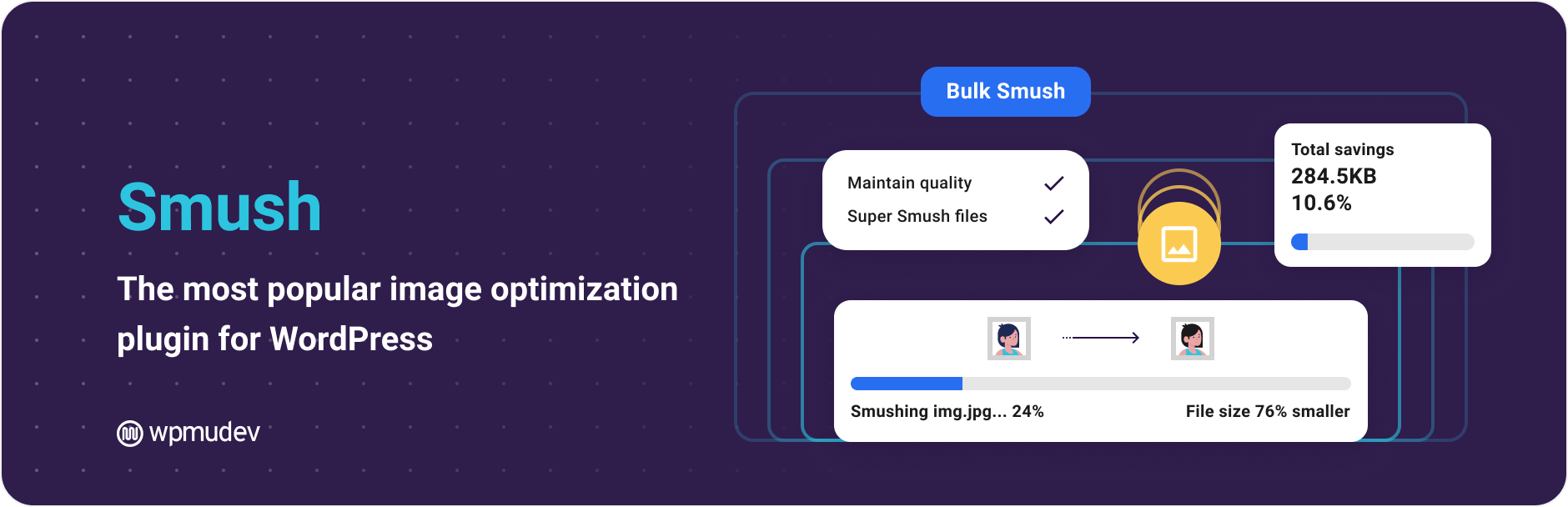
Smush vs Imagify 的选择,可以用一句话概括:如果你已经在用 WP Rocket,想要一套更统一的付费性能工作流,Imagify 更顺;如果你想从免费或低成本方式开始,把图片体积先降下来,Smush 更容易入门。两者都不建议和其他图片 CDN、主题自带 WebP、主机图片优化同时乱开,否则可能出现图片 URL 被多次改写、WebP 不显示、缩略图重复生成等问题。
不同网站该怎么选:按场景而不是按排行榜
1. 普通内容站:WP Rocket + Imagify 最省心
如果你的网站主要是文章、教程、资讯页,插件数量不多,目标是稳定提升 Core Web Vitals,那么 WP Rocket + Imagify 是比较省心的组合。WP Rocket 处理缓存、延迟加载和基础文件优化,Imagify 处理图片压缩和现代格式。编辑只需要注意上传前别用超大原图,后台维护成本较低。
2. Elementor 网站:WP Rocket + Perfmatters 更值得测试
Elementor 页面常见问题是 CSS/JS 多、动效组件多、第三方小工具多。WP Rocket 可以先建立缓存和加载优化基础,Perfmatters 再按页面卸载不需要的脚本。例如联系表单脚本只在联系页加载,WooCommerce 相关脚本只在商店和结账链路加载,弹窗或滑块插件只在使用页面加载。站内也有不少 Elementor 排查内容,可以继续看 Elementor 教程与故障修复The
3. WooCommerce 商店:谨慎优化结账链路
WooCommerce 商店不要盲目追求首页分数。购物车、结账页、我的账户、支付回调、优惠券、运费计算都比静态页面敏感。建议缓存插件排除购物车和结账页,Perfmatters 的脚本卸载也要避开交易链路。图片方面,商品主图可以压缩,但要保留足够清晰度,尤其是服装、家居、设计品类。
4. 已有服务器缓存的网站:先确认缓存层,再决定插件
如果主机已经启用 LiteSpeed Cache、Nginx FastCGI Cache、Cloudflare APO 或托管 WordPress 缓存,就不要再随手叠加 WP Rocket 的页面缓存。缓存层越多,排查越难。此时可以把重点放在 Perfmatters 的减负能力和图片插件上。站内关于缓存和 CDN 的排查,可以参考 Website Optimization 分类。
安装顺序:先备份,再测基线,再逐项打开
- 完整备份数据库和 wp-content,确认能还原,不要只依赖主机自动备份。
- 用 PageSpeed Insights、GTmetrix 或 WebPageTest 记录首页、文章页、产品页的基线数据。
- 先处理大图和未压缩图片,再开启缓存;图片问题不解决,缓存插件也救不了首屏体验。
- 开启 WP Rocket 或现有缓存方案,确认前台、后台编辑器、表单、购物车正常。
- 再加入 Perfmatters 的脚本管理,逐页卸载不需要的资源。
- 每次改动后清理插件缓存、CDN 缓存和浏览器缓存,再用无痕窗口验证。
常见误区:这些开关别乱开
- 不要同时启用多个插件的 WebP URL 改写功能。选择 Imagify 或 Smush 其中一个作为图片主工具。
- 不要为了分数强行延迟所有 JavaScript,菜单、轮播、统计、支付、表单都可能受影响。
- 不要把 WooCommerce 购物车和结账页做整页缓存。
- 不要只测首页,文章页、分类页、产品页、移动端都要测。
- 不要忽略字体和第三方脚本,很多慢站的瓶颈不是缓存,而是 Google Fonts、地图、聊天工具、广告脚本。
我的推荐搭配
如果你想要一个直接可执行的答案,可以这样选:新手内容站选择 WP Rocket + Imagify;预算有限先选 Smush 做图片压缩,再使用主机或免费缓存方案;Elementor 或 WooCommerce 站点在缓存稳定后加 Perfmatters 做脚本精简;已有服务器级缓存的网站,优先考虑 Perfmatters + Imagify/Smush,而不是再叠一层页面缓存。
这不是说某个插件一定更强,而是每个插件都有自己的位置。WP Rocket 解决“缓存和基础优化”,Perfmatters 解决“少加载和少干扰”,Imagify/Smush 解决“图片体积和格式”。把边界划清,才是 WordPress 性能优化真正稳定的做法。
FAQ
Perfmatters vs WP Rocket,只能买一个选谁?
没有缓存方案的新站优先 WP Rocket;已有服务器缓存、但页面脚本很重的网站优先 Perfmatters。如果你愿意细调,并且网站插件多,两者搭配通常比单独使用更灵活。
Imagify vs Smush,哪个压缩效果更好?
不同图片类型差异很大,不建议只看单张测试。更实用的方法是抽样测试产品图、文章配图、截图、透明 PNG 四类图片,比较体积、清晰度和移动端显示,再决定全站批量处理。
可以同时用 Imagify 和 Smush 吗?
不建议。图片压缩、WebP 生成、URL 改写最好保持一个主插件,否则后期排查图片不显示、缩略图重复、备份体积变大都会更麻烦。
延伸阅读
- Perfmatters vs WP Rocket、Imagify vs Smush:WordPress 性能优化插件到底怎么选?
- Perfmatters vs WP Rocket:WordPress 加速插件怎么选?
- Imagify or Smush, who should you give your images to for website speed?
- WordPress 插件教程
summarize
性能优化插件没有万能组合。真正靠谱的思路是先确认缓存层,再减少无用脚本,最后处理图片体积和格式。Perfmatters vs WP Rocket 的重点不是谁替代谁,而是缓存和减负如何分工;Imagify vs Smush 的重点也不是谁的名字更响,而是图片工作流是否稳定、清晰度是否可接受、是否和现有 CDN/主题功能冲突。按这个顺序做,你的网站会比盲目堆插件更快,也更不容易出问题。

Link to this article:https://www.361sale.com/en/87669/The article is copyrighted and must be reproduced with attribution.








 简体中文
简体中文  English
  日本語
日本語  Français
  Español


0
Now definitely still do SEO, just play changed. Previously rely on heaps of content, heaps of keywords can have traffic, and now pay more attention to the quality of content + brand trust + user experience. In addition to relying solely on SEO is actually more and more difficult, a lot of good basically SEO + social media + content marketing + private domain conversion to do together. SEO is still a long-term customer acquisition channel, but can no longer be taken as the only channel.Hehe is working.
March 11, 10:540
Normal, included only on behalf of Google to see the page, does not mean that the ranking immediately, "has been included but not ranked" usually because: Keyword competition, page weight is low, the content is not strong enough, the page is relatively new. Continue to optimize the long-tail keywords, content quality and internal chain, usually takes a little time, the ranking will slowly come out!Amelia Foster March 6, 16:200
Do you have a screenshot?lit. even a son who is not a fish knows the joy of fish March 6, 09:230
Don't pile on the optimization plugins first, locate the bottlenecks first: Use Query Monitor to see slow SQL, slow hooks. Pause all plugins for comparison, then turn them on one by one. Check autoload is too big (options table). Check database indexes with large table queries. Tackle host/database performance first if server TTFB is high.Hehe is working.
March 3, 16:470
Hi Windjammer, there's really no need to mess with complicated local environments, regular people follow these steps and the update basically won't crash the site 👇 First, backup the whole site, files + database are prepared, this is the bottom line, out of the problem can be a key to go back. Don't change the whole thing in one click, change it in batches, change the unimportant plug-ins first, and then change the core ones. Immediately after the update, clear the cache, go to the foreground to check the home page, article page, buttons, forms, these key positions. It is best to install a plug-in that supports version rollback, in case of a crash, cut back to the old version in a second. To summarize: backup first, change in batches, check after changing, leave a way back, stable ✅😎 Hope this helps!bugbang March 2, 09:550
Usually it's not that the payment didn't work, but that the callback (webhook) didn't write back the order status. Troubleshooting steps: WooCommerce → Status → Logs: see if the payment gateway has webhook error / signature error / timeout Check if the site is blocked by WAF (Cloudflare, Pagoda Firewall, security plugins) Check if "Cache checkout pages/interface paths" is enabled (checkout pages and callback interfaces should not be cached) Look at the server error logs for 500/fatal errors that interrupt the callback execution. Solution: Release wp-json, wc-api, payment gateway callback URLs (configure as per gateway documentation) Disable cache and JS merge compression test on checkout page once If using Cloudflare: set no-challenge, no-block rules for callback URLsUlla Nala Zhenhuan (18嬛嬛嬛) January 31st, 09:360
1) Determine whether it is "Normal Waiting" or "Abnormally Stuck". You can first look at 3 signals: whether the page release time is within 7-14 days, whether there are only a small number of pages with this status, and whether the page has appeared in the XML Sitemap. If all three are satisfied, most likely belong to the normal crawling and evaluation stage, do not need to do it immediately. 2) Under what circumstances is it useless to "wait"? The following cases will not be solved automatically by time: the page has almost no internal links (isolated page), the content is highly similar to the existing pages on the site, canonical points to other URLs, and too many similar articles are published on the same topic for a short period of time. In this case, Google has been crawled, but judged that "it is not worth entering the index". 3) The most effective way of manual intervention (no tossing) Prioritize these 3 things: add internal links, link to the page from related old articles or columns, and enhance the density of information on the first screen. The first 2-3 paragraphs directly answer the user's question, avoid too much padding, confirm canonical as self-referential, avoid being judged as a duplicate page, and then go to GSC to request reindexing after doing so. 4) What "intervention actions" are counterproductive? It is not recommended: frequent deletion and reposting, clicking "request to index" several times in a row, forcing keywords to be stacked for indexing, changing URLs or titles arbitrarily. These operations will allow Google to reassess the stability of the page, but slow down the inclusion. 5) a practical judgment standard If an article: has been crawled, there is no noindex / robots problem, there are at least 1-2 related internal links, the content obviously solves an independent problem, then it is included, just a matter of time, not a plug-in problem.Post Porter January 30th 10:000
The new station does not do external links can be completely, the first content and station structure to do a good job more stable. Only rely on the content can generally get included and part of the long-tail word rankings, but the amount of high competition will be slow. It is recommended to wait for the site stable inclusion, 30-50 quality content, keywords began to enter the top 20/30, and then a small amount of external links, priority brand words/naked chain/citation type, do not come up to chase the number. 👍