







WooCommerce 支付集成看起来只是“装一个收款插件”,但真正影响成交和售后的,往往是插件之外的配置:你是否需要 Stripe Connect 分账?Airwallex WooCommerce plugin 的币种和结算账户是否匹配?WooPayments 是否适合当前地区和业务类型?手机端 Stripe Checkout 是否足够顺手?Stripe webhook 能不能把付款结果稳定回写到订单?这篇文章按上线视角拆解,不只比较插件,而是给你一套可以直接照着检查的配置步骤。
如果你正在为新站接入支付,建议先把本文当作上线清单;如果你已经上线但遇到“客户付款了,后台订单还是待付款”“移动端支付按钮点不动”“退款和对账对不上”等问题,也可以按下面的顺序反查。
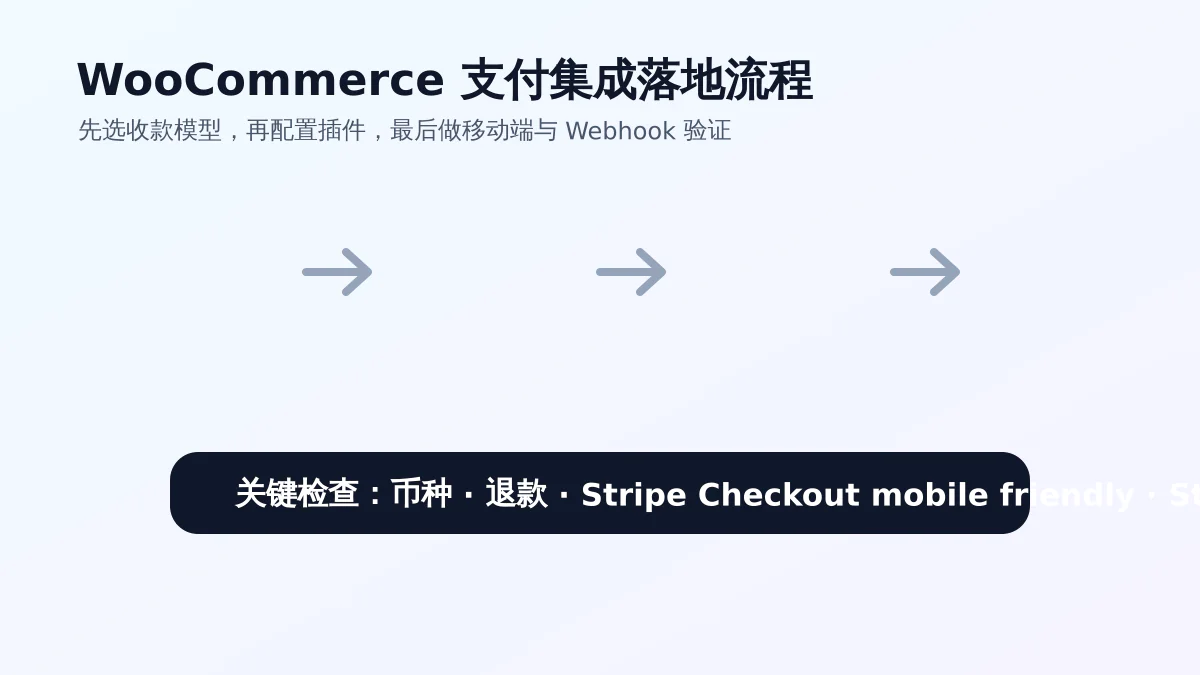
一、先判断业务模型:不要一开始就堆插件
很多 WooCommerce 店主会同时安装 Stripe、WooPayments、PayPal、Airwallex 甚至多个本地支付插件,认为入口越多越安全。实际情况相反:支付脚本越多,结账页越重;同类插件越多,订单备注、Webhook、退款按钮越容易冲突。比较稳的做法,是先根据业务模型选主支付方案,再补充少量备用入口。
- 单一品牌独立站:优先考虑 WooPayments 或官方 Stripe 插件,目标是稳定收卡、退款方便、后台操作简单。
- 平台型业务或多商户业务:重点研究 Stripe Connect,因为核心问题不是“能不能付款”,而是资金应该进谁的账户、平台如何收手续费。
- 跨境多币种业务:重点评估 Airwallex WooCommerce plugin,尤其要看币种、到账账户、换汇成本和当地支付方式。
- 订阅、会员、课程、下载类业务:额外关注付款成功后权限是否自动开通,Webhook 失败会直接影响交付。
站内之前整理过 WooCommerce 支付集成路线图,如果你想先做方案对比,可以先看那篇;本文则更偏向“今天要上线,该怎么一步步配置”。
二、Stripe Connect:适合平台分账,不适合所有店铺
Stripe Connect 经常被误解成“更高级的 Stripe 收款”。它真正解决的是平台与子商户之间的资金关系:谁收钱、谁承担拒付、平台如何抽佣、卖家如何完成 KYC、退款从哪个账户扣。普通 B2C 独立站如果所有订单都进入同一个公司账户,通常不需要一开始就上 Connect;但如果你做的是多供应商商城、预约平台、服务撮合平台或门店入驻模式,Connect 就是必须提前设计的底层能力。
Stripe Connect 配置步骤
- 在 Stripe Dashboard 启用 Connect,并确认你的主体资料、结算账户、税务信息已经完成验证。
- 选择账户类型:Standard 维护成本低,Express 适合平台统一体验,Custom 灵活但合规和开发成本更高。
- 确认 WooCommerce 端插件是否真的支持 Connect,而不是只支持普通 Stripe Checkout 或 Payment Element。
- 在测试环境创建 connected account,模拟平台手续费、转账、退款和拒付场景。
- 上线前核对订单号、PaymentIntent、transfer、application fee 与 WooCommerce 订单备注是否能一一对应。
这里要特别提醒:Stripe Connect 的复杂度不在按钮样式,而在账务链路。不要只做“成功付款”测试,还要测试部分退款、全额退款、卖家账户未完成验证、客户争议付款等边界情况。
三、Airwallex WooCommerce plugin:重点不是安装,而是币种和对账
Airwallex WooCommerce plugin 更适合有跨境收款、多币种结算、海外客户付款需求的店铺。它的价值不只是给结账页多一个支付入口,而是把收款、换汇、结算账户和财务对账串起来。因此配置时不要只看插件能否启用,更要看 WooCommerce 默认货币、多币种插件、Airwallex 账户币种和最终到账币种是否一致。
Airwallex 上线配置建议
- 从官方渠道安装插件,避免使用来路不明的破解版或二次打包版本。
- 在 Airwallex 后台确认商户审核、业务地区、支持的支付方式和结算账户状态。
- 填写 API Key、Client ID、Webhook Secret 等信息时,严格区分 sandbox 与 production。
- 用表格列出前台展示币种、WooCommerce 订单币种、网关扣款币种、财务到账币种,避免后期对账混乱。
- 测试成功付款、失败付款、取消付款、全额退款、部分退款,并记录交易 ID 与 WooCommerce 订单备注。
如果你的店铺同时使用多币种插件,还要检查缓存规则。价格切换、优惠券、运费和税费都可能影响最终支付金额,支付网关看到的金额必须和客户确认付款时看到的金额一致。
四、WooPayments:适合想降低后台维护成本的店铺
WooPayments 的优势是和 WooCommerce 后台结合较深,很多付款、退款、争议信息可以直接在 WordPress 后台查看。对中小型独立站来说,它通常比“多个 Stripe 插件叠加”更容易维护。但 WooPayments 也有地区、行业和账户审核限制,某些业务可能无法启用,或者需要额外资料审核。
使用 WooPayments 时,最重要的是避免重复。不要同时启用多个 Stripe 类插件,让结账页出现两个相似的信用卡入口;也不要让缓存插件、性能插件随意延迟支付脚本。你可以保留 PayPal 或银行转账作为备用方式,但主卡支付入口尽量保持清晰。
五、Stripe Checkout mobile friendly:移动端要真机测试
Stripe Checkout mobile friendly 不是简单说“Stripe 页面是响应式的”。客户在手机上完成付款时,会经过购物车、WooCommerce checkout、跳转或嵌入式支付、订单完成页等多个环节。任何一个环节被弹窗、优惠码模块、地址字段、缓存脚本打断,都可能让客户放弃支付。
移动端检查清单
- 用 iPhone Safari 和 Android Chrome 分别测试,不要只在桌面浏览器缩小窗口。
- 确认结账按钮在首屏或接近首屏,优惠码、订单备注、营销弹窗不要遮挡支付按钮。
- 虚拟产品不要强制收集不必要的街道地址,能减少字段就减少字段。
- 跳转到 Stripe Checkout 后,检查店铺名称、Logo、金额、币种、语言是否和 WooCommerce 前台一致。
- 测试 Apple Pay、Google Pay、Link 等快捷支付入口是否按设备和地区正常显示。
如果你做过性能优化,还要临时关闭或排除支付脚本的延迟加载、合并压缩。WooCommerce checkout 页面、购物车页面、订单完成页通常不建议强缓存,支付回调地址更不能被缓存。
六、Stripe webhook:订单状态能不能回写,靠它
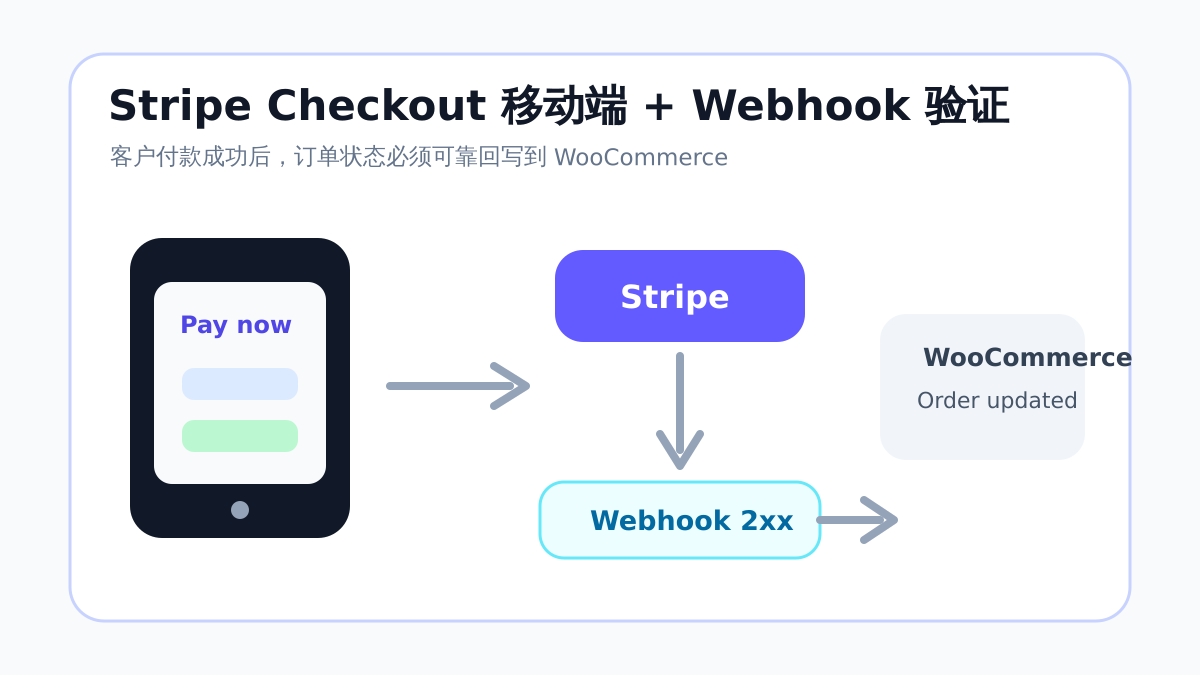
很多支付故障并不是“客户不能付款”,而是“客户已经付款,但 WooCommerce 后台订单没有更新”。Stripe webhook 的作用,就是把 Stripe 侧的付款事件发送回你的 WordPress 站点,让 WooCommerce 修改订单状态、扣库存、发邮件、开通下载或会员权限。如果 webhook 被 Cloudflare、安全插件、服务器规则、Basic Auth 或缓存拦截,前台看起来付款成功,后台却可能一直停在 pending payment。
Stripe webhook 配置步骤
- 在 WooCommerce 支付插件设置页复制 webhook endpoint URL,常见可能是 /?wc-api=wc_stripe,也可能是插件自定义地址。
- 进入 Stripe Dashboard 的 Developers → Webhooks,新建 endpoint,并粘贴该 URL。
- 按插件文档选择事件,常见包括 checkout.session.completed、payment_intent.succeeded、payment_intent.payment_failed、charge.refunded。
- 保存后复制 Signing secret,回到 WooCommerce 插件设置中填写,防止伪造回调。
- 在 Stripe 后台发送测试事件,或创建一笔测试订单,确认返回状态为 2xx,并检查 WooCommerce 订单备注。
排错时先看 Stripe 后台的响应码:403 常见于防火墙或安全插件拦截;404 多半和固定链接、回调地址或重写规则有关;500 要看 PHP 错误日志。站内 常见 WordPress 故障修复 分类里有不少服务器与插件冲突排查思路,可以配合使用。
七、上线前按这套流程跑一遍
支付上线最好当成一次小型发布,而不是后台随手点保存。建议先在测试模式跑通,再用低金额真实订单验证,最后观察 24 小时日志。尤其是会员、订阅、课程、下载产品,付款成功后还要验证权限开通,不要只看钱有没有到账。
- 只保留本次要验证的主支付插件,暂时关闭重复的 Stripe 类插件。
- 清理缓存,用无痕窗口完成购物车、结账、付款、订单完成页全流程。
- 核对支付服务商后台的交易 ID、金额、币种、手续费、订单号。
- 测试取消付款、失败付款、全额退款、部分退款,观察 WooCommerce 订单状态变化。
- 上线后重点查看 Stripe webhook 日志、Airwallex 回调记录、WooPayments 账户提示和 WooCommerce 订单备注。
常见坑:比插件选择更影响成交
- 测试密钥和正式密钥混用,导致前台显示正常但后台查不到真实交易。
- WooPayments 与另一个 Stripe 插件同时启用,结账页重复加载脚本。
- 缓存插件把 checkout、cart、order-received 或 webhook endpoint 缓存了。
- 多币种插件切换价格后,支付网关收到的金额与前台显示不一致。
- Webhook 没有配置 Signing secret,或者配置了旧 secret,导致回调验证失败。
总结:支付集成按“模型—插件—移动端—回调”顺序做
WooCommerce 支付集成不要从“哪个插件最火”开始,而要从业务模型开始。单一独立站可以优先考虑 WooPayments 或标准 Stripe;平台分账要提前设计 Stripe Connect;跨境多币种收款要认真测试 Airwallex WooCommerce plugin。最后,无论选哪一种,都要把 Stripe Checkout mobile friendly 和 Stripe webhook 当成上线必测项。前台支付顺、后台订单准、退款对账清楚,这套支付系统才算真正完成。
延伸阅读

Link to this article:https://www.361sale.com/en/87917/The article is copyrighted and must be reproduced with attribution.







 简体中文
简体中文  English
  日本語
日本語  Français
  Español


0
Now definitely still do SEO, just play changed. Previously rely on heaps of content, heaps of keywords can have traffic, and now pay more attention to the quality of content + brand trust + user experience. In addition to relying solely on SEO is actually more and more difficult, a lot of good basically SEO + social media + content marketing + private domain conversion to do together. SEO is still a long-term customer acquisition channel, but can no longer be taken as the only channel.Hehe is working.
March 11, 10:540
Normal, included only on behalf of Google to see the page, does not mean that the ranking immediately, "has been included but not ranked" usually because: Keyword competition, page weight is low, the content is not strong enough, the page is relatively new. Continue to optimize the long-tail keywords, content quality and internal chain, usually takes a little time, the ranking will slowly come out!Amelia Foster March 6, 16:200
Do you have a screenshot?lit. even a son who is not a fish knows the joy of fish March 6, 09:230
Don't pile on the optimization plugins first, locate the bottlenecks first: Use Query Monitor to see slow SQL, slow hooks. Pause all plugins for comparison, then turn them on one by one. Check autoload is too big (options table). Check database indexes with large table queries. Tackle host/database performance first if server TTFB is high.Hehe is working.
March 3, 16:470
Hi Windjammer, there's really no need to mess with complicated local environments, regular people follow these steps and the update basically won't crash the site 👇 First, backup the whole site, files + database are prepared, this is the bottom line, out of the problem can be a key to go back. Don't change the whole thing in one click, change it in batches, change the unimportant plug-ins first, and then change the core ones. Immediately after the update, clear the cache, go to the foreground to check the home page, article page, buttons, forms, these key positions. It is best to install a plug-in that supports version rollback, in case of a crash, cut back to the old version in a second. To summarize: backup first, change in batches, check after changing, leave a way back, stable ✅😎 Hope this helps!bugbang March 2, 09:550
Usually it's not that the payment didn't work, but that the callback (webhook) didn't write back the order status. Troubleshooting steps: WooCommerce → Status → Logs: see if the payment gateway has webhook error / signature error / timeout Check if the site is blocked by WAF (Cloudflare, Pagoda Firewall, security plugins) Check if "Cache checkout pages/interface paths" is enabled (checkout pages and callback interfaces should not be cached) Look at the server error logs for 500/fatal errors that interrupt the callback execution. Solution: Release wp-json, wc-api, payment gateway callback URLs (configure as per gateway documentation) Disable cache and JS merge compression test on checkout page once If using Cloudflare: set no-challenge, no-block rules for callback URLsUlla Nala Zhenhuan (18嬛嬛嬛) January 31st, 09:360
1) Determine whether it is "Normal Waiting" or "Abnormally Stuck". You can first look at 3 signals: whether the page release time is within 7-14 days, whether there are only a small number of pages with this status, and whether the page has appeared in the XML Sitemap. If all three are satisfied, most likely belong to the normal crawling and evaluation stage, do not need to do it immediately. 2) Under what circumstances is it useless to "wait"? The following cases will not be solved automatically by time: the page has almost no internal links (isolated page), the content is highly similar to the existing pages on the site, canonical points to other URLs, and too many similar articles are published on the same topic for a short period of time. In this case, Google has been crawled, but judged that "it is not worth entering the index". 3) The most effective way of manual intervention (no tossing) Prioritize these 3 things: add internal links, link to the page from related old articles or columns, and enhance the density of information on the first screen. The first 2-3 paragraphs directly answer the user's question, avoid too much padding, confirm canonical as self-referential, avoid being judged as a duplicate page, and then go to GSC to request reindexing after doing so. 4) What "intervention actions" are counterproductive? It is not recommended: frequent deletion and reposting, clicking "request to index" several times in a row, forcing keywords to be stacked for indexing, changing URLs or titles arbitrarily. These operations will allow Google to reassess the stability of the page, but slow down the inclusion. 5) a practical judgment standard If an article: has been crawled, there is no noindex / robots problem, there are at least 1-2 related internal links, the content obviously solves an independent problem, then it is included, just a matter of time, not a plug-in problem.Post Porter January 30th 10:000
The new station does not do external links can be completely, the first content and station structure to do a good job more stable. Only rely on the content can generally get included and part of the long-tail word rankings, but the amount of high competition will be slow. It is recommended to wait for the site stable inclusion, 30-50 quality content, keywords began to enter the top 20/30, and then a small amount of external links, priority brand words/naked chain/citation type, do not come up to chase the number. 👍